⌘ K ✕

AI Sales Agent

Qualify, score, and follow up with leads automatically.

AI Customer Support Agent

24/7 autonomous support with deep knowledge retrieval.

Enterprise Knowledge Copilot

Unified AI interface for all company documentation.

AI Workflow Engine

Orchestrate complex business logic with multi-agent flows.

AI Operations Dashboard

Real-time monitoring for your entire AI fleet.

Lead Intelligence System

Deep research and enrichment for every inbound lead.

Finance Review Agent

Automated auditing and expense categorization.

Custom AI Product

Bespoke AI systems built for your specific requirements.
AI Product Studio

Let's Design Your AI Advantage

2 + 8 =

Let's Design Your AI Advantage

6 + 5 =
Last Updated: October 8, 2026

AI Workflow Automation: A Complete Guide for Operations Leaders

Anuj Kumawat

18 min read

Quick Summary

Key highlights at a glance.

AI workflow automation process showing data input, AI processing, automated actions, and business impact

Quick Summary

Key highlights at a glance.

Operations teams in finance, supply chain, customer onboarding, and IT spend a large part of their week moving information between systems. Orders are re-entered into ERPs, invoices wait for manual matching, and onboarding documents remain in queues until someone reviews them.

These manual tasks slow down processes, increase errors, and make it harder to handle growing workloads without hiring more people.

Traditional rule-based automation, such as RPA and scripts, works well for predictable tasks. However, it struggles when inputs vary, which is common in day-to-day operations.

AI workflow automation addresses this gap. It combines AI models that can interpret information with orchestration tools that move work across systems, while keeping people involved in decisions that require judgment. AI adoption is already widespread. Stanford HAI’s 2025 AI Index Report found that 78% of organizations used AI in 2024, up from 55% a year earlier. The hard part is getting AI into production safely, with returns you can measure.

This guide explains how AI workflow automation works, where it delivers value, what it costs, and when AI automation and integration services make more sense than building solutions in-house.

What is AI Workflow Automation?

AI workflow automation uses AI agents, machine learning, and system integrations to manage multi-step business processes, with people stepping in for exceptions and approvals. Instead of following a fixed script, the workflow interprets inputs, determines the next step, and acts across the tools your team already uses.

Four things make it work:

  • AI agents make decisions. An agent reads an email, PDF, or ticket, understands the information, and selects the next action.
  • Systems and data connect. APIs allow agents to access your ERP, CRM, ticketing tool, or database.
  • Tasks run automatically. The workflow creates records, routes approvals, and sends messages without manual copying and pasting.
  • Teams track and improve outcomes. Each run generates data on speed, accuracy, and exceptions, helping teams improve the workflow.

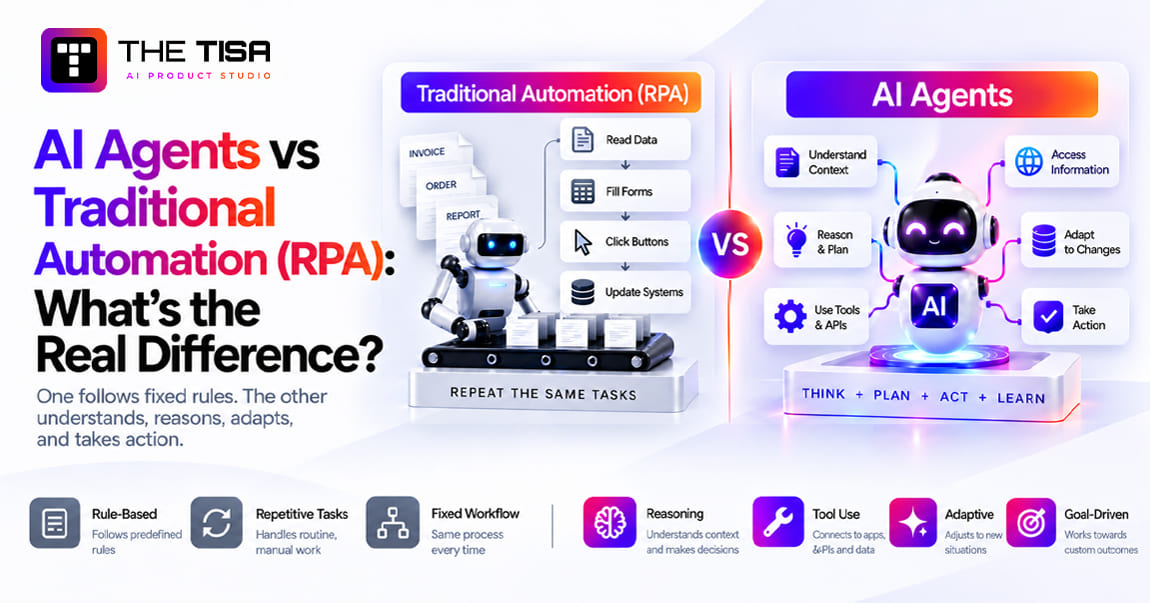
The main difference lies in how each approach handles tasks and changing inputs. Here’s how they compare:

Factor Rule-based automation (RPA, scripts) AI-driven workflows
Input type Structured, predictable data Structured and unstructured data (emails, PDFs, chats)
Exceptions Stops or fails when an exception occurs Handles common exceptions and escalates others
Change tolerance Breaks when forms or screens change Adapts to new formats within limits
Best fit Stable, high-volume, repetitive tasks Variable, cross-system processes that require judgment
Maintenance Requires regular script fixes Requires prompt, model, and data tuning, along with monitoring

This doesn’t make RPA obsolete. Many workflows use both: RPA handles predictable tasks, while AI handles situations that require interpretation. The differences become clearer when comparing AI agents with traditional automation. 

Why Should Operations Leaders Care About AI Workflow Automation?

AI workflow automation helps reduce costs that hiring alone can’t address, such as rework, delays, and inconsistent decisions. For US companies facing high labor costs and limited engineering capacity, these improvements can make a real difference. Larger US firms are already adopting AI. The U.S. Census Bureau’s Business Trends and Outlook Survey shows that 37% of businesses with 250 or more employees were using AI as of May 2026, while overall business use remained between 17% and 20%.

Lower operating costs. Most savings come from reducing manual data entry and the rework it causes, rather than cutting staff. Teams spend less time correcting data errors.

Faster cycle times. Work moves as soon as an input arrives instead of waiting in a queue. When the data is complete, automation can help teams finish approvals in minutes rather than days.

Higher accuracy. AI applies the same criteria to the first invoice of the day and the five-hundredth. This consistency matters in finance and compliance, where small errors can cause problems.

Better visibility. Each automated run creates a record of what happened. Teams can see where work gets delayed, which exceptions keep recurring, and which suppliers or customers cause the most issues.

Scale without linear headcount. When workloads double in Q4, automation can handle much of the increase without requiring a similar rise in headcount. Employees can focus on cases that need their attention.

These benefits give operations leaders more control over daily processes. They can track performance, identify problems, and make improvements instead of relying on spreadsheets and manual updates.

Which Operations Workflows Deliver the Fastest Impact?

The best early results come from processes that handle high volumes of data, rely on documents, and use multiple systems. Six areas offer clear opportunities for AI automation:

Workflow What AI handles Where people stay involved
Procure to pay Invoice intake, PO creation, three-way matching, and payment preparation Mismatches above a set threshold and new vendors
Order to cash Order capture from emails or portals, pricing checks, billing, and cash application Credit holds and disputed invoices
Record to report Account reconciliations, close task tracking, and variance explanations Final sign-off and audit adjustments
Customer onboarding KYC document checks, risk scoring, and account setup High-risk profiles and flagged cases
Supply chain operations Demand signals, replenishment suggestions, supplier messages, and exception handling Allocation decisions and contract changes
IT and employee operations Access requests, ticket triage, provisioning, and ITSM updates Privileged access and security incidents

Industry requirements also affect how businesses use AI automation. Healthcare workflows must follow HIPAA rules for patient data. Fintech onboarding needs a clear audit trail for every risk decision, while logistics operations focus on resolving exceptions quickly. The basic approach remains similar, but each industry needs different safeguards.

What Are the Key Components of Architecture?

A production AI workflow system has five main layers. Each layer plays a specific role in helping the system run reliably, handle tasks, and improve over time.

a. AI Agents

An AI agent uses a large language model (LLM) to understand a goal, plan steps, and use tools to complete tasks. An LLM can interpret and generate language, making it useful for tasks such as classifying requests, extracting contract details, and drafting supplier replies. Teams can start with focused AI agent development for a specific process instead of building a general assistant that handles everything.

b. Workflow Orchestration

Orchestration defines the steps, rules, approvals, and order of operations. It determines when an agent runs, what happens if a step fails, and who approves each action. This layer keeps processes organized and helps make their execution predictable.

c. Data and Integrations

AI systems need secure access to business data through APIs, which allow different software applications to exchange information. Two approaches can help connect AI models with business data and tools:

  • RAG (retrieval-augmented generation) allows a model to retrieve relevant information from internal documents, such as policies, contracts, and SOPs, before generating a response. It uses embeddings, which represent the meaning of text as numerical values, and a vector database to find relevant information. AWS explains how RAG works. RAG is useful when a task depends on internal knowledge, but simple routing and data extraction usually don’t require it.
  • MCP (Model Context Protocol) is an open standard that provides a consistent way for AI applications to connect with external tools and data sources. It can simplify integrations by providing a common interface for discovering and using tools and accessing data.

Fine-tuning trains a model on specific examples to adapt its behavior. However, it is rarely the first step for operations use cases. Well-designed prompts, clean data, and RAG can address many requirements without the additional cost of fine-tuning.

d. Human-in-the-Loop

People review exceptions, approve high-risk actions, and correct mistakes. These corrections can help teams identify problems and improve the system over time. Including human review from the start helps maintain control and ensures that important decisions receive the necessary attention.

e. Analytics and Monitoring

Dashboards help teams track processing speed, accuracy, exceptions, and model costs. Alerts can highlight changes in system behavior and help identify problems early. Regular monitoring also helps businesses measure results and find areas that need improvement.

How Does AI Workflow Automation Work, Step by Step?

AI workflow automation runs as a closed loop of six stages, and each run helps improve the next one. Here is the process using a vendor invoice as an example:

1. Trigger. A new invoice arrives in the AP inbox. An event, file upload, or scheduled job starts the workflow.

2. AI understands. The agent reads the PDF, extracts the vendor, amount, PO number, and line items, and checks that the document is an invoice.

3. Decide and plan. It compares the invoice with the PO and receiving record, then chooses a path: approve automatically, request a correction, or escalate it for review.

4. Execute. The workflow posts the entry in the ERP, updates the vendor record, and schedules payment through APIs.

5. Review and act. If the amounts differ beyond the set tolerance, a person receives a short summary with supporting evidence and approves or rejects the invoice.

6. Learn and improve. Reviewer decisions, error rates, and processing times help teams refine prompts, rules, and thresholds for future runs.

The value lies in steps 5 and 6. A system that handles exceptions clearly and learns from corrections earns trust. One that makes decisions without proper review can quickly lose it.

How Do You Build a Roadmap, and What Does it Cost?

Start with one workflow, measure its results over a few months, and then expand. Large projects that try to automate everything at once can quickly exceed their budgets. In S&P Global Market Intelligence’s 2025 enterprise AI survey, 42% of companies said they had abandoned most of their AI initiatives before production, up from 17% the previous year. Respondents identified data privacy, security risks, and cost as the main obstacles. A phased roadmap helps businesses address these challenges.

The Five Phases of AI Workflow Automation Implementation 

1. Assess and prioritize. List potential processes and evaluate them based on their expected benefits. Start with the one that offers the clearest value.

2. Map and design. Document the existing process, define how it should work after automation, and set success metrics before development begins.

3. Build and integrate. Develop the AI agents and orchestration, then connect them to existing systems such as ERP, CRM, and ticketing tools.

4. Test and validate. Test the system using historical data, compare its outputs with actual team decisions, and check that it meets compliance requirements.

5. Deploy and scale. Launch the workflow with monitoring, make adjustments over the next few weeks, and use the same foundation to automate the next process.

How to Pick Your First Use Case

Prioritize processes that meet three criteria: high volume and significant manual effort, clear rules and available data, and a realistic opportunity to measure ROI within three to six months. If the required data is not ready, address those issues before automating the process.

What Drives Cost and Timeline?

Every AI workflow automation project has different costs, but several factors determine how much time and money it requires.

Cost driver Lower cost Higher cost
Number of systems connected One or two systems with modern APIs Multiple systems, including legacy systems without APIs
Input complexity Structured forms Mixed documents, handwriting, and multiple languages
Decision risk Internal task routing Financial, legal, or patient-facing decisions
Compliance needs Standard logging SOC 2, HIPAA, or detailed audit trails
Data readiness Clean, centralized data Siloed data that needs cleaning and additional pipelines
Ongoing operation Low volume and basic monitoring High volume, model usage fees, and regular tuning

As a planning guide, a focused pilot for one workflow typically takes 8-12 weeks. A production rollout involving multiple systems usually takes three to six months. Businesses should also account for ongoing expenses, including model API usage, cloud hosting, monitoring, and regular prompt or rule updates. The AI agent development cost guide provides more detail on these expenses.

Build, Buy, or Partner?

Businesses can choose between an off-the-shelf platform, in-house development, or a custom development partner. The right approach depends on the complexity of the workflow and the resources available.

Option Works best when Watch out for
Off-the-shelf platform The process is standard and fits the platform’s templates Vendor lock-in and limited customization
Build in-house You have available AI and integration engineers Hiring time, slower delivery, and technical debt
Partner on custom AI workflow automation solutions The process is central to your business or spans multiple systems Choosing a partner without production experience

Many companies use a combination of these approaches. They rely on platforms for simple workflows and build custom solutions for processes that require more control or specific business logic.

What Separates Successful Projects From Stalled Ones?

Successful AI workflow automation projects share a few common practices. They set clear goals, involve the right people, and address problems early.

  • Start small, prove value, and scale. A working workflow with measurable results builds support for expanding automation to other processes.
  • Involve operations early. Employees who manage daily processes understand where problems occur. Their input helps engineers account for these situations.
  • Keep data clean and accessible. In the 2026 data integrity study by Precisely and Drexel LeBow, 43% of leaders identified data readiness as their biggest barrier to aligning AI with business goals. Fix duplicate vendor records and missing fields before automating processes.
  • Design for exceptions. Decide how the system should handle uncertain results and make it easy to send unusual cases for human review.
  • Build in security and auditability. Record every decision, limit each agent’s data access, and keep sensitive credentials out of prompts.
  • Monitor KPIs and adoption. Track performance and check whether employees use the workflow. If they don’t trust it, they may return to manual processes.

Common Challenges and How to Handle Them

Challenge How to overcome it
Siloed systems and data Connect systems through integrations and create a unified data layer before scaling
Unclear process ownership Assign a business owner to each workflow and define clear responsibilities
Change resistance Show early results, train users, and explain which tasks still need human involvement
Complex exceptions Send unusual cases to people with the relevant context
Hard-to-prove ROI Record baseline performance before launch and track the same metrics afterward
Legacy systems without APIs Use middleware, API wrappers, or RPA to connect older systems

Security also needs to be part of the budget. Verizon’s 2025 Data Breach Investigations Report found that third-party involvement in breaches doubled to 30% in one year. It also reported that 15% of employees routinely accessed generative AI tools on corporate devices. These figures show why businesses need controlled workflows and vetted vendors to protect customer data. The generative AI governance guide covers the policies needed to manage these risks. If older systems are causing delays, AI integration into legacy systems explains practical ways to connect them.

Which Metrics Prove Impact?

Track a few key metrics from the start to see whether automation delivers measurable results.

Metric What it tells you
Cycle time How long a case takes from trigger to completion
Cost per transaction Labor, rework, and AI usage costs per processed item
Error rate How often outputs need correction
Straight-through processing rate The share of cases completed without human intervention
User adoption Whether employees use the workflow or rely on manual processes
Business impact How automation affects cash flow, customer satisfaction, or throughput

Set targets using your own performance data, not vendor benchmarks. A measured 15% improvement gives you a clearer picture of progress than a promised 60% gain you cannot verify.

When Should You Bring in an AI Development Partner?

Outside help makes sense when the workflow touches several core systems, your engineers can’t step away from the product roadmap, or a failed launch would create real compliance or customer risk. It makes less sense for a single, standard flow that an off-the-shelf tool already handles.

If you do evaluate partners, look past the demo. Ask them to walk you through a workflow that’s live in production today, and ask what happens when a step breaks. A good partner should explain exactly how they handle exceptions, logging, and rollback.

Next, check what they actually build. Your team needs APIs, dashboards, and admin tools to use the workflow every day, so a partner who only delivers the model layer leaves you with half a system. They should also choose models and cloud providers based on your process, not push the same ones every time. Before you sign, confirm in writing that you own the code, prompts, and data after launch.

Where THE TISA Fits: From Process Map to a Workflow Your Team Trusts

At THE TISA, an engagement starts with the people who run the process, not with code. We sit with the operations owner, walk through the current steps, and review real cases, including the ones that don’t follow the usual path. This helps us decide which tasks make sense to automate, which ones need a person, and how to measure the result.

Once the process is clear, one team takes care of the full build. That includes the agents and orchestration, connections with your ERP, CRM, or ticketing system, and the software people use to review work and handle exceptions. Because we also build traditional software, we connect the AI with the rest of the application instead of treating it as a separate layer.

Before launch, we test the workflow against historical data and compare its results with decisions your team made in the past. After launch, we deploy it on your preferred cloud, track accuracy and cost, and make changes when the workflow needs them. You can see examples in our case studies, including admin and operations platforms we’ve built.

The goal is simple: custom AI solutions for operational efficiency that your team can own, understand, and build on as the next process comes into scope.

Conclusion

AI workflow automation is less a technology upgrade than an operating decision. It changes who handles what, how fast work moves, and how much you can see along the way.

The companies getting real value aren’t the ones running the most pilots. They pick one painful, measurable process, connect it properly to their systems, plan for exceptions, and track results against a clear baseline.

Before you move forward, check three things. Is your data ready for the process you want to automate? Do you have an owner who will run it after launch? Can you name the metric that shows whether it worked? If you can answer all three, you’re ready for a pilot. If not, start there. An experienced partner like THE TISA can help you shape the plan.

Frequently Asked Questions

Q1. How accurate does the AI need to be before it goes live?
Ans.
The AI doesn’t need to be perfect. The system needs to match or beat the error rate your team has today, which is rarely zero. The standard also depends on the decision. A system can route support tickets at 90% accuracy and still save time, but payment approvals should only run on their own when the results are close to flawless.

Q2. Can a pilot run without disrupting day-to-day operations?
Ans.
A pilot can run without disrupting day-to-day operations. Many teams start in shadow mode, where the AI processes live cases alongside the team but doesn’t act on them. Staff keep working as usual while you compare the two sets of results. Once the numbers hold up, let the system handle a small share of cases and increase that share step by step.

Q3. What if the AI model provider raises prices or retires the model?
Ans.
AI model providers can raise prices or retire models more often than most teams expect. Ask for a design that keeps the model separate from the business logic, so you can switch models without rebuilding the workflow. Before making a switch, run a batch of past cases through the new model to confirm the results still match.

Q4. Who is accountable when an automated decision turns out to be wrong?
Ans.
Your company is accountable, just as it would be if an employee made the mistake. Your team should decide early which decisions the system can make alone, which amounts need a manager’s sign-off, and who handles cases that go wrong. Put these rules in writing before launch, not after the first incident.

Q5. Can AI read handwritten forms or documents in other languages?
Ans.
Current AI models handle most major languages well, and many can read clear handwriting. Accuracy drops with poor scans, unusual layouts, or messy writing. Test the system on a sample of your own documents, including the worst ones, before you agree on the scope.

Q6. Does the operations team need technical skills to run an AI workflow?
Ans.
The operations team doesn’t need coding skills. The team needs people who know the process well enough to judge whether the output is right and notice which kinds of cases keep failing. Technical work, such as changing integrations or updating models, can stay with IT or an outside partner.

Q7. Why choose THE TISA as an AI development partner?
Ans.
THE TISA builds the whole workflow, not just the AI part. The same team maps your process, connects your systems, and builds the review screens your staff use every day. Each workflow gets tested against your team’s past decisions before launch, runs on the cloud you choose, and stays fully owned by your company.

Anuj Kumawat

"Anuj Kumawat is an AI/ML professional at THE TISA, with 5+ years of experience in Artificial Intelligence, Machine Learning, and data-driven solutions. He focuses on developing intelligent systems and practical AI/ML solutions for modern businesses."

Explore More

Scroll to Top
The TISA
Hi there! 👋
How can we help you today?
now