1,850
EdTech / Student Management
Campus Flow
AI-Powered Student Learning and Academic Management Portal
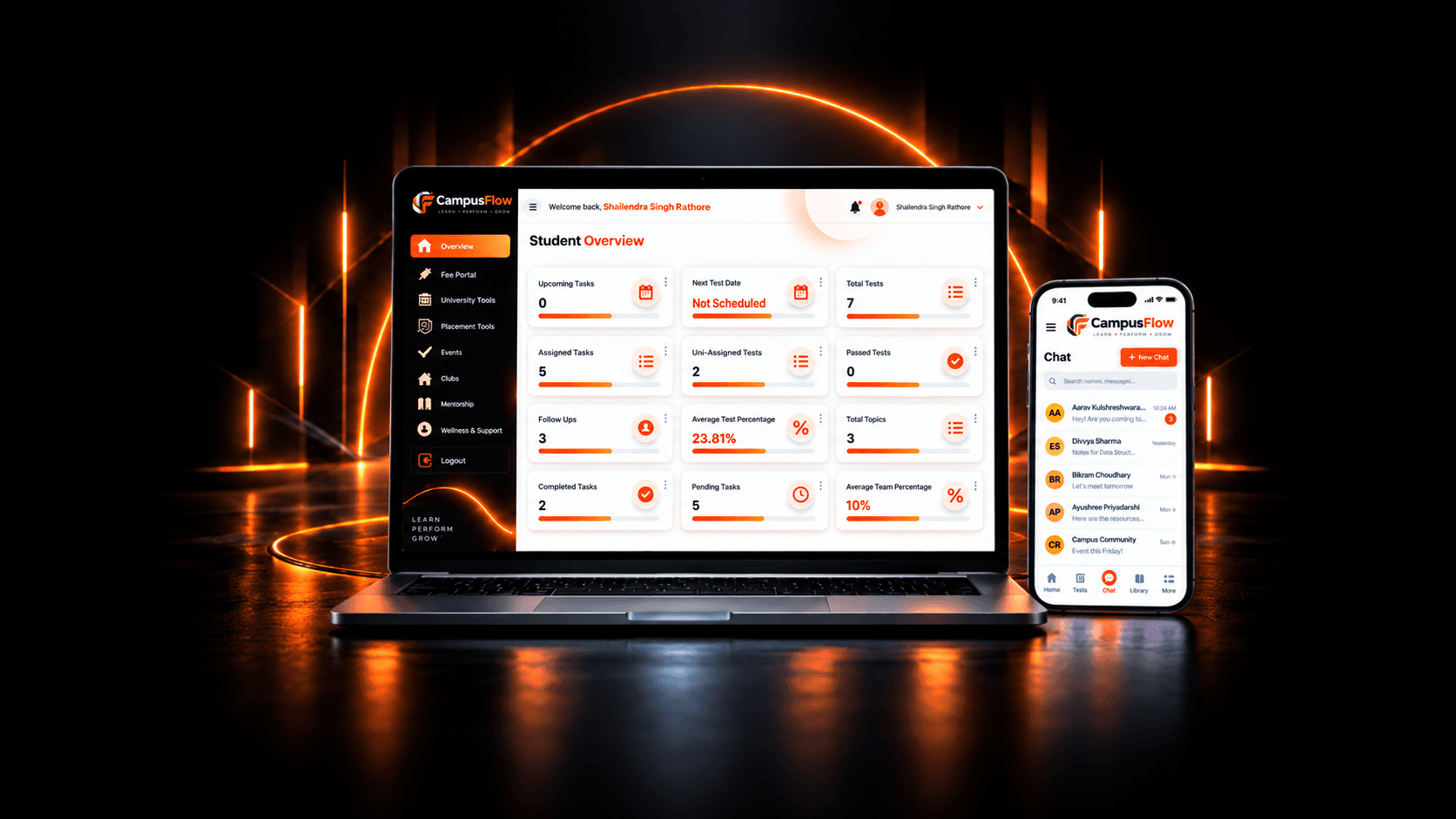
Campus Flow is an AI-powered student portal created to help students manage their academic activities through one online system.
SingaporeMarket
2 MonthsTimeline
4 MembersProject Team
EdTechIndustry
Executive Summary
Campus Flow
- Client
- Albert Joe
- Market
- Singapore
- Industry
- EdTech / Student Management
- Timeline
- 2 Months
- Team
- Project Team - 4 Members
- Services
- AI Application Development, AI SaaS Development, Custom Software Development, AI Workflow Automation
- Technology
- Next.js, Bootstrap, Node.js, Express.js
- Primary Outcome
- 1,850 Registered Students
Verified project metrics
Project Outcomes
Campus Flow reduces the need to manage tasks, online exams, attendance, and study material through separate systems. Students can access their academic activities from one place and understand their work more easily. Automatic answer checking reduces manual work and gives students faster results. The portal also keeps student records organised, making it easier to track task completion, attendance, participation, and online exam performance.
Project Overview
Campus Flow is an AI-powered student portal created to help students manage their academic activities through one online system.
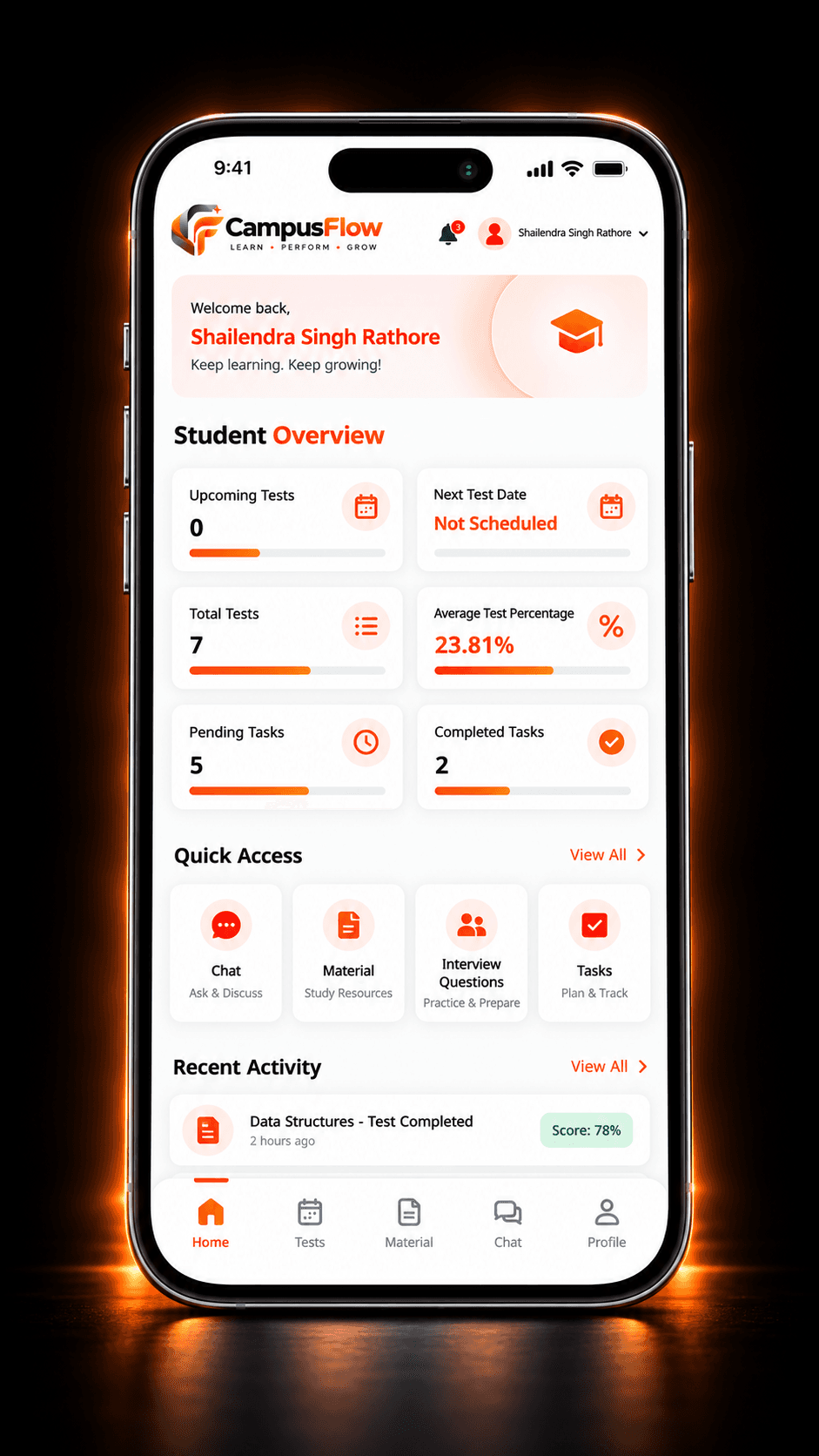
Students can log in to their accounts and view assigned tasks, attend weekly online exams, check attendance, access study material and prepare with interview questions. Online exam results are calculated and shown as soon as a student submits the test.
Mentors can assign tasks, add test questions, share learning material and monitor student progress. This gives both students and mentors a clear view of ongoing academic activities.
The portal keeps tasks, exams, attendance, results and learning resources together instead of managing them through separate tools or manual records.
What We Built
We developed a role-based student management portal with separate access for students, mentors and administrators. It includes student login, task assignment, task status tracking, attendance records, study material and a topic-based interview question library and an online exam module. This module includes a fixed time limit, automatic submission, page-switch detection and the option to change answers before submission. Correct answers are stored in the backend, so the system can check responses and show the result immediately after the exam is submitted.
Client Background
Albert Joe wanted to create a single system to manage student learning activities more easily. Tasks, online exams, attendance, study material and student progress were being handled separately, which made the process difficult for both students and mentors. The client needed a single portal where mentors could manage academic work and students could access their learning activities in one place.
Project Scope
We handled the complete planning, design and development of the Campus Flow student portal. Our work included:
- Understanding client requirements
- Student workflow planning
- UI/UX design
- Frontend and backend development
- Database integration
- Student login, profile, and dashboard development
- Role-based access development
- Task assignment and online exam management
- Attendance tracking
- Study material and interview question management
- OpenAI integration
- Scalable microservices setup
- Mobile and performance optimization
- Security implementation
- Testing and deployment
Target Audience
Campus Flow is designed for:
- School, college and training institute students
- Learners
Objectives
The main objectives of the project were to:
- 01Manage student activities in one place
- 02Provide secure login access to students
- 03Make task assignment and tracking easier
- 04Conduct weekly online exams
- 05Check answers automatically and show results immediately
- 06Maintain a controlled online exam environment
- 07Provide easy access to attendance and study material
- 08Support interview preparation
- 09Support future growth and new features
Business Challenge
The client needed one system to manage student activities without using separate tools or manual records.
- 01Student progress was difficult to track because activities were managed in different places.
- 02Students had no clear way to track assigned tasks and check whether they were completed or pending.
- 03Manual answer checking took time and delayed exam results.
- 04Online exams needed better control over time limits, page switching and automatic submission.
- 05Students needed one place to view tasks, attendance, online exams, results and study material.
- 06The system also needed a better way to manage growing student records and academic data.
Our Solution
To make academic activities easier to manage, we created a student portal with the following solutions:
- Students can manage their academic activities in one place and track their progress more easily.
- Students can view assigned tasks from their dashboard and check whether each task is pending or completed.
- The system checks exam answers automatically and shows the result immediately after submission.
- The online exam module includes fixed time limits, page-switch detection and automatic submission when the timer ends.
- The microservices-based backend keeps the main functions separate, making student records and academic data easier to manage as the portal grows.
Before → After
Before
Student activities were managed through separate processes.
After
Tasks, online exams, attendance, and study material are available in one portal.
Before
Tasks required regular manual follow-up.
After
Students can check whether a task is Pending or Done.
Before
Exam answers were checked manually, which delayed results.
After
Answers are checked automatically, and results appear after submission.
Before
Exam timing and late submissions required manual control.
After
Online exams follow a fixed timer and submit automatically when time ends.
Before
There was limited control during online exams.
After
Leaving the active exam page can trigger automatic submission.
Before
Attendance records were not easily accessible.
After
Students can check their attendance from their accounts.
Before
Study material was shared through different channels.
After
Faculty material is available in one section.
Before
Interview preparation was managed separately.
After
Topic-based interview questions are available inside the portal.
Delivery ownership
THE TISA's Role
Product Strategy
Discovery
UX/UI Design
AI Architecture
Backend Engineering
Frontend Engineering
QA
Key Features
Campus Flow includes the following features to help students manage their daily academic activities.
04Student Access
01
Student Access
- Secure student login
- Personal dashboard
- Profile and account details
- Access to personal academic data
Development Process
We began by understanding how students would use the portal to manage their daily academic activities. This included access to tasks, online exams, attendance, results, study material and interview questions.
Technical Challenges and Solutions
Technology Stack

Next.js

Bootstrap

Node.js

Express.js

MySQL

MongoDB

OpenAI

Microservices Architecture

REST APIs

Secure login and role-based access
Design Decisions
The design focused on making the student portal simple, clear and easy to use. Important design choices included:
- Simple student navigation
- Clear Pending and Done task status
- Focused online exam screen with minimal distractions
- Clearly visible countdown timer
- Option to change answers before submission
- Separate sections for tasks, exams, study material and interview questions
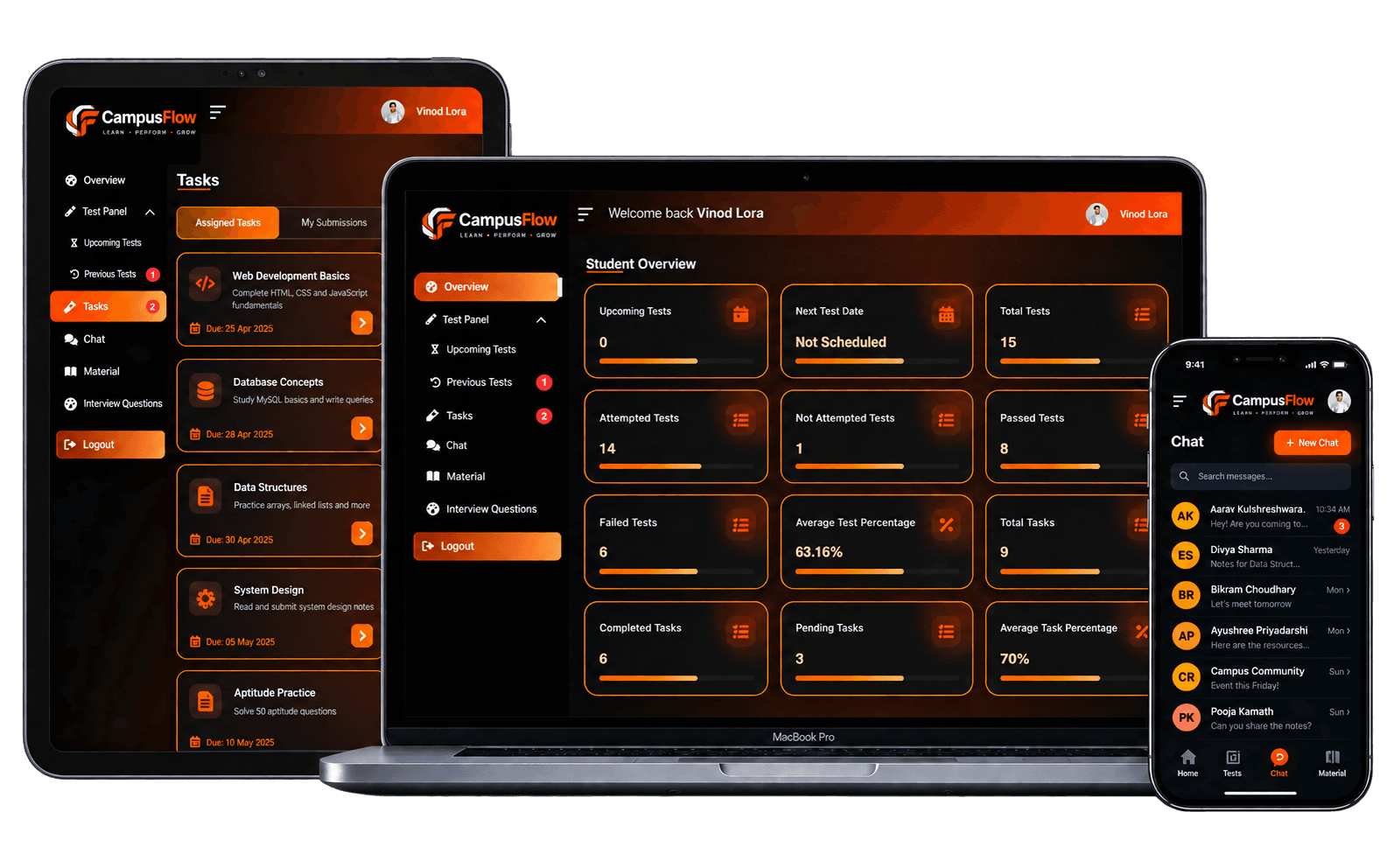
- Responsive layouts for desktop, tablet and mobile
- Consistent dashboard structure
- Reusable layouts and components
SEO Work
Campus Flow is a login-based student portal, so public search visibility is not its main purpose. SEO work was limited to public and technical requirements such as: Private student data, exam pages, profiles, and academic records were not shown in search results.
- Clear page titles
- Basic metadata
- Correct heading structure
- Clean URL structure
- Favicon and branding setup
- Mobile-friendly pages
- Fast initial loading
- Restricted indexing of private student pages
Performance Optimization
Independent scaling of microservices
- Optimized Next.js pages
- Lazy loading
- Reusable frontend components
- Reduced unnecessary API requests
- Faster question and result loading
- Pagination for long question lists
- Improved dashboard performance
- Optimized database queries
- Loading states for dynamic content
- Caching of non-sensitive data
- Compressed images and files
Security
The portal manages student accounts, attendance, exam answers, and academic results. Security was considered throughout development. Security measures included:
- Secure login and password hashing
- Token-based authentication
- Role-based access control
- Protected frontend routes and backend APIs
- Input and request validation
- Secure access to student records
- Exam submission validation
- Server-side result calculation
- Secure storage of correct answers
- Prevention of answer exposure before submission
- Database query protection
- Rate limiting where needed
- Secure API communication
- Environment variable protection
- Safe error handling
- Restricted search indexing
Architecture Diagram
 01
01Next.js
 02
02REST APIs
- 03
Node.js
 04
04Express.js
- 05
MySQL
- 06
MongoDB
- 07
OpenAI
Results
Students can now:
- 01Log in securely
- 02View assigned tasks and their status
- 03Attend weekly online exams
- 04Review answers before submission
- 05Receive results immediately
- 06Check attendance records
- 07Access study material
- 08Prepare with topic-based interview questions
- 09Manage their profile information
Project Showcase
Visual Identity
Primary colors and typography used across Campus Flow
CCampus Flow
PoppinsAa
Campus Flow
Color
- #FF6B0001Primary Orange255 107 0
- #11182702Dark Navy Green17 24 39
- #FFFFFF03White255 255 255
- #F8F9FA04Light Gray248 249 250
- #1F293705Dark Text31 41 55
- #6B728006Secondary Text107 114 128
Type
- 01 · Primary4 weights
Poppins
ABCDEFGHIJKLMNOPQRSTUVWXYZ
abcdefghijklmnopqrstuvwxyz
0123456789- Regular
- Medium
- Semibold
- Bold
Client Testimonial
“Our experience with the team was good throughout the project. They listened to our requirements and developed the portal according to our academic needs. Campus Flow is easy to use and helps students access important activities without confusion. We are happy with the final result and the support provided by the team.”
Albert Joe
Future Scalability
The portal can be expanded with more student-focused features in the future. Future improvements may include:
- 01
AI study support with personalised recommendations
- 02
AI-generated practice questions
- 03
Assignment file submission and feedback
- 04
More online exam options, including question randomisation and negative marking
- 05
Descriptive answer evaluation
- 06
Student performance reports and certificates
- 07
Live and recorded learning modules
- 08
Mobile application
- 09
Multi-language support
- 10
Leave request management
Lessons Learned
This project helped us learn what matters while building a student portal.
- 01
Student dashboards should focus on daily academic activities.
- 02
Task status should be clear and easy to understand.
- 03
Online exam timing, submission, and result calculation should be handled through the backend.
- 04
Correct answers should remain hidden until submission.
- 05
Tasks, attendance, and online exams should stay connected to one student account.
- 06
User permissions and data structure should be planned before development.
- 07
Performance and usage metrics should be tracked from the beginning.
Conclusion
Campus Flow gives students one place to manage their daily academic activities. They can track tasks, attend online exams, check attendance, view results, and access study material through their accounts. It keeps everything clear and easy for students to use.

Building Something Similar?
Talk with THE TISA about the architecture, timeline, team, and technology required for your project.