180
Workforce Management and Education Technology
PeopleCore
AI-Powered Employee and Academic Operations Portal
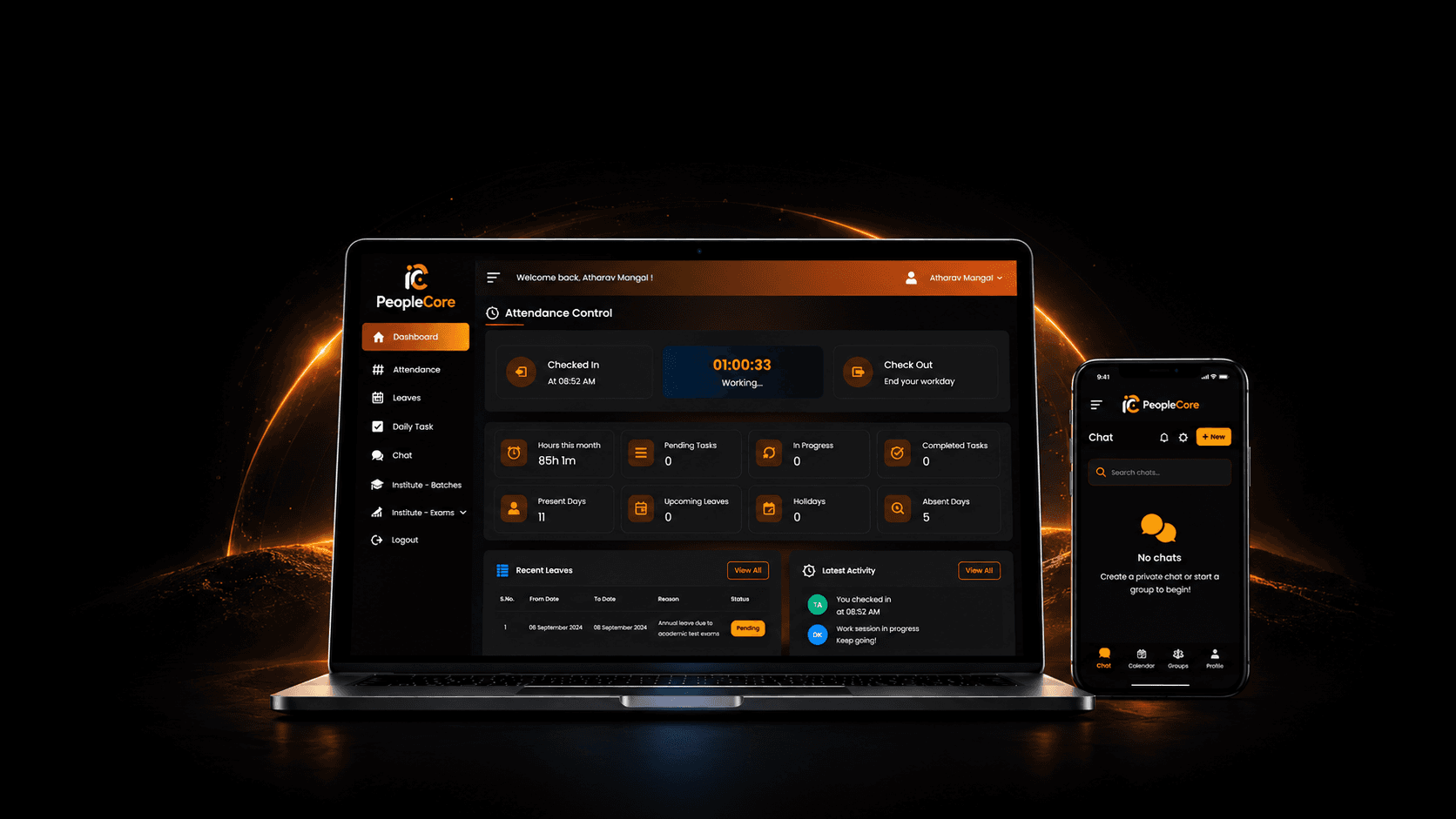
PeopleCore is an AI-powered employee and academic operations portal developed to manage employee activities and mentor-led student operations within one portal.
SingaporeMarket
1 MonthTimeline
2 MembersProject Team
Workforce Management and Education TechnologyIndustry
Executive Summary
PeopleCore
- Client
- Albert Joe
- Market
- Singapore
- Industry
- Workforce Management and Education Technology
- Timeline
- 1 Month
- Team
- Project Team - 2 Members
- Services
- Generative AI Development, AI Application Development, AI SaaS Development, Custom Software Development
- Technology
- Next.js, Bootstrap, Node.js, Express.js
- Primary Outcome
- 180 Active Employees
Verified project metrics
Project Outcomes
PeopleCore brought employee and mentor work into one portal, reducing the need to check separate records, messages, and manual updates. The organisation can now review attendance, leave, daily activities, mentor batches, and academic records from one place. Role-based access also ensures that users only see the information related to their work. This makes regular operations easier to follow, reduces repeated follow-ups, and improves control over employee and academic information.
Project Overview
PeopleCore is an AI-powered employee and academic operations portal developed to manage employee activities and mentor-led student operations within one portal.
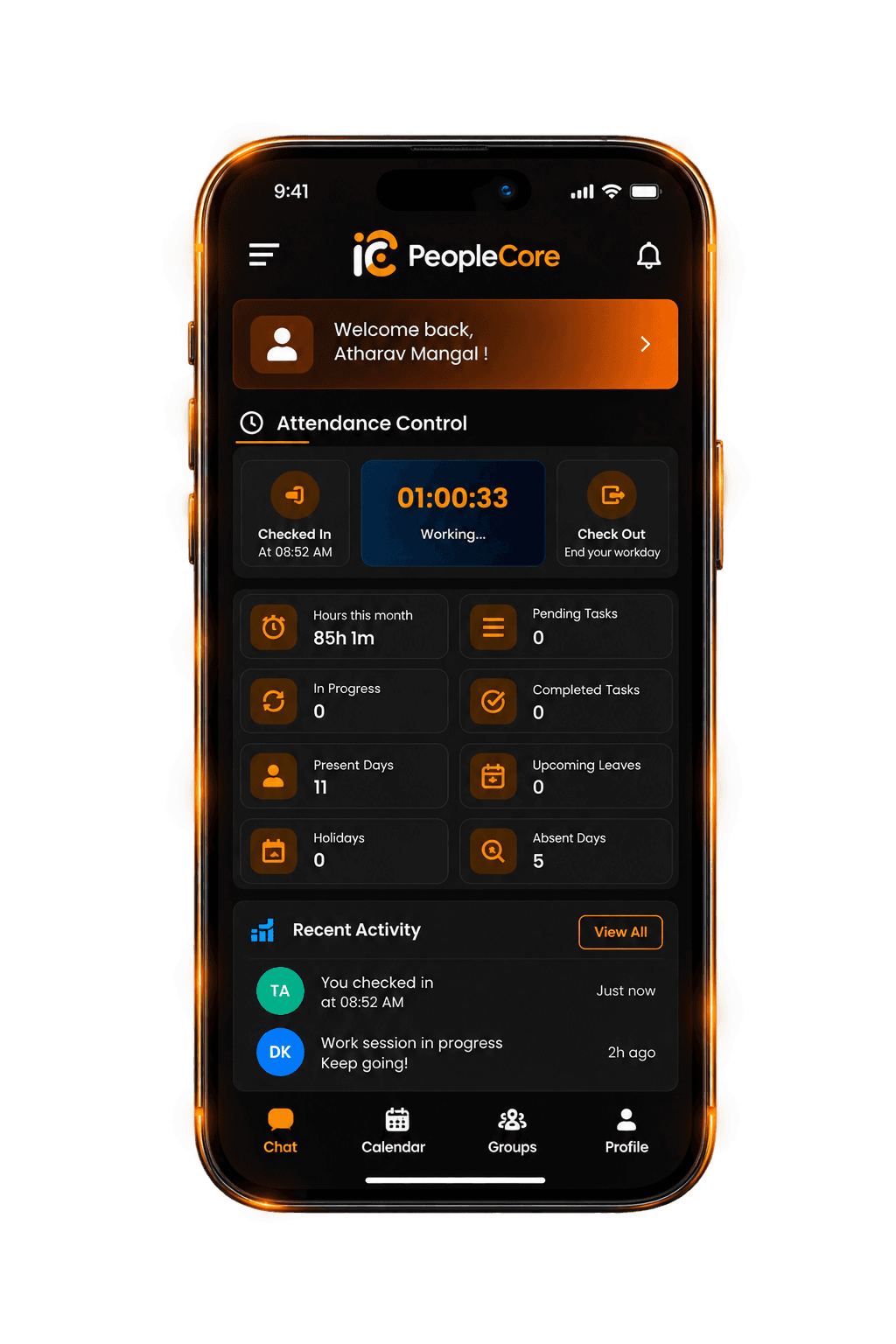
Employees can record attendance, view working hours, apply for leave and update daily activities. Mentors can access and manage the students, tasks, online exams, questions, and results of their assigned batches. Student-related options are shown only to mentors who have assigned batches. Mentors without batch responsibilities do not see these sections.
The portal reduces manual record handling and gives each user access only to the information required for their work.
What We Built
We built a role-based portal for employees, mentors, and authorised management users. It includes attendance and working-hour tracking, leave records, daily activities, batch access, student tasks, online exams, question management, result review, AI-supported summaries, and Student Portal integration. Secure login, role-based permissions, backend APIs, database connections, and separate services were developed to run these modules smoothly.
Client Background
Albert Joe needed a system for an organisation where employees manage daily workplace activities and some also work as mentors for student batches. He wanted employees to review their own records, mentors to access only their assigned batches, and management users to view authorised employee and academic information. Student-related sections also needed to remain hidden from users without mentor responsibilities.
Project Scope
Our team handled the complete development process, including:
- Requirement gathering
- Employee and mentor workflow planning
- User-role and permission planning
- UI/UX design
- Frontend development
- Backend and API development
- Database integration
- Authentication and access control
- OpenAI integration
- Microservices setup
- Responsive development
- Performance optimisations
- Security implementation
- Cross-browser and device testing
- Deployment and live review
Target Audience
PeopleCore is designed for organisations that manage employees along with training or academic activities. The main users are:
- Employees
- Mentors and trainers
- HR and operations teams
- Management users
Objectives
The main objectives were to:
- 01Create one role-based system for employee and mentor activities
- 02Simplify attendance, working-hour, leave, and daily work tracking
- 03Record late check-ins and early checkouts clearly
- 04Give mentors access only to their assigned batches and related academic sections
- 05Support student tasks, questions, online exams, and result management
- 06Reduce manual records and repeated follow-ups
- 07Support future users, batches, and new modules
Business Challenge
Before development, we looked at the main problems employees and mentors faced in their daily work.
- 01Attendance, working hours, leave, and daily activities were managed through separate records and messages. This made updates harder to check and created more follow-ups.
- 02Employees also had no proper way to add expected time, actual time, and task status. Because of this, delays and incomplete work were difficult to track.
- 03Only some employees worked as mentors, and each mentor handled specific batches. The system therefore needed to show student information only to the right mentors.
- 04The main challenge was to manage employee and academic work in one portal while giving each user access only to the sections related to their role.
Our Solution
We created a role-based portal that shows each user only the sections related to their work.
- Employees can check in and check out, view working hours, apply for leave, and check monthly attendance. Work hours are calculated automatically. Late check-ins require a reason, while early checkouts include a confirmation step.
- The daily activity section allows employees to add their work, expected time, actual time, and task status. This makes progress, delays, and incomplete work easier to review.
- Academic sections are shown only to mentors with assigned batches. They can manage the students, tasks, questions, online exams, and results connected to those batches. Users without batch responsibilities do not see these academic sections.
- OpenAI creates short summaries to make employee and operational records easier to review.
Before → After
How Daily Workflows Changed
Before
Attendance and work hours required manual tracking
After
Online check-in, checkout and automatic time calculation
Before
Late entries and early checkouts were difficult to review
After
Reasons and confirmations recorded within the system
Before
Leave and daily work were handled through separate communication
After
Leave and activity details recorded through dedicated sections
Before
Progress and delays were difficult to identify
After
Expected time, actual time and clear work status
Before
Student options could not be organised by mentor responsibility
After
Academic modules shown according to batch assignments
Before
Mentors required a clear way to find relevant students
After
Each mentor sees students from assigned batches only
Before
Tasks and online exams required separate handling
After
Batch-based task and online exam management
Before
Records were spread across different methods
After
Information organised within role-based sections
Delivery ownership
THE TISA's Role
Product Strategy
Discovery
UX/UI Design
AI Architecture
Backend Engineering
Frontend Engineering
Mobile Development
Integrations
QA
Key Features
The portal includes the following employee and mentor modules:
04Employee Dashboard
01
Employee Dashboard
- View working-hour summary and current working time
- Check leave status and upcoming holidays
- Review recent activities
- Quickly access regular employee records
Development Process
We began by studying how employees and mentors handled their regular work. This helped us understand attendance, leave, daily activities, and academic responsibilities. Then, we planned what employees, mentors, HR, and management users could view and manage. Special attention was given to mentor assignments so that each mentor could access only the students and records from their assigned batches.
Technical Challenges
Technology Stack

Next.js

Bootstrap

Node.js

Express.js

REST APIs

MySQL

MongoDB

OpenAI

Microservices Architecture
Design Decisions
The portal was planned to make everyday employee and mentor work simple and easy to follow. Important decisions included:
- Easy access to check-in and checkout
- Automatic working-hour display
- Monthly views for attendance, holidays, and time off
- Short forms for leave requests and work updates
- Simple fields for time and progress
- Navigation based on user roles
- Academic sections limited to assigned mentors
- Batch selection before adding student tasks or online exams
- Search and filters for faster record review
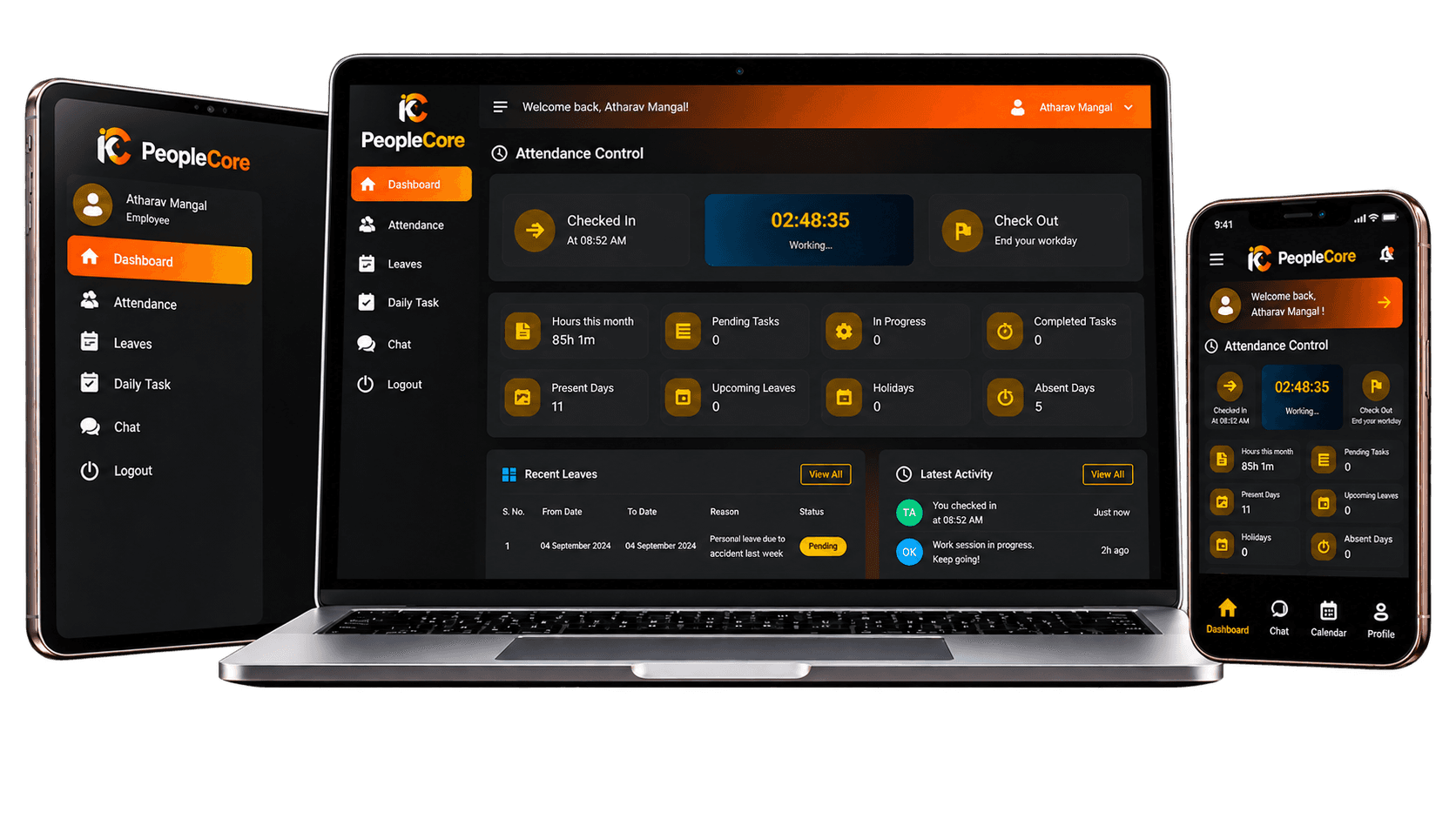
- Responsive layouts across desktop, tablet, and mobile
SEO and Indexing
PeopleCore is a private portal, so public SEO was limited to the login page. Internal pages were kept away from search-engine indexing. The work included:
- Clear page URLs
- Proper page headings
- Mobile-friendly login page
- Fast login-page loading
- Restricted indexing for private pages
Performance Optimisation
We improved the portal’s performance through:
- Optimised Next.js pages
- Reusable frontend components
- Reduced unnecessary frontend code
- Fewer unnecessary API calls
- Efficient database requests
- Pagination for large records
- Server-side search and filters
- Controlled loading of batch and online exam data
- Responsive mobile layouts
- Clear loading and error states
- Reliable handling of failed requests
Security
The portal handles private employee information and student academic records, so access control was considered throughout development. Security measures included:
- Secure login
- Protected passwords
- Token-based authentication
- Role-based permissions
- Protected pages and APIs
- Input and request validation
- Controlled access to employee records
- Batch-based student access
- Protected tasks and online exams
- Restricted question and result visibility
- Secure database and API communication
- Session and logout handling
- Private pages blocked from search engines
- Safe error handling
- AI summaries limited to authorised users
Architecture Diagram
Results
For Employees
- 01Employees can record attendance, review working hours, apply for leave and update regular work through a clear workflow. They can also check their own records without depending on separate messages.
For Management
- 01Authorised users can review employee and academic records based on their role. This makes regular work easier to check while keeping access limited to the right users.
Project Showcase
Visual Identity
Visual Identity
PPeopleCore
PoppinsAa
PeopleCore
Color
- #FF6B0001Primary Orange255 107 0
- #11182702Dark Navy17 24 39
- #FFFFFF03White255 255 255
- #F8F9FA04Light Grey248 249 250
- #1F293705Dark Text31 41 55
- #6B728006Secondary Text107 114 128
- #F59E0B07Warning Orange245 158 11
- #EF444408Error Red239 68 68
Type
- 01 · Primary4 weights
Poppins
ABCDEFGHIJKLMNOPQRSTUVWXYZ
abcdefghijklmnopqrstuvwxyz
0123456789- Regular
- Medium
- Semibold
- Bold
Client Testimonial
PeopleCore made it easier for our employees and mentors to handle their work in one place. The portal is simple to use, and each user can quickly find the sections related to their role. We thank Team TISA for understanding our requirements and developing the portal to match our organisation’s daily workflow.
Albert Joe
Future Scalability
Future improvements can include:
- 01
Shift and overtime management
- 02
Payroll processing
- 03
Employee document storage
- 04
Performance reviews
- 05
Reusable online exam templates
- 06
Real-time notifications
- 07
Biometric attendance
- 08
Multi-branch support
Lessons Learned
While building PeopleCore, we learned a few important lessons about usability, access and future growth:
- 01
Regular actions should take as few steps as possible
- 02
Attendance and working hours should be calculated automatically
- 03
Role-based access is important when employees and mentors use the same system
- 04
Academic options should appear only for mentors with assigned batches
- 05
Batch-based access ensures that mentors see only the students and records related to their classes
- 06
Separate services make future updates easier
Conclusion
PeopleCore brings employee activities and mentor-led academic work into a single system. It simplifies daily records, gives mentors access only to their assigned batches, and ensures that users only see the information related to their role. For the organisation, it reduces manual follow-ups, makes records easier to review, and gives management better control over employee and academic activities. The system can also support more features as the organisation grows.

Building Something Similar?
Talk with THE TISA about the architecture, timeline, team, and technology required for your project.