

Custom software development makes sense when ready-made tools no longer meet a business’s needs. Common signs include disconnected systems, manual workarounds, and AI features that existing software cannot support.
Software spending continues to grow. Gartner’s July 2026 forecast estimates that global software spending will reach approximately $1.468 trillion in 2026, up 15.5% from 2025. The U.S. Census Bureau reports that AI use among US businesses ranged from 17% to 20% between December 2025 and May 2026.
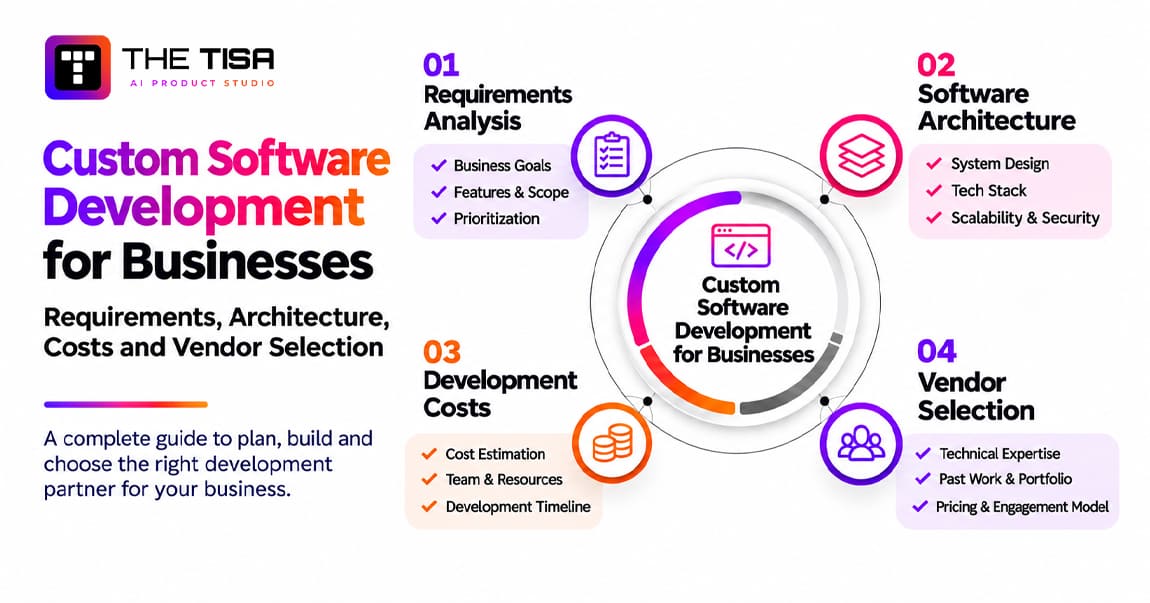
A successful software project depends on four key decisions: what the software needs to do, how it should be built, how much it will cost to develop and maintain, and who should build it. Each decision affects the project’s budget, quality, and long-term performance.
This guide walks through these decisions in practical terms. You’ll learn how to define requirements that developers can estimate, choose an architecture that fits your business, plan development costs beyond the first release, and evaluate software development partners. It also covers where AI fits, from a single API integration to RAG implementation for businesses that need answers based on their own private data.
Key Takeaways
- Gartner’s July 2026 forecast puts worldwide software spending at approximately $1.468 trillion in 2026, up 15.5% from 2025.
- Integration is the real bottleneck: enterprises run an average of 897 apps, but only 29% are connected (MuleSoft, 2025).
- Clutch’s reviewed software projects average $132,480 over about 13 months, while 65.7% of firms in GoodFirms’ survey place typical projects between $30,000 and $100,000.
- Maintenance and support can exceed 80% of lifecycle cost (ISBSG), and Flexera’s 2026 report estimates 29% of IaaS and PaaS spend is wasted, so budget beyond the build.
- US data breaches averaged a record $10.22 million in 2025 (IBM), so compliance needs like HIPAA, SOC 2, and CCPA belong in requirements.
- DoD suspended CMMC Phase 2 on July 13, 2026, but Phase 1 self-assessments still apply, and HIPAA’s encryption and MFA changes remain a proposal, with a final rule now targeted for July 2027.
- 46% of developers distrust the accuracy of AI tools, so AI features need citations, review steps, and fallbacks.
- AI pays off only when data and permissions are ready first; RAG is usually the safest way to ground answers in private data.

Part 1: Understanding Custom Software
Before you talk scope, stack, or price, it helps to agree on what “custom” actually means. Many failed projects start with two people using the same word for very different things.
What Is Custom Software Development?
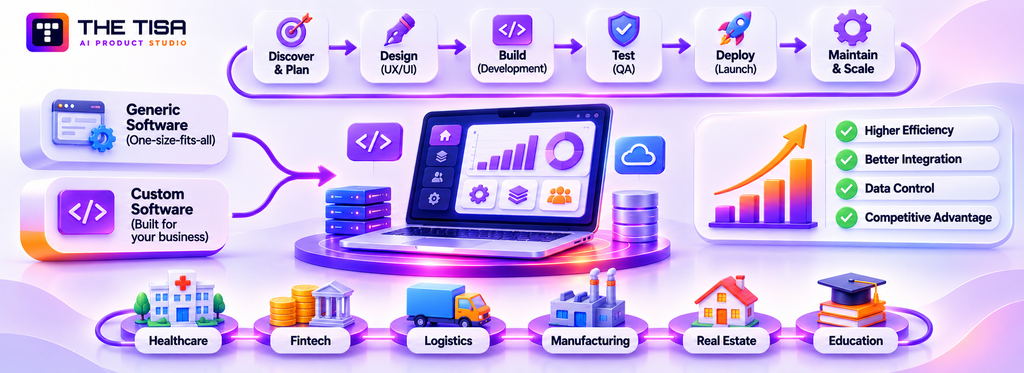
Custom software development is the work of designing, building, deploying, and maintaining software for one organization’s workflows, data, and users, rather than licensing a product built for a general market. You set the requirements and the roadmap. When the contract is written well, you also own the code.
In practice, “custom” sits on a spectrum. Very few companies build everything from scratch, and they shouldn’t. Most modern builds combine your own business logic with proven open-source libraries, cloud services, and third-party APIs for things like payments, email, and identity.
| Level of customization | What it looks like | Typical example |
|---|---|---|
| Configuration | Settings, fields, and workflows inside a SaaS tool | Custom pipeline stages in a CRM |
| Extension | Plugins, scripts, or apps built on a vendor’s platform | A Salesforce app or a Shopify app |
| Custom layer | Your own application connected to existing systems through APIs | A quoting portal that reads from the ERP and writes to the CRM |
| Full custom build | A standalone product or platform your team owns end to end | A multi-tenant SaaS product or an internal operations platform |
When people say they need custom software, they usually mean the bottom two rows. That distinction matters, because the cost, risk, and ownership model change sharply between rows.
How Custom Software Differs From Generic Software
Generic software is designed for the average customer in a market. Its vendor earns money by serving thousands of companies with one codebase, so every feature has to make sense for most of them.
Custom software is designed around the exceptions that make your business different. Think of a freight broker with carrier-specific pricing rules, a clinic group with its own intake sequence, or a manufacturer with a quoting process nobody else uses. A generic tool can approximate those processes. A tailored system can encode them exactly.
Examples of Custom-Built Applications
Here are common patterns US businesses fund, described generically rather than as client claims:
- Customer portals where buyers place orders, track shipments, or download invoices without calling support.
- Internal operations platforms that replace spreadsheets for dispatch, scheduling, inventory, or field service.
- Pricing and quoting engines that apply complex rules faster and more consistently than a sales rep with a calculator.
- Data and reporting hubs that pull figures from five systems into one trusted view for leadership.
- AI-powered assistants that answer staff questions from internal documents or draft responses for review.
Who Needs Custom Software?
Not everyone. A small team with standard processes is usually better served by good SaaS. You are a stronger candidate when several of these signals show up at once:
- Your team maintains workarounds, macros, or manual exports to make existing tools fit.
- Data lives in disconnected systems, and nobody fully trusts the reports.
- A process that sets you apart from competitors runs on tools your competitors also use.
- You are paying for large SaaS bundles but using a small share of the features.
- You need AI to work with private data that you don’t want to hand to a generic tool.
- Compliance rules force you to control where data lives and who can touch it.
The market reflects these pressures. Grand View Research values the global market for tailored software at about $45.4 billion in 2025, projecting growth to $178.9 billion by 2033. It identifies North America as the largest region, with roughly a third of revenue.
What Custom Builds Look Like Across Industries
The value of a tailored system shows up differently in each sector. These patterns come up repeatedly in US buying conversations:
- Healthcare. Patient intake, referral tracking, prior-authorization workflows, and care-coordination dashboards that connect to an EHR. The hard parts are access control, audit trails, and integration with clinical systems that change slowly.
- Financial services and fintech. Customer onboarding with identity checks, loan origination workflows, advisor portals, and internal risk dashboards. Accuracy, traceability, and vendor oversight matter as much as features.
- Logistics and supply chain. Dispatch, load planning, proof of delivery, carrier billing, and customer tracking portals. Real-time status and reconciliation between operations and finance are the usual pain points.
- Manufacturing. Configure-price-quote tools, production scheduling, quality inspection records, and supplier portals. Value comes from encoding complex product rules that generic tools can’t express.
- Real estate and property management. Leasing pipelines, maintenance requests, owner reporting, and tenant communication. Most of the gain comes from connecting listing, accounting, and service systems.
- Education. Enrollment, scheduling, assessments, and administrative portals linked to a learning management system. Student-data rules shape how records are stored, exported, and shared.
- Professional services. Matter or project intake, resource planning, time capture, and client portals. The goal is usually fewer handoffs and faster billing.
Across all of them, the winning projects start with one painful workflow, connect it to the systems that already hold the data, and expand only after that first release proves its value.
How Does Custom Software Development Work in Practice?
It works as a sequence of decisions that turn a business problem into running software, each one narrowing what gets built next. The stages are similar across vendors. What differs is how much rigor goes into each one.
Here is the short version. Part 4 covers each stage of delivery in depth, so this table focuses on the question each stage answers and the artifact you should expect to see.
| Stage | Key question it answers | What you should receive |
|---|---|---|
| Problem identification | What is broken, and what is it costing us? | A problem statement with a measurable baseline |
| Requirements gathering | What must the software do, and how well? | Functional and non-functional requirements |
| Product planning | What ships first, and what waits? | A prioritized backlog and an MVP scope |
| Architecture and stack | How will it be structured and hosted? | Architecture diagram, stack decision, and key trade-offs |
| Development and testing | Does it work as specified? | Working increments, test reports, and demos |
| Deployment and maintenance | Does it keep working in production? | Release plan, monitoring, and a support agreement |
A mature custom software process makes each artifact visible to you. If a vendor can’t show you a requirements document, an architecture decision record, or a test report on request, you are relying on trust rather than evidence.
The people involved matter as much as the steps. Expect a product owner from your side who can make decisions, plus a business analyst, a solution architect, designers, engineers, and QA on the delivery side. On smaller builds, one senior person may wear two of those hats. On regulated builds, you will also want security and compliance reviewers involved early.
What Types of Custom Software Do Businesses Build?
Most commissioned software falls into a handful of categories, and each has its own cost and complexity drivers. Knowing the category early helps you set realistic expectations for budget and timeline.
| Type | Primary users | Common integrations | Main complexity driver |
|---|---|---|---|
| Enterprise software | Employees across departments | ERP, HRIS, identity provider, data warehouse | Permissions, audit trails, and legacy data |
| SaaS applications | External paying customers | Billing, email, analytics, SSO | Multi-tenancy, uptime, and security reviews |
| Web applications | Customers or partners | CRM, payment gateways, CMS | Performance and user experience |
| Mobile applications | Field staff or consumers | Backend APIs, push notifications, maps | Offline behavior and app store rules |
| Business process automation | Operations teams | Email, documents, ERP, RPA bots | Exception handling |
| CRM and ERP extensions | Sales, finance, operations | The core CRM or ERP | Vendor API limits and upgrade cycles |
| Marketplace platforms | Buyers and sellers | Payments, identity verification, messaging | Two-sided trust and payouts |
| Internal business systems | A specific team | Spreadsheets, shared drives, email | Undocumented tribal knowledge |
Mobile deserves a special note. Many businesses assume they need native apps for iOS and Android when a responsive web app or a cross-platform build would serve users just as well at lower cost. A good delivery team should help you make that call before quoting.
Integration is the thread that runs through every row above. MuleSoft’s 2025 Connectivity Benchmark found that enterprises use an average of 897 applications, yet only 29% are integrated. That gap is where much custom work begins.
Custom vs Off-the-Shelf Software: Which Fits Your Business?
Off-the-shelf software fits when your process is standard and speed matters most. Custom fits when the process itself is a competitive advantage, or when no product handles your data, integrations, or compliance rules without heavy workarounds.
The custom vs off-the-shelf question rarely has a pure answer. Most companies end up with a portfolio: SaaS for commodity functions like payroll and email, and tailored software for the workflows that make money or carry risk.
| Factor | Off-the-shelf software | Custom software |
|---|---|---|
| Feature flexibility | Limited to what the vendor ships | Built around your exact workflows |
| Initial investment | Low; subscription starts immediately | High; you fund design and development |
| Time to first value | Days to weeks | Weeks to months |
| Long-term ownership | Vendor controls roadmap and pricing | You control roadmap; you own the code if contracted |
| Integration capabilities | Depends on vendor APIs and partner apps | Designed around your systems from the start |
| Scalability | Scales on the vendor’s terms and price tiers | Scales on your architecture and cloud budget |
| Maintenance responsibility | Vendor patches and upgrades | You or your partner patch, upgrade, and monitor |
| Data control | Stored where the vendor chooses, within contract terms | Stored where you choose |
A Simple Build vs Buy Framework
Ask these five questions in order. If you answer “yes” to three or more, a custom layer or full build deserves a serious look.
- Is this process a source of competitive advantage or revenue, not just a cost of doing business?
- Have you tried at least two credible products and found that each needs heavy workarounds?
- Will the software touch sensitive data that you need to control tightly?
- Does it need to connect with three or more existing systems in real time?
- Will per-seat or per-transaction SaaS pricing grow faster than your revenue as you scale?
If the answers are mixed, consider a hybrid: keep the SaaS platform and build a thin custom layer on its APIs. We go deeper on this trade-off in our guide to when enterprises should build their own software. For AI features specifically, the logic shifts a bit, because models, data, and vendors change quickly; the build vs buy AI decision framework covers that version of the question.
What Are the Benefits and Limitations of Custom Software?
The main benefit is fit: software shaped around how you work, connected to the systems you already run, and owned on your terms. The main limitation is responsibility: you fund the build, and you own the upkeep forever.
Both sides deserve an honest look before you sign anything.
Benefits Businesses Actually Feel
- Business-specific workflows. Staff stop translating their work into a tool’s logic. Adoption tends to rise when software matches real tasks.
- Operational efficiency. Manual re-entry, copy-paste between tools, and end-of-week reconciliations shrink or disappear.
- Competitive differentiation. A pricing engine, a faster customer portal, or a smarter dispatch system is hard for rivals to copy by buying the same subscription.
- Integration flexibility. You design data flows around your systems instead of waiting for a vendor to build a connector.
- Data ownership. You decide where data lives, how long you keep it, and who can access it. That matters for both compliance and AI.
Limitations You Need to Plan For
- Development costs. You pay upfront for discovery, design, engineering, and testing before anyone uses the product.
- Maintenance obligations. Security patches, dependency updates, and cloud changes never stop. Black Duck’s 2025 research found that 97% of audited codebases contain open source and 86% contain vulnerable open-source components, so someone has to keep those libraries current.
- Vendor dependency risk. You escape SaaS lock-in but can create a new dependency on the agency that wrote the code. Documentation, code ownership, and handover terms protect you.
- Time to value. Even a lean MVP takes weeks. If a working SaaS tool exists, the opportunity cost of waiting is real.
- Key-person risk. Small internal teams often have one engineer who understands the system. When that person leaves, progress stalls.
None of these limitations is a reason to avoid custom work. They are reasons to plan it properly, which is what the rest of this guide is about. If your team needs a starting point, review how a full-cycle software development partner structures discovery, delivery, and support before you request quotes.
When a Custom Build Is the Wrong Choice
Saying no to a custom build is sometimes the best decision a leadership team makes. Watch for these situations:
- The process isn’t stable yet. If your team changes how it sells, ships, or serves customers every quarter, you’ll be paying to rebuild logic that hasn’t settled. Run the process on flexible tools until it stops moving.
- The need is a commodity. Payroll, email, basic accounting, and team chat are solved problems. Building them rarely creates an advantage.
- Nobody can own the product. Without an internal product owner who can make decisions and accept work, even a strong vendor will drift.
- The budget covers the build but not the years after. If there’s no money for hosting, security updates, and support, the system will decay quickly.
- The real problem is data or process, not software. Messy data, unclear ownership, or a broken approval chain will follow you into any new system.
In these cases, a configuration project, a small integration, or a process fix usually delivers more value for far less risk.
Part 2: Business Requirements and Product Planning
Requirements are where budgets are won or lost. A vague brief leads to inaccurate estimates and change orders. This part explains how to turn a business need into requirements that a team can design, price, and test.
What Business Requirements Do You Need Before Building Software?
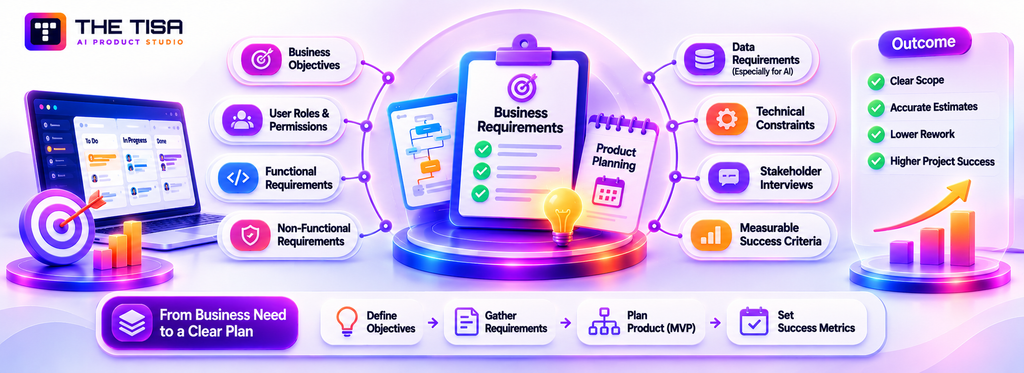
Document seven things before development begins: the business objective, users and their roles, functional requirements, non-functional requirements, data requirements, technical constraints, and measures of success. Without these details, the team has little basis for an accurate estimate.
You don’t need a 100-page specification. For most first releases, a clear 10- to 20-page document, supported by workflow diagrams and a few screen sketches, is enough.
Business Objectives
Start with the outcome, not the feature list. “Build a customer portal” describes a solution. “Cut order-status calls to support by half within six months” defines an objective. The second statement tells the team what to improve and gives leadership a way to measure the result.
Good objectives are specific, measurable, and tied to money or risk. Examples:
- Reduce quote turnaround from two days to two hours.
- Eliminate weekly manual reconciliation between the warehouse system and accounting.
- Give regional managers same-day visibility into margin by job.
Functional Requirements
Functional requirements describe what the system does. Teams usually document them as user stories or use cases. A useful format is: As a [role], I want to [action], so that [outcome]. Each story should include acceptance criteria that a tester can verify.
For example: As a dispatcher, I want to see every unassigned job on a map, so that I can assign the nearest technician. Acceptance criteria might cover map refresh frequency, filters by skill, and what happens when no technician is available.
Non-Functional Requirements
Non-functional requirements describe how well the system performs. Teams often overlook them, even though they influence a large part of the architecture and cost. Define them with measurable targets wherever possible.
| Category | Weak requirement | Measurable requirement |
|---|---|---|
| Performance | “The app should be fast” | 95% of page loads under 2 seconds on a typical 4G connection |
| Availability | “Always up” | 99.9% monthly uptime, excluding scheduled maintenance windows |
| Scalability | “Handles growth” | Supports 5,000 concurrent users without code changes |
| Security | “Secure” | SSO with MFA, encryption in transit and at rest, role-based access |
| Data retention | “Keep records” | Retain financial records for seven years; purge drafts after 90 days |
| Recovery | “Backed up” | Recovery point objective of 1 hour and recovery time objective of 4 hours |
| Accessibility | “Accessible” | Meets WCAG 2.1 Level AA on all customer-facing screens |
Accessibility deserves attention in the US. The Department of Justice adopted WCAG 2.1 Level AA as the technical standard for state and local government web content and apps. In April 2026, it extended the compliance dates by one year without changing that standard. Private businesses face ADA lawsuits under different rules, but WCAG remains a practical benchmark. The current W3C recommendation is WCAG 2.2, which builds on WCAG 2.1.
User Roles and Permissions
List each user type, what they can view, and what they can change. A simple role matrix helps catch access issues early. Who can approve a refund? Can a branch manager see another branch’s data? Can a contractor export records?
Design permissions upfront. Adding row-level security to a live system can mean rewriting queries across the codebase.
Stakeholder Interviews
Talk to the people who do the work, not just those who manage it. Managers describe how a process should run, while frontline staff explain how it works in practice, including the workarounds they use. Both perspectives belong in the requirements.
Conduct 45-minute interviews with three to five people per role, and observe someone completing the task. Shadowing often reveals steps that people don’t mention during interviews.
Technical Constraints
Record the facts that limit design choices: the existing ERP version and its API, a mandated cloud provider, single sign-on through Okta or Microsoft Entra ID, a requirement to host data in the US, or security restrictions on certain open-source licenses. Identify these constraints before architecture planning begins.
Data Requirements, Especially for AI
If AI is part of the project, document the data each feature needs, where it lives, how clean it is, who owns it, and whether it can leave your environment. Many AI projects stall because of data issues rather than the model itself. If your leadership team is still defining where AI belongs, a structured AI adoption strategy should come before feature requirements.
Measurable Success Criteria
Close the document by defining how you will judge success 90 days after launch. Link each criterion to a business objective and record the current baseline before development. Without a starting point, you cannot measure the improvement.
Common Requirements Mistakes to Avoid
Most first drafts have the same gaps. Catching them early can save weeks of rework.
- Writing solutions instead of needs. “Add a dropdown with all customers” may hide the real need: “Find the right customer in under five seconds.” Describe the goal, not the interface.
- Ignoring exceptions. Requirements often cover only the happy path. Consider what happens when a payment fails, a record is duplicated, or an approver is on vacation.
- Assuming data is clean. Customer records, product codes, and addresses may be inconsistent across systems. Check sample data early.
- Leaving reporting until last. Reports affect data structure. If leadership needs margins by region, the system must capture the right regional and cost information from the start.
- Mixing must-haves with wishes. Set clear priorities so optional features don’t delay the first release.
- Skipping the people who do the work. Managers may miss daily workarounds and edge cases. Get input from the people who will use the system.
Give the document to someone outside the project. If they can’t explain what the first release will do and how success will be measured, the requirements need more work.
What Happens During Software Discovery and Planning?
Discovery is a short, paid phase that usually takes two to six weeks. During this time, your team and the delivery team turn business requirements into a validated plan, prioritized scope, and realistic estimate. It is also the easiest stage to make changes before development begins.
Some buyers see discovery as an extra vendor expense. However, it helps both sides avoid costly assumptions. The vendor can assess the work before setting a price, while you get a clearer picture before committing a large budget.
Discovery Workshops
Workshops bring decision-makers, users, and the delivery team together to discuss business goals, current processes, pain points, integrations, and constraints. The team records the key decisions so everyone works from the same understanding.
Business Process Analysis
The team maps how work currently moves between people and systems, then outlines the proposed workflow. Comparing the two reveals what the software needs to support. In some cases, improving a process can remove the need for expensive features.
User Journey Mapping
A journey map follows a user from the first trigger to the final outcome, such as a customer reordering parts, a nurse completing intake, or an adjuster closing a claim. It highlights delays, repeated tasks, and unnecessary tool changes. These gaps help the team identify where software can make the biggest difference.
Product Requirement Documents
The product requirements document (PRD) brings together project objectives, user roles, features, acceptance criteria, non-functional requirements, and open questions. Keep it updated as decisions change, and record revisions so everyone can track what the team agreed on and when.
Feature Prioritization
Not every requirement needs to go into the first release. One common method is MoSCoW: Must have, Should have, Could have, and Won’t have this time. Teams can also rank features by business value and development effort. Someone with decision-making authority should approve the final priorities; otherwise, the team may struggle to leave anything out.
MVP Scope Definition
A minimum viable product (MVP) is the smallest release that delivers real value to users and provides useful feedback. For an internal tool, it might cover one department’s workflow from start to finish. For a SaaS product, it might handle one core task well for a specific customer segment.
An MVP is more than a prototype or demo. It needs to be secure, stable, and supportable because real users will rely on it.
Technical Feasibility Assessment
Before finalizing the plan, the architect tests the project’s biggest technical risks. Can the ERP’s API handle the expected request volume? Does the legacy database contain the required fields? Can an AI model answer questions accurately using company documents? A short technical test, often involving a few days of focused coding, can answer these questions before they become expensive development problems.
What Discovery Should Deliver
By the end of discovery, you should have:
- A validated requirements document and PRD.
- Current-state and future-state process maps.
- A prioritized backlog with a clearly defined MVP.
- A proposed architecture with key trade-offs explained.
- Clickable wireframes or a prototype for core workflows.
- A risk register with mitigation plans.
- A delivery plan, team structure, and estimated cost range with stated assumptions.
You should own these deliverables, even if you hire another vendor for development. A transparent custom software process gives clients ownership of the discovery documents and plans.
A Requirements Document Outline You Can Reuse
A clear requirements document helps vendors estimate the project accurately. The following outline covers the main details most teams need before starting development.
- Purpose and objectives. The business problem, measurable outcomes, and baseline for comparison.
- Scope. What’s included in the first release, what’s excluded, and what’s planned for later.
- Users and roles. Each user type, estimated headcount, and a permission matrix showing what each role can view, create, edit, approve, and export.
- Current and future workflows. Step-by-step process maps showing hand-offs between people and systems.
- Functional requirements. User stories grouped by workflow, each with acceptance criteria.
- Non-functional requirements. Measurable targets for performance, availability, security, accessibility, data retention, and recovery.
- Data. Data entities, sources, owners, volumes, quality issues, and restrictions on data leaving your environment.
- Integrations. Systems involved, data exchanged, direction and frequency of transfer, source of truth, and known API limits.
- Compliance and policy. Applicable regulations, internal policies, and audit requirements.
- AI use cases, if any. The task, data the model can access, output review process, and quality measures.
- Reporting. Required dashboards and exports for each role, including refresh frequency.
- Constraints and assumptions. Required platforms, hosting rules, budget range, and fixed dates.
- Open questions and decisions log. Unresolved questions, who must answer them, and decisions already made.
Keep the document concise enough for the team to use. Link supporting diagrams and screen sketches instead of adding every detail to the main document. Assign one person to maintain it and record changes. An outdated requirements document can create confusion because the team may continue relying on decisions that no longer apply.
How Do Product Design and UX Shape Custom Software?
Design affects whether people use the software you build or find ways to work around it. Good UX shortens training time, reduces errors, and lowers support costs. Poor UX can turn an expensive system into something employees avoid.
Internal tools often receive less design attention than they need. However, employees who use an operations platform for eight hours a day notice every extra click. Saving a few seconds on a task repeated 200 times a day can add up to significant time savings.
User Research
Research helps teams understand who will use the software, what those users need, and where they face delays. Common methods include interviews, workplace observation, surveys, and support ticket reviews. For B2B products, speak with both buyers and daily users because their priorities may differ.
Information Architecture
Information architecture organizes features and content so users can find what they need. It defines navigation, labels, and relationships between screens. Card sorting is one useful method: users group features in ways that make sense to them, helping teams plan a clearer structure.
Wireframing
Wireframes are basic screen layouts that show structure without visual details. They help teams test ideas before development begins. Revising a wireframe takes minutes, while changing a coded screen can take days.
UI Design Systems
A design system provides reusable components, colors, typography, and spacing rules. It keeps screens consistent and helps engineers work faster by reusing tested elements instead of building each button or form from scratch. As a product grows, this shared system makes new screens easier to design and maintain.
Prototyping
Clickable prototypes let users test a workflow before engineers build it. They help teams spot confusing steps, missing information, and incorrect assumptions while changes are still relatively easy to make.
Accessibility and Responsive Design
Accessible design considers color contrast, keyboard navigation, screen reader labels, visible focus states, and clear error messages. Responsive design keeps screens usable across phones, tablets, and desktops. Addressing both during the design stage is usually easier and less expensive than making major changes later.
Usability Testing
Ask real users to complete real tasks with a prototype or working product. Even a small group of participants in each testing round can reveal major usability problems. Test the workflow, fix the issues, and test it again.
If your team does not have in-house designers, a dedicated product design and UI/UX team can conduct user research and create a design system that engineers can use directly during development.
How Do You Choose the Right Type of Software Solution?
Choose a solution based on how unique your business processes are, how quickly you need results, how much control you need over data, and what you can invest in long-term ownership. A full custom build is one option among several, not the default choice.
The Main Options
- Custom development. Built around your business needs and owned by your company. It offers greater control and flexibility but requires a higher upfront investment and ongoing maintenance.
- SaaS subscription. Ready to use and maintained by the vendor. It gets you started quickly, but offers less control and involves recurring fees based on users or usage.
- White-label software. An existing vendor product rebranded under your company’s name. It helps you enter the market faster than building from scratch, but your ability to differentiate the product depends on the vendor’s features and restrictions.
- Low-code platforms. Visual tools for building forms, workflows, and simple applications. They suit internal tools with limited complexity but may struggle with complex logic, large-scale use, or unusual integrations. You also depend on the platform’s licensing and capabilities.
- Hybrid solutions. Combine SaaS or low-code tools for standard functions with custom development for features that set your business apart. This approach is common among mid-size and enterprise companies.
A Decision Framework
| Your situation | Likely best fit | Why |
|---|---|---|
| Standard process, need it next month, small budget | SaaS subscription | Quick to implement; the vendor handles maintenance. |
| Need a branded product quickly, with limited differentiation | White-label | Helps you enter the market without building the core product. |
| Simple internal workflow, non-technical owners | Low-code | Supports quick development and lets business users make changes. |
| Standard core, but unique integrations or reporting | Hybrid | Keeps standard functions on SaaS and adds custom features where needed. |
| Differentiating process, sensitive data, and plans to scale | Custom build | Provides control over business logic, data, and the development roadmap. |
| AI working with private documents and internal systems | Custom layer or hybrid | Allows control over data access, retrieval, and model selection. |
The custom vs off-the-shelf decision from Part 1 is part of this broader comparison. The right choice depends on which combination meets your requirements without adding unnecessary long-term complexity.
Don’t select a solution simply because it worked for another company. Check whether it fits your own requirements. If existing products cannot handle your integrations, business rules, or data controls effectively, custom software development may be the better fit.
Part 3: Software Architecture and Technology
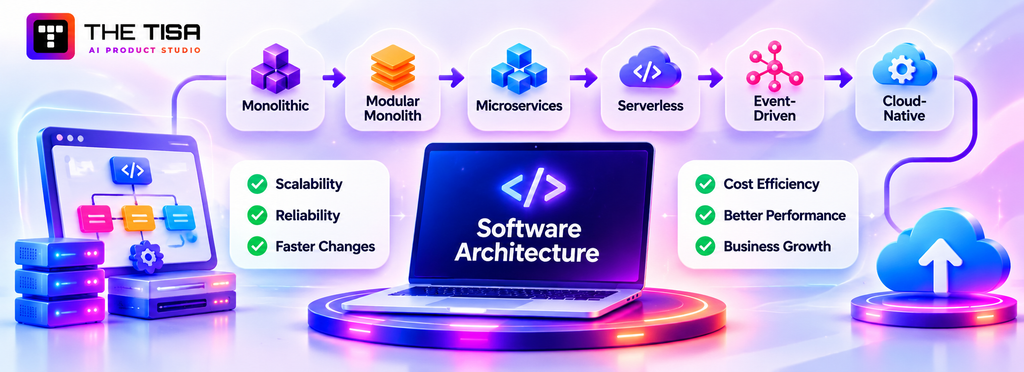
Architecture is one of the least visible parts of custom software development, but its decisions affect the system for years. A sound structure makes future changes easier and less expensive. A poor one can make every new feature harder to build and maintain.
What Is Software Architecture, and Why Does It Matter to the Business?
Software architecture defines a system’s high-level structure: its main components, how they communicate, where data lives, and how the application is deployed. These decisions affect the cost of future changes, the system’s ability to scale, and how much of the application a failure can disrupt.
Think of architecture as a building’s floor plan and plumbing. Repainting rooms is relatively cheap, but moving load-bearing walls after people move in is expensive and disruptive. Architecture decisions have a similar long-term impact.
For a business leader, three questions help assess these decisions:
- How fast can we change it? Can the team release small improvements regularly without risking the rest of the system?
- How does it fail? Does one broken component bring down the entire application or affect only one feature?
- What will it cost to run? Does cloud spending grow in line with usage or faster than it?
Architecture also affects how much value teams get from AI-assisted development. Google’s 2025 DORA report found that teams with loosely coupled architectures and fast feedback loops see greater benefits from AI coding tools, while tightly coupled systems can limit those gains.
The Main Architecture Styles
Monolithic architecture. The entire application runs as one deployable unit, with a single codebase and usually one database. Monoliths are relatively simple to build, test, and deploy, making them a practical starting point. However, without clear internal boundaries, components can become tightly connected and harder to maintain.
Modular monolith. The application still runs as one deployable unit, but the team organizes it into separate modules, such as billing, inventory, and user management, with clear rules for how they interact. This keeps much of a monolith’s simplicity while making individual modules easier to maintain or separate later if needed. For many first releases, it offers a practical balance. Martin Fowler explains this approach in his article on starting with a monolith first.
Microservices architecture. The team divides the application into smaller services, each responsible for its own data and deployment. This lets large teams work in parallel and scale specific services independently. However, microservices introduce network communication, distributed data management, additional monitoring, and more infrastructure. They suit organizations with multiple teams and clear scaling needs better than small teams building their first product.
Serverless architecture. Developers write functions that a cloud provider runs on demand, usually charging based on execution. Serverless works well for variable or event-driven workloads, such as file processing and scheduled jobs. However, debugging can become harder, and costs may rise with consistently high usage.
Event-driven architecture. Components communicate by publishing and responding to events, such as “order placed” or “payment failed,” often through a message broker. This reduces direct dependencies and helps the system handle sudden increases in activity. Without proper monitoring and tracing, following a process across multiple events can become difficult.
Cloud-native architecture. Teams design software to use managed cloud services, often with containers, Kubernetes, automated scaling, and recovery mechanisms. Cloud-native is not a single architecture pattern but a set of practices that teams can apply to other styles.
Hybrid architecture. Many production systems combine different approaches. For example, a modular monolith might handle core business operations, while serverless functions process files and an event bus sends data to analytics systems.
| Style | Best fit | Team size | Main trade-off |
|---|---|---|---|
| Monolith | MVPs and simple internal tools | 1 to 6 engineers | Can become difficult to maintain as it grows |
| Modular monolith | Most first releases and mid-size platforms | 3 to 15 engineers | Requires clear module boundaries |
| Microservices | Large platforms with independent scaling needs | Multiple teams | Higher operational complexity and cost |
| Serverless | Variable, event-based, or scheduled workloads | Any | Debugging and costs can become harder to manage at high, constant usage |
| Event-driven | Systems that respond to frequent business events | Medium to large | Harder to trace processes across components |
For AI-heavy products, we compare these approaches in monolith vs microservices for AI-powered applications. Choose the simplest architecture that meets your non-functional requirements and supports future changes.
Major cloud providers also publish architecture review frameworks covering operational excellence, security, reliability, performance efficiency, cost optimization, and sustainability. Ask your software vendor which framework it uses to assess architecture decisions.
How Do You Choose the Right Technology Stack?
Choose a technology stack that your future team can hire for, your development partner knows well, and your project actually needs. Popularity, a mature ecosystem, and long-term support matter more than using the latest technology.
A software stack includes several layers, each with different technology options. The following table covers commonly used choices in 2026.
| Layer | Common choices | When they fit |
|---|---|---|
| Frontend | React, Next.js, Angular | React and Next.js suit most web products; Angular remains common in enterprise teams. |
| Backend | Node.js, NestJS, Python, Django, .NET, Java | Node.js and NestJS suit JavaScript-heavy teams; Python works well for data and AI projects; .NET and Java are common in enterprise systems. |
| Databases | PostgreSQL, MySQL, MongoDB | PostgreSQL is a strong general-purpose choice; MongoDB suits flexible document-based data. |
| Caching | Redis | Useful for sessions, rate limits, frequently accessed data, and queues. |
| APIs and communication | REST, GraphQL, webhooks, message queues | REST works for most standard API needs; GraphQL helps when clients need data from multiple sources in flexible formats. |
| Cloud | AWS, Microsoft Azure, Google Cloud | Often depends on existing contracts, identity systems, and team expertise. |
| Containers and orchestration | Docker, Kubernetes, managed container services | Docker provides consistent environments; orchestration becomes useful when managing multiple services. |
The Stack Overflow 2025 Developer Survey offers a useful indication of technology adoption and hiring depth. It reported a seven-point increase in Python adoption from 2024 to 2025, while Docker usage reached 71% of respondents. Technologies with broad adoption generally offer a larger talent pool and stronger community support.
Technology Trade-Offs Worth Discussing
- One language or two? Using TypeScript across the frontend and backend can simplify hiring and code sharing. Adding Python for AI services is also a practical choice.
- Managed services or self-hosted? Managed databases and queues may cost more per unit, but they reduce the engineering work involved in patching, backups, and infrastructure management.
- Cloud lock-in. Using a provider’s proprietary services can speed up development but make switching providers more expensive. Keep core business logic portable where practical, even if some infrastructure remains provider-specific.
- Vendor familiarity. A team with strong experience in a particular stack can deliver more reliably than a team learning a supposedly better alternative within the same budget.
AI-enabled products add a few more decisions, including model providers, vector databases, and orchestration libraries. The AI full-stack development overview explains how these components fit alongside a conventional web stack.
How Should You Plan Cloud Infrastructure and Hosting?
Plan hosting as part of the architecture, not as a task for launch week. Your hosting choice affects reliability, security, monthly costs, and the operational work your team handles over time.
| Hosting model | What it means | Good fit | Trade-off |
|---|---|---|---|
| Managed platform (PaaS) | The provider manages servers, scaling, and patching; you deploy your code. | Most first releases and small teams | Less control over server configuration |
| Managed containers | You package services in containers, and the provider manages orchestration. | Applications with several services and steady traffic | More setup and monitoring work |
| Serverless functions | Code runs on demand, and you pay for each execution. | Variable, event-driven, or scheduled workloads | Harder debugging; costs rise with constant high usage |
| Self-managed virtual machines | You manage operating systems, patches, and scaling. | Special licensing or legacy requirements | Highest operational burden |
For most businesses, managed services offer better overall value once you account for the engineering hours that self-managed infrastructure requires for patching, backups, and on-call support.
Environments and Infrastructure as Code
Define every environment, from development and staging to production, using infrastructure as code. Store configurations for servers, databases, networks, and permissions in version-controlled files. This makes environments reproducible, allows teams to review infrastructure changes like application code, and speeds up the setup of new regions or disaster recovery environments.
Data Residency and Shared Responsibility
Many US businesses, particularly in healthcare, finance, and the public sector, require data to stay in US regions. Include these requirements in the project scope and vendor contract. Also, clarify the shared responsibility model. The cloud provider secures the underlying infrastructure, while your team or development partner manages configuration, identity and access, encryption settings, and application security. Many cloud security incidents result from mistakes in these customer-managed areas.
Backups and Disaster Recovery
Backups are useful only if you can restore your data successfully. Automate backups, store copies in a separate account or region, and test full restores regularly. Set your recovery plan according to the targets in your non-functional requirements. Shorter recovery times often require more replication and higher infrastructure costs.
Keeping Cloud Costs Under Control
Cloud spending can increase gradually unless someone tracks resource usage. Practical controls include:
- Tagging every resource by product, environment, and owner so teams can trace costs.
- Budgets and alerts that notify owners before spending exceeds the planned limit.
- Right-sizing instances and databases based on actual usage rather than initial estimates.
- Autoscaling for variable traffic, with sensible limits to prevent unexpected costs.
- Commitment discounts for steady workloads once usage patterns become clear.
- Shutting down idle environments outside working hours, especially development and testing systems.
- Monthly cost reviews where engineering and finance teams review spending trends together.
Ask your development partner who will manage these controls after launch. Without clear ownership, unnecessary cloud spending can become a recurring expense.
Review the cloud architecture whenever a major feature ships. New services, larger data volumes, and AI workloads can change cost and reliability requirements. Regular reviews help your team address these changes before they create expensive problems.
What Goes Into Backend Development and Database Engineering?
The backend manages business rules, data, and integrations. It controls user access, maintains data consistency, and connects the frontend with other systems. Its design affects the software’s long-term reliability and maintainability.
API Architecture
The backend exposes APIs that the frontend, mobile apps, and external systems use to exchange data. Good APIs follow consistent naming, error-handling, and pagination rules. They also include versioning and documentation and are organized around business resources rather than database tables.
Database Schema Design and Normalization
Database schema design defines tables, fields, relationships, and constraints. Normalization reduces duplicate data so a customer’s address stays in one place instead of appearing in multiple records. Teams may use denormalization to improve reporting speed, but they should document that decision.
Constraints such as unique keys, foreign keys, and required fields prevent invalid data from entering the database. This is easier than correcting damaged records later.
Query Optimization
Slow database queries can delay screen loading. Engineers improve performance by adding indexes, retrieving only the required data, and dividing large lists into smaller pages. They also review query plans as data grows.
A query that runs in milliseconds with 1,000 records may take seconds with 10 million. Regular checks help identify performance problems early.
Authentication and Authorization
Authentication confirms a user’s identity, while authorization determines what they can access or change. Most businesses should use an established identity provider for login, single sign-on, and multi-factor authentication instead of building these features from scratch.
The backend must enforce roles, permissions, and record-level access so users cannot bypass security rules through the interface.
Background Processing
Tasks such as sending emails, generating reports, syncing data with an ERP, or processing large documents with an AI model can take time. Background job queues handle this work separately, retry failed jobs, and keep the application responsive.
Data Consistency
When a customer places an order, the inventory, payment, and customer records must stay in sync. Database transactions maintain consistency within a single database.
Across multiple services or external systems, teams use idempotent operations, retries, and compensating actions to handle failures. Without these safeguards, payment or inventory records can become inconsistent.
Database Scalability
Most business systems can run on a well-configured relational database for years. As data and usage increase, teams can use read replicas, caching, and partitioning to improve performance. They can also move reporting workloads to a separate data warehouse.
Sharding supports very large databases but adds operational complexity. Most businesses do not need it until simpler scaling options reach their limits.
How Should Frontend and Application Development Be Approached?
Users often judge the entire product by its frontend. It should be fast, clear, and secure, with a consistent experience across browsers and devices.
Web Application Architecture
Modern web apps typically use one of three rendering approaches. Server-side rendering (SSR) builds pages on the server, helping them load quickly and supporting SEO. Single-page applications (SPAs) load once and update content in the browser, making them suitable for highly interactive tools. Hybrid frameworks such as Next.js combine both approaches, allowing teams to choose how each page renders.
Public-facing pages usually benefit from server-side rendering, while internal dashboards often work well with client-side rendering.
Responsive Interfaces
Employees use phones and tablets for fieldwork, approvals, and quick lookups. Design layouts to adapt to different screen sizes from the start, with touch-friendly controls and readable tables.
Component-Based Development
Developers build interfaces using reusable components, such as buttons, forms, tables, and modals, that follow the design system. This keeps the interface consistent and lets teams fix a bug in one place instead of updating the same code across multiple screens.
State Management
State is the data an interface holds while a user works, such as applied filters, partially completed forms, or cart contents. Good state management prevents issues such as a screen displaying outdated information after an update. Simple applications need little tooling, while complex dashboards benefit from a more structured approach.
Performance Optimization
Developers improve frontend performance through code splitting, which limits how much code users download, and lazy loading, which delays loading images until needed. Caching API responses and using server-side pagination for large tables also help pages respond faster.
Set performance targets during requirements planning and measure them during testing.
Frontend Security
Never trust input from the browser or store sensitive credentials in frontend code. Protect against cross-site scripting (XSS) by safely handling user-generated content. Use secure cookie settings and a content security policy.
Hiding a button does not secure the action behind it. The backend must enforce permissions so users cannot access restricted functions by bypassing the interface.
Cross-Browser Compatibility
Test the application on the browsers and devices your users rely on. Analytics from existing systems can help identify which ones matter most. Enterprise users may also work with older browsers, so check compatibility requirements before development begins.
When evaluating a development team, ask to review production screens, performance scores, and accessibility test results from previous projects rather than relying on design mockups alone.
How Do You Plan for Scale Without Overbuilding?
Plan for the growth your business can reasonably expect over the next two to three years. Make it easy to increase capacity when needed rather than building for a scale you may never reach. Overbuilt systems increase development, hosting, and maintenance costs, while underbuilt systems can struggle as demand grows.
A practical approach includes:
- Set growth assumptions in writing. Estimate expected users, daily transactions, data volume, and peak periods such as month-end or seasonal spikes. Review these estimates every quarter.
- Keep application servers stateless. Store session data in a shared location rather than on individual servers. This makes it easier to add server instances when demand increases.
- Cache deliberately. Cache frequently accessed data that changes rarely, and decide how long the cached data can remain outdated before the system refreshes it.
- Move slow tasks to background queues. Process reports, imports, notifications, and AI calls in the background so heavy workloads don’t slow down the user interface.
- Monitor database performance. Check indexes and query efficiency before investing in additional infrastructure. Many early performance problems come from inefficient queries rather than limited server capacity.
- Load-test before launch and major events. Simulate expected traffic and allow for higher demand. Identify the first bottleneck and address it before users experience slowdowns.
- Define scaling triggers. Agree on the metrics, such as response time or queue length, that should prompt additional capacity. This helps teams make scaling decisions before performance becomes a problem.
This approach keeps the first release lean while giving the system room to handle growth without requiring an emergency rewrite.
How Do APIs, Third-Party Integrations, and AI Fit Into Custom Software?
APIs connect custom software with external systems such as CRMs, ERPs, payment providers, identity platforms, and AI models. Integrations can account for a third or more of a project’s development effort, so teams should plan them early.
REST APIs
REST is the most common approach for web APIs. It uses standard HTTP methods to work with resources, such as GET /orders to retrieve orders or POST /invoices to create an invoice. REST is widely supported and relatively easy to implement and cache. The OpenAPI Specification provides machine-readable documentation that developers, partners, and testing tools can use to understand API endpoints.
GraphQL
GraphQL lets clients request only the fields they need in a single call. It works well when different screens or applications need different data from related sources. However, it adds complexity around server-side caching, query performance, and authorization. REST is often sufficient for standard applications, so the choice depends on how clients use the data.
Webhooks
A webhook sends a request from one system to another when an event occurs, such as a successful payment. This avoids repeatedly checking for updates through API requests. Teams must verify incoming webhooks, retry failed requests, and handle duplicate events safely to prevent missed or repeated actions.
Payment Gateway Integrations
Use an established payment processor instead of handling card numbers directly. Hosted payment fields keep raw card data off your servers, reducing your PCI DSS compliance scope. Plan for refunds, disputes, failed renewals, and tax calculations alongside successful payments.
CRM and ERP Integrations
CRM and ERP integrations can be challenging, particularly when older systems have limited APIs, strict request limits, or support only scheduled data exchanges. During discovery, define which data moves between systems, how often it moves, and which system acts as the source of truth for each field. This helps prevent conflicting records and synchronization problems.
Authentication Integrations
Enterprise customers often expect single sign-on (SSO) through providers such as Okta or Microsoft Entra ID. These integrations typically use standards such as SAML or OpenID Connect. Plan SSO early because adding it later can affect user management, permissions, and security reviews.
Third-Party Service Limitations
External services may enforce request limits, experience outages, change API behavior, or revise pricing. Keep each integration behind an internal interface so the application does not depend directly on a provider’s implementation. Add timeouts, retries, and failure monitoring. This also makes replacing a provider easier without changing multiple parts of the application.
API Versioning and Documentation
Once other applications depend on your APIs, changes must not break existing integrations. Use versioning for significant changes and give users time to move away from older versions. Keep API documentation updated and communicate deprecation dates before removing endpoints. This helps internal teams and external partners update their integrations without disrupting operations.
Securing APIs and Integrations
APIs expose business data and functions to other systems, making them potential targets for attackers. Apply these practices to protect access and prevent misuse:
- Authenticate every call. Use standard protocols such as OAuth 2.0 for user access and scoped service credentials for system-to-system communication. Never rely on hidden URLs for security.
- Authorize access at the object level. Verify that the caller can access the specific record requested, not just the API endpoint. For example, changing an order ID in a request should not let one customer view another customer’s order.
- Limit response data. Return only the fields the caller needs. Unnecessary fields can expose sensitive business or customer information.
- Set rate limits. Restrict how many requests a user or integration can make within a given period. This helps prevent abuse, scraping, and excessive traffic from overwhelming the system.
- Validate inputs. Check incoming data for unexpected fields, invalid types, and excessive sizes before passing it to business logic or the database.
- Store and rotate secrets securely. Keep API keys and tokens in a secret manager, rotate them regularly, and revoke access when a partner or employee no longer needs it.
- Log and monitor activity. Record who made each request, which resource they accessed, and when. Set alerts for unusual traffic and repeated authorization failures.
Apply the same security checks to third-party integrations. Review the data each service receives, the permissions it holds, and how you can revoke its access if the provider is compromised.
Adding AI: The Concepts in Plain Language
AI features are common in custom software. Here are the key terms and how they fit into a product.
- Large language models (LLMs). These models can read, summarize, draft, classify, and answer questions based on text. Software typically connects to them through an API, much like a payment gateway.
- Embeddings. Embeddings convert text into numerical representations of its meaning, allowing software to find semantically similar information rather than relying only on keyword matches.
- Vector databases. These databases store and search embeddings efficiently. Teams can use dedicated products or extend an existing database with tools such as pgvector for PostgreSQL.
- Retrieval-augmented generation (RAG). RAG retrieves relevant information from business documents or data and provides it to an AI model as context for generating answers. Researchers introduced the approach in a 2020 paper on retrieval-augmented generation. Businesses use it to ground AI responses in private knowledge. This guide to RAG for business leaders explains the approach without the mathematical details.
- Fine-tuning. Fine-tuning trains a model on specific examples to adjust its response style, output format, or classification behavior. It suits specialized tasks but is rarely the first choice for giving models access to company facts, which RAG generally handles better. See fine-tuning, prompt engineering, and RAG for a comparison.
- AI agents. AI agents use models to plan steps and call tools, such as searching records, creating support tickets, or drafting emails. Since they handle multi-step workflows, teams must restrict permissions, log actions, and require human approval for consequential decisions. These safeguards matter when building AI agents for business applications.
- Model Context Protocol (MCP). MCP is an open standard for connecting AI applications to tools and data sources through a common interface. The Model Context Protocol documentation explains its architecture. Businesses can use MCP to reduce custom integration code when assistants need access to multiple internal systems.
| AI capability | Where it fits in a real product | When you probably don’t need it |
|---|---|---|
| LLM API call | Summaries, drafting, classification, and document extraction | Existing rules already handle the task reliably |
| RAG | Answering questions from policies, manuals, contracts, tickets | Data is tiny, static, or fully structured in a database |
| Fine-tuning | Strict output formats or domain-specific classification | You mainly need the model to know your facts |
| AI agents | Multi-step tasks across tools with clear goals | A single fixed workflow or a simple form solves it |
| MCP | AI assistants reaching several internal tools in a standard way | One integration with one tool |
Two considerations matter when adding AI to a product.
First, AI responses can be inaccurate. The Stack Overflow 2025 Developer Survey found that 46% of developers distrust AI tool accuracy, compared with 33% who trust it. Include response reviews, source citations, and fallback options rather than assuming every answer is correct.
Second, avoid depending too heavily on one model provider. A tightly coupled product can become difficult to change when pricing or model quality shifts. A thin abstraction layer makes switching providers easier without rewriting core application logic. This approach is known as vendor-agnostic AI architecture.
For practical implementation patterns, see this overview of AI API integration in full-stack development.
Does This Feature Need AI at All?
Before adding AI to a workflow, check whether it solves the problem better than ordinary code. AI suits tasks involving unstructured input, such as emails, documents, and free-text requests, where a person can review the output. It is usually unnecessary for tasks with clear rules and exact results, such as tax calculations, inventory counts, and permission checks. Ordinary code handles these faster, cheaper, and more reliably.
Ask five questions before adding an AI feature:
- What is the task, in one sentence? Define exactly what the feature should do.
- What does it cost today? Measure the time, delays, and errors involved in the current process.
- What happens when the output is wrong? If a mistake could be costly or irreversible, require human review before saving or sending the result.
- What data does it need, and may that data leave your environment? Check whether sharing the data with an external provider meets your security and privacy requirements.
- How will quality be measured? Define a test set and pass threshold before development begins.
Features that pass these checks are more likely to deliver practical value. Those that don’t can become expensive demos that users rarely adopt.
How Do You Modernize Legacy Software and Migrate Data Safely?
Modernize legacy software incrementally whenever possible. Replace or wrap old components one capability at a time, migrate data in tested stages, and keep a rollback plan ready. Large rewrites carry a higher risk of delays, cost overruns, and failed cutovers.
Legacy systems remain a challenge across both public and private sectors. A July 2025 GAO review identified 11 critical federal legacy systems in need of modernization and found that only three agencies had documented plans covering all key practices. Private companies face similar challenges with aging systems, outdated technologies, and fewer developers who understand the original code.
Modernization Options
| Option | What it means | When it fits |
|---|---|---|
| Retain | Keep the system and connect it through APIs | It still works, but other systems need access to its data |
| Rehost | Move it to the cloud with minimal changes | You need to leave a data center within a tight timeline |
| Replatform | Move it with modest changes, such as switching to a managed database | You want to reduce operational work without rewriting the application |
| Refactor | Restructure existing code to improve maintainability | The business logic remains useful, but the code is difficult to change |
| Replace | Build or buy a new product and migrate the data | The existing system no longer meets business needs |
| Retire | Shut down the system and archive its data | Its functionality is unused or duplicated elsewhere |
Modernizing Outdated Applications
The strangler fig approach is a practical way to modernize outdated applications. New functionality runs alongside the old system, and the team gradually moves traffic to the new components until it can retire the old core. This approach lets users benefit from improvements without requiring a complete replacement at once.
Monolith Modernization
Start by identifying modules such as billing, reporting, and notifications. Give them clear interfaces and separate only those that need independent scaling or release cycles. Many businesses can improve a tangled monolith by making it modular without introducing the added complexity of microservices.
Cloud Migration
Moving legacy software to the cloud can reduce hardware management and support automated scaling, but it does not guarantee lower costs. Lift-and-shift migrations can increase spending until teams right-size resources and adopt managed services where appropriate.
Integration With Existing Infrastructure
During modernization, old and new systems may need to run side by side. Define which system owns each record, how teams will resolve conflicting updates, and how long both systems will remain active.
Migration Risks and Rollback Planning
Data migration can put a modernization project at risk through poor data quality, undocumented fields, character encoding issues, or missing historical records. A safe migration plan should include:
- Profiling and cleaning source data before migration.
- Documenting every field mapping and data transformation.
- Running multiple full migration rehearsals using copies of production data.
- Reconciling record counts and totals after each rehearsal.
- Defining go/no-go criteria and testing the rollback procedure.
- Freezing or carefully synchronizing data changes during the final cutover.
When adding AI to an older platform, teams can also modernize selected components without replacing the entire application. The practical approaches covered in this guide to legacy system modernization without starting from scratch provide useful context for that decision.


Part 4: The Software Development Lifecycle
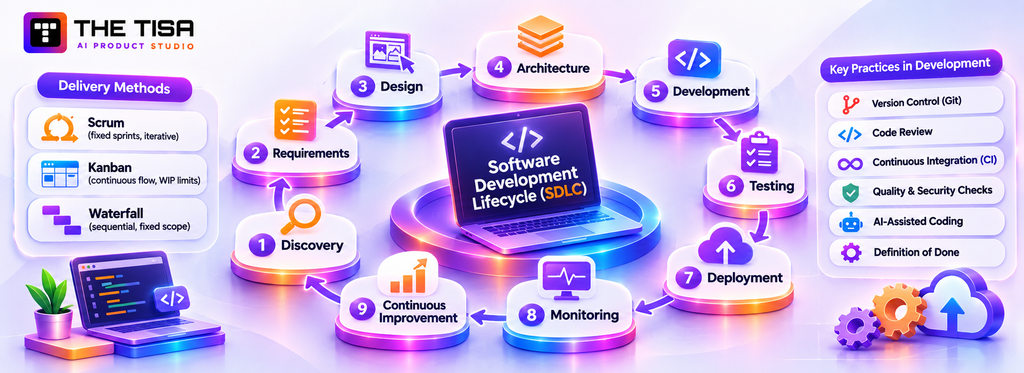
The software development lifecycle (SDLC) is the repeatable loop a team follows to take an idea into production and keep improving it. Parts 1 to 3 covered what to decide. This part covers how the work actually flows week to week, and what you should see as a buyer at each stage.
What Does the Complete Software Development Process Look Like?
A well-run custom software process moves through nine stages: discovery, requirements, design, architecture, development, testing, deployment, monitoring, and continuous improvement. Then it loops back. The stages overlap in agile delivery, but none can be skipped without paying for it later.
| Stage | Main activities | Exit signal | Your role as the client |
|---|---|---|---|
| 1. Discovery | Workshops, process mapping, feasibility spikes | Validated scope and estimate | Provide access to people, data, and systems |
| 2. Requirements | User stories, acceptance criteria, NFRs | Signed-off backlog for the next release | Prioritize and approve |
| 3. Design | Wireframes, prototypes, design system | Tested flows for core journeys | Join usability sessions and review |
| 4. Architecture | Structure, stack, security, hosting plan | Architecture decision records | Confirm constraints and risk tolerance |
| 5. Development | Sprints, code review, CI pipeline | Working increments in staging | Attend demos and give fast feedback |
| 6. Testing | Automated and manual QA, security, UAT | Release candidate passes agreed criteria | Run user acceptance testing |
| 7. Deployment | Release automation, data migration, cutover | Live in production with rollback ready | Approve go-live and communicate to users |
| 8. Monitoring | Logs, metrics, alerts, uptime tracking | Stable operation against SLOs | Report issues through agreed channels |
| 9. Continuous improvement | Analytics, feedback, backlog refinement | Next release planned | Review results against success criteria |
Since discovery, requirements, design, and architecture were covered earlier, the sections below focus on how they connect inside delivery, then go deeper on stages five through nine.
Stages 1 to 4: Turning Plans Into a Delivery Backlog
In agile delivery, discovery and design continue after coding starts. The team usually prepares designs one or two sprints ahead. Architecture also evolves: early decisions cover areas that are difficult to change later, such as the data model, identity, hosting, and integration patterns. Teams address smaller technical choices as they develop features.
An architecture decision record (ADR) documents an important technical choice, the alternatives considered, and the reason for selecting one. This one-page record helps future developers or a new vendor understand the reasoning behind the system’s architecture.
Choosing a Delivery Methodology
Most custom software projects use an agile approach, which emphasizes working software, collaboration, and adapting to changing requirements.
- Scrum organizes work into fixed sprints, usually two weeks long. Each sprint includes planning, daily check-ins, a demo, and a retrospective. It suits product builds with a stable development team.
- Kanban moves tasks through a prioritized queue while limiting work in progress. It suits maintenance, support, and operations-heavy teams.
- Waterfall requires teams to complete each phase before starting the next. It suits small projects with clearly defined requirements and few expected changes, or projects that require formal sign-offs between phases. Frequent requirement changes make it harder to manage.
Many US enterprises use a hybrid approach: fixed phases for discovery and architecture, agile sprints for development, and formal release approvals for compliance.
Stage 5: How Does Development Actually Happen?
Teams develop software in short cycles, with each cycle producing working, tested features. The product should remain ready for release, even if the team does not release it immediately.
Sprints and the Definition of Done
At the start of each sprint, the team selects backlog items to complete. A shared “definition of done” sets clear completion criteria. It should include reviewed code, passing automated tests, updated documentation, completed security checks, and deployment to a staging environment.
Code Review
At least one other engineer should review every code change before merging. Reviews catch bugs, maintain coding standards, and share knowledge across the team. They also reduce key-person risk by ensuring that multiple engineers understand each part of the system.
Version Control and Branching
Teams use version control, typically Git, to track code, infrastructure configuration, and database migration scripts. Short-lived branches and frequent merges help prevent conflicts and keep the codebase current.
Continuous Integration
A continuous integration (CI) pipeline automatically builds and tests every change. If a change breaks a test, the team finds out within minutes. CI also runs static analysis, dependency vulnerability scans, and code quality checks.
AI-Assisted Coding
AI coding assistants can speed up boilerplate coding, test writing, and technical exploration. However, their output may contain bugs, insecure patterns, or licensing issues. Ask your vendor how engineers review AI-generated code and whether these tools send code or data to third-party services.
Demos and Feedback
Sprint demos let you review working software every two to three weeks and identify problems early. Timely, specific feedback from your product owner helps the team make decisions and maintain delivery speed.
Stage 6: What Testing Should a Custom Build Include?
Testing should cover correctness, integration, performance, security, accessibility, and real user acceptance, with as much automated as practical. Skipping testing doesn’t save money. It moves the cost to production, where bugs are most expensive.
The Consortium for Information & Software Quality estimated the cost of poor software quality in the US at $2.41 trillion in 2022, with accumulated technical debt of about $1.52 trillion. Those national figures are abstract, but the mechanism is concrete: shortcuts compound.
| Test type | What it checks | Who usually owns it |
|---|---|---|
| Unit tests | Individual functions and business rules | Developers |
| Integration tests | Components and external systems working together | Developers and QA |
| End-to-end tests | Full user journeys through the interface | QA engineers |
| Regression tests | Old features still work after new changes | Automated suite in CI |
| Performance and load tests | Speed and stability under expected and peak traffic | QA or performance engineers |
| Security tests | Vulnerabilities, access control, dependency risks | Security engineers or specialist firms |
| Accessibility tests | Keyboard use, screen readers, contrast, labels | QA with automated and manual checks |
| User acceptance testing | The software solves the business problem | Your business users |
Testing AI Features
AI outputs can vary, so test them against realistic questions and documents with expected results. Measure accuracy, completeness, and refusal behavior. Verify that the system does not expose restricted data, and repeat evaluations whenever prompts, models, or data sources change.
Environments
Maintain three environments: development for daily work, staging for final checks, and production for live users. Keep staging close to production and use realistic but masked data. Use real customer data only when compliance rules permit it and the necessary controls are in place.
Stage 7: How Should Software Be Deployed to Production?
Deploy software through automation, using small and frequent releases with a tested rollback procedure. Large, infrequent manual releases increase the risk of production outages.
Continuous Delivery Pipelines
A continuous delivery pipeline takes code that passes CI through staging and into production with minimal manual steps. Teams define infrastructure as code to keep environments consistent and review infrastructure changes alongside application code.
Release Strategies
- Blue-green deployment maintains two identical production environments. The team switches traffic to the new version and can quickly switch back if something fails.
- Canary releases send a small share of users to the new version first. The team monitors error rates before gradually expanding the release.
- Feature flags let teams deploy code with a feature turned off, then enable it for selected users or accounts. They separate deployment from release and allow teams to disable a problematic feature without redeploying.
Go-Live Readiness
Before launch, confirm that monitoring and alerts work, backups have passed a restore test, and the team has rehearsed the rollback procedure. Also make sure support staff know how to handle issues and users understand what’s changing and where to get help.
Stage 8: What Should Teams Monitor After Launch?
Monitor user experience, not just server status. Track errors, response times, availability, and key business events. Send alerts to the people responsible for resolving issues.
The Three Kinds of Telemetry
- Logs record events such as errors, warnings, and important system actions.
- Metrics track numbers over time, such as request rates, response times, queue lengths, and CPU usage.
- Traces follow a request across services and show where it spends time.
Service Level Objectives
A service level objective (SLO) sets a measurable target, such as “99.9% of checkout requests succeed within 1 second over 30 days.” SLOs connect reliability with business priorities. When the system meets its target, teams can focus on new features. When it falls short, reliability work takes priority.
Business Monitoring
Track business activities such as orders submitted, quotes generated, tickets resolved, and reports downloaded. A sudden drop can reveal a problem before it appears in error logs.
Security Monitoring
Watch for unusual login patterns, permission changes, large data exports, and repeated failed requests. Centralized audit logs help teams investigate incidents and meet compliance requirements.
Stage 9: How Does Continuous Improvement Work?
Continuous improvement uses product data and user feedback to guide what teams build, fix, or remove next. It also requires setting aside time to address technical debt.
Feedback Loops
Combine product analytics, support tickets, user interviews, and the success metrics defined during requirements planning. Review the findings monthly and use them to update the backlog.
Technical Debt Budget
Every system accumulates shortcuts. Reserve part of each sprint, often 15% to 25% of capacity, for refactoring, dependency updates, and performance improvements. Without regular maintenance, technical debt slows development and makes new features more expensive to build.
Delivery Health Metrics
Track four widely used delivery measures: deployment frequency, lead time for changes, change failure rate, and time to restore service. These metrics show whether the team is improving delivery speed and stability or facing more failures and delays.
Planned Evolution
Custom software development continues after launch through regular, measured releases. Decide early who will own this work: your internal team, the original partner under a maintenance and support agreement, or both. Part 5 explains how to budget for it.
For an example of how teams organize delivery when AI components are involved, review this AI software development process and compare its stages with the custom software process proposed by your vendor.
What Should You Receive at Handover?
Whether your development partner continues providing support or transfers the system to your internal team, a complete handover protects your investment. Without it, the next team may spend months understanding the system.
Request these items during the project rather than waiting until the end:
- Source code in your own repository, with a clean history and no committed secrets.
- Infrastructure definitions for every environment, so your team can rebuild them independently.
- Architecture overview with diagrams, key decisions, and their reasoning.
- Setup guide that lets a new engineer run the system locally within a day.
- Deployment and rollback runbook explaining how to release updates and reverse a deployment.
- Operations runbook covering monitoring, alerts, backups, restores, and common fixes.
- API documentation for all internal and external interfaces.
- Data dictionary describing important database tables and fields.
- Test suite and test data that run automatically, with notes on coverage gaps.
- Access inventory listing accounts, services, and credentials, with ownership transferred to your organization.
- Open-source and third-party list documenting licenses and renewal dates.
- Known issues and backlog recording unresolved problems and planned work.
As a final check, ask an engineer who didn’t build the system to deploy a small change using only the handover materials. If they get stuck, the documentation needs improvement.
Part 5: Costs, Timelines, and Total Cost of Ownership
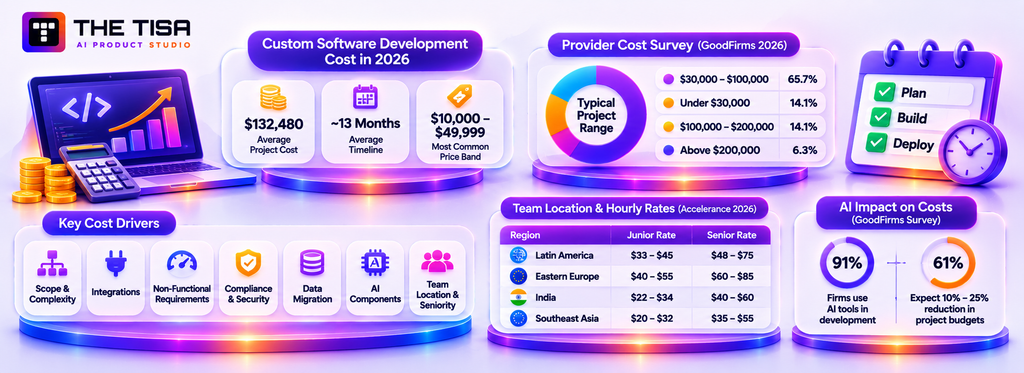
The development price is often the starting point for buying discussions, but it represents only part of the total cost. You also need to consider ongoing expenses over several years.
How Much Does Custom Software Development Cost in 2026?
Industry benchmarks place many custom software projects between tens of thousands and a few hundred thousand dollars, although larger builds can cost more. Clutch, which collects pricing data from verified client reviews, reports an average software development project cost of $132,480 and a typical timeline of about 13 months. However, the most common project band is $10,000 to $49,999. A few expensive projects can push the average above the cost of a typical engagement.
GoodFirms’ 2026 software cost survey, based on responses from more than 100 software companies, provides a similar view from the provider side.
| Benchmark | Figure | Source |
|---|---|---|
| Average reviewed project cost | $132,480 | Clutch |
| Average reviewed project timeline | About 13 months | Clutch |
| Most common reviewed project band | $10,000 to $49,999 | Clutch |
| Firms placing typical projects at $30,000 to $100,000 | 65.7% | GoodFirms |
| Firms placing typical projects under $30,000 | 14.1% | GoodFirms |
| Firms placing typical projects at $100,000 to $200,000 | 14.1% | GoodFirms |
| Firms placing typical projects above $200,000 | 6.3% | GoodFirms |
Percentages are rounded and may not total exactly 100%.
Why Published Averages Can Mislead
These figures provide a reference, not a fixed price. Three factors explain why actual project costs vary:
- Marketplace mix. Review platforms include small agencies and offshore providers, so their data may not reflect a typical US mid-market or enterprise project.
- Averages versus typical prices. A few expensive projects can raise the average. The most common price band often gives a better sense of what smaller projects cost.
- Different scopes. A customer portal could be a three-screen application or a multi-tenant platform with SSO, audit logs, and five integrations. Their budgets will differ significantly.
Use these benchmarks to evaluate proposals. If a quote falls well below the expected range for a complex project, ask what it excludes. Check whether the price covers testing, security, documentation, deployment automation, and post-launch support.
What Factors Drive the Cost of a Custom Build?
Seven factors explain most cost differences between quotes for the same project. Understanding them helps you adjust the scope to fit your budget.
- Scope and complexity. The number of user roles, workflows, screens, and business rules affects development effort. Complex requirements, such as pricing logic and approval chains, cost more than simple forms.
- Integrations. Each external system requires development, testing, and error handling. Older ERPs with limited or batch-only APIs often need more work.
- Non-functional requirements. High availability, strict performance targets, multi-region hosting, and detailed audit trails increase engineering effort.
- Compliance and security. HIPAA safeguards, SOC 2 readiness, PCI requirements, and accessibility audits add work across development, testing, and documentation.
- Data migration. Moving and cleaning years of records from older systems can take more time than expected.
- AI components. Retrieval pipelines, evaluation sets, guardrails, and monitoring add work beyond model API integration.
- Team location and seniority. Developer rates vary by region and experience, as the next section explains.
AI tools are also changing development estimates. In the same GoodFirms survey, 91% of responding software companies said they use AI tools during development, while 61% expect AI to reduce project budgets by 10% to 25%. These are provider expectations, not guaranteed savings. Ask vendors where AI reduces development time and how they review its output.
How Do Team Location and Delivery Models Affect Price?
Location affects hourly rates, but not the number of hours a project requires. A lower-rate team may need more time if communication or experience is lacking. Compare total project cost and delivery risk, not just hourly rates.
For an in-house team, the U.S. Bureau of Labor Statistics reports a median annual wage of $133,080 for software developers as of May 2024. Employers also pay for payroll taxes, benefits, equipment, recruitment, and management.
Agency rates vary by location. Clutch reports that most listed software development firms charge $25 to $49 per hour, while US-based firms on the platform typically charge $50 to $99 per hour. For offshore and nearshore teams, the Accelerance 2026 rates report, based on a survey of 60 development partners, provides these ranges:
| Region | Junior developer rate | Senior developer rate | Year-on-year change (2026 report) |
|---|---|---|---|
| Latin America | $33 to $45 per hour | $60 to $75 per hour | Down 7.1% year on year |
| Europe | $31 to $39 per hour | $64 to $76 per hour | Down 4.4% year on year |
| Asia | $24 to $31 per hour | $31 to $41 per hour | Effective rates down nearly 8% |
Accelerance cautions against judging software development cost by hourly rates alone. A lower rate can lead to higher costs if the team creates scope changes, rework, or delays. Ask vendors how they assign senior and junior developers and assess delivery quality.
Which Pricing Model Should You Choose?
Use fixed prices for small, well-defined work. Use time and materials for evolving products. Use a dedicated team for long-running roadmaps. Many US buyers combine them: fixed-price discovery, then time and materials with a monthly cap.
| Model | How it works | Best for | Risk sits with |
|---|---|---|---|
| Fixed price | One price for a defined scope | Small, stable, well-specified projects | Vendor on cost; you on flexibility and change orders |
| Time and materials | You pay for hours worked at agreed rates | Products where scope will evolve | You, unless capped |
| Dedicated team | Monthly fee for a stable team | Long-term product development | Shared; depends on governance |
| Milestone-based | Payments tied to accepted deliverables | Projects with clear checkpoints | Shared |
| Hybrid | Fixed discovery, then capped sprints | Most mid-size custom builds | Balanced |
A fixed-price contract offers little cost certainty when the project scope is unclear. Vendors may increase their estimates to cover the risk or charge extra for changes through change requests. Clear requirements, as discussed in Part 2, help control costs and reduce the risk of budget overruns.
What Ongoing Costs Do Businesses Underestimate?
Businesses often underestimate maintenance, cloud infrastructure, and AI usage costs. These expenses continue after launch and can exceed the initial development cost over the software’s lifetime.
- Maintenance and support. The International Software Benchmarking Standards Group notes that maintenance and support can account for more than 80% of total project lifecycle costs, from development to retirement. ISBSG groups this work into incident management, problem management, quick queries, and user support. In practice, it also includes bug fixes, security patches, dependency upgrades, and regular improvements.
- Cloud infrastructure. Hosting, databases, storage, backups, logging, and bandwidth add recurring expenses. Flexera’s 2026 State of the Cloud findings estimate that 29% of IaaS and PaaS spending goes to waste, reversing a five-year downward trend.
- AI usage fees. Model providers charge based on usage. OpenAI’s API pricing sets rates per million input and output tokens. Output tokens cost more than input tokens, while batch processing offers lower rates. Costs increase with user numbers, document sizes, and how often the application runs AI features.
- Third-party services. Email delivery, SMS, maps, identity verification, monitoring, and payment processing come with monthly or usage-based fees.
- Compliance and audits. Penetration tests, SOC 2 audits, and accessibility reviews add recurring costs for many businesses.
- Data migration and cleanup. Profiling, mapping, cleaning, and testing data migrations require time and effort, particularly when moving records from older systems.
- Training and change management. Employees need documentation and training to learn new workflows. Businesses should also account for a temporary drop in productivity during the transition.
- Internal team time. Product owners, subject-matter experts, and testers spend time supporting the project. Although these hours may not appear on a vendor’s invoice, they still contribute to the overall cost.
How Should You Build a Three-Year Cost View?
Build it from line items that each vendor must estimate in writing, rather than from a single build price. This turns proposals into comparable numbers and exposes missing work early.
| Cost line | What to request from each vendor | How to sanity-check it |
|---|---|---|
| Initial build | Phased estimate with hours by role and stated assumptions | Compare against the Clutch and GoodFirms benchmarks for similar scope |
| Cloud hosting | Monthly estimate at launch scale and at three times your expected usage | Ask how the architecture keeps waste low; compare with Flexera’s waste findings |
| Maintenance and support | Annual support quote with response times and included hours | Weigh against ISBSG’s evidence that maintenance dominates lifecycle cost |
| AI usage | Expected token volume per user and per feature | Multiply by the provider’s published rates and add a buffer |
| Third-party services | List of paid services with current pricing tiers | Check each vendor’s public pricing page |
| Compliance work | Audit, penetration testing, and documentation effort | Confirm which frameworks apply during requirements |
| Internal time | Expected hours from your product owner and experts | Budget it, even if it’s not invoiced |
The true custom software development cost is the build plus everything needed to run, secure, and improve the system for its useful life. For a deeper breakdown of line items, see our 2026 cost guide for tailored software.
How Did the 2025 Tax Changes Affect Software Budgets?
The 2025 federal tax law restored immediate expensing for domestic research and experimental (R&E) costs, including eligible software development costs. This affects the after-tax cost comparison between domestic and offshore development.
The One Big Beautiful Bill Act introduced Section 174A, which, as Grant Thornton explains, permanently allows businesses to fully expense domestic R&E costs paid or incurred in tax years beginning after December 31, 2024. The IRS issued guidance in Revenue Procedure 2025-28 on August 28, 2025. Overseas R&E remains subject to 15-year amortization, while eligible small businesses can apply the changes to earlier years.
For US businesses, two points matter:
- Compare after-tax costs, not just hourly rates. Eligible domestic R&E costs can generally be deducted in the year incurred, while overseas costs must be amortized over 15 years.
- Track where the work happens. Contracts and invoices should identify whether development takes place in the US or abroad.
Tax treatment depends on the work and the business. Consult a CPA before signing a domestic or offshore development contract.
How Long Does Custom Software Take to Build?
Clutch reports an average timeline of about 13 months for reviewed software projects. GoodFirms’ survey places small projects at one to three months and enterprise builds at 12 to 24 months. A focused first release can reach users sooner when the team keeps the initial scope manageable.
Projects often take longer when decisions stall, access to systems or data arrives late, or new features increase the scope without clear trade-offs. Adding developers late in the project rarely speeds up delivery because the existing team must spend time bringing them up to speed. Regular demos and timely decisions from a product owner help the team maintain progress.
How Can You Control Costs Without Cutting Quality?
Control costs by narrowing scope, not by cutting testing, security, or design. The cheapest feature is the one you decide not to build yet.
- Fund discovery first. A few weeks of discovery prevents months of rework.
- Ship a real MVP. Launch one workflow end to end, measure it, then expand.
- Reuse proven components. Use managed identity, payments, and notifications instead of building them.
- Cap time and materials. Set a monthly budget ceiling with a reforecast whenever scope changes.
- Decide fast. Slow approvals cost money. Assign a product owner with authority.
- Design for operating cost. Ask the architect to estimate hosting and AI usage at launch and at scale.
- Protect QA. Hours cut from testing usually return as larger production fixes.
When leadership asks for one number, give a range with assumptions attached. A custom software development cost range tied to a clear scope is far more useful than a precise figure built on guesses.
How Should You Estimate ROI?
Estimate return on investment (ROI) by comparing current operating costs with expected savings over the same three-year period used to calculate total cost of ownership.
- Capture the baseline. Record the hours spent on manual tasks, error rates, software licensing costs you can eliminate, and revenue lost through slow response times.
- Estimate improvements conservatively. Use pilot results instead of relying on vendor projections.
- List non-financial benefits separately. Better data quality and faster decisions matter, but don’t count them as financial savings unless you can measure their value.
- Include total cost of ownership. Account for maintenance, hosting, and AI usage alongside the initial development cost.
- Set review points. Measure results after 90 days, six months, and one year. Use them to adjust the roadmap.
This approach gives finance leaders a clear basis for reviewing the business case and helps the team set measurable targets for each release.
Part 6: Security, Compliance, Risks, and Common Mistakes
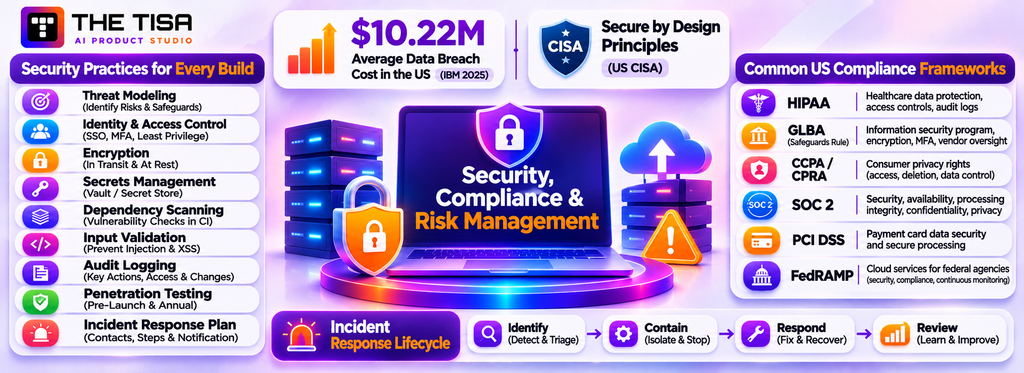
Security and compliance should be part of the software requirements from the beginning, not features added just before launch. For US companies, a security breach can also bring significant financial and legal consequences.
Why Does Security Need to Be Designed In From the Start? (h3)
Data breaches can expose sensitive information, disrupt operations, and lead to regulatory penalties. IBM’s 2025 Cost of a Data Breach Report found that the average breach cost in the United States reached a record $10.22 million, while the global average fell to $4.44 million. Higher regulatory fines and detection costs contributed to the increase in the US.
The US Cybersecurity and Infrastructure Security Agency promotes Secure by Design principles, which ask software makers to take responsibility for customer security rather than leaving users to manage it themselves. Businesses should expect their development partners to follow these principles and explain how they protect application data and access.
Security Practices to Expect in Every Custom Build (h4)
- Threat modeling to identify potential security risks and define safeguards.
- Strong identity controls such as single sign-on, multi-factor authentication, and least-privilege roles.
- Encryption in transit with TLS and at rest for databases, files, and backups.
- Secrets management through a vault or cloud provider’s secret store, rather than storing credentials in code.
- Dependency scanning in the CI pipeline to identify vulnerable open-source libraries.
- Input validation and output encoding to prevent injection attacks and cross-site scripting.
- Audit logging for sensitive actions, including permission changes, data exports, and financial edits.
- Independent penetration testing before major launches and at least once a year afterward.
- An incident response plan with named contacts, escalation steps, and customer notification procedures.
Planning Incident Response Before Launch
Any production system can face a security incident, such as a leaked credential, a vulnerable library, or a misconfigured storage bucket. A clear response plan helps the responsible teams contain the incident and limit its impact. Before launch, agree on these responsibilities with your development partner:
- Who is on call? Identify responsible people, contact methods, and escalation paths for nights and weekends.
- What gets logged? Record authentication events, permission changes, data exports, and admin actions. Retain logs long enough to investigate incidents.
- How will the team contain an incident? Make sure it can revoke sessions, rotate keys, disable features through flags, and isolate a compromised service.
- Who handles notifications? Assign legal and compliance owners to assess state breach-notification laws and contractual obligations to customers.
- How will the team address the cause? Review significant incidents without assigning blame, then track corrective actions to prevent similar problems.
Run a short tabletop exercise before launch. For example, simulate a stolen admin password to check whether the team can identify the incident, restrict access, review logs, and contact the right people. This helps reveal gaps in the response plan before the system goes live.
Which US Compliance Requirements Commonly Apply?
The requirements depend on your industry, the data you handle, and the customers you serve. Many US businesses must follow at least one of the frameworks below. Identify applicable requirements early because they affect software controls, vendor agreements, and documentation. Your legal and compliance teams should confirm which rules apply; this overview is not legal advice.
| Framework | Who it usually affects | What it means for software |
|---|---|---|
| HIPAA | Healthcare providers, health plans, and their business associates | Safeguards for protected health information, access controls, audit logs, and business associate agreements. See the HIPAA Security Rule overview from HHS. |
| GLBA Safeguards Rule | Many non-bank financial institutions, such as lenders and some advisers | A written information security program, encryption, MFA, and vendor oversight under the FTC Safeguards Rule. |
| CCPA/CPRA and other state privacy laws | Businesses handling California residents’ personal information above set thresholds | Data inventories, access and deletion requests, and contracts with service providers. The California Attorney General’s CCPA page explains consumer rights. |
| SOC 2 | B2B and SaaS companies selling to enterprises | Not a law, but a common procurement requirement. The AICPA’s SOC 2 resources describe the trust services criteria. |
| PCI DSS | Anyone storing, processing, or transmitting card data | Use hosted payment fields to keep card data out of your systems and reduce scope. |
| SEC cybersecurity disclosure | Public companies | Material incident disclosure and annual reporting on cyber risk management, under rules the SEC adopted in 2023. |
| ADA and WCAG | Public entities by rule; private businesses through litigation risk | Accessible interfaces, as discussed in Part 2. |
Enterprise customers often send security questionnaires before signing a contract. Familiarity with SOC 2 controls can help your team respond to these reviews. The guide on SOC 2, GDPR, and AI SaaS security covers questions investors and enterprise buyers commonly raise.
Which 2025–2026 Regulatory Updates Should Shape Your Build?
Recent regulatory changes affect the compliance requirements for US companies across several industries. Key developments include defense cybersecurity requirements, proposed HIPAA updates, student-data obligations, and accessibility rules.
Defense Contractors: CMMC Phase 2 Is Suspended, Phase 1 Still Applies
The Department of Defense’s Cybersecurity Maturity Model Certification (CMMC) program became part of defense contracts on November 10, 2025, when Phase 1 took effect. The department has since paused Phase 2, which would have required third-party certification from November 10, 2026. As Latham & Watkins explains, the DoD suspended Phase 2 on July 13, 2026, while a reform task force reviewed the program. No new start date has been announced.
The pause does not remove existing security obligations. Contractors must still complete Phase 1 self-assessments and follow the NIST SP 800-171 security controls. If a system handles defense contract data, the contractor and its vendors must meet the applicable requirements. Ask vendors how they protect this information and whether their security practices account for CMMC obligations.
Healthcare: HIPAA Security Rule Changes Are Pending
HHS published a proposed overhaul of the HIPAA Security Rule in the Federal Register on January 6, 2025. The proposal would make encryption of electronic protected health information at rest and in transit, along with multi-factor authentication, mandatory rather than “addressable.” These changes remain proposals. As PACT-One reported, no final rule had been published by late October 2026. Alston & Bird reported that the federal regulatory agenda now targets July 2027 for a final rule, after the earlier May 2026 target passed without action.
Healthcare organizations can plan for these proposed controls now without treating them as current obligations. Encryption, MFA, asset inventories, and tested backups are established safeguards and often appear in hospital vendor questionnaires. Keeping these controls in place also helps organizations prepare for the proposed changes.
Education: Student Records Carry Specific Duties
EdTech products and institutional systems that handle education records must comply with the Family Educational Rights and Privacy Act (FERPA). The US Department of Education’s FERPA guidance explains students’ and parents’ rights to access education records and the limits on disclosing them. These requirements call for role-based access, restrictions on who can export student records, and logs of disclosures. Vendor contracts must also define how student data can be used.
Financial Services: Safeguards Now Include Breach Reporting
Non-bank financial institutions covered by the FTC Safeguards Rule, discussed in the compliance table above, must notify the FTC about certain security events involving customer information. This reporting requirement comes from an amendment that took effect in 2024. These institutions need access logs that help them identify affected customer information and determine whether an incident requires reporting.
Accessibility: Deadlines Moved, the Standard Did Not
As noted in Part 2, the Department of Justice extended the ADA Title II web and mobile accessibility deadlines in April 2026 but kept WCAG 2.1 Level AA as the required standard. Public-sector buyers and their vendors should continue to meet this standard.
| Sector | Update | Status and key date | What it means for the build |
|---|---|---|---|
| Defense supply chain | CMMC DFARS rule | Phase 1 in effect since November 10, 2025; Phase 2 suspended on July 13, 2026, with no new start date | Phase 1 self-assessments and NIST SP 800-171 controls still apply |
| Healthcare | HIPAA Security Rule proposal | Proposed January 6, 2025; no final rule yet, target July 2027 | Current rule applies; encryption, MFA, and asset inventories remain important |
| Education | FERPA obligations | Ongoing | Access controls, export limits, and disclosure logging |
| Financial services | FTC Safeguards Rule notification amendment | Effective 2024 | Logs that support incident assessment and reporting |
| Public sector | ADA Title II deadline extension | April 2026 | WCAG 2.1 AA remains the target |
These updates are not legal advice. The requirements that apply depend on your industry and the data you handle. Confirm the relevant obligations with your legal or compliance team.
What New Risks Do AI Features Introduce?
AI features bring four main risks: data leakage, prompt injection, inaccurate output, and uncontrolled spending. Each requires clear safeguards.
- Data leakage. An AI model may expose sensitive information included in its prompts. Apply user permissions before retrieving data, share only the necessary fields, and review each AI provider’s data retention and training policies.
- Prompt injection. Malicious instructions hidden in documents, emails, or web pages can attempt to override an AI system’s instructions. Treat retrieved content as untrusted and validate model output before allowing sensitive actions. Require human approval for actions that could affect important data or operations.
- Inaccurate or fabricated output. AI models can present incorrect information with confidence. Ground responses in reliable sources, include citations, and let users verify important claims. Keep human reviewers responsible for consequential decisions.
- Uncontrolled spending. Token-based pricing can increase with usage. Set per-user limits, cache repeated requests, and monitor AI usage regularly.
Companies also need clear AI governance policies that define which tools employees can use, what data they can share, and who reviews new AI use cases. THE TISA’s generative AI governance guide provides a useful starting point.
How Should Data Privacy Shape Product Design?
Privacy should guide product decisions from the beginning, not wait until a legal review. This helps businesses meet state privacy requirements, respond to enterprise questionnaires, and maintain customer trust.
Apply these principles when handling personal data:
- Collect only what you need. Every field you store requires protection, appropriate retention, and possible deletion when someone makes a request. Review why each field is necessary before collecting it.
- Set retention rules for each data type. Define how long to keep records, logs, backups, and AI prompts. Automate deletion when the retention period ends.
- Support individual data requests. Provide tools to find, export, correct, and delete personal information. Several state privacy laws give consumers these rights.
- Mask data outside production. Use synthetic or masked data for testing instead of copies of real customer records.
- Protect sensitive information separately. Apply stricter access controls and additional encryption to health, financial, and identity data.
- Track third-party data sharing. Maintain an inventory of external services that receive personal information and ensure appropriate data processing agreements are in place.
- Make consent and preferences visible. If the product sends marketing messages or uses personal data for analytics, record each person’s choices and honor any changes promptly.
These practices also support responsible AI use. Clear data categories and access rules help determine what information an AI model may use and what must remain restricted.
What Are the Biggest Risks in a Custom Software Project?
The biggest project risks are unclear scope, weak product ownership, underestimated integrations, poor vendor fit, and lack of a plan for life after launch. Most can be spotted early and reduced with simple controls.
| Risk | Early warning sign | Practical mitigation |
|---|---|---|
| Scope creep | New “small” requests every week with no trade-offs | Change control: every addition names what moves out or what it costs |
| Unavailable product owner | Decisions wait days; demos are skipped | Assign an empowered owner with protected weekly time |
| Integration surprises | Vague answers about ERP or CRM APIs | Technical spike during discovery; test API access early |
| Poor data quality | Reports already disagree across systems | Data profiling and cleanup plan before migration |
| Vendor lock-in | No repository access; undocumented code | Code in your repository from day one; documentation in the definition of done |
| Key-person dependency | One engineer knows everything | Code reviews, pairing, and written architecture records |
| Security gaps | No mention of threat modeling or testing | Security requirements in the contract and backlog |
| Budget overrun | No burn reports until the money runs out | Weekly burn tracking against a capped budget |
| Low adoption | Users weren’t involved until launch | User research, usability testing, and phased rollout |
What Mistakes Do Businesses Make Most Often?
The same mistakes appear across industries and company sizes. Avoiding them is often the difference between a project that pays back and one that becomes a cautionary tale.
- Starting with a solution instead of a problem. “We need an app” skips the question of what outcome the app should change.
- Writing features without non-functional requirements. Speed, uptime, security, and data retention drive architecture and cost.
- Choosing a vendor on hourly rate alone. Seniority, process, and communication determine the total cost far more than the rate.
- Skipping discovery to save money. The savings vanish in the first major change request.
- Building everything in version one. Large first releases arrive late and miss what users actually need.
- Treating QA as a phase at the end. Testing must run inside every sprint.
- Ignoring data migration until late. Old data is always messier than expected.
- Not owning the code repository. If the code lives only in the vendor’s account, your leverage disappears.
- Forgetting operating costs. Hosting, monitoring, AI usage, and maintenance belong in the business case.
- Adding AI without a measurable use case. AI should target a specific task, with a baseline and an evaluation method.
- Leaving users out until launch. Late feedback forces expensive rework or produces software that nobody adopts.
- No plan after go-live. Without maintenance and an improvement backlog, even good software decays.
A disciplined custom software process guards against most of these by design: requirements before estimates, demos every sprint, testing throughout, and operations planned before launch.
Part 7: Vendor Selection and Partnering
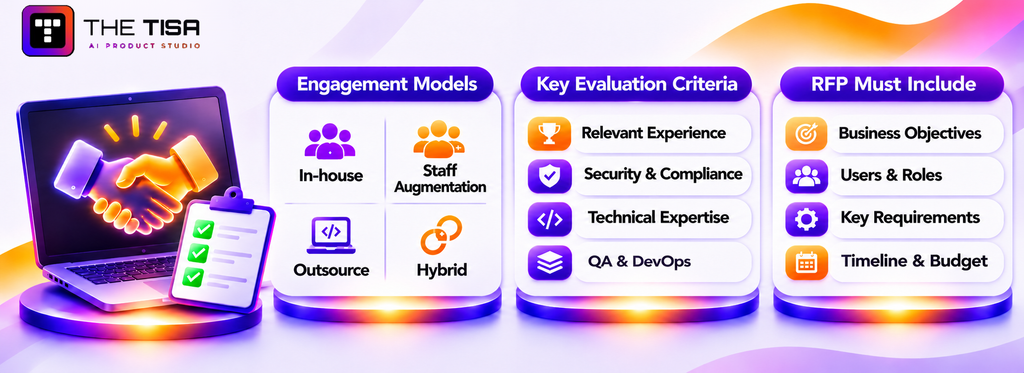
The partner you choose will make hundreds of small decisions on your behalf every week. Those decisions shape quality, security, and cost long after the contract is signed. This part gives you a structured way to choose.
Should You Build In-House, Augment Your Team, or Outsource?
Build in-house when the software supports your long-term business advantage and you can retain engineers. Choose staff augmentation when you have technical leadership but need additional team members. Outsource when you need a complete team or lack internal engineering leadership.
| Model | Best when | Main advantage | Main risk |
|---|---|---|---|
| In-house | Software is your product or core advantage | Full control and deep context | Hiring challenges and fixed staffing commitments |
| Staff augmentation | You have a strong CTO or lead and a clear backlog | Additional team members under your management | You handle delivery and coordination |
| Project outsourcing | You need a defined outcome but lack a full team | One accountable delivery partner | Weak oversight can lead to project drift |
| Hybrid | You want long-term ownership with external support initially | Gradual transfer to an internal team | Poorly planned handover |
Many US companies start with an outsourced team for the first release, then hire internally and move to a hybrid model. If you plan to follow this approach, include knowledge transfer in the contract. The article on staff augmentation vs outsourcing vs in-house hiring for AI projects compares these models in more detail.
Onshore, Nearshore, or Offshore?
Onshore teams in the US offer full time-zone alignment and simpler contracting. Nearshore teams in Latin America provide good time-zone overlap, while offshore teams in India, Southeast Asia, or Eastern Europe offer access to large talent pools. Offshore partnerships need planned overlap hours, clear written communication, and experienced oversight. Many established firms address these needs through US-hours overlap and US-based contacts.
Don’t choose a vendor based on location alone. Identify the technical skills and oversight your project requires, then compare vendors across regions.
What Criteria Matter Most When Evaluating a Development Partner?
Prioritize relevant experience, delivery practices, technical expertise, security, and communication when evaluating vendors. Price matters, but it alone does not show how well a partner will handle your project.
A weighted scorecard helps your team compare vendors against the same criteria.
| Criterion | Suggested weight | What good looks like |
|---|---|---|
| Relevant experience | 20% | Has delivered systems with similar complexity, integrations, or industry requirements |
| Discovery and requirements process | 15% | Asks detailed questions before quoting and defines clear discovery deliverables |
| Technical expertise | 15% | Explains technical trade-offs clearly and involves senior specialists |
| Security and compliance | 15% | Follows documented security practices and understands relevant compliance frameworks |
| Communication and transparency | 10% | Provides regular demos, written updates, and clear decisions |
| QA and DevOps practices | 10% | Uses automated testing, CI/CD, staging environments, and monitoring |
| AI capability, if relevant | 5% | Has delivered production AI systems with evaluation methods and safeguards |
| Commercial terms and price | 10% | Offers clear assumptions, fair change control, and defined IP ownership |
Adjust the weights to match your project. For regulated healthcare software, give security more weight. For a startup MVP, prioritize speed and product understanding.
What Should a Software RFP Include?
A good request for proposal (RFP) describes the business problem, users, requirements, and expectations clearly enough for vendors to submit comparable proposals without prescribing the solution.
Include these sections:
- Company background and why the project matters now.
- Business objectives with measurable targets.
- Users and roles, including estimated numbers for each group.
- Current systems and integrations, including relevant versions and known API limits.
- Key functional requirements at the epic level, along with the most important user journeys.
- Non-functional requirements, such as performance, availability, security, accessibility, and data residency.
- Compliance obligations that apply to the project.
- Timeline expectations and any fixed dates.
- Budget range to help vendors understand the project’s financial boundaries.
- Response format, covering the proposed approach, team composition and seniority, assumptions, risks, and relevant references.
- Evaluation criteria and process, including scorecard weights and the decision date.
Settle the custom vs off-the-shelf decision before issuing an RFP. If you haven’t made that decision, ask vendors to recommend an approach and explain whether an existing product could meet part of your needs. Vendors who recommend an existing product when it makes sense may be better partners for the parts that genuinely require custom software development.
How to Prepare for Vendor Conversations
Good vendors will ask detailed questions before recommending an approach. Preparing a few key details in advance helps them understand your requirements and makes the discussions more productive.
Before the first meeting, prepare:
- A one-page problem summary covering the business objective, current situation, and people affected by the problem.
- Your decision process. Identify who will evaluate proposals, who will approve the final decision, and when you expect to decide.
- A realistic budget range and how you arrived at it. This helps vendors suggest options that fit your financial boundaries.
- A system access plan. Specify which environments, sample data, and documentation vendors can review during discovery, and under what agreements.
- Product owner availability. Identify the person responsible for day-to-day decisions and their availability during the engagement.
- Known constraints. List required cloud providers, security policies, compliance obligations, and any fixed launch dates.
Pay attention to the questions vendors ask. Those who show a clear understanding of your requirements are often stronger candidates than those who rely on a generic pitch deck.
Which Questions Should You Ask Vendors?
Ask questions that require specific examples and clear answers. General claims like “we’re agile” or “security is our priority” don’t show how a vendor actually works.
About Experience
- Walk us through a project with similar integrations. What challenges came up, and how did your team handle them?
- Who from that project would be assigned to ours?
- Can we speak with a client whose project faced challenges?
About Process
- What updates will we receive during each sprint?
- How do you handle change requests?
- What criteria do you use to mark work as complete?
About Technology and Architecture
- What factors guide your choice of architecture for a project?
- How do you decide between a modular monolith and microservices?
About Security
- What security practices and tools do you follow?
- How do you manage secrets, access to client systems, and staff offboarding?
- Have you worked on software subject to HIPAA, SOC 2, or PCI requirements? What additional measures did those projects require?
About AI, If Relevant
- How do you evaluate AI output quality before and after launch?
- How do you enforce data permissions during retrieval and prompt handling?
- How would you switch model providers if their pricing or output quality changed?
About Commercial Terms
- Who owns the code, designs, and documentation, and when does ownership transfer?
- Will the code remain in our repository from the start?
- Do you use subcontractors, and where are they located?
How Can You Verify a Vendor’s Claims?
Verify through evidence you can inspect: reference calls, case studies with technical detail, a review of sample code or documentation, and ideally a paid discovery phase or small pilot.
- Reference calls. Ask references about communication, how problems were handled, and whether they would hire the vendor again. Ask for at least one reference from a project similar in size to yours.
- Case studies. Look for specifics: the stack, the integrations, the team size, the timeline, and what the vendor actually did. Vague stories with only adjectives are a weak signal.
- Technical conversation. Have your technical lead, or an independent advisor, spend an hour with the vendor’s proposed architect. Depth or its absence becomes clear quickly.
- Sample artifacts. Ask to see a redacted requirements document, architecture record, or test report from a past project.
- Paid discovery or pilot. Two to six weeks of paid work shows how the team actually communicates and thinks, at limited risk to you.
- Independent reviews. Third-party review platforms add context, though they should never replace your own checks.
How to Structure a Paid Pilot
A paid pilot is the most reliable way to test a vendor before a large commitment. Keep it small enough to finish quickly and real enough to reveal how the team works.
- Pick a meaningful slice. Choose one workflow or integration that touches your real systems, not a throwaway demo.
- Fix the scope and timebox. Agree on what will be delivered and when, with a clear fee.
- Write acceptance criteria upfront. Define what working looks like, including tests, documentation, and a deployed environment.
- Insist on the real team. The people on the pilot should be the people who would staff the full project.
- Own the output. Code, designs, and documents go into your repository and remain yours whatever you decide.
- Score it honestly. Rate communication, quality, estimation accuracy, and how the team handled surprises, using the same scorecard you used for selection.
If the pilot goes well, you start the full build with momentum. If it doesn’t, you’ve spent a fraction of the budget to avoid a much larger mistake.
What Red Flags Should Make You Walk Away?
Walk away, or at least slow down, if you see any of these:
- A fixed price for a large project before any meaningful discovery.
- No questions about your users, data, or integrations during sales calls.
- Reluctance to put code in your repository or to commit to IP assignment.
- Senior people in the sales process who disappear once the contract is signed.
- No automated testing, no staging environment, or no CI pipeline.
- Vague answers about security practices or subcontractors.
- Promises that AI will “handle” complex judgment work with no mention of evaluation or human review.
- Pressure to sign quickly with discounts that expire.
Which Contract Terms Protect Your Business?
The contract should protect ownership, quality, data, and your ability to leave. Have counsel review it, but make sure these terms are present.
| Term | Why it matters |
|---|---|
| IP ownership and assignment | Ensures you own the code and deliverables. Under US copyright law, “work made for hire” has specific limits for contractors, as the US Copyright Office’s circular on works made for hire explains, so contracts usually include an explicit assignment as well. |
| Repository and access ownership | Code, cloud accounts, and domains should be in your name from the start. |
| Open-source disclosure | Requires a list of open-source components and licenses so you can manage legal and security risk. |
| Acceptance criteria | Defines when a deliverable counts as complete and accepted. |
| Warranty period | Free fixes for defects found within an agreed period after acceptance, often 30 to 90 days. |
| Service levels for support | Response and resolution times by severity after launch. |
| Data protection terms | Confidentiality, security obligations, breach notification timelines, and a data processing agreement where needed. |
| Subcontracting limits | Requires approval before the vendor uses third parties. |
| Insurance | Professional liability and cyber liability coverage at appropriate levels. |
| Termination and transition assistance | Your right to exit, plus the vendor’s duty to hand over code, documentation, and knowledge. |
How Should You Govern the Relationship After Signing?
A signed contract is the start of governance, not the end. Most outsourced projects that fail do so gradually, through missed signals that nobody acted on.
Set up a simple operating rhythm from week one:
- Weekly delivery check-in. Progress against the plan, blockers, decisions needed, and budget burn compared with forecast.
- Sprint demos. Working software every two to three weeks, reviewed by the people who will use it.
- Monthly steering review. Scope changes, risks, quality trends, and whether the release plan still matches business priorities.
- Change control. Every new request is written down with its estimated effort and what it displaces, then approved or deferred.
- Quality signals. Defect counts by severity, test coverage on critical paths, and production incidents.
- Quarterly relationship review. What’s working, what isn’t, team stability, and whether the commercial model still fits.
Keep these reviews short and written. A one-page status note each week creates a record that protects both sides when memories differ about what was agreed.
Onboarding Your Development Partner in the First 30 Days
The first month sets the pace for the whole engagement. Delays in access, unclear ownership, and missing context are the most common reasons new teams start slowly. A simple onboarding plan prevents them:
- Week one: access and accounts. Create named accounts for every team member in your code repository, cloud environment, ticketing tool, and communication channels, with least-privilege permissions and an offboarding checklist ready from the start.
- Week one: context sessions. Walk the team through the business, the users, the current workflows, and the reasons behind the project. Recorded sessions help future team members too.
- Week two: system walkthroughs. Have your internal experts demonstrate the existing systems, data sources, and integration points the new software will touch.
- Week two: working agreements. Confirm meeting cadence, response times, definition of done, branching and review rules, and how decisions are recorded.
- Weeks three and four: a first deliverable. Agree on a small, real piece of work, such as a working skeleton deployed to staging, so both sides see the delivery process end to end early.
- End of month: a short retrospective. Review what slowed the team down, fix access or communication gaps, and adjust the plan before full-speed delivery begins.
Companies that treat onboarding as a deliberate project usually see their partner reach full productivity much sooner, and they surface mismatches in skills or working style while change is still easy.
When Does Professional Development Support Make Sense?
Outside help makes sense when the project is critical, the timeline is tight, and your internal team lacks either the capacity or the specific experience the build requires. AI features, complex integrations, and regulated data are the most common triggers.
It makes less sense when a mature SaaS product solves the problem, or when you have an experienced internal team with available capacity. In that case, a short architecture or security review may be all you need.
Whichever route you take, keep ownership of three things: the product vision, the code repository, and the decision rights. A good partner for custom software development strengthens your team’s capability over time instead of making you permanently dependent.
What Two Production Builds Show About Working With THE TISA
THE TISA is a custom software development and AI engineering company that designs and builds web platforms, internal business systems, and AI-powered applications. The following two projects demonstrate how these solutions address real operational challenges and translate the principles discussed in this guide into production systems.
Narsik Logistics ERP: A Modular Monolith Built Around Messy Operations
A part-truckload logistics company was managing bookings, trips, deliveries, customer payments, and vendor costs through separate files and registers. Delivery and payment statuses often became inconsistent, document numbers were duplicated, and teams lacked a unified view of shipments.
A four-developer team delivered an internal ERP in approximately three and a half months. The system covered booking, trip planning, challans, proof of delivery, customer ledgers, vendor dues, branch-level access, and audit logs.
Built with Next.js, TypeScript, NestJS, PostgreSQL, and Prisma, the application followed a modular monolith architecture to simplify deployment and database transactions during the initial phase.
The Narsik Logistics ERP case study reports approximately 4,850 bookings handled per month, an average API response time of 320 ms, and average page loads of 1.9 seconds. Two key lessons from the project were to plan access control early and preserve financial records through correction entries rather than deleting original transactions.
OpsPilot: Introducing AI After Establishing Data and Permissions
A multi-branch education institute in Singapore had academic, HR, finance, admissions, and placement data spread across spreadsheets, paper files, and separate software systems. Leadership also spent considerable time reviewing reports.
An eight-person team spent six months building OpsPilot, a microservices-based administration platform connected to the existing Student LMS, employee portal, and website through REST APIs. Microservices fit here because each module had its own integration and branches needed to update modules independently.
OpenAI was introduced as a read-only summarization layer behind role- and branch-level permissions. The AI could summarize information but could not modify records or approve actions; administrators retained control.
The detailed OpsPilot AI integration write-up reports 2,850 monthly active users and more than 6,400 student records managed. It is also candid about limits. The project didn’t measure an AI-specific time saving or accuracy score, so it doesn’t claim one.
How These Lessons Translate for US Projects
Both clients were outside the US, but the engineering principles apply to US businesses as well: integrate existing systems before automating workflows, establish permissions before introducing AI, and choose architecture according to business requirements. For US projects, THE TISA considers applicable requirements such as HIPAA, SOC 2 expectations, state privacy laws, and data residency during discovery.
A typical engagement includes paid discovery, requirements planning, architecture design, two-week development sprints, AI and API integrations where needed, cloud deployment, testing, and monitoring.
Engineering is based in Jaipur, India, with a US contact line and overlap hours arranged with each client. Security practices, including ISO 27001 alignment, are outlined on the company’s security and data protection page.
These projects demonstrate THE TISA’s approach to solving operational challenges through custom software and controlled AI integration. For businesses evaluating a development partner, the focus should remain on practical requirements, sound engineering decisions, and measurable outcomes.
Conclusion
Custom software development pays off when it targets a specific, measurable business problem and is planned as a multi-year product, not a one-time purchase. The companies that get value from it make four decisions carefully. They write requirements that include non-functional needs and success metrics. They choose the simplest architecture that fits their team and growth. They budget for total cost of ownership, including hosting, AI usage, and maintenance. And they pick a partner based on evidence, not rate cards.
Before moving forward, check three things. Can you name the outcome and its baseline? Do you know which systems and data the software must touch? And will you own the code, the cloud accounts, and the decisions? If the answer to all three is yes, you’re ready to start discovery.
Frequently Asked Questions
Q1. Is a freelancer or an agency better for a first MVP?
Ans. A skilled freelancer can work well for a narrow prototype with no sensitive data and few integrations. Once the MVP needs design, backend, QA, security, and deployment together, one person becomes a bottleneck and a single point of failure. An agency or small product team costs more per hour but brings coverage across roles, continuity when someone leaves, and established processes for testing and releases. Whichever route is chosen, keep the code in a company-owned repository from the first day.
Q2. How can a business estimate custom software development cost before contacting vendors?
Ans. Count four things: user roles, core workflows, external integrations, and compliance obligations. A project with two roles, one workflow, and no integrations sits near the lower published benchmarks, such as Clutch’s most common band. Projects with several workflows, three or more integrations, and regulated data usually land well above the averages. Then add separate estimates for hosting, ongoing support, and AI usage. The result is a budget band rough enough to decide whether a paid discovery phase is worth funding.
Q3. Is the custom vs off-the-shelf choice reversible later?
Ans. Usually yes, if planned for. Starting on SaaS and moving to a custom platform later is common, provided the SaaS contract allows full data export through APIs or bulk files. Going the other way, from custom to a product, is also possible if the custom system’s data model is documented. Before signing any software contract, confirm data export formats, export costs, and how long data remains accessible after cancellation. Those terms decide how expensive a later switch becomes.
Q4. What happens if the development vendor goes out of business mid-project?
Ans. Exposure depends on what the business already controls. Code in a company-owned repository, cloud accounts in the company’s name, and current documentation make it possible for a new team to continue within weeks. For vendor-hosted or licensed components, a source code escrow agreement releases code if the vendor fails. Paying in milestones tied to accepted deliverables also limits money at risk at any point in the project.
Q5. Can a new vendor take over an application built by another company?
Ans. Yes. Takeovers typically start with a two to four week code and infrastructure audit covering architecture, test coverage, security issues, dependency age, and documentation gaps. The audit produces a risk list and a stabilization plan before new features begin. Expect slower progress for the first month while the new team learns the system. Access to the previous team for a short handover, even a few paid hours, reduces risk considerably.
Q6. How should confidential information be protected while evaluating vendors?
Ans. Sign a mutual NDA before sharing anything sensitive, and share in stages. Early conversations need business goals and rough scale, not real customer data. Use sample or masked data for any technical demos. Grant system access only after a contract is signed, through named accounts with least-privilege permissions that can be revoked. Keep a simple log of what was shared with whom.
Q7. How much time do internal staff need to commit during a build?
Ans. Plan for a product owner spending roughly 10 to 20 hours a week, attending sprint planning and demos, answering questions, and accepting work. Subject-matter experts typically need two to four hours a week each during discovery and testing. IT or security staff are needed at key points for access, integrations, and reviews. Projects slow down most when these people are too busy to respond within a day or two.
Q8. Is it safe to send company data to AI model providers through a custom application?
Ans. It can be, with the right setup. Business API offerings from major providers generally have different data terms from consumer chat apps, and several offer options such as reduced retention or deployment inside a company’s own cloud environment, for example through Azure or AWS. Send only the fields a task needs, strip identifiers where possible, and review each provider’s current terms. Highly regulated data may require a signed agreement, such as a HIPAA business associate agreement, before use.
Q9. What should a company do if a software project is clearly off track?
Ans. Pause new feature work and run a short, independent review. Compare delivered scope against the plan, check code quality and test coverage, and list open risks. Then re-plan around a smaller release that delivers value quickly. Changing vendors may be necessary, but only after the review shows whether the root cause is the team, unclear requirements, or slow decisions on the client side, since a new vendor won’t fix the last two.
Q10. Do federal contractors need special requirements for custom software?
Ans. Often, yes. Cloud services used by federal agencies generally need FedRAMP authorization. Defense contractors handling federal contract information or controlled unclassified information face the Cybersecurity Maturity Model Certification (CMMC) program; Phase 1 self-assessments apply now, while Phase 2 third-party certification was suspended on July 13, 2026. Some work also carries export control or US-person staffing rules. These requirements affect hosting, vendor location, and staffing, so they must be identified before choosing a partner.
Q11. How long should custom software last before it needs a rebuild?
Ans. Well-maintained systems commonly run 7 to 10 years or longer, with components such as frameworks, libraries, and infrastructure upgraded along the way. Rebuilds are usually triggered by unsupported technology, a business model change, or code that has become too costly to change. Regular dependency updates and a steady technical debt budget extend lifespan far more than any initial technology choice.
Q12. What can be done if employees don’t use the new software after launch?
Ans. Find out why before adding features. Watch a few users work, review support tickets, and check analytics for where people drop off. Common causes are missing steps that the old process handled, slow screens, unclear naming, and old tools still available as a fallback. Fix the top issues quickly, retire the old workaround where possible, and appoint team champions who help colleagues and feed problems back to the product owner.
Build Custom Software That Fits Your Business
Turn your business requirements into reliable, scalable software with the right development strategy. Talk to THE TISA about software architecture, technology selection, development costs, integrations, and choosing the right approach to build a solution that supports your business goals.
Discuss Your Custom Software Project →