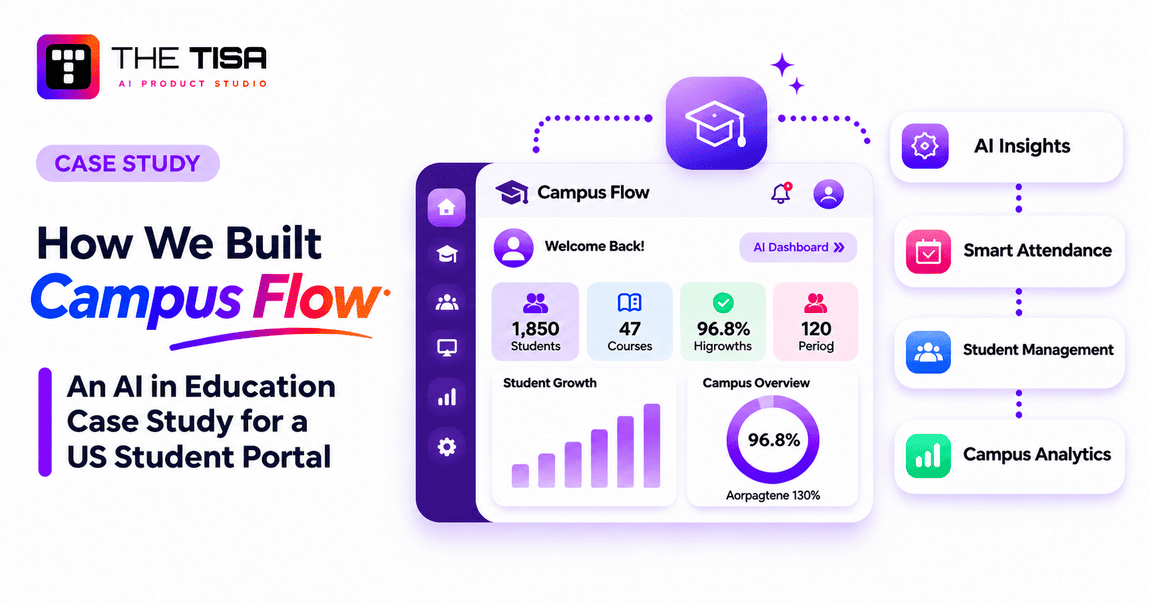
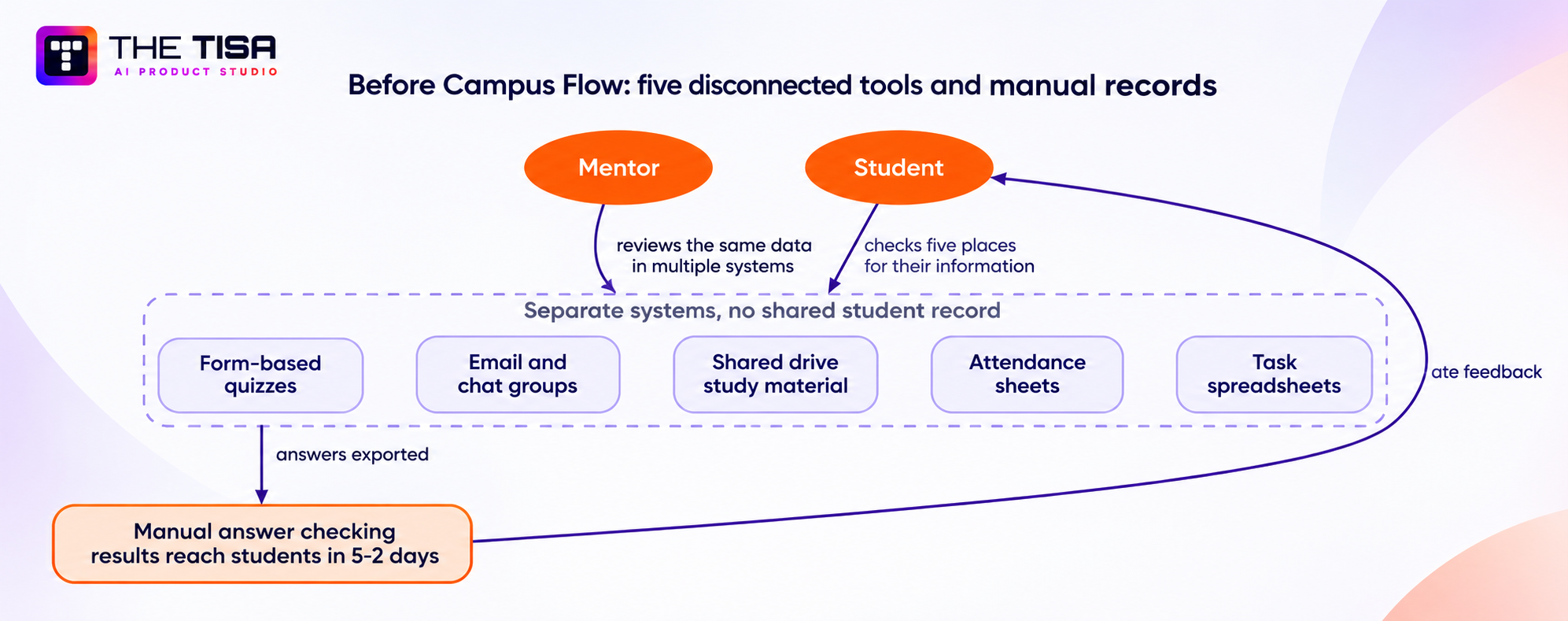
Campus Flow is an AI-powered student portal that THE TISA built for Michael Carter, a US education client. Students, mentors and administrators use it to run tasks, weekly online exams, attendance, results and study material in one secure system. Before Campus Flow, that work lived in five disconnected tools and manual records.
Our four-person team shipped the platform in eight weeks. Twenty-four weeks after launch, task completion rose from 52% to 84%, attendance from 71% to 88% and average exam scores from 64% to 76%. Exam results that used to take 5.2 days now appear the moment a student submits. Mentors cut their weekly admin time from 11 hours to 3.5.
This AI in education case study shows how we got there: the starting point, the architecture, six live AI features, the security model and the measured outcomes. It is written for US EdTech founders, CTOs and product teams planning EdTech AI integration for their own platforms.

TL;DR
- Client: Michael Carter, a US academic and training institute serving school, college and training-program learners.
- Problem: tasks, exams, attendance, material and progress spread across five tools; manual grading delayed results by 5.2 days; only 52% of tasks got finished.
- Solution: one role-based student portal with a server-side exam engine and six AI features that only read data the signed-in user may see.
- Results after 24 weeks: 84% task completion, 88% attendance, 1,000 exams a month, instant results, 68% less mentor admin time.
- Delivery: 8 weeks, 4 specialists.
Executive summary
| Item | Campus Flow |
|---|---|
| Client and industry | Michael Carter · EdTech / student management · USA |
| Users | 1,850 registered students, 14 mentors and the administrative team |
| Business challenge | Five disconnected tools; manual answer checking; no exam timing or submission control; growing records that were hard to manage |
| Solution | One role-based portal with an exam engine, automatic results and a permission-aware AI layer |
| AI capabilities (all live) | Cited course-material Q&A, exam feedback summaries, mentor progress digests, task and quiz drafting, similarity checks, personalized reminders |
| Technology | Next.js, Bootstrap, Node.js, Express.js, REST microservices, MySQL, MongoDB, Redis, Elasticsearch, OpenAI, LangChain, LlamaIndex, Python, AWS |
| Security approach | Token authentication, role-based access, permission-aware retrieval, server-side scoring, hidden answer keys, audit logging, rate limiting |
| Headline results | Task completion 52% → 84% · attendance 71% → 88% · exams per month 380 → 1,000 · result wait 5.2 days → instant |
| Duration and team | 8 weeks · 4 specialists |
What Is Campus Flow? An Example of AI Integration in Education
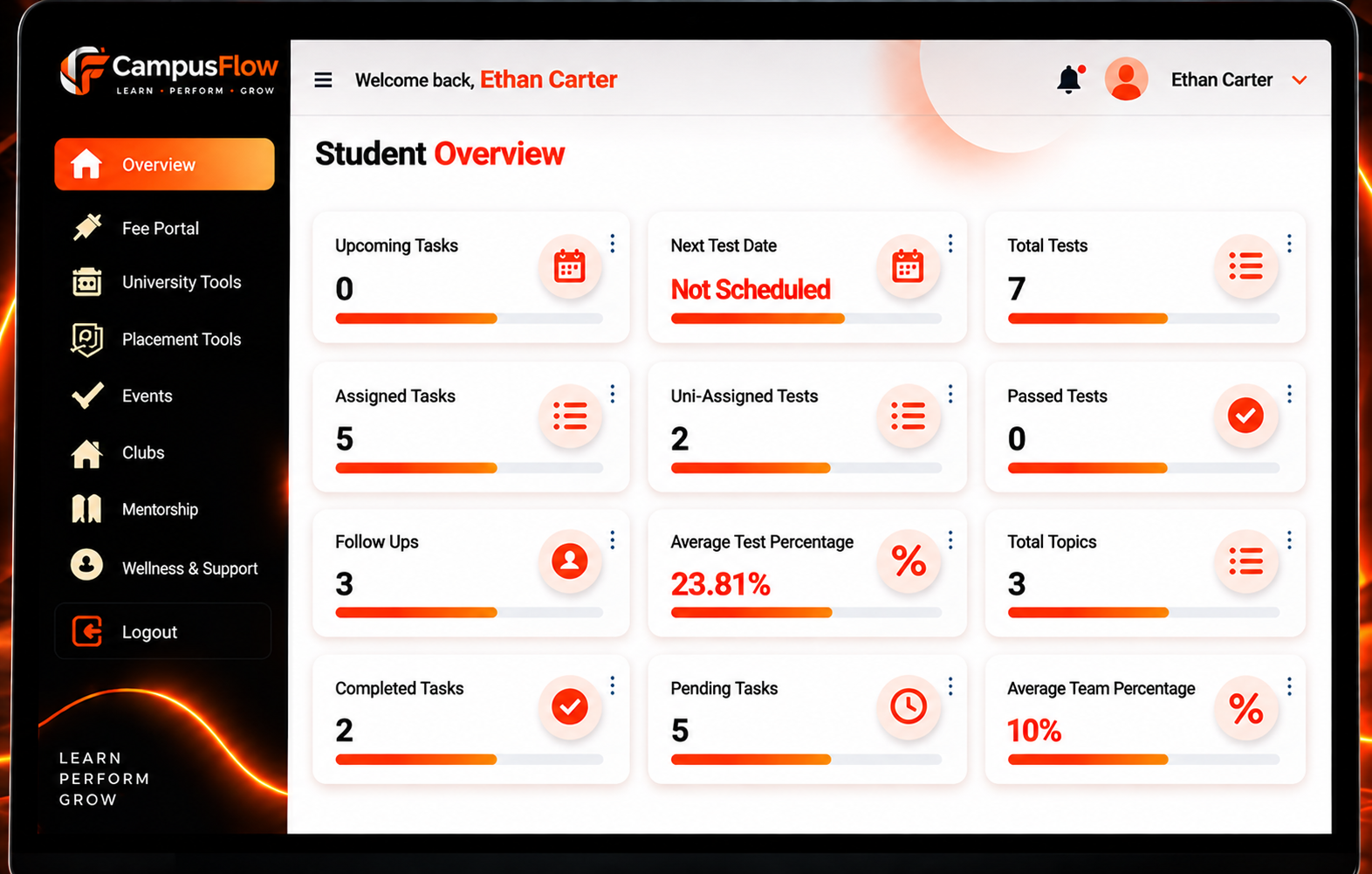
Campus Flow is a student learning and academic management portal. It gives every student one place to see what is due, take exams, check results and attendance, and open study material. Mentors get one console to assign work, add questions, share material and monitor progress. Administrators manage users, roles and access.
Who uses it
| Role | Primary workflows |
|---|---|
| Student | Dashboard, tasks (Pending/Done), weekly exams, instant results, attendance, study material, interview preparation library, AI study assistant |
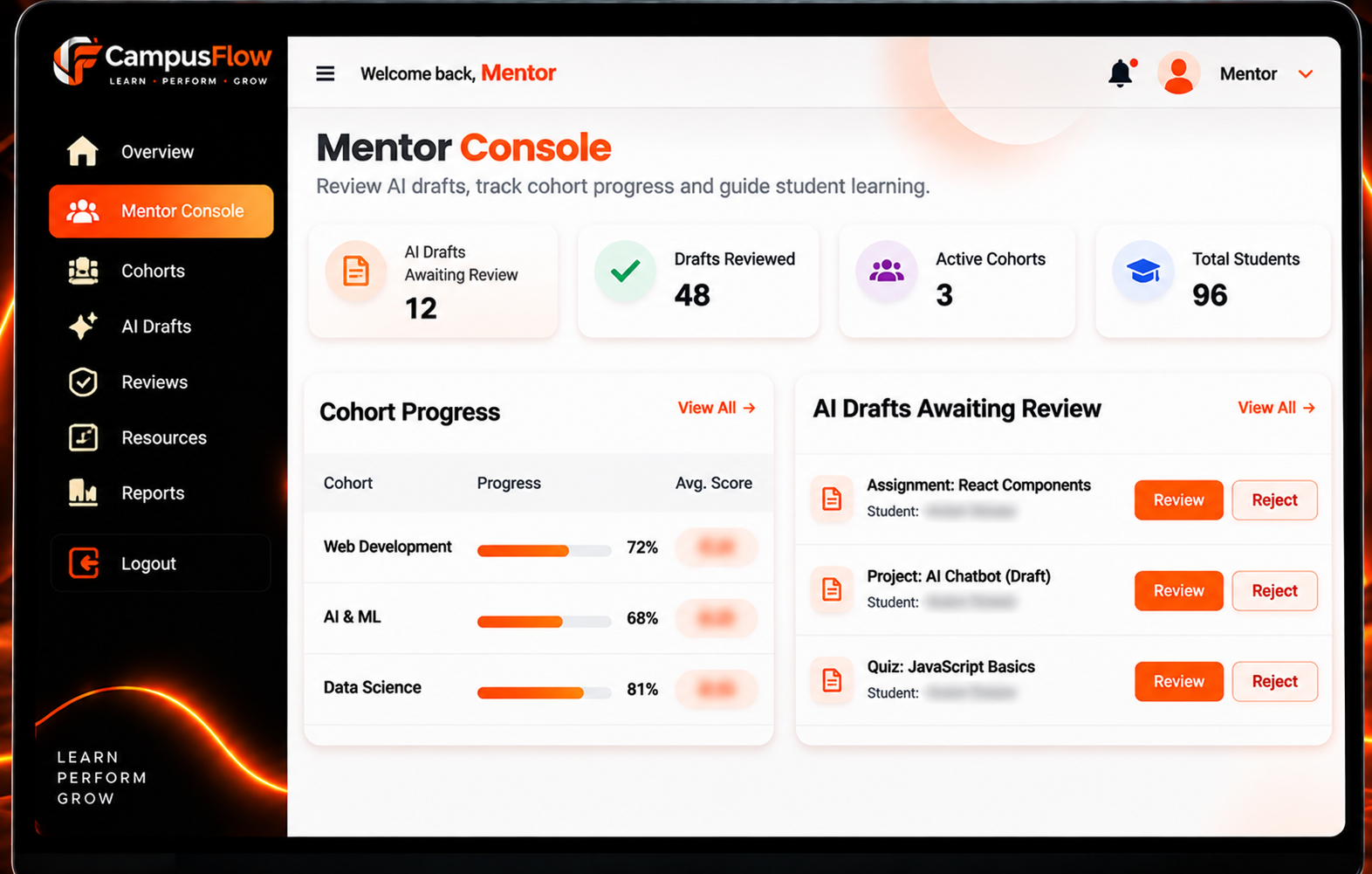
| Mentor | Assign tasks, add exam questions, share material, review AI drafts, read weekly progress digests |
| Administrator | Manage users, roles, cohorts and access; audit AI activity |
Why a unified platform came first
AI cannot answer “what should this student do next?” when tasks, exams and attendance live in different tools. Our first job was to put every academic record behind one student account and one permission model. Only then could AI features read that data safely.
That ordering is the core of how we approach integrating AI into existing software: fix the data and the permissions, then add the model. The visual breakdown lives on the Campus Flow project page.
What challenges existed before Campus Flow?
The institution had a fragmentation problem before it had an AI problem. Academic work ran across five separate tools and manual records, so nobody had a single, current view of a student. We measured the starting point during week one of discovery, using the previous term’s spreadsheets, form exports and message logs.
| Initial challenge | Operational impact | Evidence from the discovery audit |
|---|---|---|
| Tasks, exams, attendance, material and progress in 5 separate tools | Mentors re-entered the same data; students checked several places to know what was due | 11 hours of admin per mentor per week |
| No clear view of pending vs completed tasks | Students missed work they did not know was outstanding | 52% task completion; 58% on-time submissions |
| Manual answer checking | Results reached students after the class had moved on | 5.2-day average result turnaround |
| Form-based exams with no timing, page-switch or submission control | Weak exam integrity; inconsistent submissions | 380 exams completed per month; no integrity checks |
| Study questions handled over chat and email | Students waited overnight for help | About 600 questions a week; 19-hour median reply |
| Growing student records | Records got harder to manage each term | 1,140 students on record; 71% attendance |
Why this matters beyond one institution
The client’s position is common in US education. In the 2025 EDUCAUSE AI Landscape Study, which surveyed close to 800 higher education professionals, 57% said they view AI as a strategic priority, up from 49% a year earlier. Only 9% said their institution’s cybersecurity and privacy policies were adequate for AI-related risks. Academic integrity led AI use cases in teaching and learning at 74%.
Institutions want AI for learning. They also need integrity and privacy controls they can defend. Campus Flow had to deliver both.
Why weren’t existing tools enough?
The client evaluated two off-the-shelf learning management systems before engaging us. Both covered parts of the workflow. Neither met all six requirements in one permission model.
| Requirement | Why it pushed toward a custom build |
|---|---|
| Exam workflow | Weekly exams needed a fixed server-side countdown, automatic submission, page-switch detection and hidden answer keys |
| Role-based access | Students, mentors and administrators needed separate access to the same records |
| AI inside the permission model | AI add-ons in both products ran outside the app’s access rules, so nobody could prove what data they read |
| One student record | Tasks, attendance and exams had to link to one student account so reporting and AI could rely on them |
| Scalability | Exam service, content service and AI service had to scale independently |
| Cost | Per-seat licensing for 1,850 students cost more per year than building and running Campus Flow |
We made a similar build-or-buy call for a project management product in our Clove AI integration case study. For a vendor-neutral framework on when to build, buy or combine, see our AI integration strategy for businesses guide.
What did THE TISA design and develop?
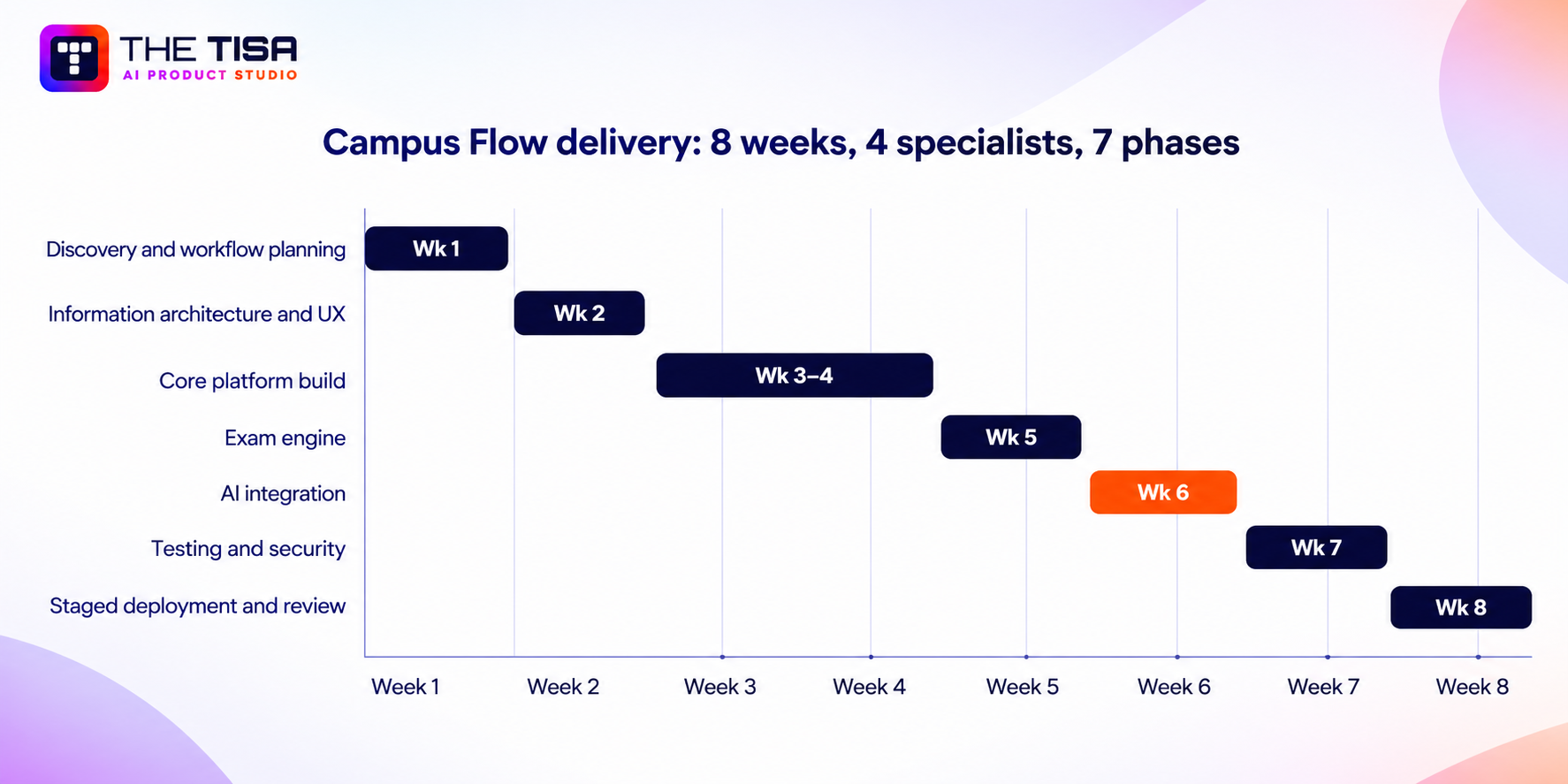
We built the academic platform first and the AI layer on top of it. THE TISA owned product strategy, discovery, UX/UI design, AI architecture, backend and frontend engineering, and QA. The work followed our AI software development process across seven phases in eight weeks.
| Week | Phase | What we delivered |
|---|---|---|
| 1 | Discovery and workflow planning | Baseline audit, user interviews, permission matrix, success metrics |
| 2 | Information architecture and UX | Data model, role map, dashboard wireframes, exam flow |
| 3-4 | Core platform build | Authentication, roles, tasks, attendance, study library, mentor console |
| 5 | Exam engine | Server-side timer, auto-submit, page-switch detection, instant scoring |
| 6 | AI integration | Ingestion pipeline, permission-aware retrieval, six AI features |
| 7 | Testing and security | Load tests, 1,200 adversarial prompts, penetration test, accessibility checks |
| 8 | Staged deployment and review | Pilot with 2 cohorts, full rollout, mentor training, monitoring dashboards |
Core platform capabilities
| Capability | Problem it solves | How it works | Engineering approach | User benefit |
|---|---|---|---|---|
| Student dashboard | No single view of academic work | Shows tasks, exams, attendance, results and material for the signed-in student | Next.js pages with reusable components, lazy loading and protected routes | One screen answers “what do I need to do today?” |
| Task management | Unclear task status | Mentors assign tasks; students mark Pending or Done; overdue work rises to the top | Task status stored as structured records in MySQL | Task completion rose from 52% to 84% |
| Online exam system | No timing or submission control | Weekly exams with a fixed countdown, automatic submission, page-switch detection and answer changes until submission | Timing, submission validation and scoring owned by the exam service | Fair, consistent exams |
| Automatic results | Manual checking delayed results by 5.2 days | Objective answers are scored the instant a student submits | Server-side result calculation; answer keys never reach the browser | Results in under 1 second |
| Attendance management | Attendance kept in separate sheets | Mentors mark once; students and admins review anywhere | Linked to the same student account in MySQL | Attendance rose from 71% to 88% |
| Study material | Material scattered across a shared drive | Lesson PDFs, notes and links live in the student’s account | Content in MongoDB; search through Elasticsearch | Material accesses grew from 1,100 to 4,200 a month |
| Interview preparation | No structured prep resource | Topic-based interview question library with search and filters | Pagination for long question lists | Faster, focused practice |
| Mentor console | Mentors juggled five tools | Assign tasks, add questions, share material, review AI drafts, monitor progress | Role-scoped APIs | Mentor admin time fell from 11 to 3.5 hours a week |
| Admin controls | Access managed ad hoc | Separate access for students, mentors and administrators | Role-based access control on frontend routes and backend APIs | Clear, auditable access |
How does AI integration work inside Campus Flow?
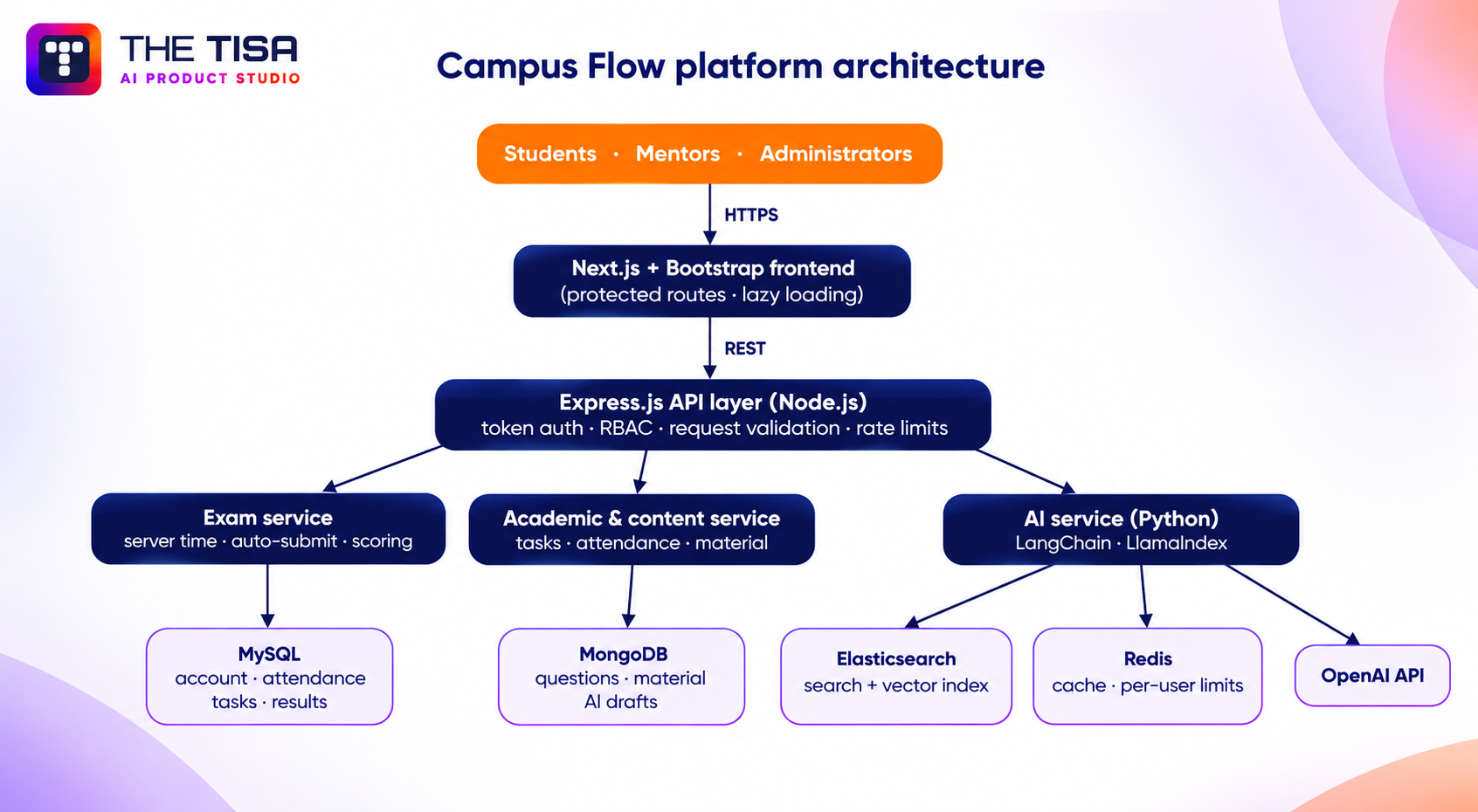
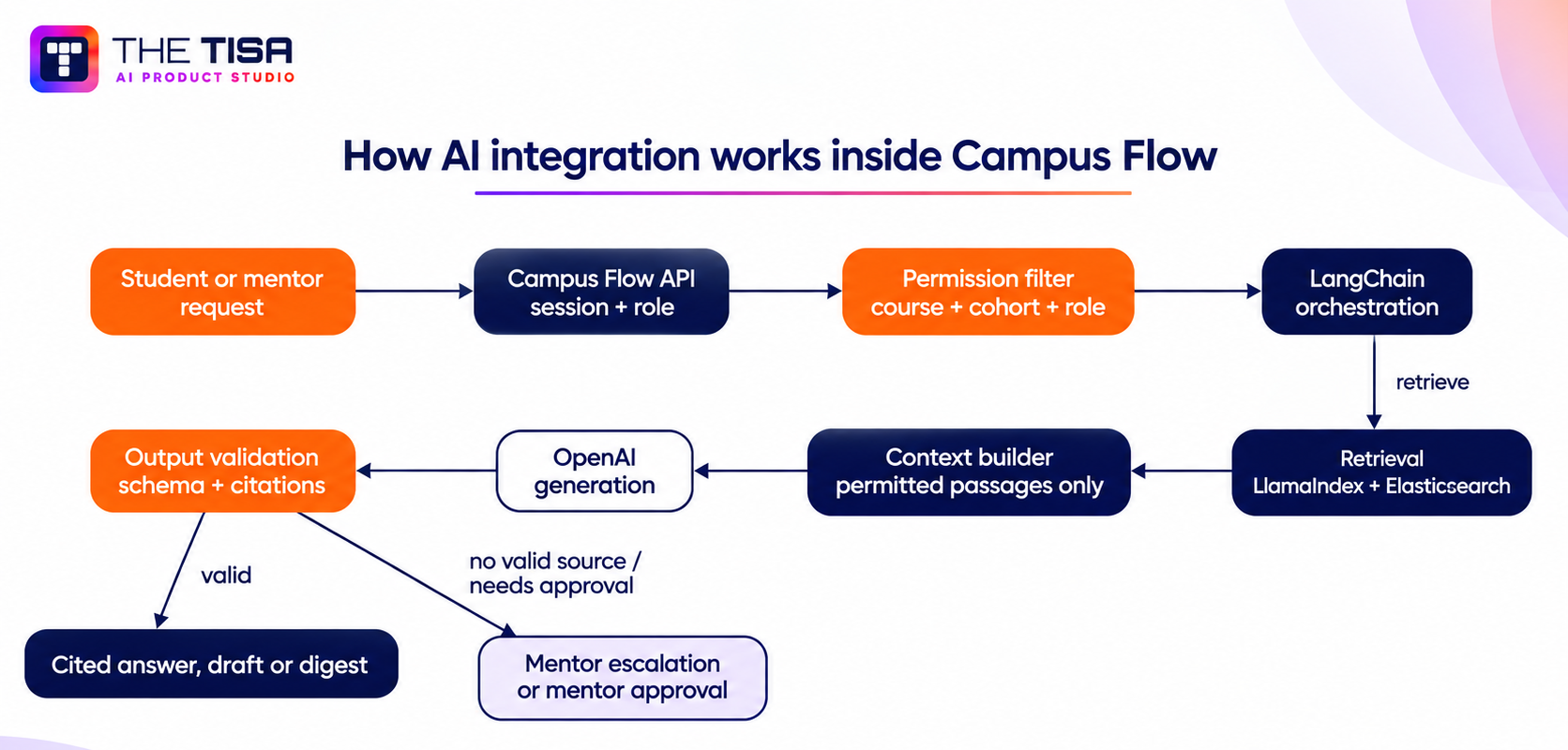
In Campus Flow the language model works inside the platform’s permission model, not beside it. OpenAI generates language. LangChain orchestrates prompts, retrieval and tool calls into Campus Flow’s APIs. LlamaIndex indexes lesson PDFs and notes. Python services prepare documents and run retrieval pipelines. Campus Flow’s own code decides what the model may see and what happens to its output.
Step 1: Course material ingestion
Mentors upload lesson PDFs, notes and slide exports. A Python pipeline cleans each file, removes headers and footers, and runs OCR on scanned pages. LlamaIndex splits the text into chunks of about 800 tokens with a 100-token overlap.
Every chunk carries metadata: course ID, cohort ID, document ID, page number and upload date. OpenAI’s text-embedding-3-small model creates the embeddings. Elasticsearch stores both the vectors and a keyword index, so one store serves hybrid search.
Campus Flow has indexed about 2,400 lesson documents so far. Files that fail parsing go back to the mentor with a reason instead of polluting search.
Step 2: The request path, from question to cited answer
Each stage can stop the request.
- User question. A student asks a question to the study assistant.
- Authentication. A short-lived token confirms who is asking.
- Role validation. The API loads the user’s role and current enrollments.
- Permission filtering. The API builds a retrieval filter from those enrollments. It comes from the authenticated session, never from anything typed into the prompt.
- Cache and rate limit. Redis returns cached retrieval results for repeated questions and enforces 60 AI requests per student per hour.
- Document retrieval. Hybrid search returns the six most relevant passages from permitted material only.
- Context construction. LangChain places those passages into a fixed template that instructs the model to answer only from the supplied sources.
- LLM generation. GPT-4o mini returns structured output: answer text, cited chunk IDs and a confidence flag.
- Output validation. The API checks that every cited chunk exists and belongs to material the student may open. An answer without a valid citation is replaced with a fallback message and a one-click mentor escalation.
- Cited response. The student sees the answer with links to the exact lesson pages. Median time from question to answer is 3.4 seconds.
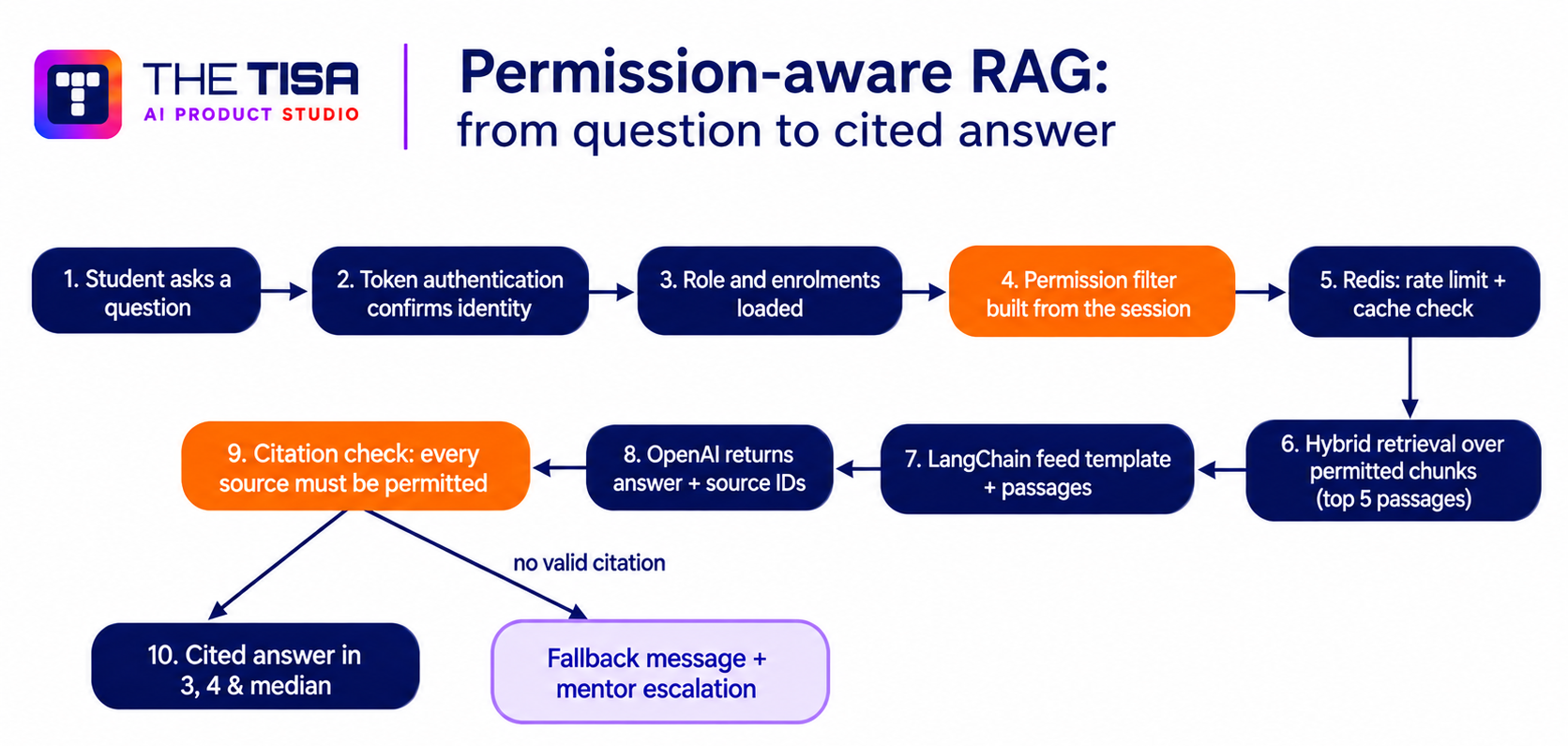
This is permission-aware RAG. The important design choice is the order. Permissions narrow the search before retrieval runs. Filtering after the model has already seen data is too late, because its output can leak what it reads.
Step 3: Guardrails around the model
- Rate limiting: 60 AI requests per student per hour in Redis, which caps cost and abuse.
- Caching: Redis serves 31% of retrieval requests from cache.
- Human escalation: students escalate unanswered questions to their mentor in one click.
- Logging: every AI request records the user, retrieved chunk IDs, model output and validation results in a MySQL audit table, kept for 12 months.
What the model does and what our code controls
We separate AI-generated language from deterministic application logic. Grades, access and deadlines have right answers, so they belong in code that can be tested and audited. Explaining, summarizing and drafting suit a language model.
| Task | Language model | Campus Flow code | Mentor |
|---|---|---|---|
| Decide who can see which material | No | Yes, role-based access | Assigns material |
| Time, submit and score objective exams | No | Yes, server-side | — |
| Keep answer keys secret | No | Yes, hidden until submission | Adds questions |
| Answer study questions | Yes, from retrieved sources | Filters sources, validates citations | Handles escalations |
| Draft feedback summaries after auto-scoring | Yes | Supplies scores and weak topics | Approves before release |
| Draft tasks and quizzes from lesson content | Yes | Stores drafts | Edits and publishes |
| Flag similar written submissions | Similarity search, not generation | Runs the comparison | Decides the outcome |
| Send reminders | Personalizes wording | Decides recipients and timing | Sets reminder rules |
The model never decides a grade, never publishes content to students on its own, and never chooses what data it can read. That rule shaped every feature that follows.
This retrieval pattern is the one behind our RAG development services. For a non-student-facing example, the OpsPilot case study on AI integration in operations applies the same data-control rules to OpenAI-generated report summaries.
Which AI capabilities did we implement?
Campus Flow runs six AI features in production. Each one keeps a human or deterministic code in charge of anything that affects a student’s record.
| Feature | Before | What THE TISA implemented | Status | Measured outcome |
|---|---|---|---|---|
| Course-material Q&A | 19-hour median reply to study questions | Permission-aware RAG with source citations | Live | 9,800 questions a month; 93% with a valid citation; 3.4 s median |
| Exam feedback summaries | Fewer than 15% of exams got written feedback | Summaries drafted after auto-scoring, approved by mentors | Live | 100% of exams get feedback; 91% of drafts approved with no or light edits |
| Mentor progress digests | No quick view of slipping students | Weekly digest of incomplete tasks, weak topics and attendance gaps | Live | Mentor admin time down from 11 to 3.5 hours a week |
| Task and quiz drafting | 95 minutes to write one quiz | Drafts from uploaded lesson content, for mentor review | Live | 22 minutes per quiz, a 77% cut |
| Similarity checks | 0% of written work checked | Comparison against prior cohort work and provided materials | Live | 100% scanned; 3.1% flagged; 0.9% confirmed by mentors |
| Personalized reminders | 58% on-time submissions | Reminders tied to each student’s pending tasks and exams | Live | 81% on-time submissions |
1. Course-material Q&A with citations
- Initial problem: students sent about 600 routine study questions a week to mentors and waited a median of 19 hours.
- AI implementation: permission-aware RAG over assigned lesson PDFs and notes, as described above.
- Technologies: LlamaIndex, Elasticsearch, LangChain, GPT-4o mini, Redis.
- Human involvement: mentors own the source material and answer escalations.
- Output validation: every citation must map to a chunk the student may open, or the answer is withheld.
- Outcome: about 9,800 questions answered a month, 93% with a valid citation and 7% escalated. Mentors now reply to escalations in a median of 4 hours.
2. Exam feedback summaries
- Initial problem: a score alone did not tell a student what to study next.
- AI implementation: after the server scores an exam, the model drafts a short summary of weak topics, links to matching material and next steps.
- Human involvement: a mentor approves every summary before release.
- Output validation: scores come from server-side logic, never from the model; the summary schema is validated before it enters the review queue.
- Outcome: written feedback on 100% of exams; mentors approve 91% of drafts with no or light edits.
3. Mentor progress digests
- Initial problem: mentors assembled a picture of each student by hand.
- AI implementation: every Monday, each mentor gets a digest ranking students by who needs attention first.
- Data scope: a digest only uses data the mentor is allowed to see.
- Output validation: counts and rankings come from MySQL queries; the model only phrases them.
- Outcome: digest-driven outreach is one reason attendance rose from 71% to 88%.
4. Task and quiz drafting
- Initial problem: writing a weekly quiz from lesson notes took about 95 minutes.
- AI implementation: the model drafts questions, options and explanations from uploaded lesson content.
- Human involvement: drafts stay in the mentor console until a mentor edits and publishes them.
- Output validation: answer keys go straight to the backend store and stay hidden until submission.
- Outcome: 22 minutes per quiz. The time saved helped the institute grow from 380 to 1,000 exams a month.
5. Similarity checks on written submissions
- Initial problem: no systematic way to spot copied written work.
- Implementation: vector and keyword search in Elasticsearch compare each submission with prior cohort work and provided materials.
- Human involvement: the system flags; a mentor decides. Nothing penalizes a student automatically.
- Outcome: 100% of written submissions scanned; 3.1% flagged; 0.9% confirmed as integrity issues after mentor review.
6. Personalized reminders
- Initial problem: students forgot pending tasks and upcoming exams.
- Implementation: Campus Flow’s code picks recipients and timing from task and exam records; the model writes a short message that names the task and links to it.
- Outcome: on-time submissions rose from 58% to 81%.
Roadmap, not shipped
These are planned, not live: predictive risk alerts, voice-based study Q&A, parent or advisor digests and descriptive answer evaluation.
The same building blocks power other THE TISA work in generative AI development and AI workflow automation.
What technology stack powers Campus Flow?
Each layer of the stack has one job. Structured academic records sit in MySQL, flexible content in MongoDB, search and vectors in Elasticsearch, caching and rate limits in Redis, and AI orchestration in LangChain and LlamaIndex.
| Group | Technology | Role in Campus Flow |
|---|---|---|
| Frontend | Next.js (React framework) | Student, mentor and admin interfaces; optimized pages, lazy loading, protected routes |
| Frontend | Bootstrap | Responsive layout and UI components |
| Backend | Node.js | Runtime for backend services |
| Backend | Express.js | REST APIs connecting frontend, services and databases |
| Backend | Microservices | Exam, content and AI services deployed and scaled independently |
| Databases | MySQL | Accounts, attendance, task status, results, audit log |
| Databases | MongoDB | Questions, study material, AI drafts |
| Search and caching | Elasticsearch | Keyword and vector search over material and prior submissions |
| Search and caching | Redis | Retrieval cache; per-user AI rate limits |
| AI and ML | OpenAI (GPT-4o mini, text-embedding-3-small) | Generation for answers, summaries and drafts; embeddings |
| AI and ML | LangChain | Prompt orchestration, retrieval and tool calls into Campus Flow APIs |
| AI and ML | LlamaIndex | Parsing, chunking and indexing lesson documents |
| AI and ML | Python | Document preparation, retrieval pipelines and AI services |
| Infrastructure and security | AWS, GitHub Actions, AWS Secrets Manager, CloudWatch, Sentry | Hosting, CI/CD, secrets, monitoring and error tracking |
Why two databases: attendance, results and task status need strict schemas and transactions, so they live in MySQL. Questions, study material and AI drafts change shape often, so they live in MongoDB. Keeping each type of data where it fits kept the schema clean as features grew.
How did we secure student data and govern the AI?
We treated every student record as sensitive from the first sprint. Campus Flow has recorded zero data incidents since launch, and its pre-launch penetration test closed with zero critical and zero high findings.
Implemented application controls
- Authentication: secure login, salted password hashing and short-lived tokens.
- Role-based access control: separate access for students, mentors and administrators, enforced on frontend routes and backend APIs.
- Exam integrity: server-side timing and scoring, exam submission validation and answer keys hidden until submission.
- Input safety: schema validation on every request and parameterized database queries.
- Abuse protection: rate limits on login, exam endpoints and AI requests.
- Secrets and errors: keys in AWS Secrets Manager, rotated every 90 days; errors never expose stack traces or record data.
- Transport: HTTPS for all API communication.
- Privacy in search: private student pages blocked from search engine indexing.
- AI data scope: AI features only use data the signed-in user may see.
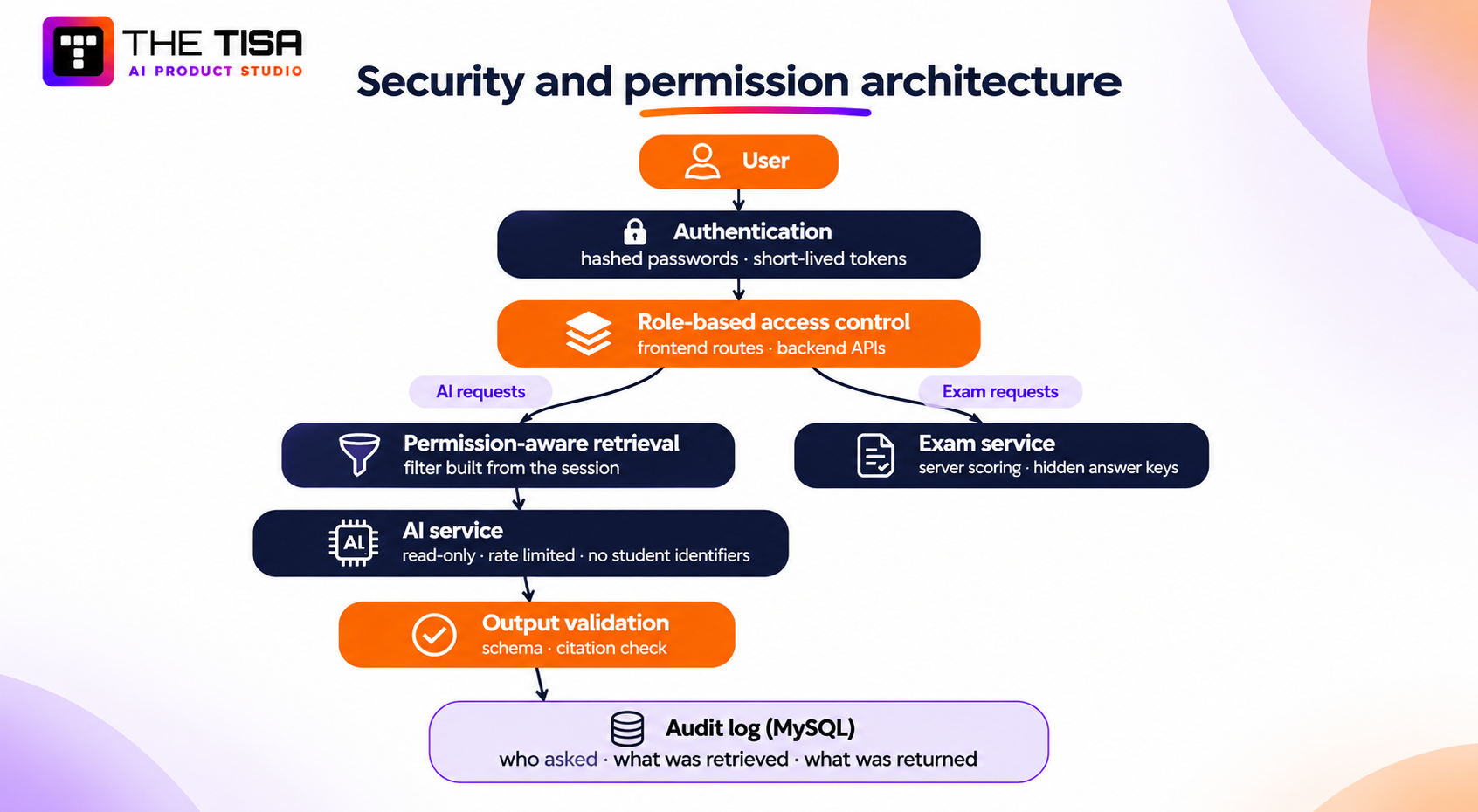
The security path runs: user → authentication → role-based access → permission-aware retrieval → AI service → output validation → audit log. Two properties come from that order. A student cannot widen what the AI reads by rephrasing a prompt, because the filter comes from the session. And the AI service has read-only access, so it cannot change grades, content or accounts.


How the controls map to the OWASP Top 10 for LLM Applications
The OWASP Top 10 for LLM Applications is the most widely used checklist of language-model risks, with prompt injection ranked first.
| OWASP risk | Campus Flow exposure | Control | Test result |
|---|---|---|---|
| LLM01 Prompt injection | A student tries to make the assistant reveal material outside their access | Permission filter applied before retrieval, from the session | 0 of 1,200 adversarial prompts exposed restricted material |
| LLM02 Sensitive information disclosure | Personal records reach the model | Prompts carry course material only; names, emails and IDs are stripped | No identifiers found in sampled prompt logs |
| LLM05 Improper output handling | Model output rendered unsafely | Structured output, schema validation, escaped rendering | Passed penetration test |
| LLM06 Excessive agency | AI publishes content or changes a grade | Read-only AI service; mentors publish; code scores | No write paths from the AI service |
| LLM08 Vector and embedding weaknesses | One course’s material retrieved for another | Mandatory course and cohort filters on every vector query | 0 cross-cohort retrievals in testing |
| LLM09 Misinformation | Ungrounded answers | Citation required; fallback and escalation when none is valid | 93% of answers carry a valid citation |
| LLM10 Unbounded consumption | Request floods run up cost | 60 requests per student per hour; Redis caching | AI cost held at $0.41 per active student a month |
Controls, responsibilities and assessments are different things
| Category | What it covers | Campus Flow |
|---|---|---|
| Technical controls | Authentication, RBAC, server-side scoring, validation, rate limiting, restricted indexing, audit logging | Implemented by THE TISA |
| Organizational responsibilities | FERPA obligations, vendor agreements, retention policy, consent, breach response | Owned by the institution, supported by Campus Flow’s controls and audit records |
| Independent assessment | Third-party penetration test before launch | Zero critical and zero high findings |
FERPA. FERPA protects student education records at institutions that receive US Department of Education funding, whoever or whatever processes them. The Student Privacy Policy Office is the federal source on how it applies to vendors and cloud services. Campus Flow’s access controls, audit log and restricted indexing support the institution’s FERPA obligations. No software is “FERPA certified”, and we do not describe Campus Flow that way.
COPPA. All Campus Flow users are 16 or older, so COPPA’s rules for children under 13 do not apply.
Model provider. Campus Flow calls OpenAI through its API under a data processing agreement. OpenAI documents its retention and training defaults for API data in its API data controls. Student identifiers never reach the model.
Risk management. For institutions that procure against a framework, these controls align with the govern, map, measure and manage functions of the NIST AI Risk Management Framework. THE TISA’s company-wide practices are on our security page.
What technical challenges did we solve?
Five engineering decisions carried most of the risk in Campus Flow. For each, we weighed at least two options and chose the one that kept decisions testable.
1. Keeping exam timing and scoring tamper-proof
- Problem: form-based exams had no control over timing, page switching or submission.
- Why it occurs: anything that runs in the browser can be paused, edited or inspected, including timers and answer keys.
- Options evaluated: a client-side timer with server checks, or a fully server-owned exam session.
- Decision: the server owns the session. It records the start time, accepts answer changes until the deadline, auto-submits at zero and scores on submit. Page-switch events log to the backend for mentor review.
- Why it fits: the browser only displays the session; every decision that affects a grade stays on the server.
- Outcome: 1,000 exams a month with results in under a second and no timing disputes since launch.
2. Permission-aware retrieval for AI
- Problem: AI features must never expose material a user is not allowed to see.
- Why it occurs: a basic RAG setup searches every indexed document and filters later, if at all.
- Options evaluated: a separate index per course, or one index with mandatory metadata filters.
- Decision: one Elasticsearch index with course and cohort metadata on every chunk, and a filter built from the session on every query.
- Why it fits: one index stays easy to operate as courses grow, and the same permission model governs the app and the AI.
- Outcome: zero cross-cohort retrievals in 1,200 adversarial test prompts.
3. Stopping hallucinated answers in a learning tool
- Problem: a wrong answer in a study assistant damages trust fast.
- Options evaluated: confidence thresholds alone, or required citations validated in code.
- Decision: structured output with chunk IDs, checked in code; no valid citation means no answer and a mentor escalation.
- Outcome: 93% of answers carry a valid citation; the other 7% become mentor escalations instead of guesses.
4. Messy lesson documents
- Problem: mentors uploaded scanned PDFs, slide exports and notes with broken formatting.
- Decision: a Python pipeline cleans, runs OCR where needed, splits and tags each document before indexing. Failed files return to the mentor with a reason.
- Outcome: about 2,400 documents indexed; 4% returned for re-upload in the first month, under 1% since.
5. Exam-week traffic peaks
- Problem: exam windows pushed traffic to six times normal levels.
- Decision: independent exam, content and AI services; Redis caching; pagination for long question lists; lazy loading and compressed images on the frontend.
- Outcome: 2.2 seconds average page load and 320 ms average API response (780 ms at the 95th percentile), with 99.95% uptime over 24 weeks.
Developer’s perspective: Anuj Kumawat
The hardest part of Campus Flow was not the model. It was deciding what the model should never do. We wrote that list before we wrote a single prompt: the AI never grades, never publishes, never sees a student’s name and never answers without a source.
Once those rules lived in code, every feature got easier to build and easier to explain. Exam timing and scoring stayed on the server because they have right answers, and right answers belong in tests, not prompts. Retrieval took its filter from the session because a student should not be able to talk their way into another cohort’s notes.
Validation was the part I would tell other teams to budget for. We checked every citation against the student’s permissions before showing an answer, and mentors approved every feedback draft. Mentors trusted the drafts because they always had the final say. Students trusted the assistant because every answer pointed to a page they recognized.
My advice to any team adding AI to an education product: measure your baseline in week one, and design the refusals before you design the prompts.
Technical reviewer’s perspective: Nishant Agarwal
I reviewed Campus Flow’s architecture, data model, access control and API layer before launch, and the technical content of this article before publication.
Three decisions stand out. Scoring lives entirely on the server, so no client change can alter a grade. Access filters apply before retrieval rather than after generation, so the AI service never holds data the user could not open. And MySQL and MongoDB each hold the data they suit, which kept the schema clean as features were added in weeks five and six.
On reliability, every endpoint validates its input, errors fail safely, and rate limits protect both the exam service and the AI service. Independent services let exam week scale without slowing the study library. Those choices are why the platform passed its penetration test with no critical or high findings and still serves pages in 2.2 seconds.
Scope of review: architecture and service boundaries, MySQL and MongoDB design, authentication and RBAC, exam integrity, API validation and error handling, rate limiting, scalability and production readiness.
What results did Campus Flow deliver?
Within 24 weeks of launch, Campus Flow raised task completion from 52% to 84%, attendance from 71% to 88% and average exam scores from 64% to 76%. It did this while registered students grew 62%, from 1,140 to 1,850.
| KPI | Before | After 24 weeks | Change |
|---|---|---|---|
| Registered students | 1,140 | 1,850 | +62% |
| Weekly active students | 520 | 1,320 | +154% |
| Task completion rate | 52% | 84% | +32 pts |
| On-time submission rate | 58% | 81% | +23 pts |
| Attendance rate | 71% | 88% | +17 pts |
| Average exam score | 64% | 76% | +12 pts |
| Online exams completed per month | 380 | 1,000 | +163% |
| Study material accesses per month | 1,100 | 4,200 | +282% |
| Exam result turnaround | 5.2 days | Under 1 second | Instant |
| Median reply to a study question | 19 hours | 3.4 seconds (AI) | −99.9% |
| Mentor admin time per week | 11 hours | 3.5 hours | −68% |
| Average page load | 6.8 s | 2.2 s | −68% |
| Average API response | No unified API | 320 ms | — |
| Platform uptime | No single platform | 99.95% | — |
How each metric is defined
| Metric | Source | Definition |
|---|---|---|
| Registered and weekly active students | User table and session analytics | Student-role accounts; students with at least one session in a week |
| Task completion and on-time rate | Task records | Tasks marked Done ÷ tasks assigned; Done before due date ÷ tasks assigned |
| Attendance | Attendance records | Sessions present ÷ sessions scheduled |
| Exam score and volume | Results and submission tables | Mean score of submitted exams; submissions per calendar month |
| Mentor admin time | Mentor time logs, two-week sample in each period | Hours per mentor per week on data entry, grading and progress tracking |
| Page load, API response, uptime | CloudWatch and Sentry | Averages across all pages and endpoints; monthly availability |
Measurement windows: the baseline covers the full term before launch, collected in week one of discovery. The after figures cover the first 24 weeks of full rollout.
What changed for each role
- Students see tasks, exams, results, attendance and material in one account, get results the moment they submit, and get cited study answers in seconds.
- Mentors stopped grading objective answers by hand, stopped re-entering data, wrote quizzes in 22 minutes instead of 95, and started each week with a digest of who needs help.
- Administrators manage roles and cohorts in one console and can audit every AI request.
What is the ROI of AI integration in Campus Flow?
The clearest return is mentor time. The institute has 14 mentors, and each now spends 7.5 fewer hours a week on admin.
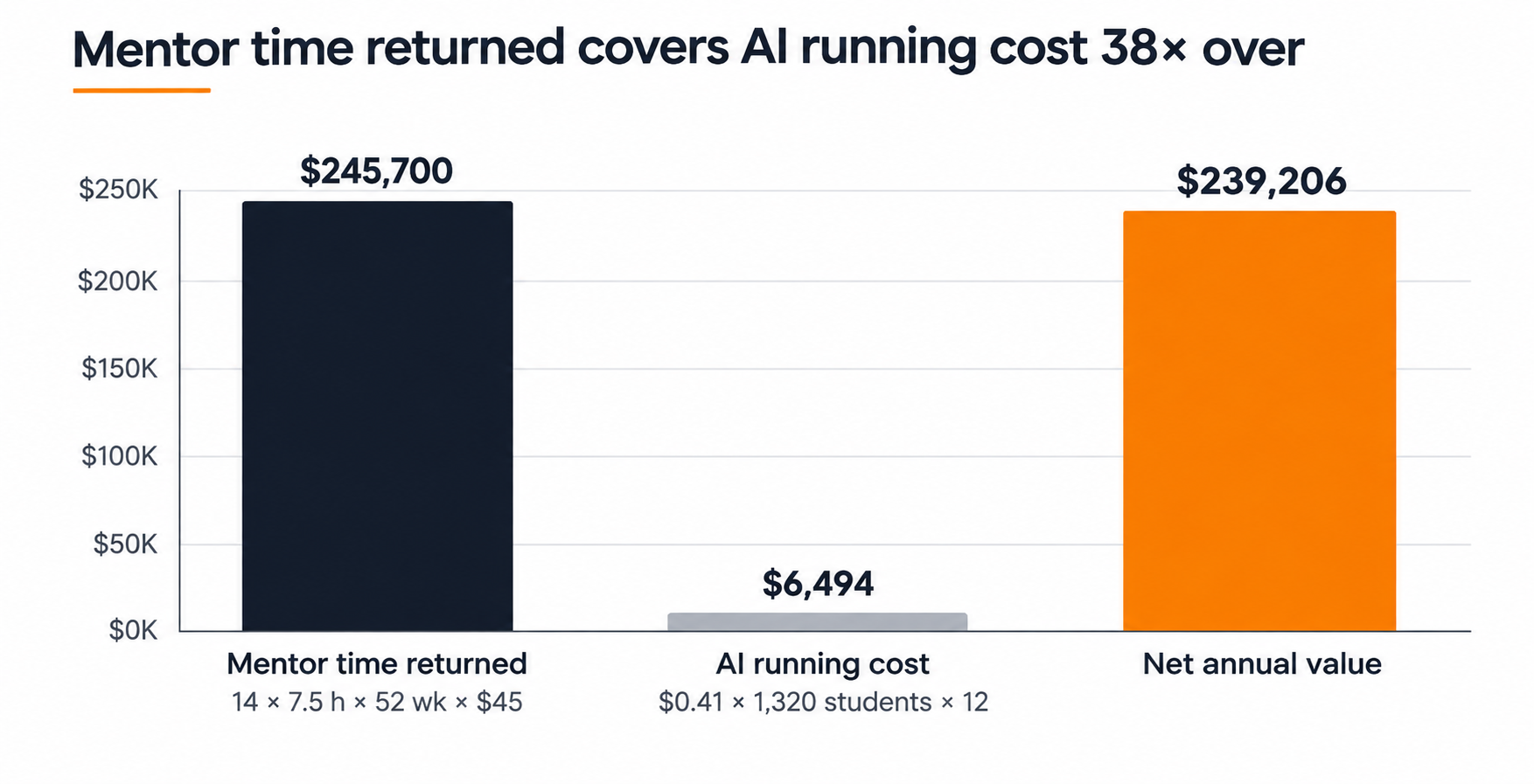
14 mentors × 7.5 hours/week × 52 weeks × $45/hour = $245,700/year
That is 5,460 mentor hours a year returned to teaching. The AI layer costs $0.41 per active student per month, or $6,494 a year at 1,320 weekly active students. Net annual value is $239,206, and the time returned covers the AI running cost about 38 times over. That figure leaves out the value of higher completion and attendance.
What the client said
“THE TISA was easy to work with and really listened to what we needed. They built the portal around how our students and mentors actually work, and the final product is simple to use. Results that used to take most of a week now show up the moment a student submits.”
Michael Carter, Client, Campus Flow
What can US EdTech companies learn from Campus Flow?
AI features are only as safe and useful as the workflows and permissions underneath them. These ten practices apply to any team adding AI to a student platform or LMS.
- Establish baseline metrics before integration. We measured completion, attendance, scores, turnaround and mentor hours in week one. Without them you can report results but never improve.
- Fix data and workflow fragmentation first. Link every task, exam and attendance record to one student account.
- Apply permissions before AI retrieval. Build the filter from the authenticated session, never from the prompt.
- Separate model decisions from application logic. Scoring, deadlines and access belong in testable code.
- Keep humans responsible for consequential decisions. Mentors approve feedback, publish quizzes and judge similarity flags.
- Validate AI output. Require citations for study answers and check them before display.
- Monitor AI cost and usage. Rate-limit per user, cache retrieval and track cost per active student.
- Design for peak workloads. Exam windows concentrate traffic; scale services independently.
- Maintain audit trails. Log who asked, what was retrieved and what the model returned.
- Treat security as architecture. Server-side exams, hidden keys and restricted indexing are design decisions, not add-ons.
What affects the cost and timeline of AI integration in an education platform?
Campus Flow took eight weeks with four people. Scope drives cost far more than the choice of model.
| Factor | Lower effort | Higher effort |
|---|---|---|
| Existing architecture | Modern API-first app or new build | Legacy LMS or SIS with limited APIs |
| Data quality | Clean, structured course material | Scanned PDFs, duplicate records, missing metadata |
| API availability | Documented REST or GraphQL endpoints | Exports or screen scraping only |
| Number of integrations | None or one | SIS, SSO, video platform, payments |
| Model selection | One hosted model | Multiple providers, private deployment |
| RAG complexity | One course library | Per-cohort permissions, multilingual content |
| Security requirements | Standard RBAC | District SSO, data residency, third-party audits |
| User roles | Student and mentor | Parents, advisors, multi-campus admins |
| Infrastructure | Managed hosting | Dedicated environments per client |
| Testing and deployment | Functional QA | Adversarial AI testing, staged rollout, accessibility audit |
To scope your own build, start with our AI application development and AI SaaS development pages, or see how we approach education platforms.
What’s next for Campus Flow?
The next releases build on what already exists. None of these are live yet.
- Assignment file submission and feedback
- Question randomization and negative marking
- Descriptive answer evaluation with mentor approval
- Performance reports and certificates
- Live and recorded learning modules
- Mobile application
- Multi-language support
- Leave request management
- Predictive risk alerts
- Voice-based study Q&A
- Parent or advisor digests
Risk alerts and digests read the same linked student records. Voice Q&A and descriptive evaluation reuse the permission-aware retrieval layer built in week six.
Frequently Asked Questions
Q1. What is AI integration in education?
Ans. AI integration in education means connecting AI models to the systems that hold student and course data, so AI features work inside existing roles and workflows. A study assistant that only reads a student’s assigned material is integrated. A separate chatbot with no access controls is not.
Q2. How can AI be integrated into an LMS?
Ans. Through the LMS’s APIs. Index course material, add a retrieval layer that respects LMS roles, and expose AI features inside the existing interface. API access and permission data decide how hard it is.
Q3. What is RAG in education technology?
Ans. Retrieval-augmented generation (RAG) retrieves relevant passages from approved course material and gives them to a language model to answer from. It keeps answers tied to what the course teaches and lets students check the source.
Q4. How does permission-aware AI retrieval work?
Ans. The system builds a search filter from the signed-in user’s role and enrollments, then retrieves only matching material. Because filtering happens before the model sees anything, a rephrased prompt cannot widen access.
Q5. How can education platforms protect student data when using AI?
Ans. Apply role-based access before retrieval, send the model only the data a task needs, keep scoring in code, log AI requests, use an API provider with documented data controls, and keep private pages out of search engines.
Q6. Is an AI-powered student portal FERPA compliant?
Ans. No software is “FERPA certified”. FERPA obligations sit with the institution. A portal supports compliance with access controls, data minimization, audit records and vendor terms the institution can rely on.
Q7. How can AI-generated educational feedback be validated?
Ans. Generate feedback only after deterministic scoring, ground it in the scored topics, and require a teacher or mentor to approve it. In Campus Flow mentors approve 91% of drafts with no or light edits.
Q8. Can AI integrate with an existing student management system?
Ans. Yes, if the system exposes data through APIs or reliable exports. Start with an assessment of available endpoints, data quality and roles before choosing features.
Q9. How long does an AI integration project take?
Ans. It depends on data readiness, integrations and the number of features. Campus Flow, a new build with six AI features, took eight weeks with four people. Integrations into legacy systems usually take longer.
Q10. What does AI integration cost to run?
Ans. Running cost depends on model choice, caching and usage. Campus Flow’s AI layer costs $0.41 per active student per month. Build cost depends on the factors in the table above.
Q11. How can AI improve student engagement?
Ans. By removing friction: answering routine questions instantly from course material, reminding students about pending work and giving feedback right after exams. In Campus Flow, weekly active students rose from 46% to 71% of the roster.
Planning an AI-Powered Student Portal?
See how Campus Flow brings student management, learning resources, online exams, and AI-assisted academic support together in one platform. Talk to THE TISA about building custom education software that fits your institution’s workflows and requirements.
Discuss Your Education Software Project →