



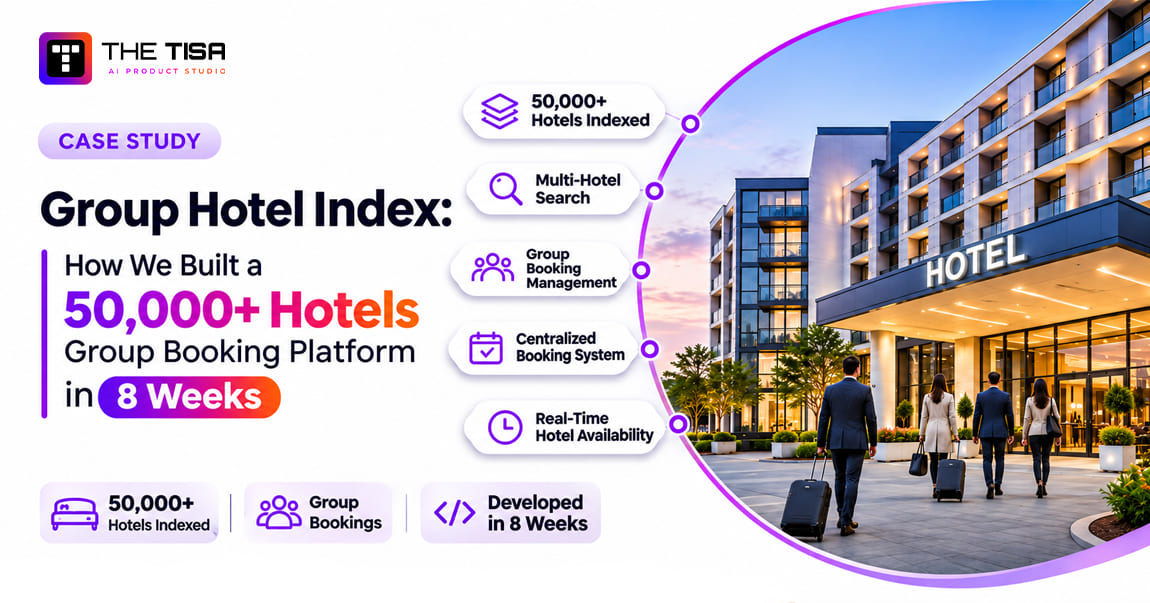
Booking 40 rooms for a wedding, a sports team or a sales conference in an unfamiliar US city is still mostly done the hard way. A planner shortlists hotels from five websites, emails each sales office the same dates and room counts, then chases replies that arrive in different formats over the next week. Hotels, meanwhile, lose a slice of every group booking to third-party sourcing platforms and commissions.
Luke Thompson, who works in US group travel, wanted to fix both sides. We built him Group Hotel Index (GHI): a nationwide directory of 50,000+ hotels where planners search by city, ZIP code or radius, send one group enquiry to several hotels at once, and compare the replies in one place. Three developers delivered it in two months.
This case study walks through the whole build: the problem, the three products inside the platform, how we made search fast across 50,000 records, how we generated tens of thousands of SEO pages without slow builds, what broke during development, and what the platform does today. If you are evaluating a software development company for a data-heavy web platform, this is what the work looks like from the inside.

TL;DR: What this case study shows
- Client: Luke Thompson, Group Hotel Index, United States.
- Product: A group hotel directory and direct enquiry platform for planners and hotel sales teams.
- Team and timeline: 3 developers, 2 months from requirements to production.
- Stack: Next.js with SSR, SSG and ISR; NestJS; PostgreSQL; Redis; BullMQ; AWS Lambda and SES; modular monolith on AWS.
- Scale today: 50,000+ hotels, about 45,000 monthly visitors, 120,000+ searches and about 3,500 group enquiries a month.
- Outcomes: nearly 68% hotel response rate, about 24% quote conversion, 58% of traffic from organic search, 1.3-second page loads and 99.5% uptime.
- AI: none in this release. The data model and event history were designed so AI features can be added next (see the roadmap).
Group Hotel Index at a glance
| Item | Detail |
|---|---|
| Client | Luke Thompson, Group Hotel Index |
| Market | United States |
| Industry | Hospitality and group travel |
| Users | Group travel planners, corporate and event planners, wedding and sports organisers, tour operators, hotel sales managers, administrators |
| Team | 3 developers |
| Timeline | 2 months |
| Stack | Next.js, TypeScript, SSR, SSG, ISR, NestJS, PostgreSQL, Redis, BullMQ, AWS Lambda, AWS SES, REST APIs, modular monolith on AWS |
| Services | Custom software development, web application development, API and backend development |
| Primary outcome | 50,000+ hotel listings; about 3,500 group enquiries a month |
What problem was the Group Hotel Index built to solve?
Group hotel sourcing in the US is a request-for-proposal (RFP) process run over email. GHI’s job was to turn it into a search, a single form and a comparable set of replies, while giving hotels a direct channel that does not take a commission.
A group booking is not a normal hotel booking. A planner is not reserving one room at a listed price; they are asking several hotels whether they can hold, say, 25 rooms for three nights around an event, with a meeting room and a group rate. Each hotel’s sales manager prices that request individually. The planner then compares quotes that differ in rate, attrition terms, cut-off dates and inclusions.
Six problems we heard in discovery
| Problem | Who felt it most | What it cost |
|---|---|---|
| Hotels for one destination spread across brand sites, OTAs and sourcing tools | Planners | Two to three hours to build a shortlist for one city |
| The same dates, room counts and event details typed into every hotel’s contact form | Planners | 10 to 15 minutes per hotel, repeated for every property |
| Replies arriving by email and phone in different formats | Planners | Quotes compared in spreadsheets; slow decisions |
| Hotels reliant on third-party platforms and commissions for group leads | Hotel sales teams | A share of group revenue paid away on every booking |
| Hotel data (addresses, amenities, images, contacts) scattered and often outdated | Administrators | Duplicate and wrong records; manual clean-up |
| No search by ZIP code or distance from a venue | Planners | Missed hotels just outside a city boundary |
The last row turned out to matter most. Planners rarely think in city names. They think “within 10 miles of the convention centre” or “near the stadium”, which is a distance search, not a text search.
What the client needed the software to do
- Give planners a nationwide hotel directory searchable by city, ZIP code and radius, with filters for brand, type, amenities, rating and price range.
- Let a planner select several hotels and send one group enquiry with dates, room needs and event details.
- Give hotel sales teams a portal to review, quote or decline, and track every enquiry.
- Give administrators a CMS to manage tens of thousands of hotel records, bulk imports, images, SEO fields and users.
- Rank in search for thousands of “hotels in [city]” and hotel-name queries, because organic traffic is the cheapest way to reach planners.
- Stay fast and stable under traffic spikes, on a two-month timeline.
None of these needs is unusual on its own. What made GHI a real engineering project was doing all six at once, on 50,000 records, in eight weeks. That combination is where generic directory templates break, and where custom software development services earn their cost.
What did THE TISA build?
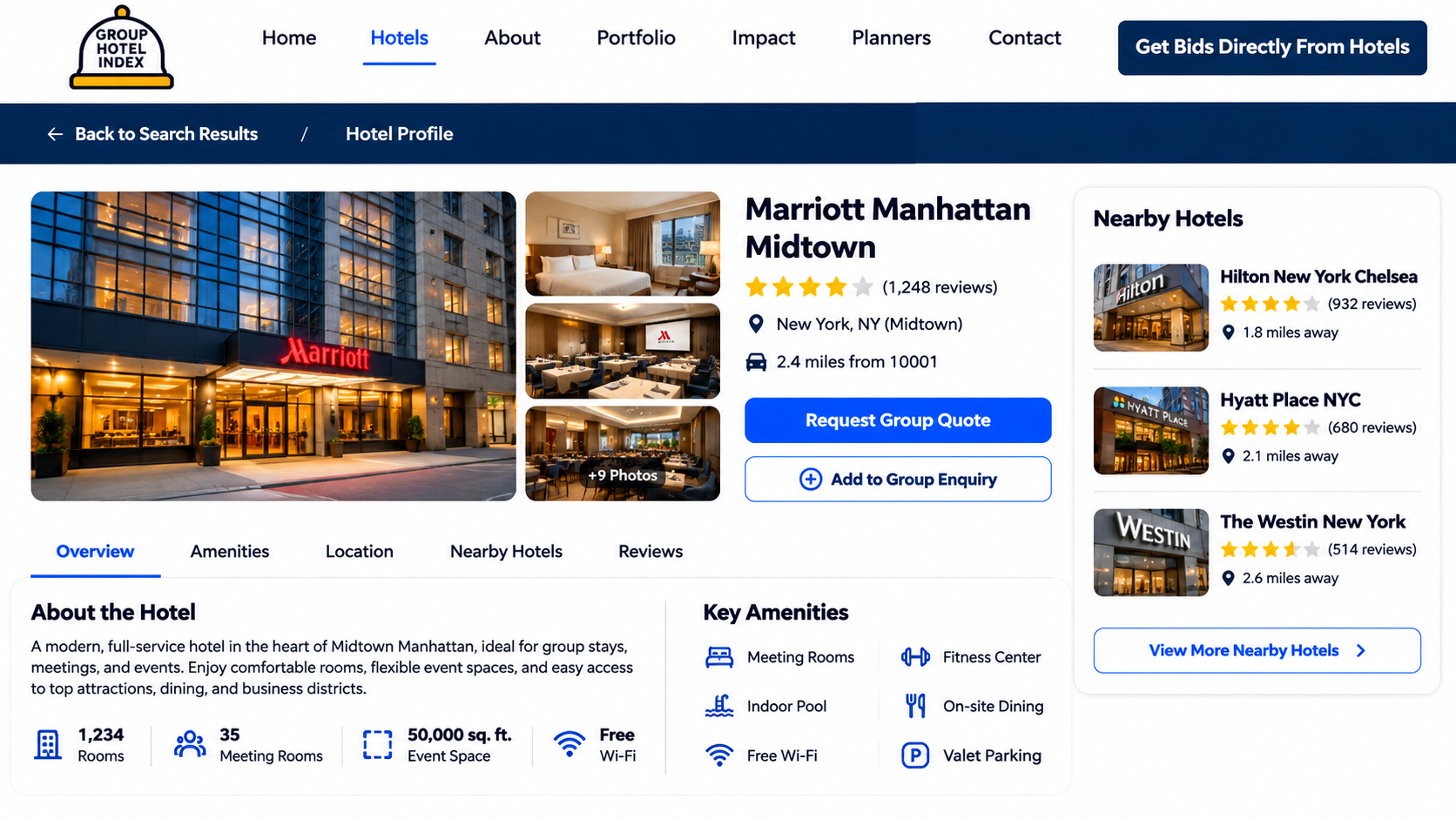
We built three products on one codebase: a public hotel directory for planners, a response portal for hotel sales teams, and an admin CMS for the GHI team. They share one data model, one API and one set of permissions.
| Product | Who uses it | What it does |
|---|---|---|
| Public hotel directory | Planners, and search engines | Browse 50,000+ hotels by state, city and destination; search by name, city, ZIP code or radius; filter; view profiles; select hotels and send a group enquiry |
| Hotel response portal | Hotel sales managers | Receive enquiries, send a quote or decline, track active and completed responses |
| Admin CMS | GHI administrators and editors | Manage listings, images, amenities and SEO fields; run bulk imports; review duplicates; manage users and roles; see analytics |
How the system fits together
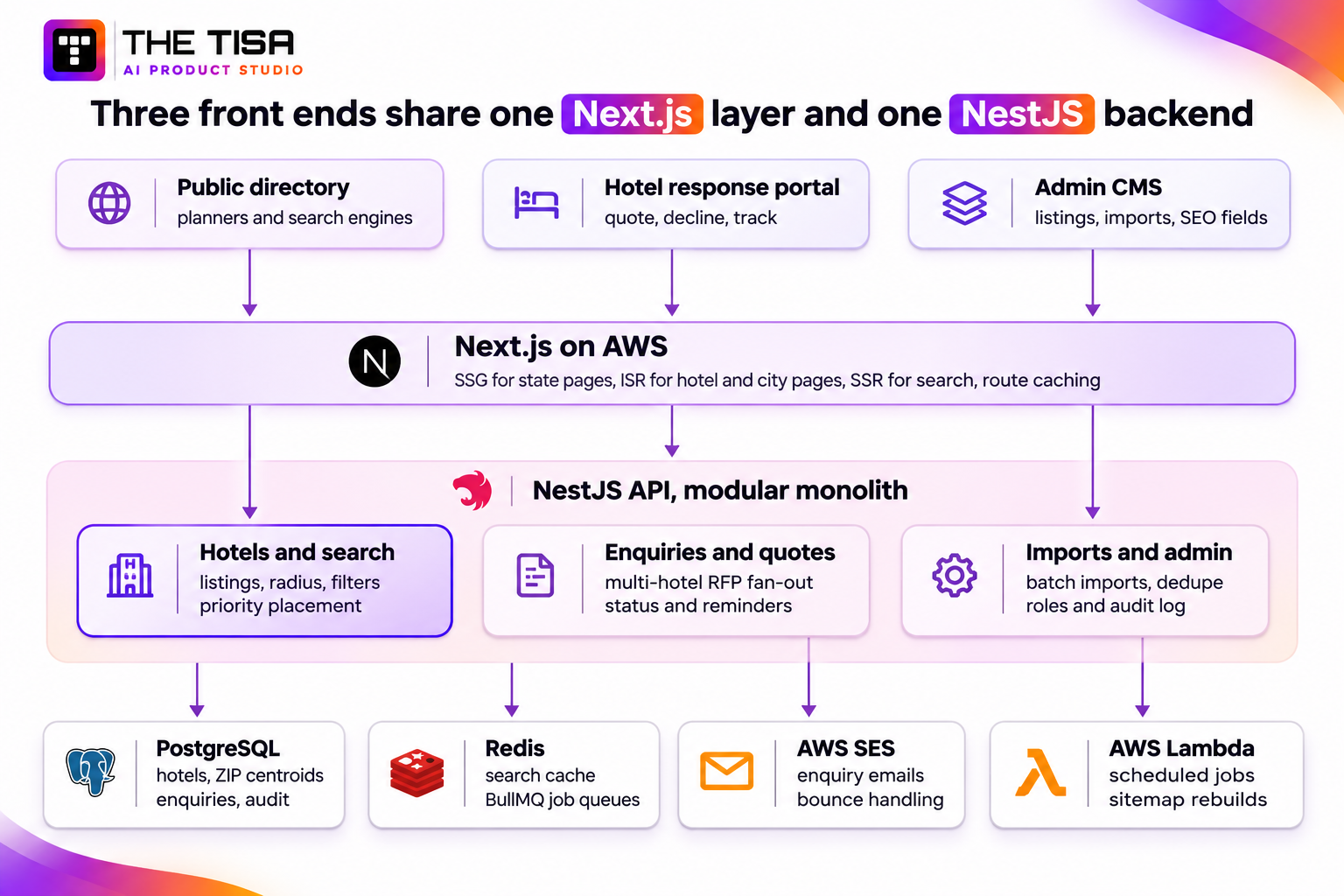
All three front ends are rendered by one Next.js application, which picks a rendering strategy per page type. Behind it, a NestJS API is split into business modules inside one deployable app: a modular monolith. PostgreSQL holds every hotel, location, user and enquiry. Redis caches repeated searches and carries the BullMQ job queues for imports and email. AWS SES sends enquiry and quote emails, and AWS Lambda runs scheduled work such as sitemap rebuilds without loading the main server.
Why a modular monolith, not microservices?
Three developers and eight weeks do not leave room for the deployment, monitoring and network overhead of a dozen services. A group enquiry also touches hotels, users and email in one flow, and one database transaction is the simplest way to keep that consistent. The modules have hard boundaries, so search or imports can be split into their own services later if traffic demands it. This is the same trade-off we describe in microservices vs monolith for AI applications, and it is a decision our API and backend development team makes per project, not by default.
Inside the platform: how each module works, and what went wrong while we built it
Each module below solved a real problem for planners, hotels or administrators, and each one threw up an engineering problem we had to solve under an eight-week deadline. We list both, because the second list is what separates working software from a demo.
1. Hotel data model and bulk imports
What it does. Every hotel is one record with its name, brand, property type, normalised address, latitude and longitude, ZIP code, city and state, amenities, images, sales contact, rating, price band and SEO fields. States, cities and ZIP code centroids live in their own location tables, so a hotel page, a city page and a radius search all read from the same source. Administrators add hotels one at a time or import them in bulk from CSV files.
Problems we hit during development
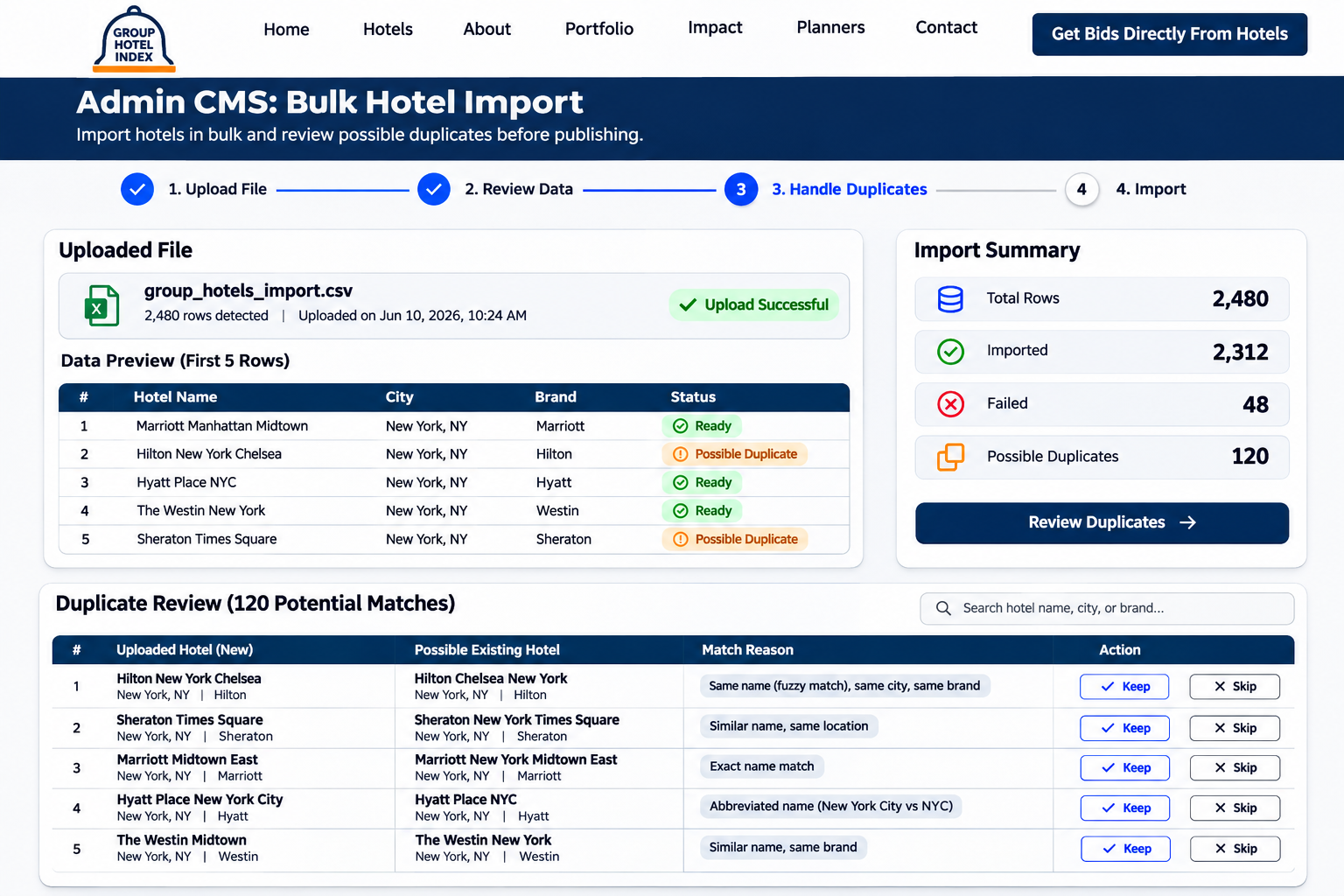
- The same hotel, spelled three ways. Source files listed “Hampton Inn & Suites Dallas-Downtown” and “Hampton Inn and Suites Dallas Downtown” as different properties. We normalise names and addresses before saving (lower case, “&” to “and”, punctuation removed, street suffixes standardised), then treat two records as a likely duplicate when their normalised names are very similar, they share a ZIP code and they sit within 150 metres of each other. Likely duplicates go to a review queue instead of being merged automatically. On the first full import, about 4% of rows were flagged.
- An import that froze the site. The first version processed a CSV inside the upload request. A 20,000-row file timed out and slowed every other page while it ran. Imports now upload the file, then a BullMQ job splits it into batches of 500 rows, validates each row and saves each batch in its own transaction. The CMS shows progress, and failed rows can be downloaded as a CSV with the reason for each. A 20,000-row import now finishes in about 9 minutes with no effect on site speed.
- Re-imports creating copies. Running the same supplier file twice doubled the hotels. Each row now carries a source ID, and imports update existing records rather than inserting new ones, so re-running a file is safe.
- Hotels with no coordinates. Rows without latitude and longitude are geocoded in a background job with rate limits. A hotel that cannot be placed on the map stays unpublished, because a hotel missing from radius search is worse than a hotel missing from the site.
2. Search by city, ZIP code and radius
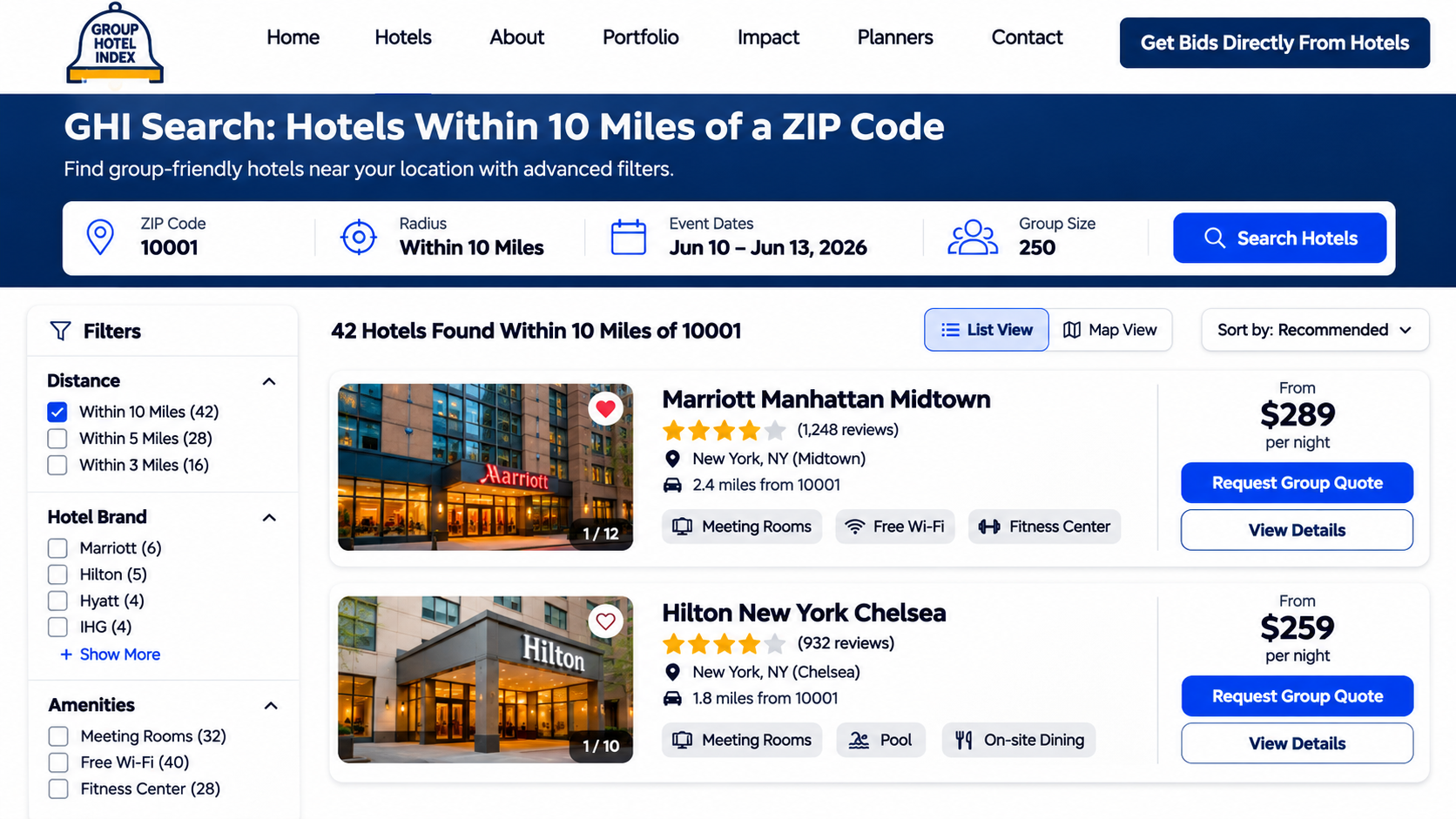
What it does. Planners search by hotel name, city or ZIP code, choose a radius from 5 to 50 miles, and filter by property type, brand, amenities, rating and price range. A ZIP code is turned into a point using a table of US ZIP code centroids built from public Census data; the radius search then finds hotels around that point, sorted by distance.
Problems we hit during development
- Distance maths across 50,000 rows. Calculating the distance from a ZIP code to every hotel took about 1.4 seconds per search. We now cut the candidates first with a bounding box on indexed latitude and longitude columns, which leaves a few hundred hotels, and only then calculate exact distances. A typical radius search now returns in about 140 ms at the 95th percentile.
- Amenity filters that multiplied joins. Filtering by four amenities meant four joins on a many-to-many table. Each hotel now also stores its amenity IDs in an integer array with a GIN index, so “has pool, parking, meeting space and shuttle” is one indexed check.
- The same searches, all day. “Hotels in Orlando” and “hotels in Nashville” run hundreds of times a day. Results are cached in Redis under a key built from the normalised query and filters, with a 10-minute lifetime, and cleared early when a hotel in that city changes. About 70% of searches are served from cache.
- ZIP codes that are not places. PO-box-only ZIP codes have no usable centroid. Those searches fall back to the city’s centre, and the page says so.
- Twenty-plus Springfields. City autocomplete always shows the state, so a planner cannot search the wrong Springfield by accident.
A simplified version of the radius query:
-- Hotels within :miles of a ZIP code centroid (simplified)
WITH origin AS (
  SELECT lat, lng FROM zip_centroids WHERE zip = :zip
), candidates AS (
  SELECT h.id, h.name, h.city,
         3959 * acos(least(1,
           cos(radians(o.lat)) * cos(radians(h.lat)) *
           cos(radians(h.lng) - radians(o.lng)) +
           sin(radians(o.lat)) * sin(radians(h.lat)))) AS miles
  FROM hotels h, origin o
  WHERE h.status = 'published'
    -- bounding box first: uses the (lat, lng) index
    AND h.lat BETWEEN o.lat - :miles / 69.0 AND o.lat + :miles / 69.0
    AND h.lng BETWEEN o.lng - :miles / (69.0 * cos(radians(o.lat)))
                  AND o.lng + :miles / (69.0 * cos(radians(o.lat)))
)
SELECT * FROM candidates WHERE miles <= :miles
ORDER BY miles LIMIT 50;
3. Directory pages and the rendering strategy
What it does. GHI publishes a page for every state, every city with hotels, and every hotel. These pages are how planners find GHI on Google, so they have to be fast, crawlable and always current. Next.js lets each page type use a different rendering strategy, and choosing the right one per page was one of the most important decisions in the build.
| Page type | Approx. count | Strategy | Why |
|---|---|---|---|
| Home and static pages | ~20 | SSG (built at deploy) | Rarely change |
| State pages | 51 | SSG, rebuilt nightly | Stable; change only when cities are added |
| City and destination pages | ~2,900 | ISR, refreshed daily and on demand | Change when hotels in the city change |
| Hotel profile pages | 50,000+ | ISR: most-visited 5,000 pre-built, the rest built on first request | Too many to build at deploy |
| Search results | Unlimited combinations | SSR, filtered combinations set to noindex | Depend on each query |
| Planner, hotel and admin dashboards | Private | Rendered after login, noindex | Private data |
Problems we hit during development
- A build that never finished. Our first attempt pre-rendered every hotel page at deploy. The build ran for over 40 minutes and then failed on memory. We now pre-build only the 5,000 most-visited hotel pages; the rest are rendered on their first visit, cached, and served statically after that.
- Edits that did not show up. An administrator would fix a hotel’s phone number and still see the old one. Every save or import now calls on-demand revalidation for the affected hotel, city and state pages, so changes appear within seconds.
- Thin pages for small towns. A town with one hotel produced a near-empty city page. City pages with fewer than three hotels are set to noindex and link to the nearest larger city page instead.
- More URLs than one sitemap allows. Google accepts up to 50,000 URLs per sitemap file, and hotel pages alone exceed that. We split sitemaps by state under a sitemap index, regenerated nightly by an AWS Lambda job.
- Structured data that could backfire. Each hotel page carries schema.org Hotel and BreadcrumbList markup built only from verified fields. We left out review ratings the platform does not collect itself, to stay inside Google’s structured data policies.
4. Group enquiries: one form, many hotels
What it does. A planner adds up to 10 hotels to an enquiry tray, then fills one form: event type, arrival and departure dates, rooms needed per night, meeting space, budget range and notes. On submit, GHI creates one enquiry with a separate request for each hotel, emails each hotel’s sales contact, and confirms to the planner.
Problems we hit during development
- One slow email held up the whole submit. The first version emailed every hotel before responding, so a 10-hotel enquiry took over 8 seconds to submit. The enquiry and its hotel requests are now saved in one transaction and the emails are queued as separate jobs. Submit returns in under a second, and one hotel’s bad email address no longer affects the others.
- Rooms are not one number. Group blocks usually peak on one night: 10 rooms on Thursday, 25 on Friday and Saturday, 8 on Sunday. A single “rooms” field could not express that, so the data model stores rooms per night.
- Double submits and spam. Each form submission carries an idempotency key, and submissions are rate-limited per IP address and per account, with a hidden honeypot field for bots. A planner’s first enquiry also requires a verified email address.
- Hotels with no sales contact. Some records had no email address. Those requests are held, the admin team is alerted to add a contact, and the planner sees the request as pending rather than silently lost.
5. Hotel response portal
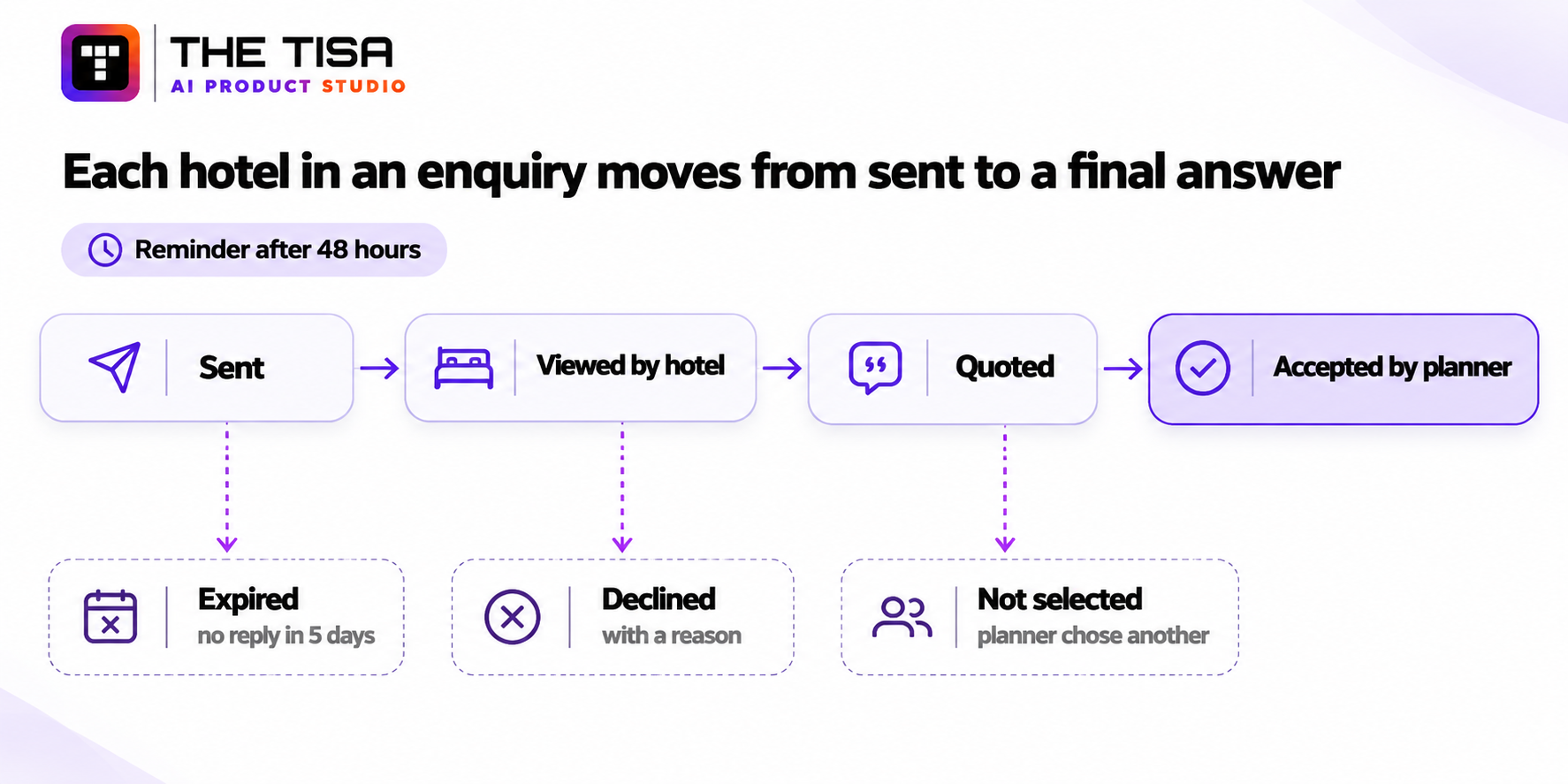
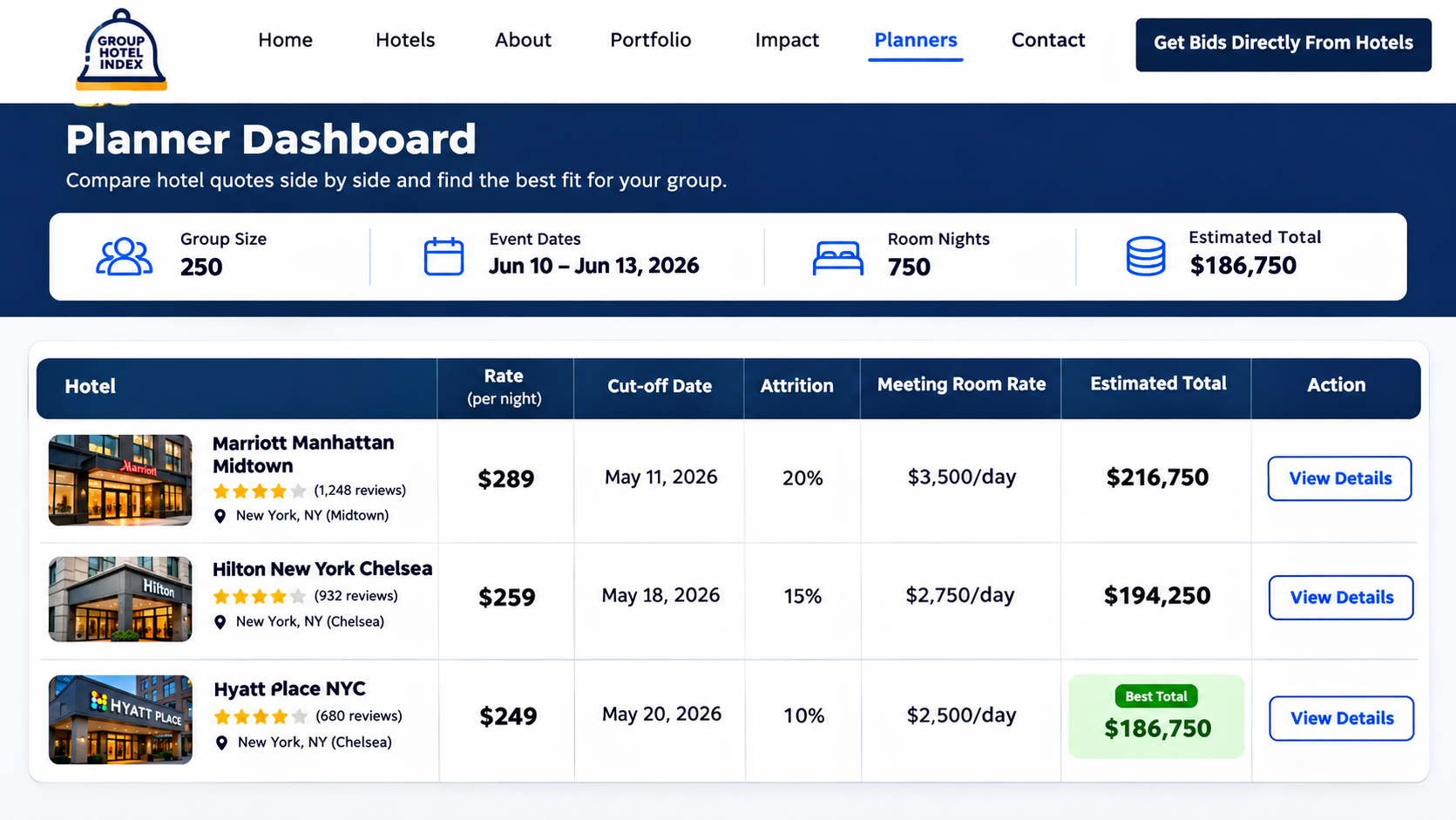
What it does. A hotel sales manager opens the request and either sends a structured quote (group rate per night, room types, cut-off date, attrition terms, meeting room rate, notes and an optional PDF) or declines with a reason. The planner sees every quote side by side, with an estimated total room cost the system calculates.
Problems we hit during development
- Hotels would not create accounts. In testing, asking a busy sales manager to sign up before replying cut responses sharply. Each enquiry email now carries a signed, single-use link that opens that one request for 14 days without a password. An account is optional, for teams who want to manage all their requests in one place.
- Quotes that could not be compared. Free-text replies (“$159 plus tax, 80% attrition, cut-off 30 days”) were impossible to line up. Quotes now use structured fields, and the comparison view normalises them into the same columns.
- Silence. An unanswered request gets one reminder after 48 hours. After 5 days it is marked expired, so the planner knows to move on instead of waiting.
- One manager, many hotels. Sales managers often cover several properties in a cluster. Users and hotels are linked many-to-many, so one login sees every hotel the manager is responsible for.
6. Priority placement
What it does. Selected hotels can be featured, which lifts them in relevant results and highlights them on city pages.
Problem we hit. Paid placement can quickly ruin search trust. A featured hotel is only lifted within results that already match the planner’s location, radius and filters. Each results page shows at most two featured hotels, each clearly labelled “Featured”, and placements expire automatically through a scheduled job.
7. Admin CMS, roles and audit log
What it does. Five roles (super admin, admin, editor, hotel user and planner) control who can view and change what. Editors manage listings, images, amenities, categories and SEO fields; admins also run imports and manage users.
Problems we hit during development
- Half-finished hotels going live. An editor could publish a hotel with no coordinates or images. Publishing now requires an address, coordinates, a sales contact and at least one image; anything missing blocks the publish button and says why.
- Who changed this? Every edit, import, publish and delete is written to an audit log with the user, time and before-and-after values. Deletes are soft, so a mistake can be undone.
8. Email and background jobs
What it does. AWS SES sends enquiry, quote, reminder and account emails. BullMQ runs imports, emails and scheduled updates, with retries and a failed-jobs view in the CMS.
Problems we hit during development
- The SES sandbox. New AWS SES accounts can only email verified addresses until AWS grants production access. We requested it in week two, not week eight, because the approval is not instant and a launch blocked on email is a launch that slips.
- Bounces and complaints. Bounce and complaint notifications feed a suppression list, so GHI stops emailing addresses that fail. SPF, DKIM and DMARC are set on the sending domain to keep enquiries out of spam folders.
- Retries that duplicated emails. A job that failed after sending but before recording success would send again. Each email job now records its message ID first and skips if it already exists.
9. Security
The platform holds planner accounts, hotel contacts and commercially sensitive quotes. Protections include password hashing, secure sessions, role-based guards on every API route, input validation and sanitisation, XSS and CSRF protection, rate limiting, checked and re-encoded image uploads, secrets kept out of code, HTTPS everywhere, an audit log, and private pages kept behind login with indexing blocked as a second layer.
10. Performance and reliability
Pages load in about 1.3 seconds and the platform runs at about 99.5% uptime. The work behind that: server-rendered and incrementally generated pages, Redis and route caching, indexed queries, pagination on every long list, heavy work in background jobs, and image optimisation. Hotel photos arrived at up to 5 MB each; they are resized on upload into three WebP sizes and lazy-loaded below the fold.
How did three developers ship it in eight weeks?
By agreeing the data model and page strategy in week one, and building the riskiest parts (search and imports) first. The schedule followed the stages of our software development process.
- Week 1: Requirements and planning. Planner, hotel and admin journeys mapped; data model, page types and rendering strategy agreed; AWS SES production access requested.
- Week 2: UX and UI design. Search-first home page, hotel cards, filters, profile page, enquiry tray and form, hotel portal and admin tables, all responsive.
- Weeks 2 and 3: Data foundation. PostgreSQL schema, location tables, ZIP centroids, import pipeline with batching, validation and duplicate review.
- Weeks 3 and 4: Search and directory pages. Radius and filter search, Redis caching, state, city and hotel pages with SSG and ISR, sitemaps and structured data.
- Weeks 5 and 6: Enquiries and hotel portal. Multi-hotel enquiries, signed response links, structured quotes, comparison view, reminders and expiry.
- Week 6: Admin CMS and roles. Listings, images, SEO fields, publish rules, users, roles and audit log.
- Week 7: Testing. Full data volume, every role, every browser and device, failed imports, failed emails and load testing of search.
- Week 8: Launch and review. Production deployment on AWS, final security and performance review, monitoring and alerts.


What results has Group Hotel Index delivered?
GHI now lists 50,000+ hotels and handles about 3,500 group enquiries a month, with most of its traffic arriving from organic search. These are the platform’s operating figures.
| Metric | Result |
|---|---|
| Hotel listings | 50,000+ |
| Monthly visitors | About 45,000 |
| Hotel searches per month | 120,000+ |
| Group enquiries per month | About 3,500 |
| Hotel response rate | Nearly 68% |
| Quote conversion rate | About 24% |
| Share of traffic from organic search | Nearly 58% |
| Average page load | About 1.3 seconds |
| Platform uptime | About 99.5% |
| Average hotels per enquiry | 6.4 |
| Median time to a hotel’s first reply | 19 hours |
| Radius search, 95th percentile | About 140 ms |
| Searches served from cache | About 70% |
| Pages indexed by Google | About 38,000 |
How these metrics were measured
| Item | Detail |
|---|---|
| Period | Monthly averages, August to October 2026 |
| Traffic and organic share | Google Analytics 4 and Google Search Console |
| Searches, enquiries, responses, conversion | GHI’s application database event records |
| Hotel response rate | Hotel requests that received a quote or a decline, divided by hotel requests sent |
| Quote conversion rate | Enquiries where the planner accepted a quote, divided by enquiries that received at least one quote |
| Page load and uptime | Real-user monitoring and an external uptime monitor |
| Verified by | GHI’s client team and THE TISA QA, from exported reports |
What these numbers do not prove
- No before-launch baseline for planners. GHI is a new platform, so there is no earlier version to compare against. The before-and-after descriptions below come from client and user walkthroughs, not a controlled study.
- Conversion is not bookings. A planner accepting a quote is a strong signal, but the contract is signed between planner and hotel, outside the platform.
- Three months of data. Group travel is seasonal; we will update these figures after a full year.
What changed for each user
| User | Before | With Group Hotel Index |
|---|---|---|
| Group travel planner | Searched across many websites and contacted each hotel separately | Searches by city, ZIP code or radius and sends one enquiry to several hotels |
| Planner, comparing replies | Quotes arrived by email and phone in different formats | Structured quotes appear side by side in one dashboard |
| Hotel sales manager | Group leads came mostly through commission-based channels | Receives direct, relevant enquiries and replies from one link |
| GHI administrator | Hotel data managed through separate records and tools | One CMS with bulk imports, duplicate review, publish rules and an audit log |
| Client | An idea and a spreadsheet of hotels | A live platform with 50,000+ hotels, organic traffic and a base for paid placements |
What the client said
“Before Group Hotel Index, managing hotel details and group enquiries took a lot of time. Now everything is available in one place, which has made the process much easier for us. Planners can find hotels and send their requirements quickly, while our team can keep hotel details updated without extra manual work. The TISA team did a great job and built a platform as we wanted.” Luke Thompson, Group Hotel Index
This testimonial is also published on the Group Hotel Index case study page.
Should you build a custom directory platform or use an off-the-shelf one?
Use an off-the-shelf directory if listings are your product’s side feature; build custom when search, data and the enquiry workflow are the product. GHI needed radius search on 50,000 records, a multi-hotel RFP flow, a hotel portal and SEO pages at scale, and no template handled all four.
| Option | Best when | Trade-offs |
|---|---|---|
| Directory plugin on a CMS | A few hundred listings, simple contact forms | Cheap and quick; slows down and gets hard to control at tens of thousands of records |
| White-label directory SaaS | Standard listings and lead forms, no custom workflow | Fast launch; you live with its data model, URLs, SEO limits and fees |
| Custom platform (like GHI) | Large datasets, custom search, multi-party workflows, SEO as a growth channel | Full control of data, pages, workflow and future features; you own the build and maintenance |
Signs custom software is worth it: your search needs are specific (distance, availability, multi-filter), more than one type of user has their own workflow, organic search is a main acquisition channel, or you plan to add paid placements, integrations or AI later.
Signs it is not: a few hundred listings, a simple contact form, and no plan to grow the product beyond that.
What we learned from building Group Hotel Index
- Design the data model before the screens. Location tables, normalised addresses and source IDs saved us more time than any other decision.
- Make heavy work asynchronous from day one. Imports and emails moved into background jobs after the first timeout; they should have started there.
- Choose a rendering strategy per page type. SSG, ISR and SSR each solved a different problem; using one everywhere would have broken either build time or freshness.
- Plan SEO with the database, not after it. Canonicals, thin-page rules, sitemaps and structured data all depend on how data is stored.
- Test with real volumes. Search that is instant on 500 test hotels can take over a second on 50,000.
- Remove friction for the side that is not paying. Hotels replied far more once they could answer from a link instead of creating an account.
- Ask for third-party approvals early. The SES production request in week two kept launching on schedule.
What’s next: the roadmap, including AI
This release has no AI, and that was deliberate: the first job was a reliable data model, search and enquiry flow. That foundation is also what makes AI practical next. Every hotel is structured data, and every inquiry, quote and decline is a timestamped event, which is exactly what AI features need to be accurate.
Planned AI features
| Planned feature | What it would do | Why the current build is ready | Related service |
|---|---|---|---|
| Natural-language search | Turn “40 rooms near the Nashville convention centre with meeting space for 120” into location, radius and filters | Search already runs on structured filters and radius | Generative AI development |
| RFP intake from email and PDF | Read a planner’s emailed RFP and pre-fill the enquiry form for review | The enquiry model already stores rooms per night, dates and event details | AI workflow automation |
| Hotel recommendations | Suggest hotels likely to respond and quote for this type of group | Every request already records response, quote and acceptance | AI application development |
| Quote drafting for hotels | Draft a structured quote from the hotel’s own rate rules for the sales manager to edit | Quotes are already structured fields | AI agent development |
| Data-quality assistant | Flag likely duplicates, outdated contacts and missing amenities | Duplicate review and audit log already exist | AI integration services |
| Hotel description drafts | Draft descriptions from verified fields, reviewed by an editor before publishing | Profiles already hold verified amenities and location data | Generative AI development |
Any AI feature would follow the rule we apply across our AI-powered software development work: the model drafts or suggests, and the platform’s own rules and a person decides.
Other planned features
- International hotel listings and multi-language support
- Hotel self-registration with profile verification
- Real-time availability, direct bookings and online payments
- Planner and hotel messaging, saved hotels and team accounts
- CRM and property management system integrations, through software integration
- Premium hotel plans and advanced reporting
How does THE TISA take custom software from idea to production?
We start from the business problem, not a stack, and we agree scope, data model and architecture before writing features. GHI followed the same six stages as every custom build; the right-hand column shows what each looked like here.
| Stage | What we do | What you get | In the GHI project |
|---|---|---|---|
| 1. Planning and scoping | Map users, workflows, data and constraints; separate what must launch from what can wait | Agreed scope, priorities, risks and a definition of a successful release | Planner, hotel and admin journeys; 11 objectives; AI deliberately left for later |
| 2. Product and technical design | Turn requirements into flows, screens, data structures and architecture | Prototype, data model, architecture and page strategy | Location tables, ZIP centroids, SSG/ISR/SSR per page type, modular monolith |
| 3. Development | Build in stages, riskiest parts first, each reviewed against scope | Working software on staging every week | Search and imports first, then enquiries, portal and CMS |
| 4. Testing and release preparation | Test critical journeys, roles, failure cases and real data volumes | Release sign-off backed by evidence | Full 50,000-hotel dataset, failed imports and emails, all roles and devices |
| 5. Deployment and handover | Production setup, monitoring, documentation | A live, monitored product and handover notes | AWS deployment, SES production access, uptime and performance monitoring |
| 6. Ongoing improvement | Extend features, fix issues, plan next phases | A living roadmap | International listings, payments and AI features planned |
THE TISA delivery capabilities
| Capability | Track record |
|---|---|
| Web platforms delivered | 45+ |
| Mobile apps delivered | 40+ |
| SaaS products delivered | 12+ |
| Cloud delivery projects | 25+ |
| AI integrations | 35+ |
| Client retention | 98% |
| Security | ISO 27001 certified, PCI-DSS compliant |
| Independent reviews | Clutch, GoodFirms, G2 |
| Team | Engineering in Jaipur, India; US line +1 (512) 640-0538 |
Frequently Asked Questions
Q1. How long does it take to build a hotel directory platform like Group Hotel Index?
Ans. GHI took two months with three developers, from requirements to production, including search, 50,000+ hotel pages, multi-hotel enquiries, a hotel portal and an admin CMS. A smaller directory can launch faster; payments, live availability or international data extend the timeline.
Q2. What tech stack works for a large directory website?
Ans. GHI uses Next.js with SSR, SSG and ISR for pages, NestJS for the API, PostgreSQL for data, Redis for caching and job queues, BullMQ for background work, and AWS Lambda and SES for scheduled tasks and email. The data model and rendering strategy matter as much as the tools.
Q3. How do you make radius search fast across 50,000 records?
Ans. Convert the ZIP code to a point, narrow candidates with a bounding box on indexed latitude and longitude columns, then calculate exact distances only for those candidates. Caching repeated searches in Redis takes care of the most popular cities.
Q4. How do you generate tens of thousands of SEO pages without slow builds?
Ans. Use a different rendering strategy per page type. GHI pre-builds stable and high-traffic pages, renders the rest on first request with incremental static regeneration, and refreshes affected pages on demand when data changes. Sitemaps are split because each file can hold at most 50,000 URLs.
Q5. How do you import and clean large hotel datasets?
Ans. Run imports as background jobs in small batches, validate every row, use a source ID so re-imports update rather than duplicate, and send likely duplicates to a review queue instead of merging them automatically.
Q6. Should a startup build custom software or use an off-the-shelf directory tool?
Ans. Use an off-the-shelf tool if listings are a small part of the product. Build custom when search, data quality, multi-party workflows or SEO at scale are the product itself, as they were for GHI.
Q7. Why a modular monolith instead of microservices?
Ans. With three developers and eight weeks, one deployable app with clear module boundaries was faster to build and simpler to run. Modules such as search or imports can be split out later if traffic requires it.
Q8. Can AI be added to the Group Hotel Index later?
Ans. Yes. Hotels are structured records and every enquiry and quote is a timestamped event, which is the foundation AI needs. Planned features include natural-language search, RFP intake from email, hotel recommendations and quote drafting for hotel sales teams.
Q9. Who owns the code and data?
Ans. Unless a different arrangement is agreed in the contract, the client owns the custom source code, product assets and data after the project.
Q10. What should I prepare before talking to a software development company?
Ans. A short description of the problem, the intended users, the essential features, existing systems and data, constraints and the outcome you want. You do not need a full specification for the first conversation.
About the author and reviewer
Nishant Agarwal, Full Stack Developer, THE TISA (author). Works on full-stack SaaS architecture, Node.js and NestJS APIs, relational database design, performance and application security. On GHI he built the backend, the radius search and the import pipeline. He also reviewed the architecture of Clove, an AI project management SaaS.
Deepak Kumawat, Co-Founder, THE TISA (reviewer). 7+ years building scalable web applications, backend systems and digital products. Author of the OpsPilot integration case study.
Project evidence and related THE TISA work
| Evidence | What it shows |
|---|---|
| Group Hotel Index case study page | Project summary, metrics, stack, screens and client testimonial |
| THE TISA software development services | Where GHI is listed among THE TISA’s top-rated software projects |
| EZSKU | B2B PWA ordering platform with barcode product discovery |
| Seed2Sell | Enterprise B2B marketplace with bidding and bulk orders |
| Narsik Logistics | B2B freight booking and shipment tracking platform |
| Campus Flow | Role-based student management portal |
| LockYantra | SaaS product with 1,250+ monthly active users |
| All case studies | 20 published case studies from 250+ projects |
Build Scalable Hotel Booking Platforms with THE TISA
Build a scalable hotel booking platform that connects thousands of properties through a unified booking experience. Talk to THE TISA about developing hotel aggregation platforms, integrating booking systems, and building reliable infrastructure for managing large-scale hotel inventory and group bookings.
Discuss Your Hotel Booking Platform Project →