



Written by Anuj Kumawat, AI/ML Engineer at THE TISA. Anuj has 5+ years of experience building retrieval, LLM and evaluation systems. He led DCD’s AI architecture.
Co-written by Nishant Agarwal, Full Stack Developer at THE TISA. Nishant led the ledger engine, REST APIs, MySQL data model and real-time layer.
Reviewed by Vishnu Kumar Kumawat, Founder of THE TISA. Review focus: client outcomes, security claims and the accuracy of every metric in this article.
Quick Summary
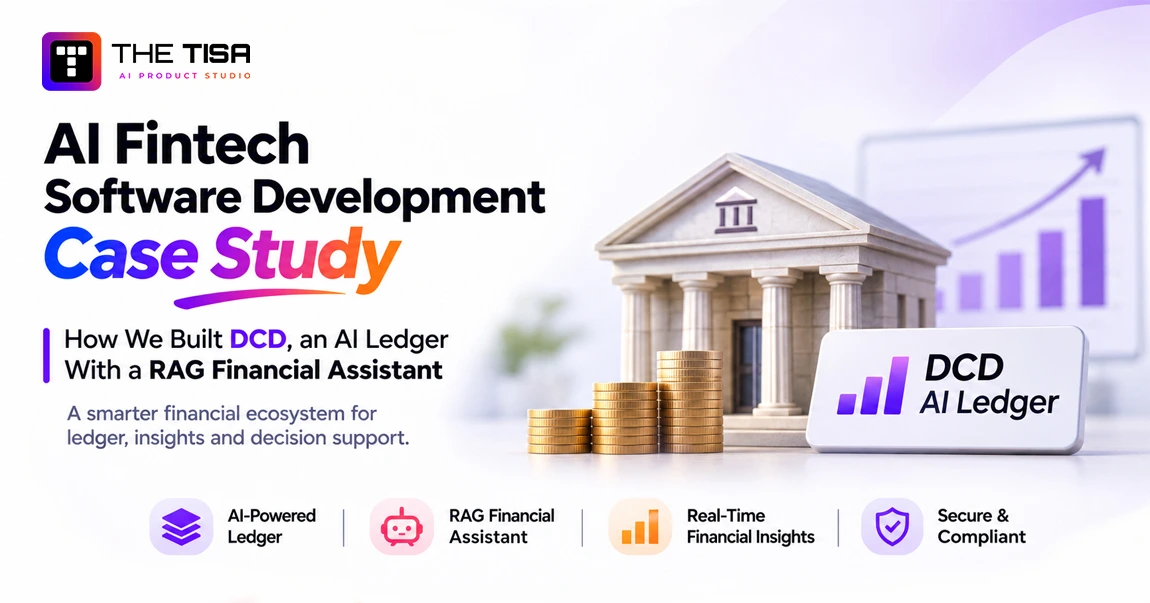
THE TISA built DCD (Debit Credit Desk), an AI ledger platform with a RAG financial assistant, for US client Rommy Cape. A four-person team delivered it in five months. DCD answers money questions from a user’s own records and receipts. Backend code calculates every total. The language model only explains numbers it receives, and every answer links to the records behind it.
TL;DR
This AI fintech software development case study shows how we combined a double-entry ledger, receipt and invoice extraction, and a retrieval-augmented generation (RAG) assistant in one Next.js, Node.js and MySQL platform. The assistant calls read-only, permission-scoped tools to fetch exact figures, searches linked documents for context, and then asks OpenAI to explain the result with references. It never posts entries on its own. DCD now serves 1,250 monthly active users who record about 18,600 transactions and ask about 4,850 AI questions a month. In our 400-question evaluation, 239 of 240 numeric answers matched the database, and 500 cross-account attack prompts produced zero data leaks. Users accept 91% of AI category suggestions without edits.

DCD at a glance
| Item | Detail |
|---|---|
| Client | Rommy Cape, United States |
| Product | DCD (Debit Credit Desk), a personal and business AI ledger |
| Industry | FinTech and financial management |
| Services | Fintech software development, AI integration, RAG development, generative AI development |
| Team | Four-person delivery team covering AI/ML, full-stack development, frontend, QA and DevOps responsibilities |
| Timeline | 5 months from discovery to production |
| Stack | Next.js, Node.js, Express.js, MySQL, OpenAI, Socket.IO, REST APIs, a separate Web3 layer |
| Users | Individuals, small businesses, accountants, auditors and administrators |
| Key Results | 1,250 MAU · 18,600 transactions a month · 91% category acceptance · 99.6% numeric answer accuracy · 81.3% less receipt processing time · 0 cross-account leaks in testing |
You can browse our other AI software development case studies for related projects.
What problem did Rommy Cape need to solve?
Rommy Cape ran personal and business finances across spreadsheets, a folder of scanned receipts and two separate tools. Every question took digging. How much did we spend on software last quarter? Which vendor invoice backs this $2,400 entry? Why is March over budget? Each answer meant opening files one by one.
The pain grew when an outside accountant joined. The accountant needed ledger access but not admin rights. An auditor later needed read-only history. The old setup could not separate those roles.
Rommy wanted one workspace for transactions, ledgers, budgets, documents and reports. Rommy also wanted an AI assistant that could answer plain-English questions about that data. We mapped six specific problems during discovery:
- Unlinked evidence. Receipts and invoices sat in folders with no tie to the entries they supported.
- Messy categories. Inconsistent labels made reports and reconciliation slow.
- No quick answers. Users had to inspect entries by hand to explain spending.
- Privacy risk. An AI assistant must never see another user’s or company’s records.
- Exact math. Totals and balances needed controlled calculation, not model estimates.
- Role confusion. Accountants and auditors needed access without full admin power.
The IRS expects your books to show income and deductions with supporting documents behind them. For a US small business, unlinked receipts are not just untidy. They are a weak spot at tax time.
Why build a custom platform instead of buying one?
Rommy’s requirements crossed three areas that off-the-shelf products usually split apart. Bookkeeping tools handled ledgers, receipt apps handled capture, and general AI chatbots answered questions without access to the books. Rommy needed all three in one permission model.
Three requirements made custom development necessary:
- Delegated professional access. Accountants and auditors needed scoped access to personal and business workspaces, with audit history, but without admin rights.
- AI answers grounded in the client’s own evidence. The assistant had to cite the user’s records and linked receipts, under the same permissions as the app.
- Room to extend. Rommy wanted to own the data model, so future bank, tax and Web3 integrations would not depend on a vendor’s roadmap.
The first release prioritized transaction entry, receipt linking, core reports and role-based access. The AI assistant followed once the ledger was stable.
Why couldn’t a chatbot on top of the ledger solve it?
A general-purpose chatbot without access to your records has to guess. Finance cannot run on guesses. Large language models (LLMs) predict text. They do not add columns reliably, and they do not know which records a user may see. We saw three ways a plain chatbot fails on financial data:
- It invents numbers. Ask for a quarterly total and the model may produce a plausible figure with no source.
- Vector search misses tables. Semantic search finds similar text, not the right row. One documented financial RAG build found questions like “What is our total FY2023 revenue?” often returned incorrect values from vector and keyword search alike.
- It ignores permissions. A model with broad database access can leak data across accounts through a clever prompt.
The wider market shows the same gap between adoption and value. Gartner found that 59% of finance leaders used AI in their function in 2025, and knowledge management led use cases at 49% adoption. Yet only 7% reported high or very high impact. Tools that look smart but cannot prove their answers rarely earn trust from finance teams.
So we did not bolt a chatbot onto a ledger. We built the ledger first, then gave the AI a narrow and verifiable job.
What is a RAG financial assistant?
A RAG financial assistant is an AI assistant that retrieves a user’s authorized financial records and documents first, then uses a language model to explain them. RAG stands for retrieval-augmented generation. The assistant grounds its financial answers in retrieved records and documents rather than relying on the model’s general knowledge.
In finance, good RAG needs two kinds of retrieval:
- Structured retrieval pulls exact figures from the database through fixed, tested queries.
- Document retrieval finds relevant passages in receipts, invoices and statements.
The model then writes a plain-language answer and cites both. DCD follows this pattern with one strict rule. Code supplies every financial figure, and the model may only restate and explain those figures.
What did THE TISA build?
We built the full product: frontend, backend, REST APIs, MySQL data model, ledger engine, document pipeline, reporting, role-based administration and the AI layer. Our AI application development and fintech teams worked as one squad. The table maps each module to the job it does.
| Module | What it does | Where AI helps |
|---|---|---|
| Ledger and transactions | Income, expenses, debit and credit journal entries, recurring transactions, reconciliation | Suggests categories; a person approves |
| Receipts and invoices | Upload, extract merchant, date, amount and tax; link the file to its entry | Extraction and draft entries |
| RAG financial assistant | Answers natural-language questions with references | Plans tool calls, writes explanations |
| Document search | Searches approved receipts, invoices and statements | Hybrid keyword and semantic search |
| Budgets and estimates | Monthly and department budgets, savings goals, budget-versus-actual, cash flow estimates | Explains variances in plain English |
| Reports | General Ledger, Trial Balance, Profit and Loss, Balance Sheet, Cash Flow | Summarizes a selected report |
| Notifications | Budget alerts, unusual activity, due payments, tax reminders, renewals, monthly summaries | Flags unusual spending for review |
| Access control | Standard user, accountant, auditor, admin and super admin roles | Retrieval follows the same roles |
| Import, export, integrations | Excel import and export, PDF reports, email reports, REST APIs, a separate Web3 layer | None by design |
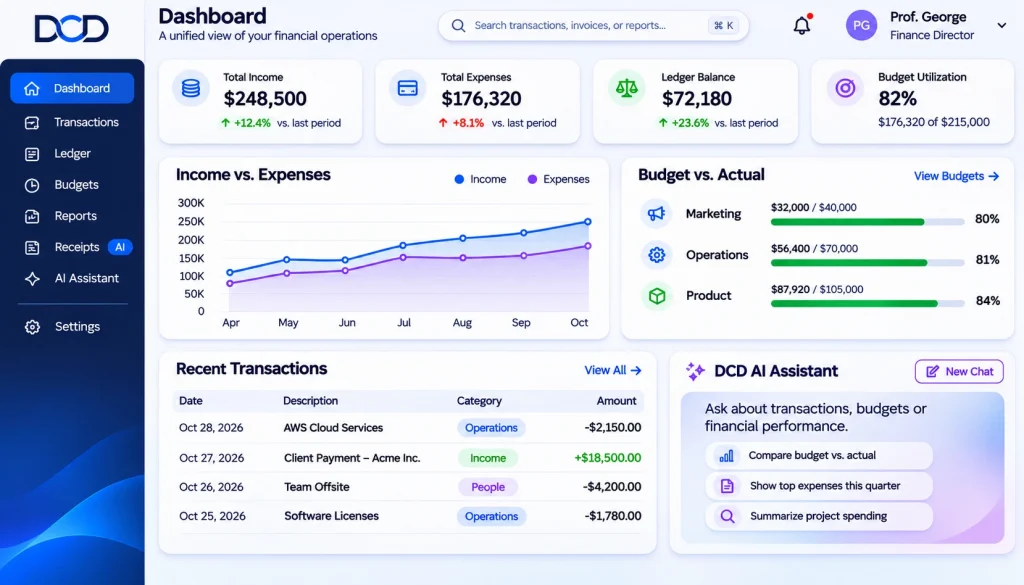
Two design choices shaped everything else. Deterministic code owns the money, so nothing the model says can change a balance. Every AI output is reviewable, so suggestions stay editable and answers carry links to their sources. Our UI/UX design team placed those references beside each answer, not behind a menu. The sections below show how each choice works in practice.
How does the DCD RAG financial assistant answer a question?
DCD answers in six steps, and code controls four of them. Take a real-style question from a small-business owner in Texas: “Why did we go over the marketing budget in October, and which invoices caused it?”
1. Read the question and resolve the scope
The backend first attaches the user’s identity, organization and role to the request. It resolves fuzzy terms into exact filters. “October” becomes October 1 to 31 in the account’s time zone and fiscal calendar. “We” becomes the user’s active organization. The model never decides whose data it can see.
2. Plan which tools to call
The model receives the question and a short list of tools. Each tool is a read-only, parameterized query that our engineers wrote and tested:
get_budget_vs_actual(category, period)

list_transactions(filters, limit)

get_category_totals(period, group_by)

search_documents(query, period, linked_only)
The model picks tools and arguments. The backend validates those arguments and applies the date ranges, organization scope and access filters resolved in Step 1. The model cannot override these values.
3. Calculate the facts in the database
MySQL runs the queries and returns exact results. For our example, the budget tool returns a $6,000 budget, $7,840 in actual spend and a $1,840 variance, or 30.7% over budget. All sums use fixed-point decimals, which store cents exactly, instead of floating-point numbers, which can add tiny rounding errors. This is the heart of the design. Every figure in a DCD answer originates in SQL. The model restates it, and code verifies it in step 5.
4. Retrieve supporting documents
The document tool searches receipts and invoices linked to the matching transactions. It uses hybrid search: keyword matching catches vendor names, invoice numbers and exact amounts, while semantic search catches meaning. The tool returns the top passages with document IDs, filtered by the access rules described in the security section.
5. Generate a grounded answer with references
The backend sends OpenAI a bounded context: the calculated facts, the top document passages and strict instructions. The model writes a short explanation. For our example, it explains that two unplanned conference sponsorship invoices added $2,100 in October. Each claim links to its transaction or document.
The backend then validates the draft before anyone sees it. Tools also return derived values, such as variances and percentages, so the model never calculates one. The model must identify which tool result supports each number in its answer. A post-check reads every amount, percentage and date in the draft and treats formats like $7,840.00 and 7840 as the same value. It confirms that each number matches its tool result and refers to the same category, vendor and period. A correct number tied to the wrong month fails, and any failed number blocks the answer. DCD regenerates once. If a mismatch remains, it shows the tool results as a plain table without the narrative.
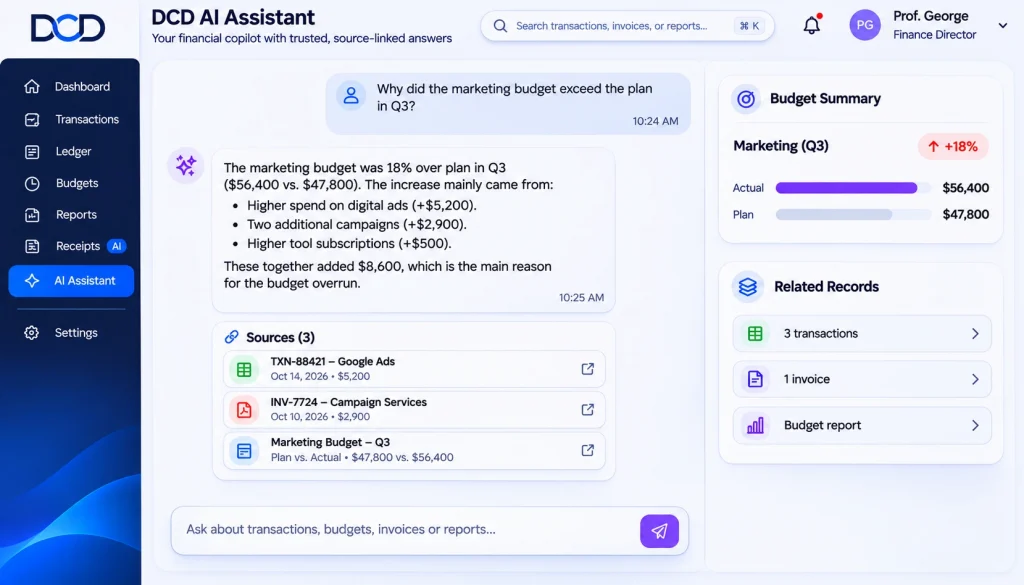
6. Clarify or limit when evidence is missing
Sometimes the records cannot support an answer. A receipt may be missing, or the question may be vague. DCD then asks a clarifying question or gives a limited answer that names the gap. It does not fill the hole with a guess.
What the model does, and what our code controls
| Task | Owner | Why |
|---|---|---|
| Who can see which records | Backend permissions | Access must not depend on a prompt |
| Date ranges, organizations, filters | Backend resolver | Ambiguity causes wrong totals |
| Totals, balances, variances | MySQL and ledger code | Exact, testable, auditable |
| Choosing which tools to call | Model, validated by code | Flexible planning, safe execution |
| Finding relevant passages | Hybrid search | Exact terms plus meaning |
| Explaining results in plain English | Model | This is what LLMs do well |
| Checking numbers in the answer | Backend post-check | Catches any drift before the user sees it |
| Posting entries to the ledger | A person with the right role | Accountability stays human |
AI engineer’s perspective: why we split the work this way
“Our first prototype let the model read query results and add them up for longer periods. It looked fine in demos. Then our test set caught a yearly total that was off by $38 because the model skipped a row. That one bug changed the design. Now the model never touches arithmetic. We also learned that ‘last quarter’ means different things to different businesses, so date resolution moved into code too.” — Anuj Kumawat, AI/ML Engineer
This split also keeps the system portable. The model sits behind one interface, so the client can change providers later with less rework and no changes to the ledger. We cover that approach in our vendor-agnostic AI guide.
If you already run a ledger, ERP or payment platform, the same read-only tool layer can sit on top of your existing database. Our AI integration projects usually start this way: tested tools first, model second.
How does the AI agent layer work without touching the books?
DCD’s assistant is a bounded AI agent. It plans steps and calls tools, but it acts inside hard limits. Its financial query tools are read-only. A separate, restricted workflow can save draft entries, and those drafts wait for human review. We sorted every possible action into three tiers before writing a line of agent code.
| Action Tier | Examples | Agent Permission |
|---|---|---|
| Read | Totals, transaction lists, document search, budget status | Allowed within the user’s scope |
| Draft | Suggested category, draft journal entry from a receipt, report summary | Only through the restricted draft workflow; a person reviews every draft |
| Write | Post an entry, change a budget, approve a reconciliation, edit roles | Never allowed; a person must act |
The agent also runs under fixed budgets. It may make at most six tool calls per question. Each tool call has a row limit and a timeout. If the agent hits a limit, it returns what it found and says what it could not finish.
Why not let the agent post entries? Because accounting needs a clear owner for every change. Our AI agent development practice follows one rule in regulated work: agents prepare, people commit. We explain the trade-offs in AI agents vs traditional automation and in our agentic AI development guide.
How does receipt and invoice processing work?
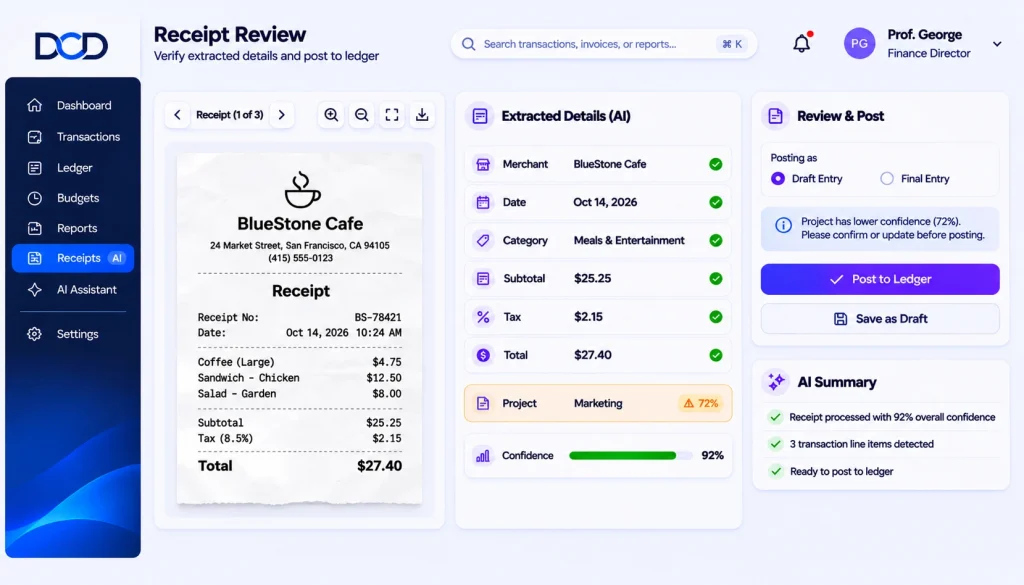
Receipt processing turns a photo or PDF into a reviewable draft entry in about 45 seconds of user time. Before DCD, the same task took users about four minutes, so the pipeline cuts processing time by 81.3%. The pipeline runs in five steps:
- Upload and store. The user uploads a receipt or invoice. DCD stores the original file in encrypted storage and never alters it.
- Extract fields. A generative AI extraction step reads the merchant, date, subtotal, tax, tip and total. DCD then assigns each field a high, medium or low confidence level. The application derives this level from format checks, the arithmetic check in step 3 and whether the field appears clearly on the document. It does not rely on raw model probabilities.
- Validate. Code checks that the subtotal, tax, tip and any discounts or service charges add up to the total. If the math does not reconcile, DCD flags the receipt for manual review. It also checks that the date is not in the future and that the currency matches the account.
- Check for duplicates. DCD compares merchant, amount and date against recent entries and flags likely repeats. It flags about 210 duplicate uploads a month.
- Draft and link. DCD creates a draft entry with a suggested category and links the file to it. The user reviews, edits and posts.
Low-confidence fields show in amber, so the reviewer knows where to look. The linked file then becomes a searchable context for the assistant. That link also supports the IRS guidance that records should back up each item on your return.
How does the ledger engine keep the numbers right?
The ledger engine follows double-entry rules, so every journal entry must balance before it saves. Nishant’s team built it as the platform’s source of truth. Key rules include:
- Balanced journals. Debits must equal credits. The API checks the totals first, then saves all lines of the entry together in one database transaction. Inside that same transaction, before it commits, a final query adds up the stored lines again. If debits and credits differ, the transaction rolls back and nothing is saved.
- Exact money types. Amounts use MySQL DECIMAL(19,4) columns, never floats.
- No silent edits. Nobody can overwrite a posted entry. Accountants correct mistakes with reversing entries, so the history stays intact.
- Idempotent writes. Each request carries a unique key. If the same request arrives twice, after a double click or a network retry, DCD posts the entry only once.
- Period locks. Accountants can lock a closed month. Later changes need a dated adjusting entry.
- Full audit trail. Every change records who, what, when and the previous value.
Reports such as the Trial Balance and Profit and Loss read from these posted entries only. Drafts and AI suggestions never appear in a financial report until a person posts them.
Developer’s perspective: building the ledger before the AI
“We were tempted to start with the assistant because it demos well. We started with the ledger instead. Once journals, period locks and reversing entries worked, the AI tools became simple read queries over trusted data. Real-time updates were the tricky part. We gave every user a private Socket.IO channel and checked permissions before each event, so an auditor never sees a draft they should not see.” — Nishant Agarwal, Full Stack Developer
How does DCD keep each user’s financial data private?
DCD applies permissions before any data reaches the model. That single rule drives the whole security design. If a record is not visible to a user in the app, the assistant cannot retrieve it either.
Five roles, one permission model
| Role | Can View | Can Change | Assistant Scope |
|---|---|---|---|
| Standard User | Own workspace | Own entries, budgets, documents | Own records |
| Accountant | Client ledgers they are assigned to | Entries, reconciliations, period locks | Assigned clients only |
| Auditor | Permitted records and audit history | Nothing | Read-only, permitted records |
| Administrator | Organization users and settings | Users, categories, settings | Organization records |
| Super Administrator | Platform settings | Platform settings and permissions | No financial context by default |
Controls across the AI path
- Scope injection. The backend automatically adds the user’s and organization’s filters to every tool call. The model cannot see or change these filters.
- Filtered retrieval. Document search filters by organization before ranking, not after. Unauthorized passages never enter the candidate list.
- Prompt minimization. Only the fields an answer needs go to OpenAI. Account numbers and tax IDs are masked.
- Provider settings. API requests run under business data controls. Teams should still confirm each provider’s current retention and training terms.
- Injection defense. Text inside an uploaded document is treated as data, never as instructions. A receipt that says “ignore previous rules” changes nothing.
- Audit logs. DCD logs every assistant question, tool call and returns a record ID for review.
Controls across the platform
DCD also uses secure login with two-factor authentication, encryption in transit and at rest, session timeouts, protected APIs, backup and recovery procedures, and a separately authorized Web3 module. Our security practices page covers how we handle client data during delivery.
What US teams should check before launch
Many US businesses that handle consumer financial data fall under the Gramm-Leach-Bliley Act. The FTC Safeguards Rule can apply well beyond banks, including to tax preparers and some accounting firms. It expects a written security program, access controls and service-provider oversight. DCD’s role model, audit logs and scoped AI requests support those expectations. Your legal team should still confirm which rules apply to your business.
For a broader checklist, read our AI SaaS security and compliance guide and the generative AI governance guide.
What does the DCD architecture look like?
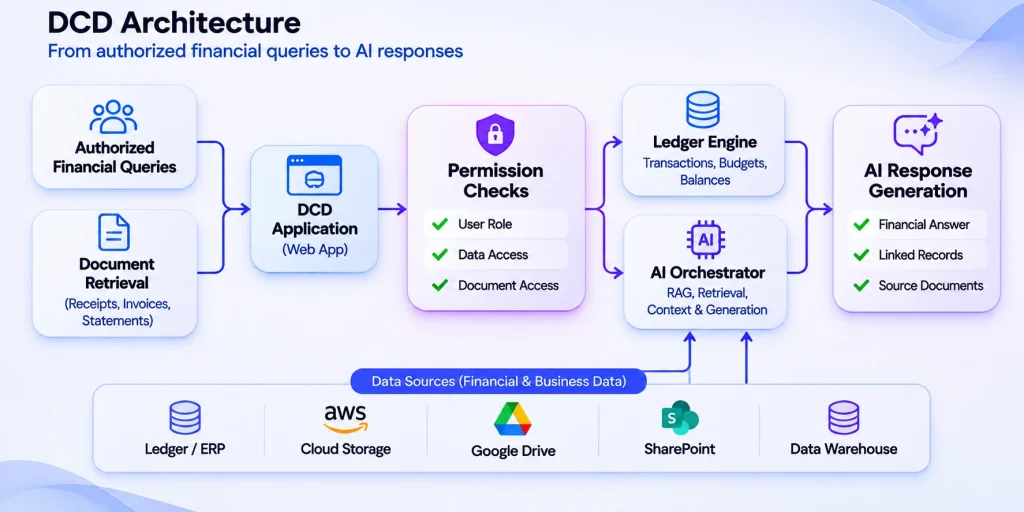
DCD uses a layered architecture where the ledger sits at the center and AI sits at the edge. Requests flow from the Next.js app to Express APIs, through a permission layer, then to either the ledger engine or the AI orchestrator. The orchestrator can only reach data through the same read tools the app uses.
The technology stack
| Layer | Technology | Why We Chose It |
|---|---|---|
| Frontend | Next.js | Role-based dashboards, fast reports, server rendering for public pages |
| Backend and APIs | Node.js, Express.js, REST | Clear endpoints for ledger, documents, AI tools and integrations |
| Financial data | MySQL | ACID transactions, decimal types, strong indexing for reports |
| AI generation | OpenAI | Tool calling, extraction and plain-English explanations |
| Document search | Hybrid keyword and vector index | Exact vendor names plus meaning |
| Real time | Socket.IO | Per-user channels for approvals, alerts and dashboard updates |
| Accounting logic | Custom ledger engine | Double-entry rules, period locks, reversing entries |
| Blockchain | Separate Web3 layer | Keeps crypto features away from core accounting |
The AI orchestrator is stateless: it handles each request independently and keeps nothing in memory afterward. The handler receives a scoped request, loads any recent conversation turns it needs from MySQL, calls tools and returns an answer. Conversation history lives in MySQL under the same permissions as other records. Our article on how full-stack teams integrate OpenAI and other AI APIs explains this pattern in more depth.
How did we deliver DCD in five months?
We delivered DCD in six phases over 20 weeks with a four-person team. We followed our standard AI software development process, with weekly demos for Rommy.
| Weeks | Phase | Key Outputs |
|---|---|---|
| 1-2 | Requirements and access planning | Workflow maps, role matrix, 400 representative AI questions |
| 3-4 | UI/UX design | Role dashboards, review screens, answer-with-references layout |
| 5-11 | Financial platform | Ledger engine, APIs, MySQL schema, reports, permissions |
| 12-15 | RAG and AI integration | Document pipeline, read tools, orchestrator, number post-check |
| 16-17 | Real-time and Web3 | Socket.IO channels, notifications, separate Web3 module |
| 18-20 | Testing and deployment | Accounting tests, access tests, AI evaluation, production launch |
We wrote the 400 test questions in week two, before any AI code existed.
Teams that already have a working product can take a shorter path. They usually need only the planning, AI integration and testing phases, which our fintech software development team usually scopes at six to ten weeks.
What went wrong, and what we changed
Four problems during the build shaped the final product.
1. Vector search returned the wrong month’s numbers. Early tests stored transaction summaries as text chunks. A question about March sometimes pulled February’s chunk because the wording matched. Fix: we removed transactions from the vector index entirely. Numbers now come only from SQL tools.
2. Receipt extraction confused subtotals with totals. Restaurant receipts with tips caused most errors. Fix: we added a math check that reconciles the subtotal, tax, tip and any discounts or service charges against the total, plus amber highlights for low-confidence fields.
3. Yearly questions overflowed the context window. “Summarize our spending this year” pulled thousands of rows. Fix: tools now return aggregates by category and month, with drill-down links instead of raw rows.
4. An early notification went to a whole organization room. In staging, an auditor saw a draft-entry alert meant for an accountant. Fix: we moved to per-user channels with a permission check on every event. We added that scenario to our regression suite.


DCD project results: AI accuracy, efficiency and platform performance
DCD combines financial record management with an AI assistant that retrieves information from authorized transactions and supporting documents. We evaluated the platform across receipt processing, financial question answering, AI suggestions and access control.
- 81.3% reduction in receipt processing time, from four minutes to 45 seconds
- 99.6% numeric answer accuracy in the 240-question numeric test
- 91% AI category suggestion acceptance without user edits
- Zero cross-account leaks in 500 adversarial prompts
These results demonstrate how DCD combines AI-assisted financial workflows with controlled calculations, document retrieval and permission-based access.
How we measured each result
| Metric | Result | Evidence |
|---|---|---|
| Receipt processing time | 4 min → 45 sec | Timed before-and-after tests |
| Manual processing time saved | 81.3% | Same receipt workflow comparison |
| AI category suggestion acceptance | 91% | Accepted suggestions ÷ total suggestions |
| Financial answer accuracy | 99.6% | 239 correct out of 240 test questions |
| Receipt total extraction accuracy | 97.8% | 600 labeled receipt samples |
| Answers with valid references | 96% | 400-question evaluation |
| Cross-account data leakage | 0 of 500 attempts | Documented adversarial test |
| AI response time (median / P95) | 3.1 s / 6.4 s | Production latency logs |
| Monthly active users | 1,250 | Analytics and authentication logs |
| Monthly transactions processed | 18,600 | Production database records |
| AI questions asked | 4,850 per month | Assistant request logs |
| Reconciliations closed by due date | 88% | Reconciliation records |
| Duplicate receipts flagged | About 210 per month | Duplicate-check logs |
How we evaluate answer quality
Usage shows adoption, not accuracy. So we built a fixed evaluation set of 400 questions from real workflows and rerun it before every release. The set includes 240 numeric questions, 60 unanswerable questions and 100 other questions covering document retrieval and financial explanations. These categories do not overlap. We measure numeric accuracy on the 240 numeric questions and reference coverage across all 400 questions. We count a reference as valid when it points to the correct record or document and supports the answer. Amazon’s finance team took a similar path and documented how systematic evaluation raised its RAG assistant’s accuracy from 49% to 86%.
The same suite also checks the failure cases that matter most in finance:
| Test | Sample | Result |
|---|---|---|
| Unanswerable questions handled with a clarifying or limited answer | 60 questions | 57 correct (95%) |
| Prompt injection via uploaded documents | 120 poisoned files | 0 rule overrides |
| Receipt date extraction | 600 receipts | 96.4% exact |
| Receipt merchant extraction | 600 receipts | 92.1% exact |
In the initial evaluation, 239 of 240 numeric answers matched the database, giving an accuracy rate of 99.6%. The only incorrect answer involved a question that mixed two fiscal years. We updated the resolver to request clarification when the fiscal period is ambiguous. The 99.6% figure reflects the initial evaluation, not a new measurement after the fix.
What the security tests covered
The 500 adversarial prompts ran in staging against three seeded organizations with overlapping vendor names. They covered five attack types: asking for another organization by name or ID, role escalation (“act as admin”), bulk requests such as “show every user’s spending,” instructions hidden in chat history, and document searches for another tenant’s invoice numbers. A test failed if any record or passage from outside the requester’s scope appeared in a tool result or answer.
These tests cover the assistant and API paths. They do not replace infrastructure security reviews or an independent penetration test, and we rerun them before every release.
What changed for each role
| Role | Before DCD | With DCD |
|---|---|---|
| Standard User | Searched spreadsheets for 6-10 minutes to explain spending | Gets a referenced answer in under 30 seconds |
| Business Owner | Waited for month-end reports | Checks budget-versus-actual any day |
| Accountant | Matched receipts to entries by hand | Reviews linked drafts and posts in bulk |
| Auditor | Requested files by email | Inspects permitted records and history directly |
| Administrator | Managed access across separate tools | Manages one role model for app and AI |
Gartner reports that finance AI use cases such as data extraction, AP and AR automation and report creation generally return value within nine to ten months. DCD’s receipt pipeline and report summaries fall into that faster-payback group of use cases.
What did the client say?
“Team TISA was professional and supportive during the DCD project. They took the time to understand how we wanted the platform to work and paid close attention during development. The system has made transactions, ledgers, documents and reports much easier to manage. Its AI tools also help users review information quickly without checking every entry one by one. We are thankful to the team and appreciate the work they have done.” — Rommy Cape, client, DCD
How does DCD compare with other ways to add AI to finance software?
For DCD’s requirements, we selected a hybrid design to balance accurate calculations, document retrieval and access control, at the cost of more engineering. The table compares basic implementations of each approach without extra security or validation controls. It reflects our design assessment, not a controlled benchmark.
| Approach | Exact Numbers | Document Context | Permission Safety | Build Effort |
|---|---|---|---|---|
| Plain LLM chatbot | Cannot verify account-specific figures without connected data or tools | None | Weak | Low |
| Vector-only RAG | Unreliable on tables | Good | Depends on filters | Medium |
| Free-form text-to-SQL | Good when the SQL is right | None | Risky; model writes queries | Medium |
| DCD hybrid: fixed SQL tools plus document RAG | Exact; checked by code | Good, with references | Strong; scope injected by backend | Higher |
We chose fixed, tested tools over free-form text-to-SQL on purpose. A model that writes its own SQL can write a slow query, a wrong join or a query that crosses accounts. Fixed tools trade a little flexibility for a lot of safety. Our RAG development services use the same pattern for other data-heavy clients, including the NovaMind multilingual RAG chatbot.
How much does it cost to build an AI accounting platform like DCD?
A platform like DCD typically costs $90,000 to $160,000 to build, depending on scope, roles and integrations. A focused MVP costs less. These ranges are planning estimates for US-market projects, not DCD’s contract value or a fixed THE TISA quote. Final cost depends on scope, integrations, security and compliance requirements, and team composition.
| Scope | Typical Features | Timeline | Cost Range (USD) |
|---|---|---|---|
| AI add-on to an existing ledger | Category suggestions, receipt extraction, read-only assistant | 6-10 weeks | $25,000-$55,000 |
| MVP AI ledger | Transactions, receipts, basic reports, single-role assistant | 3-4 months | $50,000-$90,000 |
| Full platform like DCD | Double-entry ledger, five roles, RAG assistant, reports, real time | 5-6 months | $90,000-$160,000 |
| Enterprise build | Bank feeds, multi-entity, multi-currency, SSO, compliance program | 7-12 months | $180,000+ |
Ongoing costs include hosting, model usage, monitoring and maintenance and support. At DCD’s volume, model usage is a small share of monthly running costs because tools send compact aggregates instead of raw rows. Our AI SaaS development cost guide and AI agent development cost guide break these numbers down further.
What should US fintech teams learn from DCD?
The biggest lesson is simple: build the financial truth first, then let AI explain it. Here are the eight rules we now apply to every AI integration in fintech.
- Keep accounting math in validated backend code, then verify every figure the model repeats.
- Apply access rules before retrieval, never after ranking.
- Use fixed tools, not free-form SQL. For known question types, tested queries are easier to secure and audit.
- Test extraction and retrieval separately. A great retriever cannot fix a misread receipt.
- Show references, but do not oversell them. They help users verify an answer. They do not guarantee it.
- Write the test questions before the AI code. A fixed target keeps the team honest.
- Reward “I don’t know.” A clear limited answer beats a confident wrong one.
- Measure quality, not just usage. Question volume means nothing without an accuracy test behind it.
Is your product ready for a RAG financial assistant?
A RAG financial assistant fits when most of these statements are true:
- ☐ Your financial data lives in a structured database you control.
- ☐ Users ask repeat questions about spending, budgets or documents.
- ☐ Supporting documents exist and can be linked to records.
- ☐ You have clear user roles and data boundaries.
- ☐ Someone owns accounting rules and can define correct answers.
- ☐ You can collect 200 or more real test questions.
It is a poor fit when data sits across unreconciled spreadsheets, when nobody can define a correct answer, or when you need the AI to move money on its own. In those cases, start with data cleanup or a workflow automation project first.
What’s next for DCD?
Rommy’s roadmap builds on the same architecture. Planned extensions include:
- Bank connections and automated reconciliation
- Multi-currency and multilingual support
- Payroll, inventory and tax platform connections
- Invoicing and payment collection
- Expanded cash flow forecasting
- Investment and crypto tracking through the separate Web3 layer
- Voice questions for mobile users
- Wider evaluation coverage as document volume grows
New features will add tools to the assistant without widening its permissions.
Want to see how we applied similar guardrails elsewhere? Read the AJOX AI agent case study, the OpsPilot AI integration case study or the Campus Flow AI in education case study. You can also explore our work for financial services and fintech companies.
Frequently Asked Questions
Q1. What is a RAG financial assistant?
Ans. A RAG financial assistant retrieves a user’s authorized records and documents, then uses a language model to explain them. In DCD, SQL tools supply exact figures and document search supplies context. The model writes the explanation and cites both.
Q2. Can an LLM do accounting calculations accurately?
Ans. Not reliably. LLMs predict text and can skip rows or round wrongly. DCD calculates every total in backend code and verifies each figure in the final answer, as step 3 and step 5 of the pipeline describe.
Q3. How long does it take to build AI accounting software like DCD?
Ans. A full platform like DCD takes about five to six months with a four-person team. An AI add-on to an existing ledger can launch in six to ten weeks.
Q4. How much does AI fintech software development cost?
Ans. AI fintech software development costs can range from $25,000 for an AI add-on to $160,000 for a full platform like DCD. Larger enterprise projects can start at $180,000, depending on integrations, security requirements and project scope.
Q5. Is RAG better than fine-tuning for financial data?
Ans. For live account data, yes. Financial records change daily, and RAG reads the latest data at answer time. Fine-tuning bakes knowledge into the model weights, so it cannot by itself keep one user’s data apart from another’s. Permissions must live in the application, and RAG retrieval fits that design naturally. Fine-tuning can still help with tone or document formats.
Q6. How do you stop an AI assistant from leaking another user’s data?
Ans. Apply permissions before retrieval. DCD’s backend injects user and organization scope into every tool call and filters documents before ranking. In our adversarial test, none of 500 cross-account prompts exposed another account’s records.
Q7. Can the AI assistant post or change journal entries?
Ans. No. The assistant uses read-only tools to retrieve financial information. A separate restricted workflow can save draft entries for human review, and only a person with the right role can post them.
Q8. Which AI models work for a fintech assistant?
Ans. DCD uses OpenAI for extraction and explanations. The model sits behind one interface, which reduces the work of moving to Anthropic Claude, Google Gemini or Azure OpenAI. A switch still needs adapter updates, tool-schema mapping, prompt tuning and a full rerun of the evaluation set, but the ledger and tools stay the same.
Q9. Does the FTC Safeguards Rule apply to AI finance apps?
Ans. It can. The rule covers many non-bank financial institutions, including tax preparers and some accounting firms. Access controls, audit logs and vendor oversight like DCD’s support compliance, but your legal counsel should confirm your obligations.
Q10. Can you add a RAG assistant to our existing fintech product?
Ans. Yes. We usually start with read-only tools over your current database, a document index and a 200-question evaluation set. We usually scope a pilot like this at six to eight weeks, depending on data quality and integration depth. Learn more about our AI integration services.
Building an AI-Powered Fintech Ledger With RAG?
Building an AI financial management platform requires more than transaction tracking and automated reports. Talk to THE TISA about your fintech product requirements, ledger architecture, AI integration, RAG financial assistant, and data security controls to understand the right approach for developing an AI-powered financial platform.
Discuss Your AI Fintech Project →