

Enterprise adoption of generative AI is growing, but turning promising pilots into production systems remains a challenge. A successful demo does not always translate into measurable business results.
McKinsey’s State of AI in 2026 survey found that nearly nine in ten organizations use AI regularly, yet only 37% attribute any EBIT impact to it, a figure that barely moved from the year before. Meanwhile, Menlo Ventures’ 2025 enterprise report estimates that enterprise spending on generative AI reached $37 billion in 2025, up from $11.5 billion in 2024.
Despite rising investment, measurable returns remain uneven. Success depends on data readiness, architecture, security, evaluation and a clear approach to scaling what works.
This guide explains generative AI development from both business and engineering perspectives. You will learn how to prioritize use cases, compare prompting, retrieval and fine-tuning, and design applications that integrate with existing CRM, ERP and identity systems.
It also covers security, testing, LLMOps, development costs, timelines, team models and a 90-day implementation roadmap. You will see when RAG implementation for businesses adds value, when AI agents are appropriate and how to decide between building, buying and partnering.
The guide is written for CTOs, founders and product leaders who need practical guidance for enterprise AI implementation.

Key Takeaways
- Start with a workflow, not a model. The projects that reach production solve one measurable business problem with clear owners and success criteria.
- Most enterprise value comes from grounding, not training. Retrieval over your own data solves more problems than fine-tuning, at lower cost and with easier updates.
- Agents are powerful but expensive to get wrong. Use them where a task truly needs multi-step decisions. Use fixed workflows everywhere else.
- Security is an architecture decision. Permissions must apply before data reaches the model, and every tool call needs scoped access and an audit trail.
- Evaluation is your quality gate. Without a test set and release thresholds, you cannot tell if a prompt or model change made things better or worse.
- Plan for run costs from day one. Token usage, retrieval, monitoring and human review often outlast the build budget within the first year.
- Scale in stages. A focused pilot, a production MVP and then a platform approach beat a big-bang rollout almost every time.
1. What Is Generative AI Development?
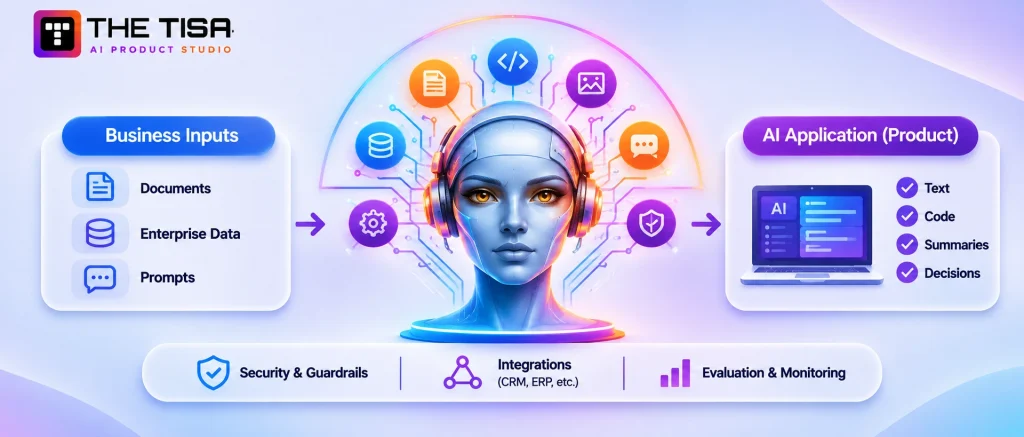
Put simply, it is the work of designing, building, testing and operating software that uses foundation models to create text, code, images, summaries or decisions from business context. The model is one component. The product is everything around it: data pipelines, retrieval, prompts, guardrails, integrations, user interfaces, evaluation and monitoring.
That distinction matters for budgeting. A company can call a model API in an afternoon. It cannot ship a reliable claims assistant, contract reviewer or support copilot in an afternoon, because those products must use the right data, respect permissions, cite sources, fail safely and stay affordable at scale.
How Does Generative AI Actually Work?
Three ideas explain most of what an executive needs to know.
Large language models (LLMs). An LLM is a neural network trained on very large volumes of text to predict the next piece of text, called a token. That simple objective, at scale, produces models that can summarize, classify, draft, translate, reason through steps and write code. Models from Anthropic, OpenAI, Google, Meta, Mistral and others now perform close to one another on many tasks. The Stanford AI Index 2026 notes that competition among leading labs is shifting toward cost, speed and reliability rather than raw capability.
Embeddings. An embedding turns a sentence, paragraph or document into a list of numbers that captures its meaning. Two passages about the same topic sit close together in that numeric space even when they use different words. Embeddings power semantic search, which is the backbone of most enterprise assistants.
Inference. Inference is the act of sending input to a model and getting output back. You pay for it per token, per request or per hour of the hosted compute. Inference cost and latency shape almost every architecture choice later in this guide.
How Is Generative AI Different From Traditional AI?
Traditional machine learning typically predicts outcomes, identifies patterns or classifies data. Generative AI creates new content, such as text, images and code, based on learned patterns and the context it receives. Both can work with structured and unstructured data, and many enterprise systems combine them.
| Dimension | Traditional AI / ML | Generative AI |
|---|---|---|
| Typical output | Predictions, classifications, scores | Text, code, images, summaries |
| Main input | Structured or unstructured data | Text, documents, structured records, images and audio |
| How you customize it | Feature engineering, training and tuning | Prompting, retrieval and fine-tuning |
| How you test it | Accuracy, precision, recall, error rates | Task accuracy, groundedness, relevance, safety |
| Main failure mode | Incorrect predictions or classifications | Incorrect or unsupported generated content |
| Example | Fraud score on a transaction | Draft of a suspicious-activity narrative |
The two approaches often work together. A traditional fraud model flags a suspicious transaction, while a generative AI application explains the findings to an analyst using supporting evidence.
Model API vs. Complete AI Application: What Are You Really Buying?
A model API provides AI capabilities, while a complete AI application connects those capabilities to business workflows. The difference lies in how the application manages data, permissions, integrations, quality and ongoing operations.
| Layer | Model API Alone | Complete Enterprise AI Application |
|---|---|---|
| Data access | Data supplied in the request | Connectors to your systems, with permissions |
| Context | Information provided in the request | Retrieval over approved, current sources |
| Controls | Provider-level safety and API controls | Business-specific guardrails, PII masking, policy rules |
| Actions | Can request tool calls; execution requires external code | Scoped tool execution across CRM, ERP and ticketing |
| Quality | Not evaluated against your business tasks by default | Measured against your own test set |
| Operations | Provider-level monitoring and usage metrics | Application monitoring, cost tracking, versioning, incident response |
If your use case only needs a general writing assistant, a licensed product is often enough. When AI must work with private data, support regulated decisions or take actions across business systems, a complete application with the right integrations and controls becomes more important.
When Does a Business Need Custom Development?
Custom work usually makes sense when one or more of these is true:
- The answer depends on proprietary data that off-the-shelf tools cannot reach safely.
- The output feeds a regulated decision in lending, insurance, healthcare, hiring or housing.
- The AI must take actions inside internal systems, not just produce text.
- The workflow is a competitive differentiator you do not want a vendor to own.
- Usage volume makes per-seat SaaS pricing more expensive than running your own stack.
If none of these apply, start with a commercial tool and revisit later. If several apply, plan for a real build. For a primer on the retrieval pattern behind most of these builds, see this business leader’s guide to RAG.
Which Misconceptions Slow Enterprise Teams Down?
- “We need to train our own model.” Very few companies need to. Prompting and retrieval over private data cover most business needs at a fraction of the cost.
- “The model will learn from our users automatically.” It will not. Improvement comes from your team updating prompts, content, retrieval and evaluation based on feedback.
- “Hallucinations make it unusable.” Unsupported answers are a real risk, but grounding, citations, refusal rules and human review reduce it to a manageable level for many workflows.
- “A bigger model fixes quality problems.” Most quality problems come from missing or poorly retrieved data. A bigger model often hides them for a while at a higher price.
- “Once launched, it is done.” Models, data and user behavior keep changing. A generative AI feature needs ongoing ownership, like any other product.
2. Enterprise Generative AI Use Cases: Where Is the Real Value?
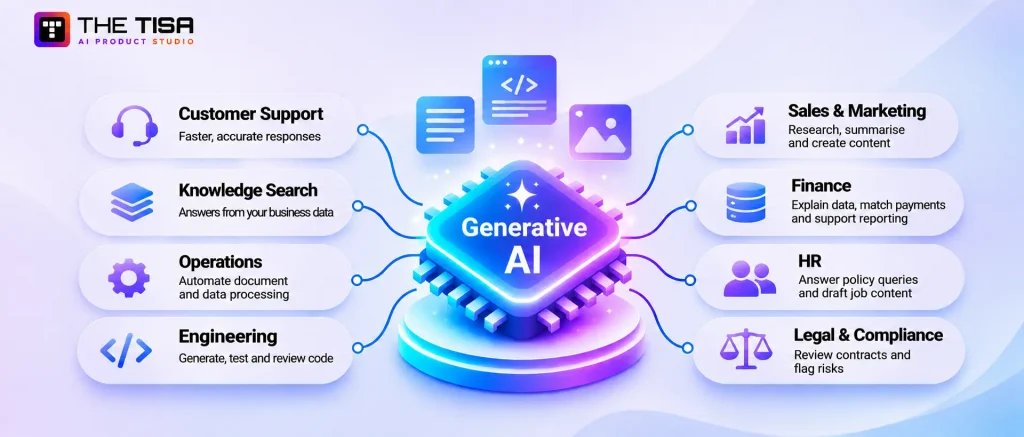
Enterprise generative AI use cases often deliver value when they handle repetitive work, rely heavily on documents or language, and allow people to review outputs efficiently. Customer support, internal knowledge search, document processing, software engineering and sales enablement are common examples.
Coding stands out. Menlo Ventures called it generative AI’s first breakout enterprise category, with roughly $4 billion in spend in 2025. The reason is simple: code is testable. A developer can run it, review it and reject it in minutes, so the feedback loop is tight and the risk is contained.
High-Impact Use Cases by Function
| Function | Use Case | What the AI Does | Typical Value Driver |
|---|---|---|---|
| Customer support | Agent assist and self-service | Drafts replies from policies and past tickets, cites sources, routes cases | Lower handle time, higher first-contact resolution |
| Knowledge management | Enterprise search assistant | Answers employee questions across wikis, SharePoint, Confluence and drives | Less time hunting for information |
| Operations | Document intake | Extracts fields from invoices, claims, PODs, forms and contracts | Fewer manual keystrokes, faster cycle time |
| Engineering | Coding assistant and code review | Writes tests, explains legacy code, proposes fixes | Faster delivery, lower maintenance load |
| Sales and marketing | Account research and content drafts | Summarizes CRM history, drafts outreach and proposals | More selling time per rep |
| Finance | Close and reporting support | Explains variances, drafts commentary, matches payments | Faster close, fewer reconciliation errors |
| HR | Policy assistant and job content | Answers benefits questions, drafts job descriptions | Lower ticket volume for HR teams |
| Legal and compliance | Contract and policy review | Flags clauses, compares against playbooks, summarizes obligations | Faster first-pass review |
A real example helps. Morgan Stanley Wealth Management built an internal assistant on OpenAI models that answers advisor questions from the firm’s own research library. OpenAI’s Morgan Stanley customer story reports that more than 98% of advisor teams use it, and the firm ran evaluations on every use case before deployment. The lesson is less about the model and more about the method: narrow scope, private content and a test framework from day one.
Business Benefits and ROI of Generative AI
Generative AI creates value in four ways. Each needs a different metric.
- Productivity: the same team handles more work. Measure throughput per person or hours saved per task.
- Cost: you reduce spend on outsourced processing, overtime or rework. Measure cost per transaction.
- Speed: work moves faster from request to result. Measure cycle time and time to first response.
- Experience: customers and employees get better answers with less effort. Measure CSAT, resolution rate or internal adoption.
Avoid promising all four at once. A support copilot usually proves productivity first and experience later. Document intake proves cost and speed first. Pick the primary outcome before you build, because it decides how you test and how you report results.
To turn these benefits into an ROI figure, measure each metric before launch, track the change after launch, convert it into dollars and subtract the full build and run cost. The cost, timeline and ROI section later in this guide gives the formula, a worked example and the KPIs to report.
A Simple Use-Case Suitability Matrix
Score each idea against value and feasibility before anyone writes code.
| # | Low Feasibility (Messy Data, High Risk, Many Integrations) | High Feasibility (Clean Sources, Human Review, Few Systems) |
|---|---|---|
| High value | Strategic bets. Fix data and controls first, then pilot. | Start here. Fund a focused pilot now. |
| Low value | Drop or park. | Quick wins. Buy a tool rather than build. |
Use the top-right box to identify your first wave of enterprise generative AI projects. Start with two or three high-value, feasible use cases and revisit the remaining ideas as your data, platform and governance mature.
Enterprise Generative AI Market Trends and Adoption
Spending data shows that companies now prefer AI embedded in tools they already use. Gartner’s September 2026 AI spending forecast puts worldwide AI spending at $2.7 trillion for 2026 and notes that, with generative AI in the Trough of Disillusionment, many enterprises lean on embedded features from incumbent software vendors.
This trend has a practical implication for enterprises adopting generative AI. Evaluate built-in AI features in Microsoft 365, Salesforce or ServiceNow before investing in custom development. Prioritize custom engineering where existing tools cannot meet your workflow, data or integration requirements. Our guide to AI workflow automation for operations leaders shows how to map those workflows before choosing tools.
Should You Start With Internal or Customer-Facing Use Cases?
Start internal in most cases. Internal tools give you a forgiving audience, a built-in review step and access to users who can explain exactly why an answer was wrong. That feedback builds your evaluation set faster than any synthetic data.
Customer-facing deployments carry more risk and more reward. A wrong answer reaches a customer directly, brand and legal exposure rise, and traffic is harder to predict. The upside is visible impact on revenue, retention or support cost.
| Factor | Internal first | Customer-facing first |
|---|---|---|
| Tolerance for errors | Higher, with employee review | Low, errors reach customers |
| Speed of feedback | Fast and detailed | Slower, often indirect |
| Compliance review | Based on data and workflow risks | Depends on data sensitivity, customer impact and legal requirements. |
| Business visibility | Moderate | High |
| Best for | Building platform, data and evaluation maturity | Companies with a strong existing support or product data foundation |
A common sequence works well: launch an agent-assist tool for support staff, measure accuracy against real tickets, then expose the same retrieval and guardrails to customers through self-service once quality holds. You reuse the platform and enter the riskier channel with evidence.
How Do You Estimate the Value of a Use Case Before Building It?
Use a simple, conservative formula during prioritization:
Estimated annual value = annual task volume × minutes saved per AI-assisted task × share of tasks where AI helps × fully loaded cost per minute
Be conservative on each input. Measure real volume from your systems. Time a sample of tasks instead of guessing. Assume AI helps on only part of the volume, because some cases will be too unusual or sensitive. Then compare the estimate against a rough build and run cost. If value does not clearly exceed cost under cautious assumptions, the use case is not ready.
How Do Priorities Differ for Startups, SaaS Companies and Large Enterprises?
| Company type | Typical first priority | Main constraint | What to get right early |
|---|---|---|---|
| Early-stage startup | An AI-native product feature that differentiates the offer | Runway and speed | A lean architecture, usage-based cost tracking and a clear evaluation loop |
| Growth-stage SaaS | AI features inside the existing product that raise retention or expansion revenue | Multi-tenant security and margins | Tenant isolation, per-customer metering and pricing that covers AI costs |
| Mid-market company | Internal productivity in support, sales or operations | Small engineering team | Buying commodity features and building only one or two differentiated workflows |
| Large enterprise | A governed platform serving many business units | Legacy systems, compliance and coordination | Shared model access, retrieval, guardrails and evaluation used by every team |
The tactics differ, but the principle holds across all four: tie each AI investment to a workflow and a number that leadership already tracks.
3. AI Readiness and Business Strategy: How Do You Decide What to Build First?
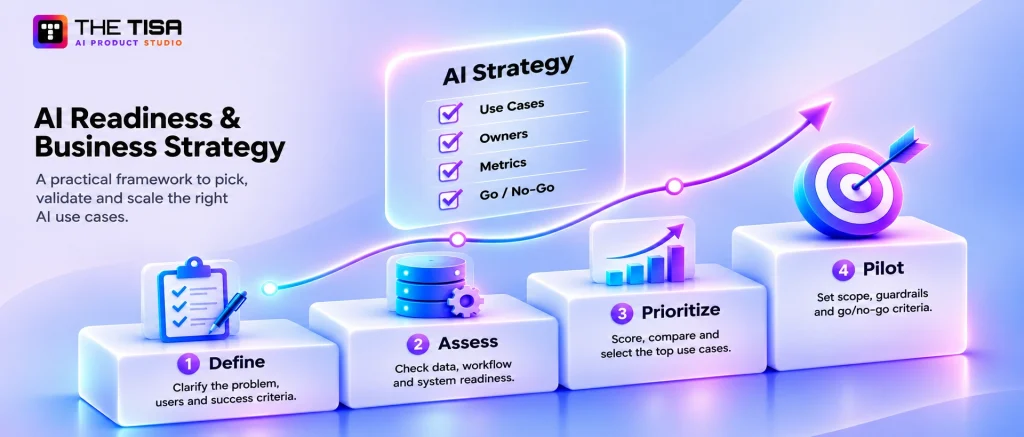
Build the strategy around a short list of workflows with named owners, baseline metrics and a clear stop rule. A strategy that lists twenty ideas and no kill criteria tends to produce twenty pilots and zero production systems.
Gartner’s analysis of why GenAI projects fail found that at least half of generative AI projects were abandoned after proof of concept, citing poor data quality, weak risk controls, rising costs or unclear value. Each of those causes can be caught before development starts.
Step 1: Define the Problem, Users and Success Criteria
Write a one-page brief for each candidate use case. It should answer:
- Who uses it? A named role, such as Tier 1 support agents or AP clerks, not “employees.”
- What job does it do? One sentence, such as “draft a cited reply to a billing ticket.”
- What does success look like? A measurable target, such as “cut average handle time from 9 minutes to 6 with no drop in CSAT.”
- What is the baseline? Today’s numbers, measured before the build starts.
- What can go wrong? The worst realistic failure and who gets hurt.
- Who owns it? A business owner who will use it and a technical owner who will run it.
If a team cannot fill in the baseline, the use case is not ready. You will have no way to prove value later.
Step 2: Assess Data, Workflow and System Readiness
Readiness is where most pilots quietly fail. Check five areas.
| Readiness area | Questions to answer | Red flag |
|---|---|---|
| Data | Do we have the documents or records? Are they current, deduplicated and labeled with owners? | Key knowledge lives in people’s heads or personal drives |
| Access | Can we enforce the same permissions the source systems use? | No clear mapping from users to document access |
| Workflow | Where does the AI fit in today’s process, and who reviews its output? | Nobody owns the step the AI will change |
| Systems | Do target systems expose APIs for read and write? | Integration requires screen scraping or manual export |
| People | Will users trust it, and do they have time to give feedback? | No champion in the business team |
McKinsey’s 2026 survey found that nearly three-quarters of AI high performers had fundamentally redesigned workflows around AI, compared with about a quarter of everyone else. Readiness is not only technical. It includes the willingness to change how work gets done.
Step 3: Score and Prioritize Use Cases
Use a weighted score so the conversation stays objective.
| Criterion | Weight | What a high score means |
|---|---|---|
| Business value | 30% | Large, measurable impact on cost, revenue or risk |
| Data readiness | 20% | Sources exist, are accessible and reasonably clean |
| Technical feasibility | 15% | Known patterns, few integrations, acceptable latency |
| Risk and compliance | 15% | Low regulatory exposure, human review is easy |
| Time to value | 10% | Pilot results possible within 8 to 12 weeks |
| Strategic fit | 10% | Supports a stated company priority or reusable platform |
Rank by total score. Then sanity-check the top three with the CFO and CISO before committing the budget. A use case that scores well but fails a security review should not move forward.
Step 4: Set Pilot Scope, Guardrails and Go/No-Go Criteria
A pilot proves value under controlled conditions. It is not a smaller version of the final product.
- Scope: one workflow, one user group, one data domain.
- Guardrails: human review of every output, no write access to systems of record, no customer-facing exposure unless approved.
- Duration: usually 8 to 12 weeks from kickoff to the go/no-go decision, with a fixed end date.
- Go criteria: quality above a set threshold on your test set, positive feedback from a small group of real users, cost per task within budget and no critical security findings.
- No-go criteria: quality stalls after two improvement cycles, users bypass the tool, or costs scale faster than value.
Write the go/no-go rules before the pilot starts and get the sponsor to sign them. This turns the end of the pilot into a decision, not a debate.
For a deeper look at building a company-wide plan, see our guide on creating an AI adoption strategy. If you are unsure whether you need strategy help or engineering help first, this comparison of AI consulting vs. AI development can clarify the split.
Who Should Own the Strategy?
Generative AI strategy fails when it sits only with IT or only with a business unit. The most effective setup is a small steering group with clear roles:
- Executive sponsor: usually the COO, CTO or a business-line leader who owns the budget and breaks ties.
- Product lead: turns ideas into scoped briefs and manages the portfolio.
- Engineering or architecture lead: owns platform decisions and technical feasibility.
- Security and privacy lead: sets guardrails and approves data use.
- Legal or compliance: reviews regulated use cases and vendor terms.
- Finance partner: validates value estimates and tracks actual costs.
Keep the group small enough to make decisions in one meeting. Large AI councils often turn into discussion forums that approve nothing.
What Strategy Mistakes Should You Avoid?
- Funding too many pilots at once. Ten small pilots usually produce ten half-finished prototypes. Two or three well-staffed pilots produce evidence.
- Choosing use cases by excitement. The most impressive demo is rarely the most valuable workflow. Let the scoring model decide.
- Skipping the baseline. Without before-and-after numbers, even a successful project looks like a cost.
- Ignoring change management. People need training, clear rules about acceptable use and a channel to report problems.
- Letting each team pick its own stack. Shared foundations for model access, retrieval, guardrails and evaluation prevent duplicated cost and inconsistent risk controls later.
What Belongs in the Business Case?
A CFO-ready business case for a generative AI initiative fits on two or three pages:
- The problem in business terms, with the current baseline.
- The proposed solution in one paragraph, including where people stay in the loop.
- Expected value with conservative, stated assumptions.
- Full cost covering build, run, internal time and support for at least 24 months.
- Risks and controls, including data, security, compliance and adoption risks.
- The staged plan with go/no-go gates and the budget released at each gate.
- Success and stop criteria agreed in advance.
Releasing the budget in stages, tied to gates, makes approval easier. Finance teams are more comfortable funding a six-week proof of concept with a clear decision point than a year-long program on faith.
4. The Generative AI Development Process: From Discovery to Production
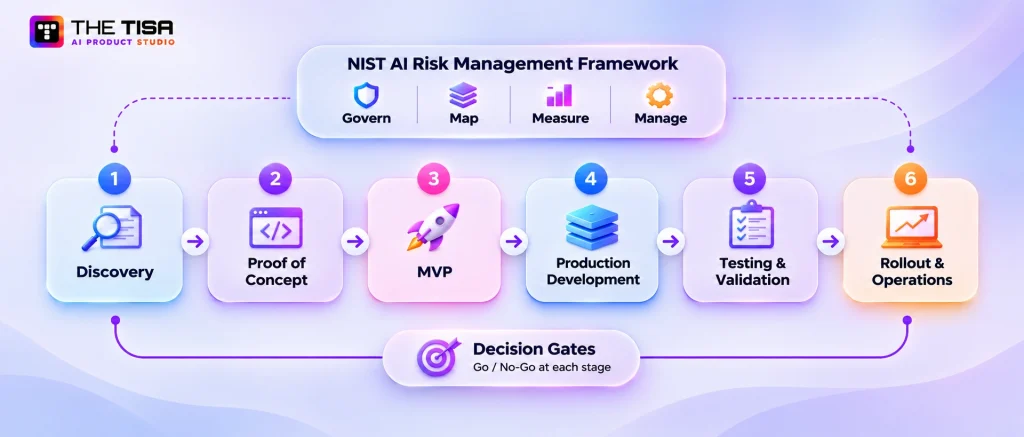
A reliable process moves through six stages: discovery, proof of concept, MVP, production development, testing and rollout. Each stage ends with a decision gate. The gates matter more than the stages, because they stop weak ideas early and keep strong ones from stalling.
This structure also maps cleanly onto the NIST AI Risk Management Framework, which organizes AI risk work into four functions: Govern, Map, Measure and Manage. You do not need to adopt NIST formally, but aligning your gates with it makes audits and board reporting much easier.
The Six Stages at a Glance
| Stage | Goal | Key deliverables | Decision gate |
|---|---|---|---|
| 1. Discovery | Confirm the problem is worth solving | Problem brief, baseline metrics, data inventory, risk notes | Is there a measurable problem with accessible data? |
| 2. Proof of concept | Prove the AI can do the core task | Prototype on real data, first evaluation set, model shortlist | Does quality clear the minimum bar on real examples? |
| 3. MVP | Prove users will adopt it in a real workflow | Working app for a pilot group, integrations, feedback loop | Do users adopt it, and does it move the target metric? |
| 4. Production development | Make it secure, scalable and supportable | Hardened architecture, SSO, logging, guardrails, CI/CD | Does it pass security, legal and performance review? |
| 5. Testing and validation | Prove it is safe to widen exposure | Full evaluation suite, red-team results, load tests | Are all release thresholds met? |
| 6. Rollout and operations | Scale use and keep quality stable | Phased launch plan, runbooks, monitoring dashboards | Is value holding as usage grows? |
Stage 1: Discovery
Discovery usually takes two to four weeks. The team interviews users, watches the current workflow, inventories data sources and documents constraints such as data residency, retention and approval chains.
The most valuable output is often a “no.” If the knowledge the AI needs does not exist in writing, or the process owner will not commit to reviewing outputs, it is cheaper to learn that in week two than in month four.
Stage 2: Proof of Concept
A proof of concept answers one narrow question: can a model do this task well enough on our data? It is not a product and should not have a polished interface.
Good POCs use 100 to 300 real examples, which then become the start of your long-term evaluation set, compare two or three model options and measure results against a rubric that domain experts agree on. Keep the POC short, typically three to six weeks. A POC that drags on for months usually signals unclear success criteria.
Stage 3: Minimum Viable Product
The MVP puts the capability into a real workflow for a small group of users. It connects to at least one live system, includes basic authentication and captures user feedback on every output.
The MVP answers a different question from the POC: will people actually use it, and does it move the business metric? Plenty of technically strong prototypes fail here because they add a step to the user’s day instead of removing one.
Stage 4: Production Development
This is where most engineering hours go. The team hardens the architecture, adds single sign-on and role-based access, builds guardrails, sets up observability, writes infrastructure as code and creates the deployment pipeline.
Production work also covers the unglamorous parts: error handling when the model provider times out, fallbacks when retrieval returns nothing useful, rate limits, data retention policies and admin tools for content owners.
Stage 5: Testing and Validation
Generative systems need two kinds of testing. Classic software testing covers APIs, integrations, load and security. AI evaluation covers answer quality, groundedness, safety and task success across a representative test set. The testing section later in this guide covers it in depth.
Stage 6: Rollout and Operations
Roll out in waves: internal users, then a broader internal group, then customers if relevant. Each wave should have its own success thresholds and a rollback plan. After launch, the work shifts to monitoring, prompt and model updates, cost control and adding new data sources.
How Do You Move From Experiment to Production?
The jump from experiment to production fails when teams treat the POC code as the foundation for the product. Notebooks and scripts written to prove a point rarely survive contact with real users, real permissions and real traffic.
Plan for a deliberate rebuild between POC and MVP. Keep the prompts, evaluation sets and lessons. Replace the plumbing. Teams that budget for this step move faster overall than teams that try to patch a prototype into production.
You can see how this staged approach works in practice in our own AI software development process, which uses discovery, architecture, iterative build and optimization phases with explicit go/no-go recommendations.
What Should a Proof-of-Concept Report Contain?
A POC should end with a short report that leadership can act on. It should include:
- The exact question the POC set out to answer
- The data used, including volume, sources and known gaps
- Models and approaches tested, with the reason for the final choice
- Evaluation results against the agreed thresholds, with examples of good and bad outputs
- Estimated production cost per task at expected volume
- Risks found, including security, privacy and compliance issues
- A clear recommendation: proceed, adjust and retest, or stop
If a POC report cannot show failure examples, the testing was not thorough enough.
What Should You Receive at Handover?
Whether the build is internal or outsourced, production readiness includes a defined set of handover materials: architecture diagrams, data flow documentation, a prompt and model registry, the evaluation suite with its latest results, runbooks for common incidents, infrastructure as code, access lists and a cost dashboard. Without these, the system depends on the memory of the people who built it.
5. Enterprise Generative AI Architecture: How Should the System Be Designed?
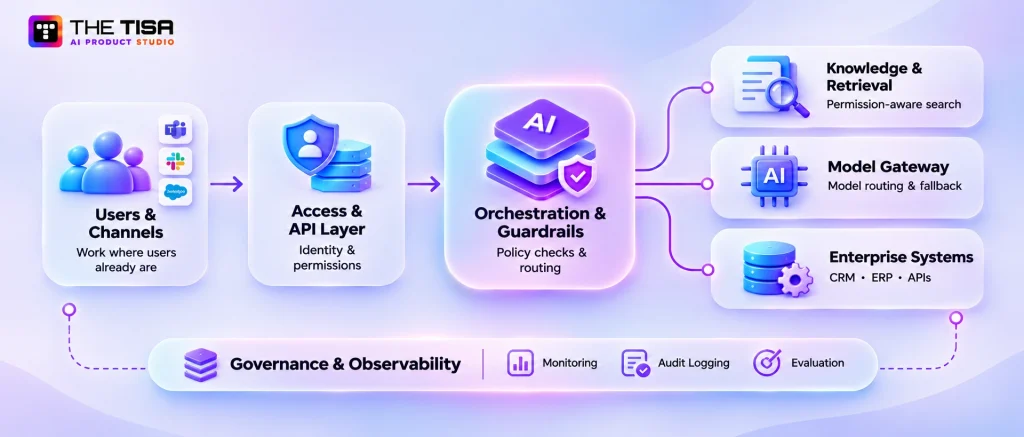
A production-grade architecture has six layers: user channels, an access and API layer, orchestration with guardrails, knowledge and retrieval, a model gateway and your existing enterprise systems. A governance and observability rail runs alongside all of them. The key design rule is simple: no request should reach a model, a document or a system of record without passing identity, permission and policy checks first.
The orchestration layer is highlighted because it is where most business logic, safety controls and cost decisions live. It is also the layer teams most often underbuild in a prototype.
Key Layers of Enterprise Generative AI Architecture
1. Users and channels. People rarely want another app. Put the assistant where work already happens: a panel inside Salesforce or ServiceNow, a bot in Microsoft Teams or Slack, a button inside your own product. Each channel should pass the user’s identity downstream, not a shared service account.
2. Access and API layer. An API gateway authenticates every request through your identity provider, such as Okta or Microsoft Entra ID, applies rate limits and attaches session context. This layer is also where you enforce tenant isolation in a multi-customer SaaS product.
3. Orchestration and guardrails. This is the brain of the application. It selects the prompt template, decides which model to call, retrieves context, calls tools and checks inputs and outputs against policy. Guardrails here include PII masking, blocked topics, prompt-injection detection, output schema validation and citation checks.
4. Knowledge and retrieval. Pipelines ingest documents and records, split them into chunks, create embeddings and store them in a search index with metadata such as owner, date, sensitivity and access list. At query time, the retriever filters by the user’s permissions before ranking results. Filtering after retrieval is a common and dangerous shortcut.
5. Model gateway. A thin internal service that wraps every model provider behind one interface. It handles retries, fallbacks, routing by cost or task, token accounting and provider failover. It helps reduce vendor lock-in and simplifies switching between model providers.
6. Enterprise systems. CRM, ERP, ticketing, HRIS, data warehouses and document stores supply context and, in some designs, receive actions. Every connection should use least-privilege credentials scoped to the specific operation.
Governance and observability rail. Tracing, quality evaluation, cost per request, audit logging, prompt and model versioning and incident response cover every layer. Without this rail, you cannot answer basic questions such as “why did the assistant say that?” or “what did this feature cost last month?”
Request Flow: How Does One Request Move Through the System?
Following one request through the architecture shows how the layers work together.
- A customer submits a ticket at the help desk. A webhook publishes an event to a queue.
- The orchestration service picks up the event, authenticates as a scoped service identity and loads the ticket, the customer’s plan and recent history through read-only tools.
- Guardrails mask payment details and personal identifiers that the reply does not need.
- The retrieval service searches policy articles and resolved tickets, filtered to content approved for customer-facing use, and reranks the results.
- The model gateway routes the request to a mid-tier model with the instructions, the retrieved passages and the ticket.
- The draft reply returns with citations. An output check confirms that every policy claim maps to a cited passage and that no restricted data appears.
- The draft lands in the agent’s view with sources highlighted. The agent edits and sends it, and the edit is logged as feedback.
- The trace, including prompt version, model, tokens, latency and outcome, goes to the observability platform for monitoring and evaluation.
No step writes to the customer record without a person acting. That single rule removes a large class of risk while still saving most of the drafting time.
Failure Handling: What Happens When Something Breaks?
Every step in that flow depends on an external service that will fail at some point. Decide the behavior for each failure in advance, so users get a predictable experience instead of a spinning wheel or a half-finished action.
| Failure | How you detect it | What the system should do |
|---|---|---|
| Model API timeout | Request exceeds its latency budget | Retry once with backoff, then fall back to a secondary model or return search-only results with a clear message |
| Rate limit from the provider | HTTP 429 errors, quota dashboards | Queue and retry with exponential backoff and jitter, pause batch work first, and plan quota increases or reserved capacity |
| Duplicate action after a retry | Idempotency key already recorded | Return the original result instead of running the action again |
| No relevant content retrieved | Top retrieval score below the threshold | Say the answer is not in approved sources, then offer search results or a human handoff |
| Invalid structured output | Schema validation fails | Retry once with the validation error included, then fail safely without passing bad data downstream |
| Downstream system or tool unavailable | Circuit breaker opens after repeated errors | Disable that tool temporarily and tell the user which step is unavailable |
| Guardrail blocks the response | Policy or safety check fires | Return a polite refusal and log the event for review |
| Task budget exceeded | Per-task or per-user cost meter | Stop the task, notify the user and require approval to continue |
Test these paths on purpose. Inject timeouts, rate-limit errors and empty retrieval results in staging and confirm the system behaves as designed. Failure paths that nobody has exercised tend to break in production at the worst moment.
How Do You Integrate Generative AI With CRM, ERP and Other Systems?
Most enterprise value comes from connecting AI to systems of record. The integration pattern depends on whether the AI needs to read, write or react.
| Integration need | Recommended pattern | Example |
|---|---|---|
| Read current records at question time | Synchronous API call through a scoped tool | Pull open opportunities from Salesforce for an account summary |
| Search large document sets | Scheduled or event-driven ingestion into the retrieval index | Index SharePoint policies nightly and on every update |
| React to business events | Event-driven processing through queues or webhooks | Summarize a new support ticket as soon as it is created |
| Write back to a system of record | Draft-then-approve flow with human confirmation | Create a draft credit memo in NetSuite for a finance reviewer |
| Bulk processing | Batch jobs using provider batch APIs | Classify 200,000 historical contracts overnight |
| Legacy systems without APIs | Integration layer or middleware first, AI second | Wrap an AS/400 order system with a REST service |
Two rules keep these integrations safe. First, the AI proposes and the system of record disposes: writes go through the same business validation as a human action. Second, every tool exposed to the model should do one narrow thing with typed inputs, so the backend can validate every argument.
For platform-specific guidance, see our AI CRM integration guide for Salesforce, HubSpot and Dynamics 365. If your core systems are older, read how to approach AI integration into legacy systems without disrupting operations.
Where Does the Model Context Protocol (MCP) Fit?
The Model Context Protocol is an open standard that lets AI applications connect to tools and data sources through a common interface. Instead of writing a custom connector for every model and every system, a team builds an MCP server for a system once, and any MCP-compatible client can use it.
Anthropic introduced MCP in late 2024. In December 2025, it donated MCP to the Linux Foundation’s new Agentic AI Foundation, which Anthropic co-founded with Block and OpenAI and which Google, Microsoft and AWS support. That matters for enterprises: the protocol now lives in a vendor-neutral foundation, which lowers the risk of standardizing on it.
MCP does not replace your security model. An MCP server still needs authentication, least-privilege scopes, input validation and logging. Treat each server like any other internal API that can change data.
How Do You Handle Identity, Access, Observability and Resilience?
- Identity: propagate the end user’s identity through every layer. Avoid shared super-user tokens for retrieval or tool calls.
- Access: apply document- and row-level permissions before data enters the prompt. Mirror the source system’s access control lists in your index metadata.
- Observability: trace each request end to end, including prompt version, model, token counts, latency and tool calls. Apply data masking, access controls and retention rules when logging retrieved content and model outputs.
- Resilience: set timeouts, retries with backoff, circuit breakers and a fallback model. Decide in advance what users see when the AI is unavailable, such as a search-only mode.
Which Deployment Pattern and Architecture Style Should You Start With?
A hybrid pattern is increasingly common: sensitive extraction runs on a self-hosted model, while general drafting uses a managed frontier model. The model gateway makes this routing invisible to the application.
Architecture style matters too. A modular monolith is often the right starting point for a first AI product, with services split out only when scale or team structure demands it. Our comparison of monolith vs. microservices for AI applications covers that decision in detail.
What Changes for Multi-Tenant SaaS Products?
SaaS companies that embed generative AI in their product face an extra architecture problem: every customer’s data must stay isolated, and every customer may want different behavior.
- Tenant-scoped retrieval: store a tenant ID on every chunk and enforce it as a mandatory filter in the retrieval service, not in application code that a developer might forget.
- Per-tenant configuration: allow customers to set tone, allowed sources, languages and feature toggles without code changes.
- Usage metering: track tokens and actions per tenant so you can price AI features, enforce plan limits and spot abuse.
- Noisy-neighbor protection: apply rate limits and queues per tenant so one heavy customer cannot slow everyone else down.
- Data deletion: when a customer leaves, remove their vectors, logs and cached responses along with their source data.
- Customer controls: many enterprise buyers want the option to disable AI features or choose a model region.
These choices also shape pricing. Usage-based AI costs do not fit neatly into flat per-seat plans, so product and finance teams should model margins per tenant before launch.
How Should You Design APIs for AI Features?
AI features behave differently from typical API endpoints. They are slower, more expensive and less predictable. A few design choices make them easier to integrate:
- Streaming endpoints for chat and drafting, so clients can show partial output.
- Asynchronous jobs for long tasks such as document analysis, with a job ID, status endpoint and webhook on completion.
- Idempotency keys so retries after timeouts do not trigger duplicate actions or duplicate charges.
- Structured responses that separate the answer, citations, confidence signals and any proposed actions.
- Explicit error types for cases such as no relevant data found, policy refusal, provider unavailable and budget exceeded, so the client can respond appropriately.
- Version headers that record which prompt and model version produced each response, for support and audit.
6. Models, RAG, Fine-Tuning and AI Agents: Which Approach Fits Your Use Case?
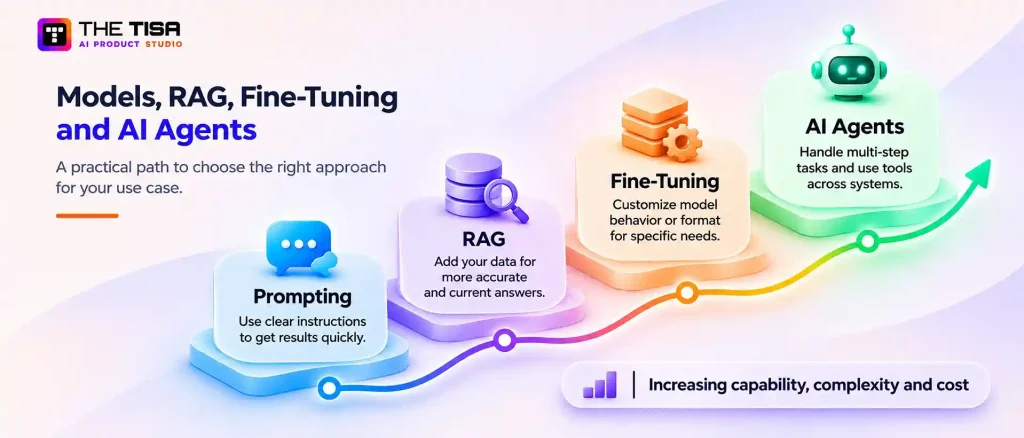
Start with prompting, add retrieval when the model needs your data, consider fine-tuning only when behavior or format must change in ways prompts cannot fix, and use agents only when a task genuinely requires multi-step decisions and tool use. Most enterprise applications combine the first two. Far fewer need the last two.
That order matters because each step adds cost, complexity and risk. Anthropic’s engineering team, writing about building effective agents, observed that the most successful implementations it saw used simple, composable patterns rather than heavy frameworks.
How Do You Choose Models, a Tech Stack and Infrastructure?
Choose the model last, not first. Define the task, the data, the latency budget and the privacy constraints, then test two or three candidate models against your own evaluation set. The best model on a public benchmark is often not the best model for your workflow or your budget.
The model market is moving fast. Menlo Ventures’ mid-2025 LLM market update reported that enterprise LLM API spend more than doubled in six months, from $3.5 billion to $8.4 billion, and that market share shifted noticeably between providers. Gartner’s July 2026 forecast for AI models and platforms expects spending on generative AI models to grow 117% in 2026. Both point to the same conclusion: provider leadership changes quickly, so your architecture should not depend on one vendor.
What Types of Models Are Available?
| Model type | Examples | Strengths | Trade-offs |
|---|---|---|---|
| Proprietary frontier models | Claude, GPT, Gemini families | Highest general quality, strong reasoning, tool use, managed APIs | Per-token costs, data processing and retention depend on the provider and deployment option. |
| Open-weight models | Llama, Mistral, Qwen, Gemma families | Run in your own VPC or on-premises, full control, no per-token fees | You own hosting, scaling, patching and safety tuning |
| Small and fast models | Lightweight tiers from major providers, small open models | Low latency and cost for classification, routing, extraction | Weaker on complex reasoning |
| Multimodal models | Vision- and audio-capable variants | Read images, PDFs, scans, charts and speech | Higher cost per request, harder to evaluate |
| Embedding models | Provider and open-source embedders | Power semantic search and clustering | Must be re-run when you switch models |
Most enterprise systems use more than one. A common pattern routes simple requests to a small model, sends complex reasoning to a frontier model and uses a separate embedding model for retrieval.
How Should You Evaluate and Select a Model?
Score candidates on six criteria, weighted for your use case.
- Quality on your tasks: measured on your evaluation set, not on leaderboards.
- Cost: price per million input and output tokens, plus features such as prompt caching and batch discounts.
- Latency: time to first token and total response time at your expected load.
- Privacy and residency: where data is processed, retention terms, zero-data-retention options and availability inside your cloud tenant.
- Context window: how much text the model can consider at once, which affects retrieval design.
- Operational fit: SLAs, rate limits, regional availability, model deprecation schedule and support.
Re-run this evaluation at least twice a year. A model that won last year may now cost twice as much as a newer option of equal quality.
What Does a Typical Generative AI Tech Stack Include?
| Layer | Common choices | What it does |
|---|---|---|
| Orchestration frameworks | LangGraph, LangChain, LlamaIndex, Semantic Kernel, provider agent SDKs | Chains model calls, retrieval and tools into workflows |
| Vector storage and search | pgvector for PostgreSQL, Elasticsearch or OpenSearch, Pinecone, Weaviate, Milvus, Azure AI Search | Stores embeddings and runs similarity and hybrid search |
| Model access | Direct provider APIs, Amazon Bedrock, Azure AI Foundry, Google Vertex AI | Routes requests to models under your cloud contracts |
| Application layer | Next.js or React front ends, Node.js or Python back ends | User experience, business logic and APIs |
| Data and pipelines | Airflow, Dagster, dbt, cloud ETL services | Ingests, cleans, chunks and refreshes source content |
| Observability and evaluation | LangSmith, Langfuse, Arize, OpenTelemetry-based tooling | Traces requests, tracks quality, cost and latency |
| Security and guardrails | Provider guardrails, policy engines, DLP and PII redaction tools | Filters inputs and outputs, enforces policy |
A practical tip: if you already run PostgreSQL, start with pgvector. It keeps vectors next to your relational data, simplifies permissions and avoids another vendor until scale demands it.
Generative AI Model Hosting Options: Cloud vs. On-Premises
The core choice is between consuming models as a cloud service and running them on infrastructure you control. Cloud options trade some control for speed and lower operating effort. On-premises and self-hosted options trade higher cost and slower access to new models for maximum data control. Most enterprises end up somewhere between the two.
| Hosting option | Best for | Watch out for |
|---|---|---|
| Public provider API | Fast start, low volume, non-sensitive data | Data handling terms, vendor lock-in, rate limits |
| Managed cloud model services (Bedrock, Azure, Vertex) | Most US enterprises with existing cloud agreements | Regional model availability, quota management |
| Self-hosted open-weight model in your VPC | Strict data control, predictable high volume | GPU cost, MLOps skills, security patching |
| On-premises or air-gapped | Defense, some healthcare and government workloads | Highest cost and slowest access to new models |
| Hybrid | Mixed sensitivity across use cases | More complex routing and governance |
For most US companies, accessing models through an existing AWS, Azure or Google Cloud agreement is a practical option. It supports established security and compliance requirements, uses committed spend where applicable and simplifies procurement.
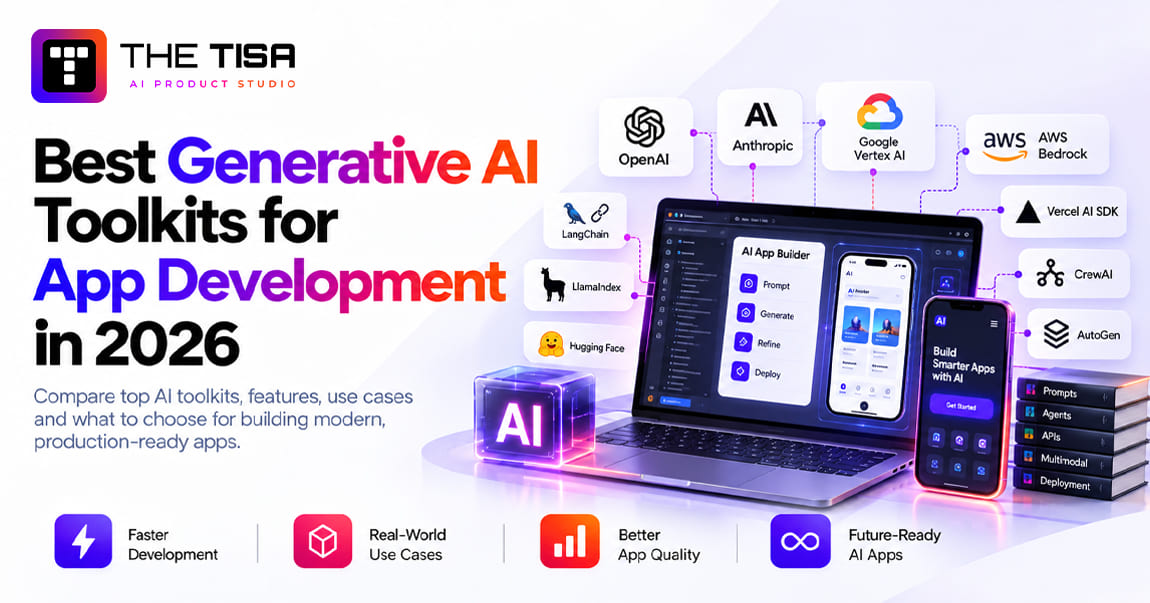
To keep switching costs low, put a thin model gateway between your application and providers. Our article on vendor-agnostic AI across OpenAI, Claude and Azure explains the pattern. For a broader tool comparison, see the best generative AI toolkits for app development.
Do Long-Context Models Replace RAG?
No, but they change where retrieval is needed. Modern models can read very large inputs in one request, which makes it tempting to paste entire document sets into every prompt. That works for small, stable collections such as a single contract or a short policy manual.
For enterprise knowledge bases, retrieval still wins for four reasons:
- Cost: sending hundreds of thousands of tokens with every question multiplies inference spend, even with caching.
- Latency: larger inputs take longer to process, which users notice.
- Permissions: retrieval lets you filter content per user. A giant shared context does not.
- Freshness and scale: knowledge bases change daily and often exceed any context window.
The practical answer is a blend. Use retrieval to select the most relevant material, then use the model’s larger context to include whole sections or neighboring passages rather than tiny fragments. That combination often improves answer quality without the cost of sending everything.
Should You Use Open-Weight or Proprietary Models?
| Question | Lean toward proprietary APIs | Lean toward open-weight models |
|---|---|---|
| Do you need the strongest reasoning available? | Yes | Less critical |
| Is your volume high and predictable? | Not necessarily | Yes, self-hosting can pay off |
| Must data never leave your infrastructure? | Possible through cloud tenants, check terms | Strongest control |
| Do you have MLOps and GPU expertise? | Not required | Required |
| Do you need to customize weights deeply? | Limited options | Full control |
Many enterprises run both: proprietary models for complex, low-volume tasks and an open-weight model for high-volume classification or extraction inside their own environment.
How Do You Choose an Embedding Model?
The embedding model decides how well search understands your content, so it deserves its own evaluation. Compare candidates on retrieval accuracy for your actual questions, language coverage if you serve non-English users, handling of domain vocabulary, vector size (which affects storage and speed), cost per million tokens and where the model runs. Remember that changing embedding models later means re-indexing everything, so choose carefully and keep a re-indexing pipeline ready.
Prompt Engineering and Structured Outputs
What it is: writing clear instructions, examples and constraints so the model performs a task the way you want. A system prompt sets the role and rules. Few-shot examples show the expected style. Structured output modes help models return JSON that follows a defined schema. Applications should validate responses before passing them to other systems.
Where it fits: classification, extraction, drafting, summarization and any task where the model already has the knowledge it needs.
Enterprise practice: treat prompts like code. Store them in version control, review changes, tie each version to an evaluation run and roll back if quality drops. Use structured outputs whenever another system will consume the result, because free text breaks integrations.
Business impact: the fastest and cheapest route to value. Many extraction, classification and drafting tasks reach production with good prompting alone.
Limitations: prompting cannot add knowledge the model lacks, long prompts raise cost, and behavior can shift when a provider updates a model. Regression tests catch those shifts.
Retrieval-Augmented Generation (RAG)
What it is: RAG retrieves relevant passages from your own content at question time and gives them to the model as context. The model then answers from those passages and can cite them. Microsoft’s overview of RAG in Azure AI Search is a clear vendor reference for the pattern.
The pipeline:
- Ingest documents and records from approved sources.
- Chunk them into passages sized for retrieval.
- Embed each chunk and store it with metadata and permissions.
- Retrieve candidates using vector search, keyword search or both (hybrid search).
- Rerank candidates so the most relevant passages rise to the top.
- Generate an answer grounded in the retrieved passages, with citations.
- Check the answer against the sources before showing it, and decline when evidence is weak.
Why retrieval quality matters most: when RAG fails, the cause is usually the retrieval step, not the model. Anthropic’s research on contextual retrieval showed that adding short document-level context to each chunk, combined with keyword matching, cut failed retrievals by 49%, and by 67% when reranking was added. The practical takeaway: invest in chunking, hybrid search and reranking before you blame the model.
Permissions and citations: filter by the user’s access rights before ranking, and show citations that link back to the source. Citations build user trust and make errors easy to catch.
Business impact: answers come from current company knowledge with sources users can check, and content updates take effect without retraining any model.
Limitations: quality can never exceed the quality of your content and retrieval. RAG also adds infrastructure to run, such as indexes, pipelines and permission sync. It handles poorly any question that requires totals across many records, so route those to database tools instead.
Fine-Tuning: When and How
What it is: training an existing model further on your examples so it adopts a style, format or narrow skill more reliably.
When it helps:
- You need a consistent output format or tone that prompts cannot hold at scale.
- You want a smaller, cheaper model to match a larger model’s quality on one narrow task.
- You have sufficient high-quality training examples for that task.
When it does not help: teaching the model facts that change. Fine-tuned knowledge goes stale and is hard to audit. Use retrieval for facts and fine-tuning for behavior.
How to do it well: build the evaluation set first, fine-tune with parameter-efficient methods such as LoRA where possible, compare against a well-prompted baseline and keep the base model as a fallback.
Business impact: lower cost per request when a smaller tuned model replaces a larger one on a narrow, high-volume task, plus more consistent output.
Limitations: preparing training data is expensive, a base model upgrade may require retraining, and it is harder to explain why behavior changed between versions.
AI Agents: Tools, Orchestration and Limits
What an agent is: a system where the model decides which steps to take, calls tools such as APIs or databases, observes the results and continues until the goal is met. Anthropic draws a useful line here: workflows follow predefined code paths, while agents direct their own process.
Interest is high. McKinsey’s State of AI 2025 found that 62% of respondents’ organizations were at least experimenting with AI agents. The risk is high too. Gartner predicts that more than 40% of agentic AI projects will be canceled by the end of 2027, due to escalating costs, unclear business value or inadequate risk controls.
Where agents earn their cost: multi-step research, triage across several systems, IT operations runbooks, claims or onboarding steps with branching logic, and software engineering tasks.
Limits to set from day one:
- A maximum number of steps and tool calls per task.
- Read-only tools by default. Write actions create drafts that a person approves.
- A spending cap per task and per user.
- Clear escalation to a human when confidence is low or the agent loops.
- Full logging of every decision and tool call for audit.
Agent security controls at a glance:
| Control | What it does | Example |
|---|---|---|
| Scoped tool access | Gives each tool the narrowest permissions needed | A CRM lookup tool reads one account, never the whole database |
| Approval gates | Requires a person to confirm any write or external action | Refunds, emails and record updates wait for approval |
| Execution limits | Caps steps, tool calls, run time and spend per task | Stop after 10 tool calls or $2 of model usage |
| Isolated execution | Runs generated code or browsing in a sandbox | No access to production networks or secrets |
| Audit trails | Records every plan, tool call, input and result | Investigators can replay exactly what the agent did |
Business impact: agents can complete multi-step work that previously needed a person to switch between several systems, which makes them valuable for triage, research and operations runbooks.
Limitations: they cost more per task, behave less predictably than fixed workflows and need stronger testing and monitoring. Start narrow and widen autonomy only as evidence builds.
For a detailed build guide, see our enterprise AI agent development guide. If one agent is not enough, our article on multi-agent AI systems explains when to split work across specialized agents and when that just adds overhead.
Prompt Patterns That Hold Up in Production
Prompts written in a playground often break under real traffic. These patterns are more durable:
- Separate instructions from data. Put rules in the system prompt and wrap retrieved content and user input in clearly labeled sections. Tell the model that content inside those sections is information, not instructions.
- State what to do when unsure. Explicitly instruct the model to say it cannot find an answer rather than guess, and test that behavior.
- Require citations by ID. Ask for source IDs that your code can verify, rather than free-form references.
- Use structured outputs for anything a system consumes. Validate against a schema and retry or fail safely on invalid output.
- Keep prompts modular. Shared policy text, task instructions and examples should live in separate, reusable components.
- Pin examples to real cases. Few-shot examples drawn from production data generalize better than invented ones.
How Should You Handle Memory and Conversation State?
Models do not remember previous requests. Any memory is something your application stores and sends back. Decide deliberately what to keep:
- Short-term conversation history helps with follow-up questions. Summarize older turns to control token growth.
- User preferences, such as language or role, can be stored as structured profile data rather than raw chat logs.
- Long-term memory of past interactions raises privacy and retention questions. Store it only when there is a clear user benefit, give users visibility and apply the same retention rules as other personal data.
Treat memory as data with an owner, a retention period and access controls, not as a convenience feature.
Which Workflow Patterns Cover Most Business Needs?
Before reaching for a fully autonomous agent, check whether one of these simpler patterns fits. Anthropic’s agent guidance describes several of them, and they cover a large share of enterprise needs:
- Prompt chaining: split a task into fixed steps, such as extract, then check, then draft. Each step is easy to test.
- Routing: classify the request first, then send it to a specialized prompt or model. Good for mixed support queues.
- Parallelization: run several checks at once, such as policy compliance, tone and factual accuracy, and combine the results.
- Orchestrator and workers: a coordinating model breaks a task into subtasks for specialized workers. Useful for research and report generation.
- Evaluator and optimizer: one model drafts and another critiques against clear criteria, looping until the draft passes.
These patterns are predictable, auditable and cheaper than open-ended agents. Many systems that vendors call agents are really one of these workflows, which is often the better design.
Decision Matrix: Prompting vs. RAG vs. Fine-Tuning vs. Agents
| Question | Prompting | RAG | Fine-tuning | Agents |
|---|---|---|---|---|
| Need your private or current data? | Supplied context | Yes | Not for changing facts | Through tools |
| Need a consistent special format or tone? | Often enough | Often enough | Yes, at scale | Depends on steps |
| Need to take actions in systems? | With tools | With tools | With tools | Through tool calls |
| Data you must prepare | A few examples | Clean, permissioned documents | High-quality task examples | Tool APIs plus test scenarios |
| Typical time to first result | Days | Weeks | Weeks to months | Weeks to months |
| Ongoing cost driver | Tokens | Tokens plus indexing and storage | Training runs plus inference | Multiple model calls per task |
| Main risk | Inconsistent outputs | Poor retrieval, data leakage | Overfitting, stale knowledge | Unsafe actions, runaway cost |
| Best first step | Start here | Knowledge-based use cases | When prompting falls short | When fixed workflows fall short |
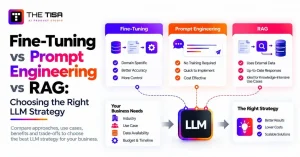
One pattern works well in practice: build the workflow version first with fixed steps. If you later find that users need flexibility the workflow cannot offer, promote specific steps to agentic behavior. For a longer comparison of the first three options, read fine-tuning vs. prompt engineering vs. RAG.
7. Enterprise Data Preparation and Management: How Do You Make Data AI-Ready?
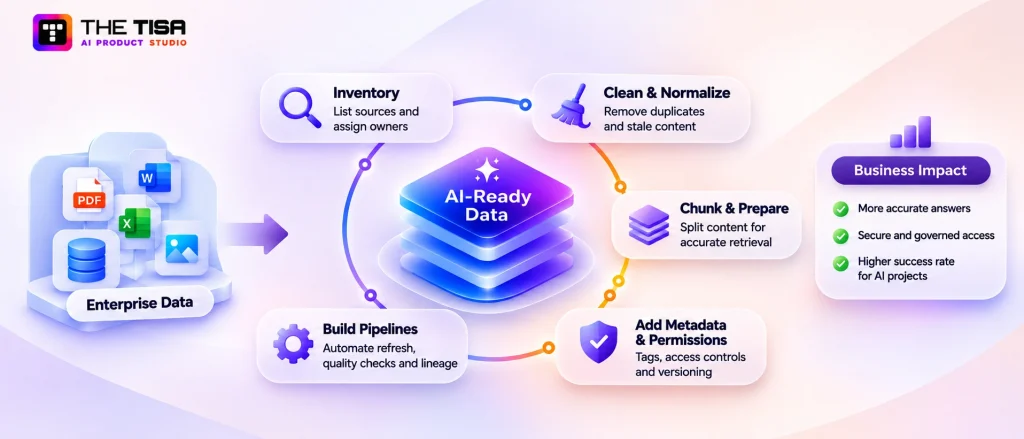
Inventory the sources, clean and deduplicate them, attach owners and permissions, chunk them for retrieval, enrich them with metadata and set up quality checks that run on every refresh. Data preparation usually takes more time than model work, and it decides most of the quality users will see.
Gartner’s research on AI-ready data found that 63% of organizations either lack the right data management practices for AI or are unsure whether they have them. The same research predicts that, through 2026, organizations will abandon 60% of AI projects that are not supported by AI-ready data.
Step 1: Inventory Structured and Unstructured Sources
List every source the use case needs. For each, record the owner, system, format, volume, update frequency, sensitivity and access model.
| Source type | Examples | Typical preparation work |
|---|---|---|
| Structured | CRM records, ERP tables, ticket fields, product catalogs | Field mapping, joins, freshness rules, row-level permissions |
| Semi-structured | JSON logs, emails, chat transcripts, XML feeds | Parsing, thread reconstruction, PII detection |
| Unstructured documents | PDFs, Word files, slide decks, wikis, policies | Text extraction, layout and table handling, OCR for scans |
| Media | Call recordings, images, scanned forms | Transcription, image-to-text, quality filtering |
Be honest about what is missing. If key answers live only in a senior employee’s head, the first task is to write them down.
Step 2: Clean, Deduplicate and Normalize
Enterprise content is messy. Common issues include:
- Duplicates and near-duplicates: five versions of the same policy, each slightly different. The model may cite the wrong one.
- Stale content: retired products, old pricing and superseded procedures. Mark them or remove them.
- Conflicting sources: a wiki that disagrees with the official PDF. Decide which source wins.
- Formatting noise: headers, footers, navigation text and boilerplate that pollute search results.
- Inconsistent terms: the same product named three ways across departments. Build a glossary or synonym map.
Assign a content owner for each collection. Without owners, quality decays within months.
Step 3: Chunk Content for Retrieval
Chunking splits documents into passages that the retriever can find and the model can use. Chunk size affects both precision and context.
| Chunking approach | How it works | Best for |
|---|---|---|
| Fixed size with overlap | Splits by token count, with some overlap between chunks | General documents, fast to implement |
| Structure-aware | Splits on headings, sections, list items or table boundaries | Policies, manuals, contracts with clear sections |
| Semantic | Splits where the topic changes, based on embeddings | Long narrative documents |
| Record-level | One chunk per ticket, product or record | Structured or semi-structured data |
| Hierarchical | Small chunks for matching, linked to their parent section for context | Long technical or legal documents |
Test at least two chunking strategies against your evaluation set. Small changes in chunk size or overlap can move retrieval quality noticeably.
Step 4: Add Metadata and Permissions
Metadata turns a pile of chunks into a searchable, governable knowledge base. Attach at least:
- Source system, document ID and URL for citations
- Owner and last-updated date
- Sensitivity label, such as public, internal, confidential or restricted
- Access control list or group IDs mirrored from the source system
- Business tags such as product line, region, customer segment or language
- Version and effective date for policies and contracts
Metadata filters let the retriever narrow results to the right region, product or time period before semantic ranking begins. That improves accuracy and reduces the chance of exposing content to the wrong user.
Step 5: Build Data Quality and Lineage Pipelines
Treat the knowledge base like any production data product.
- Automated refresh: sync on a schedule or on change events, and remove deleted source documents from the index.
- Quality checks: flag empty extractions, garbled OCR, oversized chunks and missing metadata before indexing.
- Lineage: record which source version produced which chunk, so you can trace any answer back to its origin.
- PII handling: detect and mask sensitive fields that the use case does not need.
- Monitoring: track index size, freshness and the share of questions that return no useful results.
The question “which version of which document produced this answer?” should always have an answer. If it does not, you will struggle with audits, user complaints and debugging.
How Do You Handle Tables, Scans and Images?
Real enterprise documents are not clean text. Plan for the hard formats early:
- Tables: naive text extraction scrambles rows and columns. Use layout-aware parsers, convert tables to a structured format such as Markdown or JSON and keep each table with its caption and surrounding heading.
- Scanned PDFs: run OCR and measure its quality on a sample. Poor scans create silent errors that look like model hallucinations.
- Images, charts and diagrams: multimodal models can describe them, and those descriptions can be indexed alongside the text. Validate on a sample, because descriptions of complex charts can miss details.
- Forms: extract key fields into structured records and index both the fields and the original page.
- Spreadsheets: usually better queried through tools that read the actual cells than embedded as text.
Should Some Data Stay Out of the AI System Entirely?
Yes. Not every source belongs in a knowledge base. Exclude content that the use case does not need, such as full payroll data for an IT help assistant. Apply data minimization at ingestion: index the policy, not the employee records it governs. Every source you leave out is one less permission model to maintain and one less leak to worry about.
When Does Synthetic Data Help?
Synthetic data, meaning examples generated by a model rather than collected from real usage, has a narrow but useful role:
- Filling evaluation gaps for rare scenarios, such as unusual policy exceptions, that real data has not yet produced.
- Stress testing with adversarial or malformed inputs.
- Protecting privacy in development environments where real records cannot be used.
- Bootstrapping fine-tuning when combined with expert review.
It should not replace real data in your main evaluation set. Synthetic questions tend to be cleaner and more predictable than the ones real users ask, which can make quality look better than it is.
How Do You Keep Permissions in Sync?
Permissions change constantly as people join, move teams or leave. If your index copies access lists only at ingestion, it will drift. Sync group memberships and document permissions on a schedule or through change events from your identity provider and content systems. Resolve access at query time against the latest group data where possible. Test regularly by querying as users with different roles and confirming that restricted content never appears.
8. Security, Privacy and AI Governance: How Do You Protect Enterprise AI?
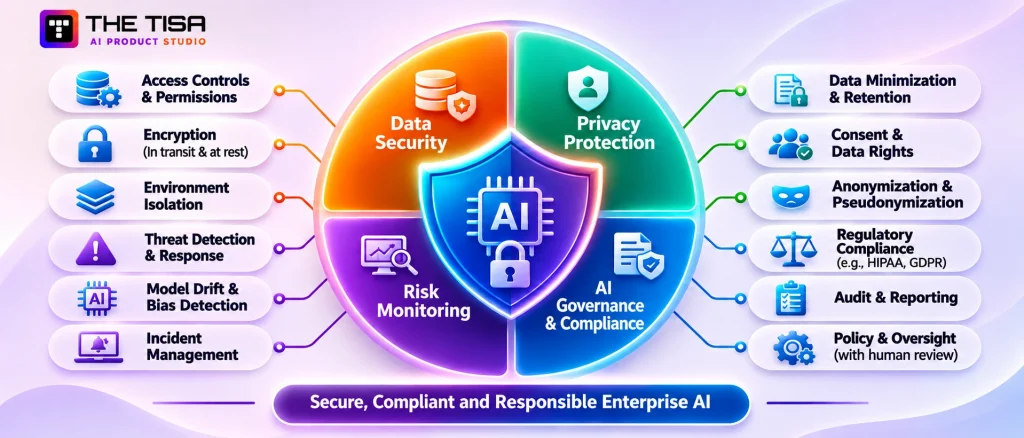
Secure generative AI by controlling what data reaches the model, what the model can do, and what leaves the system, then govern it with clear ownership, documented risk assessments, human oversight and an incident process. Good generative AI security for enterprises is mostly an architecture problem, not a filter you bolt on at the end.
The gap between adoption and control is already visible. IBM’s 2025 Cost of a Data Breach research found that 13% of organizations reported breaches of AI models or applications, and 97% of those lacked proper AI access controls. It also found that organizations with high levels of shadow AI paid an average of $670,000 more per breach.
What Are the Key Generative AI Security Risks?
The OWASP GenAI Security Project identifies key security risks in LLM applications and released its 2026 Top 10 for LLM Applications. In the 2026 edition, prompt injection ranks first and sensitive information disclosure ranks second. For agent-based systems, OWASP also published a separate Top 10 for Agentic Applications in December 2025.
| Risk | What it looks like in practice | Primary control |
|---|---|---|
| Direct prompt injection | A user types instructions that override the system rules | Instruction hierarchy, input classifiers, strict tool scopes |
| Indirect prompt injection | A document, email or web page contains hidden instructions the model follows | Treat retrieved content as data, never as instructions; isolate tool permissions |
| Sensitive data leakage | The assistant reveals another user’s records or confidential content | Permission filtering before retrieval, PII masking, output scanning |
| Excessive permissions or agency | An agent can delete records or send emails without review | Least privilege, read-only by default, human approval for writes |
| System prompt leakage | Users extract internal rules, keys or business logic | Keep secrets out of prompts; enforce rules in code |
| Insecure output handling | Model output is executed or rendered without validation | Schema validation, escaping, sandboxed execution |
| Supply chain risk | Compromised model weights, plugins, libraries or MCP servers | Vetted sources, pinned versions, dependency scanning |
| Data and model poisoning | Bad content enters the index or training set | Source allowlists, ingestion review, anomaly detection |
| Unbounded consumption | Abuse or loops drive token costs and latency up | Rate limits, per-user budgets, step caps |
Which Security Controls Should Be in Place Before Launch?
- Role-based and attribute-based access control mirrored from source systems and enforced at retrieval time.
- Encryption in transit and at rest for prompts, logs, embeddings and indexes. Embeddings can leak information, so protect them like the source data.
- Tenant and environment isolation so customer data never mixes and test systems never touch production records.
- Secrets management for API keys and service credentials, with rotation and no secrets in prompts.
- Input and output guardrails for PII, toxic content, blocked topics and injection patterns. Managed options such as Amazon Bedrock Guardrails can cover common policies, with custom checks layered on top.
- Vendor data terms reviewed and documented, including retention, training use and zero-data-retention options.
- Approved AI tools list so employees have a sanctioned alternative to shadow AI.
- Red-team testing before every major release, focused on injection, data leakage and tool misuse.
How Should You Structure AI Governance?
Governance answers three questions: who can approve a use case, how risk is assessed, and who is accountable when something goes wrong.
The NIST AI 600-1 Generative AI Profile, a companion to the NIST AI RMF, describes risks that are unique to or amplified by generative AI, such as confabulation, data privacy, information security and intellectual property, and suggests actions to manage each. It is voluntary, but it gives US enterprises a defensible, well-recognized structure.
A practical governance model includes:
- An AI review group with product, engineering, security, legal, privacy and a business representative.
- A risk tier for each use case, such as low (internal drafting), medium (internal decisions with review) and high (customer-facing or consequential decisions).
- Required artifacts by tier: a use-case brief, data map, evaluation results, risk assessment and a human oversight plan.
- A model and prompt registry recording which versions run where.
- Periodic reviews of quality, incidents, vendor changes and regulatory updates.
Our guide to generative AI governance and responsible AI policies includes policy templates you can adapt.
What US Regulations Should You Watch?
The US has no single federal AI law, so obligations come from sector rules and a growing set of state measures.
- California: the California Privacy Protection Agency finalized regulations on automated decisionmaking technology, risk assessments and cybersecurity audits. Businesses that use ADMT to make significant decisions must comply with the ADMT requirements starting January 1, 2027.
- Colorado: in May 2026, Colorado amended its AI Act and moved the effective date to January 1, 2027, while narrowing the law toward disclosure and transparency for certain automated decision tools.
- Federal preemption push: Executive Order 14365, signed in December 2025, directs federal agencies to challenge state AI laws that conflict with a national framework. Its long-term effect on state rules is still unsettled.
- Healthcare: If an AI vendor handles protected health information on behalf of a HIPAA-covered entity, HIPAA requires a business associate agreement and appropriate safeguards.
- Financial services, insurance and employment: existing anti-discrimination, consumer protection and model risk management expectations apply to AI-assisted decisions.
This is not legal advice, and the landscape changes quickly. Involve counsel early for any use case that touches hiring, lending, insurance, housing, healthcare or education. For a closer look at the January 2027 deadlines, see our breakdown of Colorado and California ADMT rules for AI integrations.
How Do Human Oversight and Incident Response Work?
Human oversight should match the risk. Low-risk drafting may only need spot checks. Consequential decisions require appropriate human review and accountability, with supporting evidence and relevant sources available to reviewers.
Incident response for AI follows the same shape as security incidents, with a few additions:
- Detect through monitoring alerts, user reports and evaluation drift.
- Contain by disabling a feature flag, switching to a fallback model or turning off a tool.
- Investigate using traces of prompts, retrieved content, model versions and tool calls.
- Fix the prompt, data, permission or guardrail at the root of the issue.
- Add a regression test so the same failure cannot ship again.
- Communicate with affected users and, where required, regulators.
Agents need extra attention because they act. Our article on enterprise AI agent security, identity and governance covers scoped credentials and approval flows for agentic systems.
How Do You Design for Data Privacy From the Start?
Privacy by design keeps compliance costs down later. Build these choices into the first architecture review:
- Minimize: send the model only the fields the task requires. A support reply rarely needs a full date of birth or account number.
- Mask and tokenize: replace sensitive values with placeholders before the prompt and restore them afterward only where needed.
- Set retention deliberately: decide how long prompts, outputs, traces and embeddings are kept, and delete them on schedule. Logs are often the largest forgotten store of personal data.
- Respect residency: keep processing in US regions when contracts or regulations require it, and confirm where your model provider runs inference.
- Honor user rights: make sure access and deletion requests reach AI logs, vector indexes and conversation memory, not just the main database.
- Document data flows: a simple diagram of where data goes, who processes it and how long it stays answers most privacy and vendor review questions.
What Should a Shadow AI Policy Include?
Blocking public AI tools rarely works on its own. Employees find workarounds when an approved option is missing. A workable policy combines four parts:
- An approved toolset that covers common needs such as writing, summarization and coding help.
- Clear data rules that state which data classes may never go into any AI tool, which may go only into approved enterprise tools and which are unrestricted.
- Technical controls such as single sign-on for approved tools, browser or network controls for unapproved ones and DLP rules for sensitive data.
- Training and a reporting path so employees know the rules and can request new tools without friction.
Review the policy at least twice a year. The tool landscape changes too quickly for an annual cycle.
What Should You Ask Model and AI Tool Vendors?
| Area | Questions to ask |
|---|---|
| Data use | Is our data used to train or improve models? Can we opt out contractually? |
| Retention | How long are prompts and outputs stored, and is zero data retention available? |
| Location | Which regions process our data? Can we restrict processing to the US? |
| Security | Which certifications and audit reports can you share, such as SOC 2 Type II or ISO 27001? |
| Subprocessors | Which third parties touch our data, and how are we notified of changes? |
| Incidents | What are your breach notification timelines and contacts? |
| Model changes | How much notice do you give before changing or retiring a model? |
| Legal protection | Do you offer indemnity for intellectual property claims related to outputs? |
Keep the answers on file. They form the core of your vendor risk record and speed up future reviews.
9. Testing and Evaluating Generative AI Applications: How Do You Prove Quality?
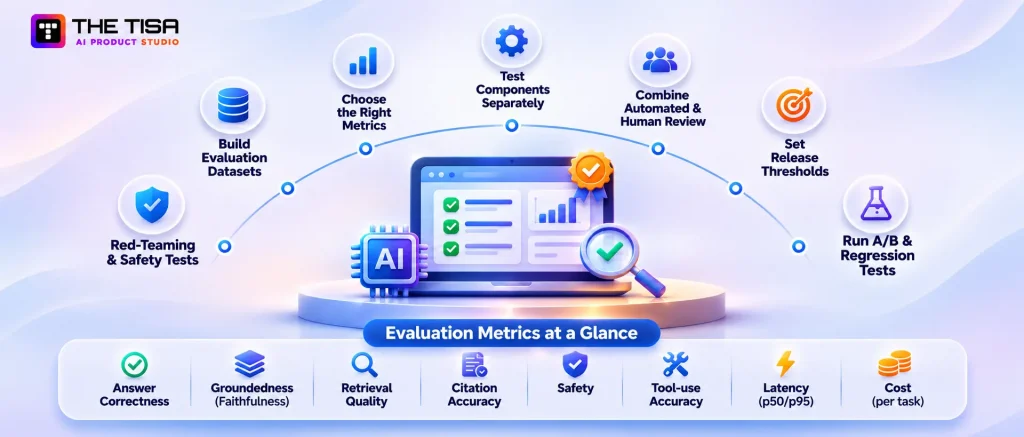
Build a representative evaluation dataset, define metrics for quality, safety, speed and cost, set release thresholds and run the full suite on every prompt, model, retrieval or code change. Evaluation is what turns a generative AI feature from a demo into a product you can maintain.
Traditional QA still applies to APIs, integrations, performance and security. AI evaluation adds a second layer because the same input can produce different outputs, and “correct” is often a matter of degree.
Step 1: Build Evaluation Datasets
A good evaluation set mirrors real usage.
- Source it from reality: real user questions, historical tickets, actual documents. Synthetic examples help fill gaps but should not dominate.
- Cover the spread: common questions, rare edge cases, ambiguous requests, questions with no answer in the data and adversarial inputs.
- Write reference answers with domain experts, or at least the key facts each answer must include.
- Start small and grow: 100 to 300 well-chosen cases is enough for a pilot. Add every production failure to the set.
- Version it alongside your prompts and code.
Step 2: Choose the Right Metrics
| Metric family | What it measures | How it is typically scored |
|---|---|---|
| Answer correctness | Does the answer match the reference or contain required facts? | Expert review, LLM-as-judge calibrated against experts |
| Groundedness (faithfulness) | Is every claim supported by retrieved sources? | Claim-by-claim check against context |
| Retrieval quality | Did the right passages come back? | Recall at k, precision, mean reciprocal rank |
| Citation accuracy | Do citations point to text that supports the claim? | Automated and manual spot checks |
| Correct refusal | Does it decline when the answer is not in the data? | Test cases with no valid answer |
| Safety | Does it avoid harmful, biased or policy-breaking output? | Red-team prompts, classifiers |
| Tool-use accuracy | Did an agent call the right tool with valid arguments? | Trace inspection, scenario tests |
| Latency | How long until the first token and the full answer? | p50 and p95 timings under load |
| Cost | What does each task cost? | Tokens and infrastructure per request |
LLM-as-judge, where one model grades another, scales evaluation well. Calibrate it first: have experts grade a sample, compare scores and adjust the rubric until agreement is high.
Step 3: Test Retrieval, Safety and Tool Use Separately
Testing the whole pipeline hides where problems come from. Test each part.
- Retrieval: for each question, check whether the correct passage appears in the top results. If not, fix chunking, metadata or search before touching the prompt.
- Generation: given the right passages, does the model answer correctly and cite them?
- Safety: run injection attempts, requests for other users’ data and out-of-scope questions.
- Tools: run scenario tests where the expected tool sequence is known, including failure cases such as API timeouts.
Step 4: Combine Automated and Human Review
Automated scoring handles volume. Humans handle judgment. A reliable approach pairs them:
- Automated checks run on every change in CI.
- Domain experts review a sample of outputs each release, focused on high-risk categories.
- Production feedback (thumbs up or down, edits, escalations) feeds new test cases weekly.
Step 5: Set Release Thresholds
Agree on thresholds before testing starts. Here is a sample LLM evaluation scorecard for a customer-support assistant.
| Metric | Pilot threshold | Production threshold | Current result | Status |
|---|---|---|---|---|
| Answer correctness (expert-graded) | 80% | 90% | Measured per release | Pass or fail |
| Groundedness | 90% | 97% | Measured per release | Pass or fail |
| Retrieval recall at top 5 | 80% | 90% | Measured per release | Pass or fail |
| Correct refusal on no-answer cases | 80% | 95% | Measured per release | Pass or fail |
| Critical safety failures | 0 | 0 | Measured per release | Pass or fail |
| p95 latency | Under 8 seconds | Under 5 seconds | Measured per release | Pass or fail |
| Cost per resolved conversation | Within pilot budget | Within business case | Measured per release | Pass or fail |
These thresholds are illustrative. Set your own based on the cost of an error in your workflow. A drafting tool with human review can launch at lower thresholds than an assistant that answers customers directly.
Step 6: Run A/B and Regression Tests
- Regression tests run the full evaluation suite on every change and block releases that reduce quality on any critical metric.
- A/B tests compare a new prompt, model or retrieval setup against the current version on live traffic, measuring business outcomes such as resolution rate or edit distance.
- Shadow mode runs a new version in parallel without showing its output, so you can compare safely before switching.
Model providers update and retire models regularly. A strong regression suite is what lets you switch models in days instead of months.
A Practical Red-Teaming Playbook
Red-teaming means deliberately trying to make the system fail before attackers or users do. Run it before launch and after every major change.
| Test area | Example attempts | What a pass looks like |
|---|---|---|
| Direct injection | Asking the assistant to ignore its rules or reveal its instructions | It refuses and continues to follow policy |
| Indirect injection | Planting hidden instructions in a document that will be retrieved | It treats the text as content and takes no unintended action |
| Data boundary | Asking for another customer’s, employee’s or department’s records | It returns nothing outside the user’s permissions |
| Tool misuse | Coaxing an agent into calling a write tool or a tool outside scope | The call is blocked or routed for approval |
| Harmful content | Requests for unsafe, discriminatory or off-brand output | It declines in a consistent, polite way |
| Cost abuse | Very long inputs, loops or repeated heavy requests | Rate limits and budgets stop the abuse |
Log every finding with severity, fix it and add the attack to the regression suite. Over time, your red-team library becomes one of your most valuable security assets.
How Do You Evaluate AI Agents Specifically?
Agents need evaluation beyond answer quality, because they take paths, not just produce text. Measure:
- Task success rate: did the agent complete the goal correctly from start to finish?
- Path efficiency: how many steps and tool calls did it use compared with a reasonable path?
- Tool argument validity: were inputs to each tool correct and within scope?
- Safe failure: when a tool failed or data was missing, did it stop, retry sensibly or escalate?
- Cost per completed task: including every model and tool call in the loop.
- Consistency: does the same scenario succeed across repeated runs?
Build scenario-based tests with a known starting state and expected end state, such as a sandbox CRM with seeded records. Run them on every change, just like your other regression tests.


10. Deployment, LLMOps and Scalability: How Do You Run Generative AI in Production?
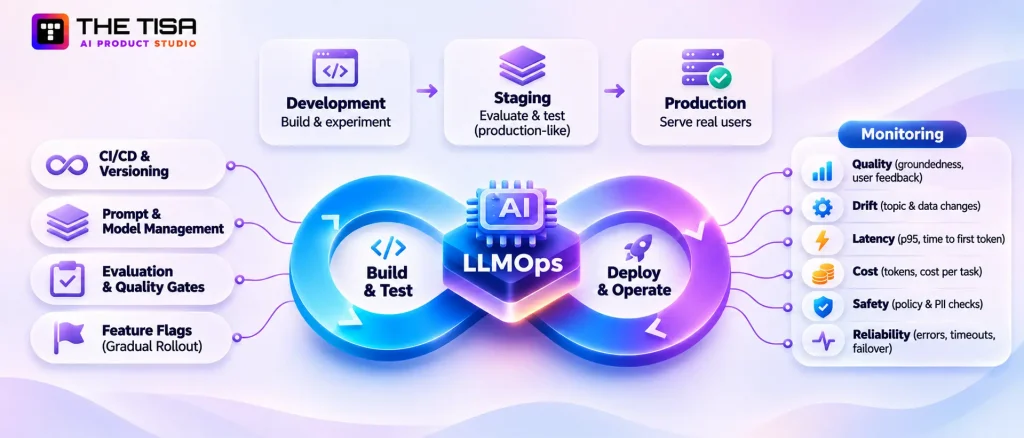
Deploy generative AI through separate development, staging and production environments, version every prompt, model, index and tool together, monitor quality, drift, latency and cost continuously, and keep a tested rollback path for each change. LLMOps is the operating discipline that keeps an AI feature reliable after launch day.
The main difference from classic DevOps is that behavior can change without a code change. A provider updates a model, a source document is edited, or user questions shift. Your operations practice has to catch all three.
Environments: Dev, Staging and Production
| Environment | Purpose | Data | Model access |
|---|---|---|---|
| Development | Build and experiment | Synthetic or masked samples | Lower-cost models, sandbox keys |
| Staging | Run full evaluation and integration tests | Production-like, masked where needed | Same models and settings as production |
| Production | Serve real users | Live, permissioned data | Pinned model versions, production quotas |
Keep staging as close to production as possible. Many quality surprises come from a different model version, index snapshot or guardrail setting in staging.
CI/CD and Versioning for Prompts and Models
A release in a generative AI system is a bundle, not just code. Version all of these together:
- Application code and infrastructure as code
- Prompt templates and system instructions
- Model name and pinned version for each task
- Retrieval settings such as chunk size, top-k, filters and reranker
- Index snapshot or build ID
- Tool definitions and their permission scopes
- Guardrail policies
- Evaluation dataset version and the results it produced
Your pipeline should run unit and integration tests, then the AI evaluation suite, and block promotion when any critical threshold fails. Feature flags let you release to a small percentage of users first.
What Should You Monitor?
| Area | Example signals | Why it matters |
|---|---|---|
| Quality | Online groundedness checks, thumbs-down rate, user edits, escalation rate | Catches silent degradation |
| Drift | Shifts in question topics, rising no-answer rate, new document types | Shows when data or users change |
| Latency | Time to first token, p95 total time, tool-call duration | Directly affects adoption |
| Cost | Tokens per request, cost per successful task, cost per user, cache hit rate | Prevents budget surprises |
| Safety | Guardrail triggers, injection attempts, PII detections | Surfaces abuse and policy gaps |
| Reliability | Provider error rates, timeouts, fallback usage | Shows when to fail over |
Standardized telemetry helps here. The OpenTelemetry project maintains semantic conventions for generative AI, which define common attributes for model calls, token usage, tool calls and agent steps. Adopting them keeps your traces portable across observability vendors.
Rollback, Rate Limits and Incident Runbooks
- Rollback: every release bundle should be revertible in minutes. Keep the previous prompt, model and index available, not deleted.
- Rate limits: set limits per user, per tenant and per feature. Add per-task budgets for agents so a loop cannot run up a large bill overnight.
- Provider failover: route to a secondary model when the primary provider is slow or down, and accept that quality may differ slightly.
- Runbooks: write step-by-step responses for common incidents: provider outage, quality drop after a model update, data leak report, cost spike and injection attack. Assign an on-call owner.
Planning for Model Updates and Deprecations
Providers retire older models on published schedules. Track deprecation dates for every model you use, rerun your evaluation suite on replacement candidates well before the cutoff and budget engineering time for at least one model migration per year. Teams with strong regression suites handle this as routine maintenance. Teams without them treat it as an emergency.
How Do You Keep Latency Acceptable?
Slow answers kill adoption faster than imperfect ones. Several techniques help:
- Stream responses so users see text as it is generated instead of waiting for the full answer.
- Run retrieval steps in parallel, such as vector and keyword searches, rather than one after another.
- Route by complexity: a small model can answer simple questions in a fraction of the time.
- Cache stable context with provider prompt caching to cut processing time on long shared prefixes.
- Trim the context: fewer, better passages reduce both latency and cost.
- Show progress for agents: when a task takes several steps, display what the system is doing so the wait feels purposeful.
Set latency targets per use case. An inline writing suggestion needs to feel instant. A research report that saves an hour of work can take a minute.
How Do You Scale for Higher Loads?
Token volume, not request count, usually hits limits first. Plan capacity around it:
- Know your quotas. Check your provider’s tokens-per-minute and requests-per-minute limits, request increases before launch and consider reserved or provisioned capacity for steady heavy load.
- Keep the application tier stateless so containers can scale out on queue depth and latency.
- Separate interactive and batch traffic. Run bulk jobs through queues and batch APIs so they never slow down live users.
- Scale retrieval independently with index replicas and well-indexed metadata filters.
- Cache at every level: stable prompt prefixes, frequent answers with appropriate access controls and embeddings for unchanged documents.
- Plan multi-region deployment for availability, while respecting data residency rules.
- Load test with realistic inputs. Use real prompt and context sizes. Tests with short prompts badly underestimate token use.
Who Runs the System After Launch?
Define an operating model before go-live:
| Responsibility | Typical owner |
|---|---|
| Business outcomes and priorities | Business owner |
| Content accuracy and freshness | Content owners in each department |
| Prompts, retrieval and evaluation | AI engineering team or partner |
| Infrastructure, uptime and cost | Platform or DevOps team |
| Security monitoring and incidents | Security operations |
| User support and training | Service desk with an escalation path to engineering |
Write these owners into the runbook. When an answer is wrong at 9 p.m. on a Friday, everyone should know who looks at it.
What Service Levels Should You Commit To?
Your AI feature inherits the availability of every provider in its path. Before promising an SLA to customers or internal teams, check the commitments of your model provider, cloud platform and search service. Build in failover to a second model, a degraded mode such as search-only results when generation is unavailable, and clear user messaging. Back up indexes, configurations and prompt registries so a full environment can be rebuilt quickly. Test the failover path at least quarterly, because an untested fallback often fails when you need it.
11. Generative AI Development Cost, Timeline and ROI: What Should You Budget and Expect?
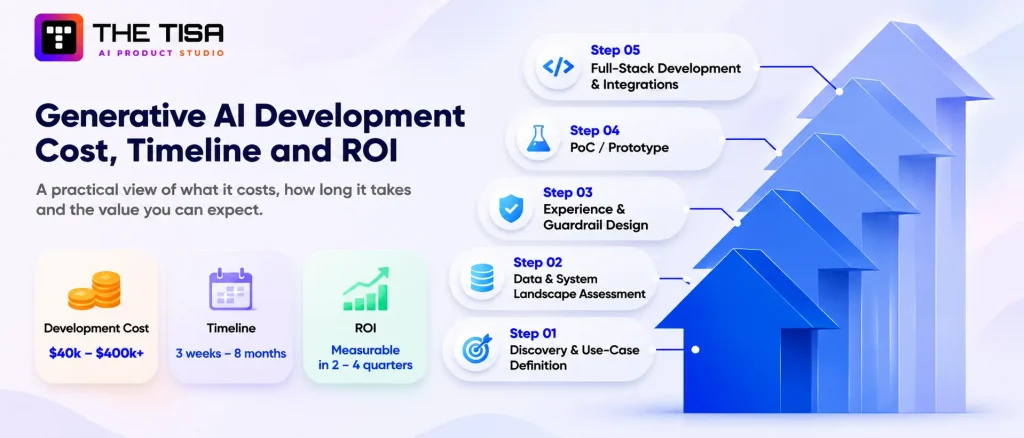
Cost, time and return are one decision, not three. A cheap build that takes a year to show value can cost more than a larger investment that pays back in two quarters. This section covers enterprise AI implementation cost, realistic timelines, team needs and how to prove ROI, in that order.
Use the numbers here as planning ranges. Your data quality, integrations and compliance scope will move them more than any other factor.
What Does Generative AI Development for Enterprise Cost?
A focused enterprise build typically costs from the mid five figures for a narrow internal assistant to several hundred thousand dollars for a multi-system platform, plus monthly run costs for model usage, infrastructure, monitoring and support. The run costs are where many budgets go wrong, because they grow with adoption.
McKinsey’s 2026 survey found that AI-related operating costs, including tokens, already constrain AI use for about one in five organizations. Plan for total cost of ownership, not just the build invoice.
What Are the Main Cost Components?
| Cost component | What it includes | Type |
|---|---|---|
| Discovery and design | Workshops, data audit, architecture, evaluation plan | One-time |
| Build | Engineering for app, retrieval, integrations, guardrails, admin tools | One-time |
| Data preparation | Cleaning, extraction, chunking, metadata, connectors | One-time plus ongoing refresh |
| Model inference | Input and output tokens, embeddings, reranking calls | Ongoing, usage-based |
| Retrieval infrastructure | Vector or search index, storage, compute | Ongoing |
| Application hosting | Containers, databases, queues, networking | Ongoing |
| Security and compliance | Reviews, penetration tests, audits, guardrail services | Periodic |
| Evaluation and monitoring | Observability tools, expert review time | Ongoing |
| Support and optimization | Prompt tuning, model migrations, new sources, bug fixes | Ongoing |
Typical Budget Ranges
Published ranges vary widely because scope varies widely. As one reference point, THE TISA publishes indicative fixed-price ranges of roughly $40,000 to $60,000 for a small project such as an internal chatbot, $80,000 to $150,000 for a medium project and $200,000 to $400,000 for large, end-to-end process automation. These are planning numbers, not quotes. Integrations, compliance scope and data quality move them more than anything else.
| Scope | Typical characteristics | What drives cost up |
|---|---|---|
| Narrow internal assistant | One data domain, one channel, read-only, human review | Messy documents, many permission groups |
| Customer-facing assistant | Several sources, CRM integration, strict quality bar | Multilingual support, voice, high availability |
| Workflow automation with actions | Multiple systems, write-backs with approvals, audit trails | Legacy APIs, regulated decisions |
| Multi-use-case platform | Shared retrieval, model gateway, governance tooling | Multi-tenancy, many business units |
An Illustrative Run-Cost Scenario
Here is a worked example for an internal knowledge assistant. Every input is an assumption you should replace with your own.
- 2,000 employees, each asking 5 questions per workday, 21 workdays a month: 210,000 requests a month
- 6,000 input tokens per request (instructions plus retrieved passages) and 500 output tokens
- A mid-tier model priced at $3 per million input tokens and $15 per million output tokens (check your provider’s current rates)
| Line item | Calculation | Monthly cost |
|---|---|---|
| Input tokens | 1.26 billion tokens at $3 per million | $3,780 |
| Output tokens | 105 million tokens at $15 per million | $1,575 |
| Model total before optimization | $5,355 |
That is roughly $2.68 per employee per month in model costs. Hosting, search infrastructure, monitoring and support sit on top. For many internal assistants those surrounding costs exceed the model bill.
How Can You Reduce Generative AI Costs?
- Prompt caching: reuse long, stable prefixes such as system instructions and shared documents. Anthropic’s prompt caching documentation prices cache reads at one-tenth of the base input rate. In the scenario above, caching a 2,000-token system prompt could cut input spend by roughly $1,100 a month with near-perfect cache hits and minimal cache write costs.
- Model routing: send simple requests to a small, cheap model and reserve the expensive model for hard ones.
- Batching: run non-urgent jobs, such as nightly classification, through discounted batch APIs.
- Tighter retrieval: send five excellent passages instead of twenty mediocre ones. You save tokens and usually improve accuracy.
- Response caching: store answers to frequent, non-personalized questions.
- Output limits: cap response length where long answers add no value.
- Usage budgets: set per-user and per-feature limits and alert on anomalies.
For detailed numbers by project type, see our breakdown of what enterprises actually pay for generative AI. If most of your scope is connecting AI to existing platforms, our guide to AI integration costs, connectors and tokens goes deeper on that side.
Which Hidden Costs Do Budgets Often Miss?
- Expert review time: domain experts who build evaluation sets and review outputs are expensive and often unbudgeted.
- Content cleanup: fixing, deduplicating and retiring old documents can take longer than the software build.
- Security and legal reviews: penetration tests, vendor assessments and privacy reviews add cost and calendar time.
- Model migrations: each provider deprecation means re-testing and sometimes re-tuning prompts.
- Re-embedding: switching embedding models requires reprocessing the entire knowledge base.
- Observability tools: tracing and evaluation platforms often charge by volume.
- Change management: training, documentation and internal communication for each rollout wave.
How Do Architecture Choices Affect Cost?
| Choice | Lower-cost option | Higher-cost option | When the higher cost is justified |
|---|---|---|---|
| Model tier | Small model for simple tasks | Frontier model for complex tasks | Complex reasoning or high error cost |
| Retrieval | Hybrid search with tight top-k | Large context stuffing | Small, stable document sets |
| Hosting | Managed API in your cloud | Self-hosted GPUs | Very high, steady volume or strict data control |
| Agent design | Fixed workflow with a few model calls | Open-ended agent loop | Tasks that truly need flexible planning |
| Evaluation | Automated checks plus sampled review | Full human review of every output | High-risk regulated decisions |
Fixed Price or Time and Materials?
| Pricing model | Works best when | Watch out for |
|---|---|---|
| Fixed price per phase | Scope is defined after discovery, and you need budget certainty | Change requests for anything outside scope |
| Time and materials | Scope is exploratory or changes often | Weak cost control without strong product ownership |
| Hybrid | Fixed-price discovery and POC, then fixed or capped phases | Clear definitions of done for each phase |
| Retainer | Ongoing optimization and support after launch | Defining which tasks the retainer covers |
For most enterprise buyers, a short fixed-price discovery followed by phase-based pricing balances flexibility with predictability.
How Long Does Implementation Take, and What Team Do You Need?
A proof of concept usually takes three to six weeks, an MVP another two to three months, and a hardened production release about four to eight months from kickoff depending on integrations and compliance. Narrow, well-scoped products can ship sooner. The team needs product, AI engineering, data, full-stack, security and QA skills, whether you staff them internally, through a partner or both.
Typical Timelines
| Phase | Typical duration | What can stretch it |
|---|---|---|
| Discovery | 2 to 4 weeks | Stakeholder availability, unclear ownership |
| Proof of concept | 3 to 6 weeks | Data access approvals, unclear success criteria |
| MVP | 8 to 12 weeks | Integration complexity, SSO and security reviews |
| Production hardening | 4 to 10 weeks | Compliance reviews, penetration testing, legacy APIs |
| Phased rollout | 4 to 8 weeks | Change management, training, support readiness |
The biggest delays are rarely technical. Data access approvals, legal review of vendor terms and security sign-off can each add weeks. Start those in parallel with discovery.
Which Roles Does the Project Need?
| Role | Responsibility | In-house or partner? |
|---|---|---|
| Product owner | Owns the use case, success metrics and priorities | Always in-house |
| AI or ML engineer | Prompts, retrieval, evaluation, model selection, agents | Either |
| Data engineer | Pipelines, connectors, cleaning, metadata, refresh | Either |
| Full-stack engineer | Application, APIs, UI and integrations | Either |
| Cloud and DevOps engineer | Infrastructure, CI/CD, observability, cost controls | Either |
| Security and privacy | Threat modeling, reviews, red-teaming, vendor terms | In-house lead, partner support |
| QA and evaluation | Test sets, regression suites, release gates | Either |
| Domain experts | Reference answers, review, feedback | Always in-house |
Key Milestones and Dependencies
- Executive sponsor and business owner named
- Data access and vendor terms approved
- Evaluation set and success thresholds signed off
- POC go/no-go decision
- Security architecture review passed
- MVP launch to pilot group
- Production readiness review passed
- Phased rollout complete and ownership handed to the run team
What Happens in the First 30 Days After Launch?
The first month in production teaches more than the entire pilot. Plan for it:
- Week 1: daily review of flagged answers, errors and user feedback. Fix the obvious gaps in content and prompts quickly.
- Week 2: compare live metrics with the pilot baseline. Look for question types the evaluation set missed and add them.
- Week 3: review cost per task at real volume and tune routing, caching and context size.
- Week 4: hold a formal review with the business owner covering adoption, quality, cost and incidents, then decide on the next rollout wave.
Keep the build team engaged through this period. Handing off to a support team on launch day usually slows the fixes that matter most.
How Do You Measure ROI and Scale From Pilot to Enterprise?
Measure ROI by comparing a pre-launch baseline with post-launch results on the metric you chose during strategy, then subtract the full cost of building and running the system. Scale only when the pilot clears its thresholds on value, quality, cost and adoption, and reuse shared components so each new use case costs less than the last.
Set the Baseline Before You Build
Capture current performance for at least four to eight weeks before launch. Typical baseline metrics include:
- Average handle time or time per task
- Volume handled per person per week
- Error, rework or escalation rate
- Cycle time from request to resolution
- Customer or employee satisfaction
- External spend on outsourced processing
Without a baseline, every ROI conversation turns into opinion.
Which KPIs Should You Track?
| KPI category | Example metrics | Who cares most |
|---|---|---|
| Adoption | Weekly active users, share of eligible tasks using AI, repeat usage | Product owner |
| Efficiency | Time saved per task, throughput per person | Operations leader |
| Quality | Accuracy, groundedness, edit rate, escalation rate | Business owner, risk |
| Financial | Cost per task, net savings, revenue influenced | CFO |
| Experience | CSAT, employee satisfaction, first-contact resolution | Customer and HR leaders |
| Risk | Incidents, guardrail triggers, audit findings | CISO, compliance |
A Simple ROI and Payback Approach
Use this structure and keep the assumptions visible.
Annual value = (hours saved per year x fully loaded hourly cost) + avoided external spend + measurable revenue impact
Annual cost = amortized build cost + model and infrastructure costs + support and optimization + internal team time
ROI = (annual value – annual cost) / annual cost
Payback period = upfront investment / monthly net value
Here is an illustrative example. A support team of 80 agents handles 40,000 tickets a month. An AI copilot saves an average of 2 minutes per ticket. That is about 1,333 hours a month. At a fully loaded cost of $45 an hour, the time is worth roughly $60,000 a month, or $720,000 a year.
Time saved is not cash saved unless you redeploy it. Count it as capacity: more tickets handled without new hires, faster resolution or time moved to higher-value work. Be explicit about which one you claim.
How Do You Scale From Pilot to Enterprise Rollout?
Scaling works best as a platform play rather than a series of one-off projects.
- Harden the first use case until it meets production thresholds and runs without daily engineering attention.
- Extract shared components: the model gateway, retrieval service, guardrails, evaluation harness and observability stack.
- Create a small enablement team that owns the platform, publishes patterns and reviews new use cases.
- Add use cases in waves, each with its own owner, baseline and thresholds, reusing the shared components.
- Report portfolio results quarterly to leadership, including the projects you stopped and why.
McKinsey’s 2026 data shows that AI high performers, about 6% of respondents, are far more likely to have redesigned workflows and to have senior leaders actively driving adoption. Scaling is as much an operating model change as a technical one.
How Should You Report AI Results to the Board?
Boards want a clear picture, not a technology tour. A one-page quarterly view usually covers:
- Portfolio status: use cases in discovery, pilot, production and stopped, with one line each on why.
- Value delivered: measured outcomes against baselines, with assumptions stated.
- Spend: build and run costs versus budget, including cost per task trends.
- Risk: incidents, audit findings, regulatory developments and open remediation items.
- Next quarter: the decisions needed from leadership, such as funding a new wave or approving a higher-risk use case.
Reporting the projects you stopped builds credibility. It shows the governance process works and that money moves toward what proves its value.
Leading vs. Lagging Indicators
Financial ROI shows up slowly. Track leading indicators that predict it:
| Leading indicators (weeks) | Lagging indicators (quarters) |
|---|---|
| Weekly active users and repeat usage | Cost per transaction |
| Share of AI drafts accepted with light edits | Headcount growth avoided at higher volume |
| Escalation and thumbs-down rates | Customer retention and satisfaction trends |
| Evaluation scores per release | Revenue influenced or protected |
| Time to first useful answer | Audit and compliance outcomes |
If leading indicators stall, act early. Waiting for lagging numbers to confirm a problem wastes a quarter.
When Should You Retire or Rebuild an AI Feature?
Not every feature deserves to live forever. Consider retiring or rebuilding when usage stays low after several improvement cycles, when a vendor’s embedded feature now does the same job for less, when run costs outpace measured value, or when quality cannot meet a new regulatory requirement. Retire cleanly: notify users, remove data you no longer need, archive evaluation results and document what the organization learned. Those lessons make the next use case cheaper and faster.
12. Industry-Specific Generative AI Implementation: What Changes by Sector?
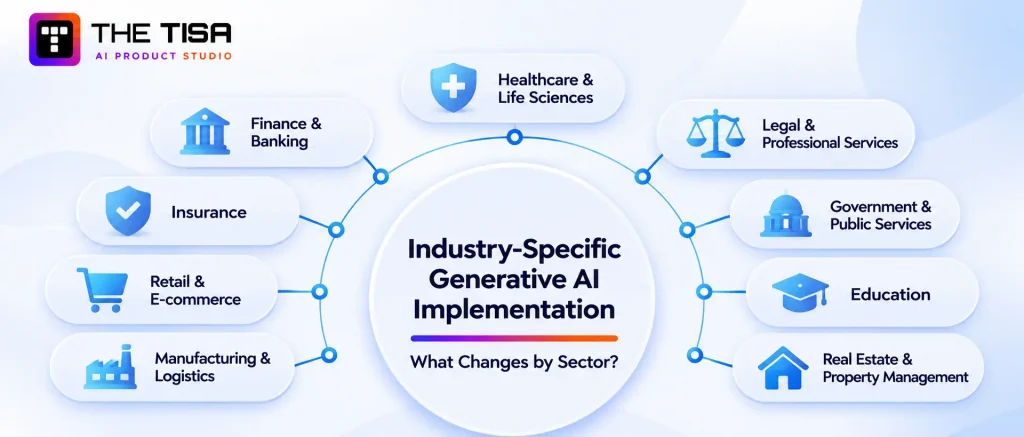
The technical patterns stay the same across industries, but the data, the risk tolerance and the rules change a lot. A misworded marketing draft is an inconvenience. A misworded clinical summary, denial letter or credit explanation can create legal exposure. Match your controls to the consequences.
Healthcare and Life Sciences
Strong use cases: clinical documentation and ambient note-taking, prior authorization packet preparation, patient message drafting, coding support, claims and denial analysis, and literature review for research teams. The Stanford AI Index 2026 highlights rapid adoption of ambient AI scribes in 2025, with physicians reporting large reductions in time spent writing notes.
Data and compliance needs: protected health information under HIPAA, business associate agreements with vendors that handle PHI on your behalf, minimum-necessary access and detailed audit logs. EHR integration through FHIR APIs is common.
Implementation considerations: keep clinicians responsible for clinical decisions, provide traceable sources for evidence-based outputs and test heavily on edge cases such as medication names and abbreviations.
Financial Services and Banking
Strong use cases: advisor and banker knowledge assistants, KYC and onboarding document review, suspicious-activity narrative drafting, call summarization, policy and procedure search, and payment reconciliation support.
Data and compliance needs: GLBA privacy rules, applicable model risk management expectations, record retention and communication supervision. Lending workflows also require fair lending and adverse-action compliance.
Implementation considerations: separate calculation from generation. Let code compute balances, totals and ratios, and let the model explain them. Keep a full audit trail of sources and outputs for examiners. See our overview of AI in financial services for fraud, compliance and customer experience.
Insurance
Strong use cases: first notice of loss intake, claims document summarization, underwriting submission triage, policy wording comparison and customer correspondence drafting.
Data and compliance needs: state insurance regulations, unfair claims practices rules and growing state scrutiny of AI in underwriting and claims decisions.
Implementation considerations: keep adjusters and underwriters in the decision loop, document how AI outputs are used and monitor for bias across protected classes.
Retail and E-commerce
Strong use cases: product content generation at catalog scale, conversational shopping assistants, review summarization, customer service automation and merchandising insights.
Data and compliance needs: consumer privacy laws such as the CCPA, truth-in-advertising rules for generated claims and brand guidelines.
Implementation considerations: ground product answers in your catalog and inventory data, not the model’s general knowledge, and run brand and claims checks before publishing generated copy.
Manufacturing and Logistics
Strong use cases: maintenance knowledge assistants built on manuals and work orders, quality report summarization, supplier document processing, shipment exception handling and booking or proof-of-delivery extraction.
Data and compliance needs: export controls for technical data, safety documentation requirements and protection of proprietary process knowledge.
Implementation considerations: field workers need mobile, voice-friendly and sometimes offline-capable interfaces. Integration with ERP, MES and TMS platforms usually determines the timeline.
Professional and Legal Services
Strong use cases: first-pass contract review against playbooks, research memo drafting, due diligence document review, proposal writing and knowledge management across past matters.
Data and compliance needs: client confidentiality, privilege, ethical duties of competence and supervision, and matter-level access walls.
Implementation considerations: enforce matter-level permissions in retrieval, require citations to source documents and keep a qualified professional responsible for every client deliverable.
What About Government, Education and Other Public-Facing Sectors?
Government and public services use generative AI for constituent service assistants, form guidance, case summarization and policy research. Procurement rules, accessibility requirements, records retention and public transparency expectations shape the design. Cloud environments with government authorizations are often required.
Education uses it for student support assistants, administrative automation, course content drafting and advising. Student records privacy under FERPA, age-appropriate content controls and academic integrity policies come first. Keep AI-assisted decisions about admissions, grading or discipline under clear human authority.
In both sectors, explainability and accessibility are not optional extras. Plain-language answers with visible sources and an easy route to a human make adoption smoother and reduce complaints.
Real Estate and Property Management
Strong use cases: listing descriptions, lease abstraction, tenant communication and maintenance request triage, and market research summaries for agents and investors.
Data and compliance needs: fair housing rules apply to generated listings, ads and screening communications, along with consumer privacy obligations for tenant data.
Implementation considerations: review generated listing and marketing language for fair housing compliance, keep tenant screening decisions with people and ground lease answers in the signed documents rather than templates.
Industry Summary
| Industry | Typical starting use case | Key requirement |
|---|---|---|
| Healthcare | Documentation and prior-auth support | BAAs where required and PHI minimization |
| Financial services | Advisor knowledge and KYC review | Audit trails and reliable calculations |
| Insurance | Claims intake and summarization | Human oversight and bias monitoring |
| Retail | Catalog content and service automation | Live catalog data |
| Manufacturing and logistics | Maintenance knowledge and document extraction | ERP, MES or TMS integration |
| Legal and professional services | Contract review against playbooks | Matter-level access controls |
| Government | Constituent support and policy search | Accessibility and records retention |
| Education | Student support and administration | Student privacy and human oversight |
| Real estate | Lease review and tenant support | Fair housing and tenant privacy |
13. Common Generative AI Implementation Challenges and Mistakes to Avoid
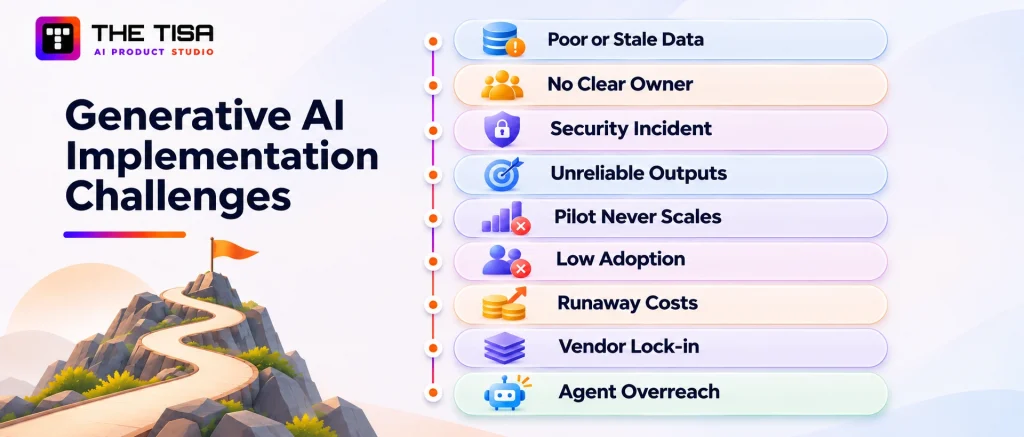
Most failures trace back to unclear ownership, poor data, unreliable outputs that nobody measured, and costs that nobody modeled. The model itself is rarely the root cause.
MIT’s NANDA initiative made this point sharply in its 2025 report. As Fortune reported, the study found that about 95% of enterprise generative AI pilots were not delivering measurable financial returns, and its lead author attributed the gap mainly to how organizations integrate the tools into workflows rather than to model quality. The exact figure has been debated, but the pattern matches what practitioners see.
Pitfalls, Root Causes and Prevention
| Pitfall | Business impact | Root cause | Prevention | Recovery if it happens |
|---|---|---|---|---|
| No clear owner | Pilot drifts, nobody adopts it | Project led by IT alone | Named business owner with a target metric | Pause, reassign ownership, reset success criteria |
| Poor or stale data | Wrong answers, lost trust | No content owners, no refresh process | Data inventory, owners, automated refresh | Audit sources, remove stale content, re-index |
| Unreliable outputs | Users stop using it | No evaluation set or thresholds | Evaluation-first development and release gates | Build a test set from failures, fix retrieval first |
| Pilot never scales | Sunk cost, skepticism | POC code treated as production | Planned rebuild between POC and MVP | Re-architect with production patterns |
| Runaway costs | Budget freeze or cancellation | No cost model, no limits | TCO model, routing, caching, per-user budgets | Add monitoring, set caps, switch tasks to cheaper models |
| Security incident | Data exposure, regulatory risk | Permissions applied after retrieval, broad tool access | Pre-retrieval filtering, least-privilege tools, red-teaming | Contain, disable affected tools, notify, add regression tests |
| Low adoption | No measurable value | Tool sits outside the daily workflow | Embed in existing apps, train users, gather feedback | Interview users, move the entry point, simplify |
| Vendor lock-in | Painful migrations, pricing exposure | Direct coupling to one provider’s API | Model gateway and portable evaluation suite | Introduce the gateway, run comparative evaluations |
| Agent overreach | Unwanted actions, rework | Too much autonomy too early | Workflow first, agents later, approvals for writes | Reduce scope to read-only, add human gates |
Three Warning Signs Worth Acting On
- Nobody can show the evaluation results for the current version. That means quality is unknown.
- The monthly AI bill is a surprise. That means the cost is unmanaged.
- Users copy answers into another tool to check them. That means trust is low, often because citations are missing or wrong.
If any of these is true today, fix it before adding new features. Each one compounds as usage grows.
Why Do People-Side Failures Matter as Much as Technical Ones?
Even a well-engineered system fails if the organization around it does not change. Watch for these patterns:
- Fear of replacement: if employees believe the tool exists to cut their jobs, they will not share the feedback it needs. Be honest about goals and how saved time will be used.
- Unclear accountability: when an AI-assisted answer is wrong, users need to know who is responsible. Make it clear that the human who sends or approves the output owns it.
- No time to learn: adoption drops when people are expected to learn a new tool on top of a full workload. Budget training time.
- Mixed signals from leadership: if managers still measure people the old way, staff will keep working the old way.
Treat rollout as a change program with communication, training, champions in each team and a feedback loop that visibly leads to improvements.
How Do You Rescue a Stalled Pilot?
If a pilot has drifted for months, a focused four-week reset often decides its fate:
- Week 1: Diagnose. Re-confirm the owner and target metric, collect 100 real failure examples and classify each one as a data, retrieval, prompt, model, integration or workflow problem.
- Week 2: Fix the biggest category. In most stalled pilots it is retrieval or missing content, not the model.
- Week 3: Re-evaluate. Run the full evaluation set and a small user test against the original thresholds.
- Week 4: Decide. Proceed to MVP, narrow the scope, or stop and document the lessons.
Stopping is a valid outcome. A clear stop frees budget and people for a better candidate and builds trust in the governance process.
14. Build vs. Buy vs. Development Partner: Which Path Fits Your Company?
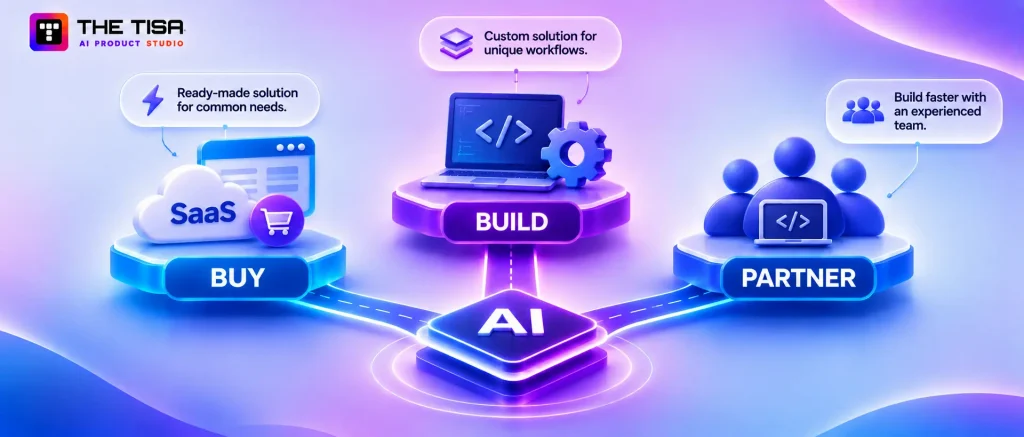
Buy when the use case is common and the vendor’s product already fits your workflow. Build when the workflow depends on your proprietary data, integrates deeply with your systems or creates competitive advantage. Bring in a development partner when you need to build but lack the time, team or experience to do it safely.
The line is moving. McKinsey’s 2026 survey found that 32% of respondents had decided against buying software they could build in-house with agentic coding tools. Building is getting cheaper, but owning what you build still carries maintenance, security and model-migration costs.
When Does a SaaS Tool Make Sense?
- The task is generic, such as meeting notes, writing help or general search.
- Your existing platforms, such as Microsoft 365, Google Workspace, Salesforce or ServiceNow, already offer a capable AI feature.
- Data stays inside a system the vendor already hosts under your agreement.
- Speed matters more than differentiation.
When Does Custom Development Make Sense?
- The workflow is unique to your business or a key differentiator.
- The AI needs to combine data from several internal systems with fine-grained permissions.
- You need control over models, hosting, data residency or audit trails.
- SaaS pricing per seat or per action becomes expensive at your scale.
- You want to embed AI features inside your own product for customers.
Build vs. Buy vs. Partner at a Glance
| Factor | Buy SaaS | Build in-house | Build with a partner |
|---|---|---|---|
| Time to value | Fastest | Slowest, especially when hiring | Fast, with an experienced team |
| Fit to your workflow | Limited to the product | Full | Full |
| Upfront cost | Low | High, including hiring | Medium to high |
| Ongoing cost | Subscription, often per seat | Team salaries plus infrastructure | Support retainer plus infrastructure |
| Control and IP | Vendor owns the product | Ownership subject to licenses | Ownership defined by contract |
| Risk | Vendor lock-in, data terms | Talent gaps, slower learning | Partner quality varies widely |
Which Delivery Model Fits?
| Model | Works best when | Watch out for |
|---|---|---|
| In-house | You have experienced AI engineers and the use case is core IP | Hiring time and cost, narrow experience base |
| Development partner | You need speed, proven patterns and a full team now | Knowledge transfer, IP terms, vendor dependence |
| Hybrid | You want to build internal capability while shipping quickly | Clear ownership of each layer |
| Staff augmentation | You have leadership and process but lack specific skills | Integration into your team’s practices |
US companies often choose the hybrid model for a first production system: a partner leads architecture and delivery while internal engineers pair on every layer and take ownership after launch. Our comparison of staff augmentation, outsourcing and in-house hiring for AI projects outlines the trade-offs in more detail.
How Do You Work Well With a Distributed Partner Team?
Many US companies work with offshore or nearshore engineering partners to control cost. It works well with a few habits:
- Fixed overlap hours each day for decisions and unblocking.
- Written decisions in a shared log, so nothing depends on a single call.
- Demos every two weeks with working software, not slides.
- Shared access to repositories, dashboards and evaluation results from day one.
- A named technical lead on each side who owns communication.
- Security onboarding that gives the partner least-privilege access to environments and masked data where possible.
The partner’s location matters less than these practices. Clear ownership and visible progress prevent most of the friction that teams worry about.
When Should You Bring the Work In-House?
Partner-led delivery often makes sense for the first one or two systems. Signs that it is time to build a larger internal team include a steady pipeline of new AI use cases, a shared platform that needs daily care, internal engineers who have paired on the build and can own each layer, and AI features that have become core to your product. A gradual transition works best: shift ownership layer by layer while the partner moves into an advisory or overflow role.
How Should You Evaluate a Generative AI Development Company?
Use a weighted scorecard rather than a gut feel. The criteria below reflect what actually predicts success in enterprise generative AI development.
| Criterion | What to look for | Questions to ask |
|---|---|---|
| Technical depth | Production RAG, evaluation, agents, integrations | Can you show an evaluation report from a shipped system? |
| Security practice | Threat modeling, permission-aware retrieval, red-teaming | How do you prevent cross-user data leakage? |
| Delivery process | Discovery, gated phases, demos every two weeks | What happens if the POC fails its go/no-go criteria? |
| Full-stack capability | Front end, back end, cloud, DevOps, not only prompts | Who builds the integrations and admin tools? |
| Vendor neutrality | Experience with several model providers | How would we switch models next year? |
| Support model | Post-launch monitoring, optimization, migrations | What is included after launch, and for how long? |
| IP and data terms | Client owns code, prompts, evaluation sets and data | Who owns the prompts and test sets you create? |
| Cost transparency | Clear estimates for build and run costs | What will this cost per month at our expected volume? |
| References | Case studies with real metrics and named limits | Can we speak with a client whose project is in production? |
Ask every vendor for a short paid discovery engagement before a large commitment. It reveals how they think, how they communicate and whether their estimates hold up.
For a fuller framework, read our build vs. buy AI decision framework. If you are comparing agencies, this vendor checklist for choosing an AI development company lists the due-diligence questions in detail.
Red Flags in Vendor Proposals
- A fixed price with no discovery phase for a complex, data-heavy use case. Either the scope is vague or risk is being priced in silently.
- No mention of evaluation. If the proposal does not describe how quality will be measured, it will not be.
- Agents for everything. Proposals that apply autonomous agents to simple, predictable tasks add cost and risk without benefit.
- One model provider hard-wired into the design with no abstraction layer.
- Vague security language such as “enterprise-grade security” without specifics on permissions, data retention and injection defenses.
- No run-cost estimate. A build quote without monthly operating costs hides the biggest long-term number.
- Ownership terms that leave prompts, evaluation sets or fine-tuned models with the vendor.
A strong proposal names its assumptions, lists the risks it sees in your environment and explains what happens if the proof of concept fails.
Can You Combine Buying and Building?
Yes, and many enterprises do. A common hybrid is to buy the commodity layers, such as managed model access, a vector database service and an observability platform, while building the parts that encode your business: retrieval over your data, integrations, workflow logic, guardrails and the user experience. This avoids reinventing infrastructure while keeping ownership of what makes the system valuable. Review the hybrid every year, since today’s custom component can become tomorrow’s commodity feature.
What Production AI Projects Reveal About Development Requirements
Frameworks are useful, but buyers learn more from what happened on real projects: what was built, which controls mattered and where the limits were. THE TISA is an AI-powered software development company that designs and ships generative AI products end to end, from discovery and architecture through full-stack build, cloud deployment and post-launch optimization. Four of its published projects show the patterns from this guide in practice.
The table focuses on engineering decisions rather than marketing claims. Where a figure appears, it comes from the published case study, is reported by THE TISA itself and comes with the caveats listed in each write-up.
| Project | What the application needed | Architecture that supported it | Integration challenge | What it demonstrates |
|---|---|---|---|---|
| Narsik Logistics Control Hub | Turn WhatsApp messages, voice notes and proof-of-delivery photos into ERP records without letting AI change financial data | A modular-monolith ERP built first, then an OpenAI layer added in six weeks with vision, transcription, embeddings and 14 read-only tools | Bookings, PODs and bank receipts lived in separate places, and every AI draft had to flow through existing ERP modules that perform the actual writes | Build the system of record before the AI layer. Reported entry time per message-based booking fell from 4 min 10 s to 1 min 35 s |
| DCD, an AI ledger with a RAG assistant | Exact financial answers, receipts linked to entries and scoped access for accountants and auditors | A double-entry ledger engine plus an assistant that calls parameterized read-only tools; code computes every total and a post-check compares each number in the answer with tool results | Injecting user and organization scope into every tool call and masking account numbers and tax IDs before prompts | Separate calculation from generation and filter permissions before retrieval. In testing, 0 of 500 cross-account attack attempts produced a leak |
| NovaMind AI, a multilingual RAG assistant | Answers from each customer’s own policies for users who switch languages mid-sentence and often speak instead of type | Language detection, tenant-filtered hybrid keyword and vector search, reranking, a minimum evidence score and one pipeline for both voice and text | Calling approved business APIs for live data, with user confirmation before any change, while keeping each tenant’s documents isolated | Decline or hand off when evidence is weak. Delivered in two months by a four-person team |
| OpsPilot, an AI-enabled admin platform | Connected records and management summaries across student, HR, payroll and finance functions | Services organized by business function, with OpenAI in a central reporting layer as a read-only summarizer | Connecting an existing student LMS, employee portal and website enquiries into one platform before adding AI | Run permission checks before preparing any data for the model, and keep AI output separate from source records |
Key Engineering Lessons From THE TISA’s AI Projects
Each lesson below comes from a specific design decision in the projects above, not from general best practice.
- Build the system of record before the AI layer. In Narsik, the ERP took 3.5 months. The OpenAI layer then took only six weeks, because clean records, roles and audit logs already existed.
- Keep arithmetic in code, not in the model. In DCD, code calculates every total, and a post-check compares each amount, percentage and date in the answer with the tool results before the user sees it.
- Treat refusal as a feature. NovaMind applies a minimum evidence score after reranking. When retrieval is weak, the assistant declines or hands off instead of guessing.
- Check permissions before any data reaches the model. OpsPilot runs permission checks before preparing data for an AI request. DCD filters by organization before ranking and injects user scope into every tool call.
- Let people approve every write. Narsik’s AI never writes to the ledger or changes shipment status on its own, and DCD’s assistant can only create drafts for review.
These are the same controls this guide recommends. They explain why the projects reached production instead of stalling as demos.
How Does an Engagement Usually Run?
THE TISA’s generative AI development services follow the staged approach described in the development process section:
- Discovery and strategy (2 to 4 weeks): problem definition, data assessment, success metrics and an honest go/no-go recommendation.
- Data and architecture (3 to 6 weeks): retrieval design, model selection across providers such as OpenAI, Anthropic’s Claude, Microsoft Azure and AWS, an evaluation strategy and a risk plan.
- Build and iterate (8 to 16 weeks): full-stack development, integrations with CRM, ERP and internal APIs, guardrails and demos about every two weeks.
- Deployment and optimization: cloud deployment, monitoring setup, cost tuning and model updates, with three months of post-launch support included in fixed-price projects.
The commercial model is fixed price per scope, which suits US buyers who need a firm number for budget approval. The team works directly with clients from its development office in Jaipur, India, and the company states that this keeps its rates below those of comparable Silicon Valley firms.
If you want to judge the work yourself, the case studies above include architecture details, metrics and the limits each project ran into.
15. Your Enterprise Generative AI Implementation Roadmap for the Next 90 Days
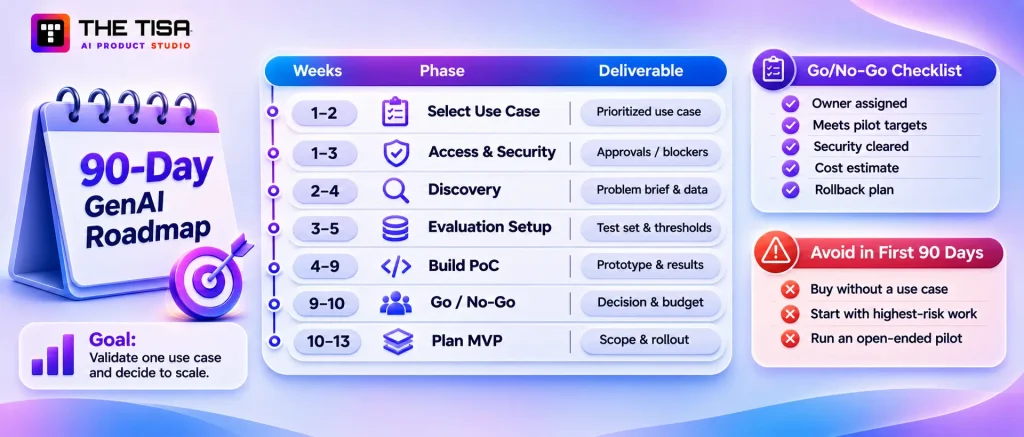
In the next 90 days, pick one high-value workflow, prove it with real data, and make a go/no-go decision based on evidence. A disciplined GenAI implementation earns the right to scale one use case at a time.
Step-by-Step Roadmap
| Weeks | Step | Owner | Deliverable |
|---|---|---|---|
| 1 to 2 | Shortlist and score three to five use cases | Business sponsor, product lead | Scored shortlist with one selected use case |
| 1 to 3 | Start data access, vendor terms and security reviews in parallel | IT, legal, security | Approvals or a list of blockers |
| 2 to 4 | Run discovery on the selected workflow | Product lead, engineering lead | Problem brief, baseline metrics, data inventory |
| 3 to 5 | Build the evaluation set and agree thresholds | Domain experts, AI engineer | 100 to 300 test cases with reference answers |
| 4 to 9 | Build and test the proof of concept | AI and data engineers | Prototype on real data, evaluation report |
| 9 to 10 | Hold the go/no-go review | Sponsor, CFO, CISO | Signed decision with next-phase budget |
| 10 to 13 | Plan the MVP and production architecture | Engineering lead, partner if used | MVP scope, architecture, cost model, rollout plan |
Readiness Checklist Before the Go/No-Go Review
- A named business owner and a technical owner
- A baseline measured before the build
- Evaluation results that meet the pilot thresholds
- A permission model that mirrors the source systems
- A cost estimate at expected production volume
- A security review with no open critical findings
- A human oversight plan that matches the risk tier
- A rollback and incident plan
Next Actions for Business Leaders
- Choose one workflow and one metric that leadership already cares about.
- Name the owner and give them time, not just a title.
- Agree in writing on what result would justify scaling and what result would stop the project.
Next Actions for Engineering Leaders
- Put a model gateway and an evaluation harness in place before the second use case arrives.
- Treat prompts, retrieval settings and test sets as versioned code.
- Design for permission-aware retrieval and least-privilege tools from the first sprint.
What Should You Avoid in the First 90 Days?
- Buying a platform before you have a use case. Tools chosen without a real workload tend to fit nobody’s needs.
- Starting with the riskiest workflow. Save consequential decisions and customer-facing autonomy for after the foundations are proven.
- Letting the pilot run without an end date. Open-ended pilots consume budget and goodwill.
- Hiding failure examples. Leadership trusts teams that show where the system breaks and what they are doing about it.
- Treating security review as the last step. Bring security in during discovery, when changes are cheap.
The first 90 days should end with evidence, a decision and a plan, not just a demo.
Conclusion
Generative AI rewards companies that treat it as a business capability built with engineering discipline, not as a model purchase. The technology is ready for many enterprise workflows. Whether it pays off depends on choices made around the build: which workflow you pick, how clean and permissioned your data is, how you measure quality, how you control cost and who owns the outcome.
Before moving forward, evaluate four things. Do you have a workflow with a measured baseline? Is the data behind it current and access-controlled? Can you define the quality bar that justifies launch? Do you have the team, internal or external, to run the system after launch day?
If the answers are yes, a focused pilot can show credible results within a quarter. If not, close those gaps first. That is where an experienced partner such as THE TISA can save months.
Frequently Asked Questions
Q1. Will a model provider use company data to train its models?
Ans. Under the commercial API and enterprise terms of major providers, customer inputs and outputs are generally not used for training by default, unlike some consumer plans. Terms differ by product and change over time, so confirm training use, retention periods and zero-data-retention options in the contract. Routing traffic through your own cloud tenant adds another layer of control.
Q2. How much data is needed before a project can start?
Ans. Less than most teams expect for retrieval-based systems. A few hundred well-maintained documents covering one domain can support a useful pilot. Currency, ownership and permissions matter more than volume. Fine-tuning requires high-quality task-specific examples, with the amount depending on the model and task.
Q3. Can generative AI run entirely inside an existing AWS, Azure or Google Cloud account?
Ans. Yes, through self-hosted models on cloud infrastructure you control. Amazon Bedrock, Azure AI Foundry and Google Vertex AI also provide managed model access. Check data processing locations, deployment options and regional model availability against your security and compliance requirements.
Q4. Who owns the code, prompts and outputs when a partner builds the system?
Ans. Ownership depends on the contract, so make it explicit. The client should own the application code, prompts, evaluation datasets, fine-tuned weights, configuration and all business data. Also review the model provider’s terms on output ownership and any copyright indemnity it offers.
Q5. Does a company need to hire data scientists to maintain the system after launch?
Ans. Usually not for retrieval and prompt-based systems. Ongoing work centers on software engineering, data pipelines, evaluation and content ownership. A small internal team or a partner support retainer can handle prompt updates, new sources and model migrations. Dedicated ML specialists matter more if you fine-tune or self-host models.
Q6. How do you get employees to actually adopt the tool?
Ans. Put it inside the tools people already use, launch with a team that asks for help and train users on what the assistant does well and where it struggles. Track weekly usage and interview non-users. Low adoption usually signals a workflow-fit problem rather than a model problem.
Q7. Is generative AI affordable for a mid-sized US company, not just large enterprises?
Ans. Yes, when scope stays focused. Managed model APIs remove the need for GPU infrastructure, and one well-chosen workflow can be piloted for a fraction of a large program’s budget. Mid-sized firms often move faster than large ones because approval chains are shorter.
Q8. Can one assistant serve both English- and Spanish-speaking customers?
Ans. Yes. Leading models handle Spanish and many other languages well. Detect the user’s language, retrieve content in that language where it exists, answer in the same language and include non-English cases in the evaluation set. Have fluent reviewers check legal and policy wording before launch.
Q9. When is traditional automation or RPA a better fit than generative AI?
Ans. When inputs are structured, rules are stable and the same steps repeat every time, rules-based automation is cheaper, faster and easier to audit. Generative AI fits where inputs are unstructured, language varies or judgment is needed. Many workflows combine both, with AI handling understanding and conventional automation handling execution.
Q10. What do enterprise customers ask SaaS vendors that embed generative AI in their product?
Ans. Expect questions about which model providers process their data, whether that data trains any model, retention periods, tenant isolation, output evaluation, prompt-injection defenses and whether AI features can be switched off. A short AI security addendum alongside SOC 2 reports and data processing agreements can shorten these reviews considerably.
Planning Generative AI Development for Your Enterprise?
Enterprise generative AI implementation requires more than choosing a model or building a proof of concept. Talk to THE TISA about your business requirements, AI architecture, model selection, data integration, security controls, and implementation roadmap to understand the right approach for developing and deploying generative AI solutions at enterprise scale.
Discuss Your Enterprise AI Project →