


Your sales and service teams already work in HubSpot. Now HubSpot offers agents that resolve tickets, research leads, and update records. The question for 2027 is whether those built-in agents can meet your business requirements without custom AI development.
According to HubSpot’s Q2 2026 earnings report, more than 55% of its Professional and Enterprise customers use HubSpot agents or Breeze Assistant, while monthly agentic actions had more than tripled since the start of the year. In September 2026, HubSpot also rebuilt Breeze Assistant to assign tasks to specialized agents rather than simply answer questions.
However, wider adoption does not mean built-in agents can meet every business requirement. Usage-based credits, complex workflows, external system dependencies, and security requirements can affect their suitability and long-term costs.
This HubSpot Breeze vs custom AI comparison evaluates capabilities, limitations, pricing, and integration requirements to determine when built-in agents are enough, when native customization is suitable, and when external custom AI development becomes necessary.

Key Takeaways
- HubSpot Breeze suits routine CRM workflows, including customer support, lead research, content creation, and data enrichment.
- HubSpot Agent Builder extends native capabilities through custom instructions, actions, and supported external tools.
- External custom AI integration becomes suitable when native capabilities cannot meet complex workflow, business logic, or governance requirements.
- HubSpot Breeze pricing depends on subscriptions, seats, and credit consumption, while custom CRM AI integration can cost 15,000–80,000.
- Evaluate total ownership costs, data security, accuracy, and business outcomes through a measurable pilot before investing in custom development.
What Is HubSpot Breeze AI in 2027?
HubSpot Breeze AI is the name most buyers use for the AI built into HubSpot. It covers an assistant, ready-made agents, AI workflow actions, and tools for building your own agents.
An AI agent is software that uses a language model to plan steps and act through approved tools. A basic chatbot mainly answers. An agent can also update a record, draft outreach, or pass a case to a person.
HubSpot made several changes to its AI tools in 2026, so confirm which version a demo shows:
- Agent Hub and Agent Builder entered public beta on July 23 for Professional and Enterprise customers, replacing the Breeze Agents and Breeze Studio labels.
- The Fall 2026 release added a self-updating Smart CRM and a Prospecting Agent that watches more than 40 buying signals.
- On November 17, HubSpot said everyday use through tools such as Claude or ChatGPT comes with a seat, PPC Land reported. A future governed agent environment will use credits.
HubSpot Breeze Use Cases 2027: Where Do Built-In Agents Fit?
HubSpot’s built-in AI agents automate repeatable tasks across sales, marketing, customer service, and operations. They use CRM records and approved business knowledge to reduce manual workloads without requiring a separate AI system.
| Business Function | Built-in AI Capability | Practical Business Use Case |
|---|---|---|
| Customer Service | Customer Agent | Answer product questions, resolve routine support requests, and escalate unresolved cases to human agents. |
| Sales | Prospecting Agent | Research prospects, identify buying signals, and draft personalized outreach. |
| Revenue Operations | Data Agent | Retrieve CRM information, identify missing details, and support data enrichment. |
| Marketing | Content Agents | Draft marketing emails, campaign content, and promotional assets for review. |
| Business Operations | AI Workflow Actions | Summarize form submissions, classify requests, and route them to relevant teams. |
In April 2026, HubSpot reported that Customer Agent resolved 65% of conversations and reduced resolution time by 39%. These vendor-reported results may vary depending on business requirements and knowledge quality.
When to Use HubSpot Breeze AI
Built-in agents can meet your business requirements when the following conditions apply:
- Repeatable tasks: Teams regularly perform similar activities, such as answering customer questions or researching prospects.
- Established business processes: Workflows follow defined steps without requiring process redesign.
- Available business knowledge: Agents can access the CRM records and approved information needed to complete tasks.
- Configuration-based requirements: Existing agent settings and workflow actions deliver the intended outcome without new development.
- Manageable exceptions: Agents can escalate unusual requests or cases with incomplete information to the appropriate teams.
For example, a B2B SaaS company can use Customer Agent to answer recurring questions about product features, subscription plans, and account setup while its support team handles account-specific exceptions. Similarly, sales teams can use Prospecting Agent to reduce manual lead research.
In these situations, HubSpot AI automation can meet business requirements without the additional cost and maintenance of a custom AI application.
HubSpot Breeze vs Custom AI: How Do Built-In and Custom Agents Compare?
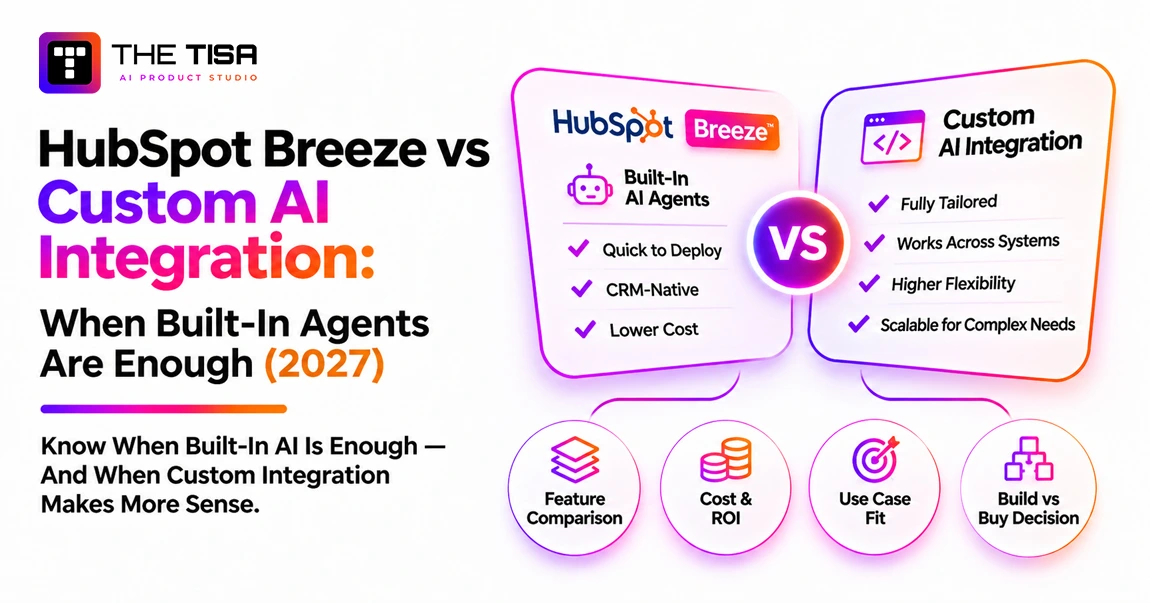
HubSpot Breeze provides ready-to-use AI agents for CRM workflows, while custom AI integration allows businesses to develop agents around their specific processes, systems, and operational requirements. HubSpot Agent Builder offers a middle ground through configurable instructions, actions, and supported external tools.
| Comparison Factor | HubSpot Breeze (Built-In AI) | HubSpot Agent Builder | External Custom AI Integration |
|---|---|---|---|
| Implementation | Configuration through existing features | Agent configuration and tool setup | Custom development and integration |
| Customization | Within predefined capabilities | Custom instructions and supported actions | Business-specific logic and workflows |
| Data Access | CRM data and approved knowledge | CRM data and supported external tools | Approved internal and external systems |
| Model Control | Platform-managed | Platform-managed | Greater control depending on architecture |
| Workflow Complexity | Standard CRM workflows | Customized CRM workflows | Complex, multi-system workflows |
| Cost Structure | Subscriptions and credits | Subscriptions, credits, and setup | Development, usage, hosting, and maintenance |
| Scalability | Platform and usage limits | Platform and tool limits | System architecture and infrastructure |
| Maintenance | Platform management and agent configuration | Agent configuration and monitoring | Engineering team manages the application |
| Best Suited For | Routine CRM tasks and automation | Specialized CRM workflows | Complex business processes and custom AI products |
When to Use Custom AI Integration
Custom AI development makes sense when business requirements extend beyond HubSpot’s native capabilities:
- Complex workflows: Your processes require coordination between multiple business systems that native integrations cannot support.
- Business-specific logic: Pricing, underwriting, or renewal decisions require specialized rules beyond native capabilities.
- Advanced controls: Your business needs approval processes, audit trails, or data residency controls beyond available platform options.
- Product development: You plan to offer AI features within your own SaaS product.
- Long-term costs: The expected cost of using HubSpot agents exceeds the total cost of developing and operating a custom solution.
Can HubSpot Breeze Replace Custom AI?
Yes. HubSpot Breeze can replace custom AI when its built-in capabilities or Agent Builder meet your business requirements.
Businesses can also adopt a hybrid approach, using HubSpot Breeze for routine CRM automation while external custom AI handles specialized processes beyond the platform’s capabilities. This allows businesses to retain existing automation and invest in custom development only where necessary.
HubSpot Breeze Pricing 2027: How Much Will You Pay?
HubSpot Breeze pricing depends on your subscription plan, paid seats, onboarding requirements, and HubSpot Credits. Additional HubSpot Credits cost $0.01 each, or $10 per 1,000 credits. Unused credits expire each month.
According to HubSpot’s Product and Services Catalog, Service Hub Professional starts at $100 per Service Seat per month, with a $1,500 onboarding fee. Enterprise onboarding costs $3,500.
Most eligible HubSpot subscriptions include monthly credits based on the subscription tier:
- Starter: 500 credits
- Professional: 3,000 credits
- Enterprise: 5,000 credits
HubSpot determines the included credit allowance based on your highest subscription tier rather than combining allowances across subscriptions.
| AI Agent or Action | Credits Required | Equivalent Credit Cost |
|---|---|---|
| Customer Agent per resolved text conversation | 50 | $0.50 |
| Prospecting Agent per lead recommended for outreach | 100 | $1.00 |
| Data Agent per prompt per record | 10 | $0.10 |
| AI workflow action per execution | 10 | $0.10 |
| Content Agent per content piece (beta) | 1,000 | $10.00 |
| Custom agent per action unit (beta) | 1 | $0.01 |
These rates reflect November 2026 pricing and may change in 2027. Additional credit charges apply when usage exceeds the included allowance.
Illustrative pricing example: A business with five Service Hub Professional seats uses Customer Agent to resolve 1,000 text conversations per month.
| Cost Component | Amount |
|---|---|
| Five Service Hub Professional seats | $500/month |
| Total monthly credit usage | 50,000 credits |
| Included monthly credits | 3,000 credits |
| Additional credits required | 47,000 credits |
| Additional credit cost | $470/month |
| Total monthly cost | $970 |
| One-time onboarding fee | $1,500 |
| Total first-year cost | $13,140 |
This estimate assumes consistent monthly usage and unchanged pricing, excluding taxes and other metered activities.
Is HubSpot Breeze Worth It in 2027?
HubSpot Breeze can be worth the investment when the value of completed tasks and time saved exceeds its operating costs. Businesses should account for human review, error correction, and unresolved cases alongside subscription and credit expenses.
In a HubSpot Breeze vs custom AI comparison, cost per successful business outcome provides a more useful measure than credit consumption alone.
Before deployment, configure spending limits and review HubSpot’s credit usage and overage settings to manage unexpected expenses and avoid interruptions to credit-based features.
HubSpot Breeze Limitations 2027: Where Do Built-In Agents Fall Short?
HubSpot’s built-in AI agents may not meet every business requirement, particularly when workflows need greater control over data, models, or complex operations.
- Beta features: HubSpot may change the functionality, availability, and credit rates of beta features.
- Shared credits: High usage in one department can limit the credits available to other teams.
- Limited model control: Built-in agents offer less flexibility over model selection, configuration, and testing.
- API rate limits: Private apps on Professional and Enterprise plans have a burst limit of 190 requests per 10 seconds, which can affect high-volume integrations.
- Complex transactions: Multi-system workflows may require custom logic to retry failed operations and reverse incomplete transactions.
Can HubSpot AI Connect to External Data?
Yes. HubSpot supports several methods for connecting external data and tools, each with different capabilities and setup requirements.
| Integration Method | What It Does | What to Check |
|---|---|---|
| Data Studio | Combines data from spreadsheets and warehouses such as Snowflake with CRM data. | Plan availability and credit usage |
| External MCP servers (beta) | Allow HubSpot AI agents to access external tools. | Development requirements and authentication |
| HubSpot’s MCP server | Allows external AI applications to read and write CRM data, including custom objects, through supported tools. | Permissions and tool limitations |
| APIs and webhooks | Exchange data and events between HubSpot and external systems. | Rate limits, retries, and ownership |
The Model Context Protocol (MCP) is an open standard that connects AI applications to data and tools. However, businesses still need to manage data quality and define business rules.
HubSpot AI Security and Data Privacy: What Should CTOs Check?
HubSpot provides built-in security and privacy controls, but businesses remain responsible for access permissions, AI settings, and compliance.
- Model training: HubSpot may use customer data to train its own AI models. HubSpot enables this setting by default. Super Admins can opt out of future training, while HubSpot automatically excludes Sensitive Data accounts.
- Third-party AI providers: HubSpot states that it prohibits external AI providers from training on customer data and applies zero data retention wherever possible.
- Access permissions: HubSpot’s MCP server follows existing user permissions and blocks access to activity and conversation data when businesses enable Sensitive Data.
Review user permissions and AI settings before connecting external AI tools.
Businesses operating in the US must also consider state-level AI regulations. California requires covered businesses to comply with automated decision-making requirements by January 1, 2027 for significant decisions, such as hiring and lending. Colorado’s SB 26-189 takes effect on the same date, although a court order has temporarily paused enforcement.
Review the applicable ADMT compliance requirements in California and Colorado with legal counsel before deploying AI for significant decisions.
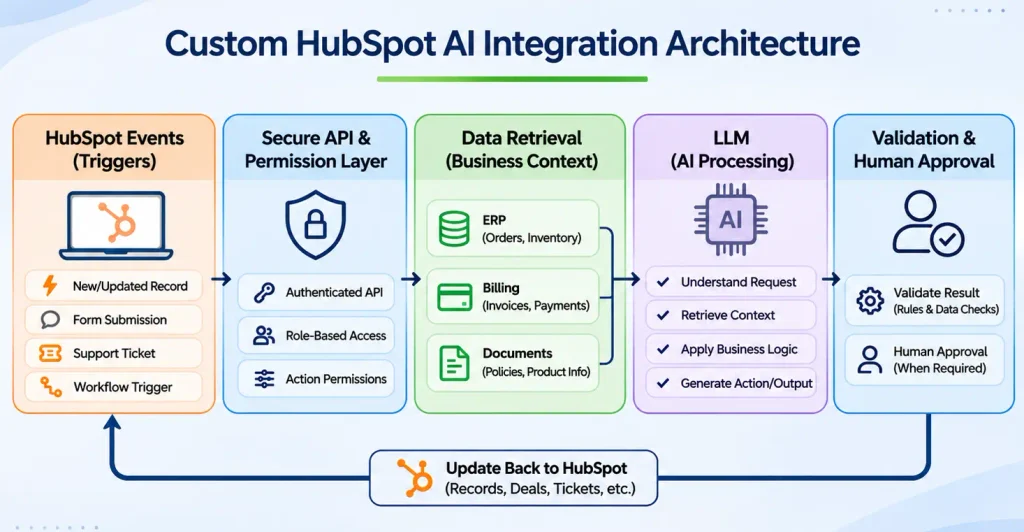
What Does a Custom HubSpot AI Integration Look Like?
A custom HubSpot AI integration places a controlled service between your CRM, other systems, and an AI model. A typical request follows five steps:
- A HubSpot event or user action triggers the service.
- The service retrieves only the records that task needs.
- A large language model (LLM), which processes and generates text, produces a result.
- Code validates it, and a person approves sensitive actions.
- The service writes back to HubSpot and logs the action and cost.
If answers rely on changing documents, add retrieval-augmented generation (RAG), which finds relevant passages before the model answers. It often uses embeddings (numbers that represent meaning) stored in a vector database. Fine-tuning further trains a model on your examples. Test prompts and retrieval before paying for it.
Host the service on your cloud with encrypted secrets, request queues, and monitoring so it can scale within API limits. Test missing data, denied permissions, failed calls, and prompt injection, where hidden text tries to hijack the agent. Assign an owner for API, model, and prompt updates, or technical debt builds.
Example: When Should a SaaS Company Extend HubSpot Breeze With Custom AI?
Consider a hypothetical B2B SaaS company with 500 business customers and an average annual contract value of $12,000. It uses HubSpot for customer management, Stripe for billing, Mixpanel for product analytics, and an internal knowledge base.
The company wants to reduce manual workloads, identify renewal risks, and improve customer retention. However, not every requirement needs custom AI development.
| Business Requirement | Recommended Solution | Reason |
|---|---|---|
| Routine customer queries | HubSpot Customer Agent | Answers questions using approved business knowledge. |
| CRM data enrichment | HubSpot Data Agent | Identifies missing customer information. |
| Customer renewal summaries | HubSpot Agent Builder | Combines custom instructions, CRM data, and supported tools. |
| Renewal risk assessment | External custom AI | Combines billing, product usage, and support data with specialized scoring logic. |
| Personalized retention recommendations | External custom AI | Applies business-specific retention policies and approval rules. |
For renewal risk assessment, the integration identifies accounts approaching renewal, retrieves data across systems, and calculates risk using business rules or a validated predictive model. An LLM explains the risk factors and recommends retention actions. Account managers approve recommendations before the integration updates HubSpot.
Restricted permissions, duplicate-update prevention, audit logs, and manual review of incomplete data help maintain operational control.
Before investing in custom development, the company should test whether Agent Builder and supported external tools meet its requirements. If native capabilities cannot support the required scoring logic, accuracy, or controls, a custom integration becomes more suitable.
Measure prediction accuracy, false alerts, time saved, cost per successful outcome, and actual customer retention to evaluate the investment.
HubSpot AI Integration Cost 2027 and Timeline
An AI integration cost guide estimates $15,000 to $80,000 for a production CRM integration with one to three use cases. Its 2027 timeline guide puts one CRM use case at 8 to 14 weeks to production. Both are planning ranges, not quotes.
| Budget Item | What to Plan For |
|---|---|
| Initial Build | $15,000 to $80,000 |
| Data Preparation | Often 10% to 25% of build cost |
| Annual Maintenance | About 15% to 20% of build cost |
| Run Costs | Model usage, hosting, monitoring, and HubSpot charges |
| People | Review, approvals, and exception handling |
In-house delivery works when AI is core to your product and engineers have capacity. US software developers earned a median $135,980 in May 2025, before benefits. A fair HubSpot Breeze vs custom AI budget compares three years of ownership. Our AI CRM integration guide covers the technical choices.


How to Evaluate HubSpot AI Agents Before You Scale
Test one workflow against a recorded baseline, with pass marks agreed upfront. HubSpot announced 28-day free trials for Customer Agent and Prospecting Agent, so check eligibility.
| Test Area | Question to Answer |
|---|---|
| Accuracy | How often do reviewers accept output without edits? |
| Outcome | Did the issue stay solved or the lead progress? |
| Cost | What did each successful result cost? |
| Safety | Could the agent see or change anything it should not? |
| Handoff | Did it escalate clearly when unsure? |
Avoid four common mistakes: launching on messy data, measuring activity instead of outcomes, granting write access too early, and leaving the agent without an owner.
How THE TISA Helps You Move HubSpot AI From Pilot to Production
As an AI software development company, THE TISA assesses your HubSpot workflows, data dependencies, business rules, and operational requirements before recommending built-in agents, Agent Builder, or external custom AI integration.
When native capabilities fall short, we design integrations around approved data sources, business-specific logic, access permissions, and human approval requirements. We define acceptance criteria, test failure scenarios, and release integrations in stages to reduce operational risks.
Workflows that require specialized business logic may need AI agent development, while those that rely on internal documents and business knowledge may benefit from RAG development.
Our OpsPilot case study demonstrates our experience integrating AI-powered reporting and administrative workflows into an existing business platform. Although it is not a HubSpot project, the underlying engineering experience is relevant to connecting business systems, processing operational data, and integrating AI into existing workflows.
What Businesses Should Expect From an AI Integration Partner
When selecting an AI development partner, look for the following deliverables:
- A documented project scope that separates read and write actions.
- Defined test cases and acceptance criteria.
- Clear ownership of source code, prompts, and logs.
- Monthly operating cost estimates and a post-launch support plan.
- A documented security approach covering data access and system protection.
If HubSpot’s built-in agents or Agent Builder can meet your requirements, we recommend configuration over custom development.
Conclusion
Your HubSpot Breeze vs custom AI decision depends on three things: where the data lives, how standard the work is, and what a mistake costs.
Use built-in agents for routine CRM tasks, and measure total cost per outcome. Move to Agent Builder when you need your own instructions and actions. Build custom when work spans systems, protects a competitive process, or needs tighter controls.
Before approving a 2027 budget, check data quality, credit forecasts, permissions, legal exposure, and engineering capacity. Then pilot one measurable workflow. It will teach you more than a long feature comparison.
Frequently Asked Questions
Q1. What does HubSpot Breeze AI do?
Ans. HubSpot Breeze AI helps businesses retrieve CRM information, create content, research leads, answer customer questions, and automate routine workflows. Feature availability depends on the subscription plan, user permissions, paid seats, and available credits.
Q2. How much does HubSpot Breeze cost?
Ans. HubSpot Breeze pricing depends on your subscription, paid seats, onboarding requirements, and AI usage. As of November 2026, additional HubSpot Credits cost $0.01 each. Your total cost depends on the features you use and monthly credit consumption.
Q3. When should businesses use HubSpot Agent Builder instead of external custom AI?
Ans. HubSpot Agent Builder suits workflows that require custom instructions, actions, and supported external tools within HubSpot’s capabilities. External custom AI becomes suitable when businesses need specialized processing logic, cross-system coordination, model flexibility, or operational controls beyond native capabilities.
Q4. What are the limitations of HubSpot Breeze AI?
Ans. HubSpot Breeze has limitations related to credit consumption, model customization, feature availability, and complex workflows. Businesses may need external custom AI integration when native agents and supported tools cannot meet their data processing, business logic, or governance requirements.
Q5. Can businesses use HubSpot Breeze and custom AI agents together?
Ans. Yes. Businesses can use HubSpot Breeze for routine CRM automation while custom AI agents handle specialized workflows beyond native capabilities. This hybrid approach helps businesses retain existing automation, control development costs, and extend AI capabilities where necessary.
Need Custom AI Integration Beyond HubSpot Breeze?
Choosing between HubSpot Breeze and custom AI integration depends on your business workflows, automation requirements, and integration needs. Talk to THE TISA about your AI integration strategy, custom AI agents, CRM connectivity, workflow automation, and data security to understand when built-in AI agents are enough and when custom development makes sense.
Discuss Your AI Integration Project →