
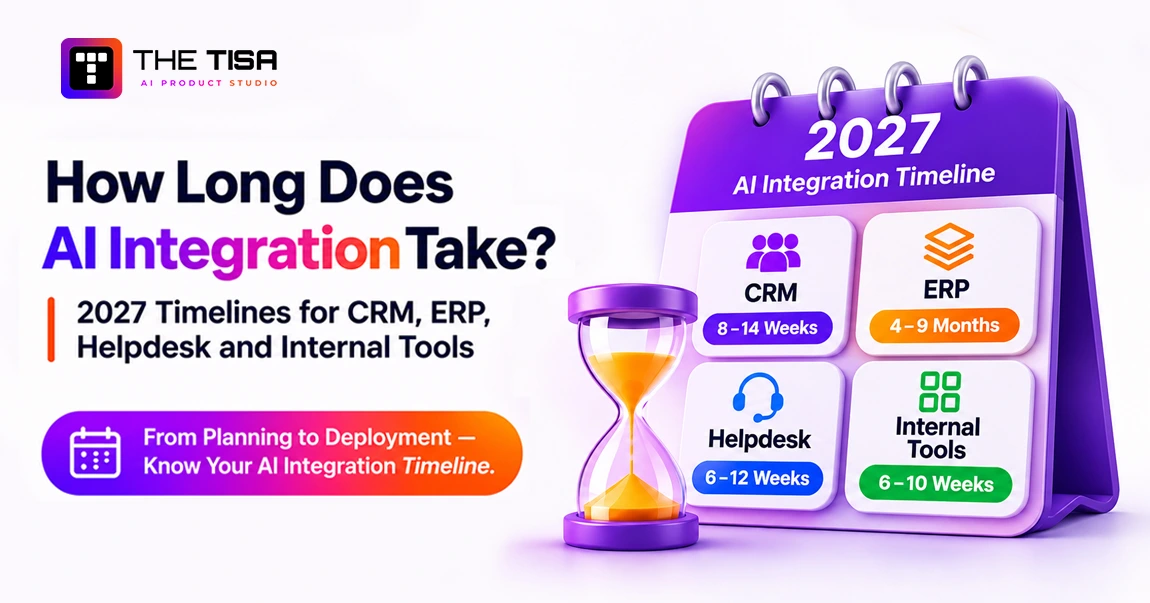
An AI integration timeline covers the time needed to add an AI feature to an existing business system and make it ready for everyday use. This could be Salesforce, NetSuite, Zendesk or an internal portal. A single use case in a CRM, helpdesk or internal tool usually takes 6-14 weeks. ERP and multi-system projects, including those using autonomous AI agents, often take 4-9 months.
The AI model itself rarely determines the timeline. Data preparation, API access, security reviews and user testing usually take longer and affect project costs. Gartner reports in January 2026 that at least 50% of generative AI projects had been abandoned after proof of concept by the end of 2025, citing poor data quality, inadequate risk controls, rising costs and unclear business value. Businesses can identify many of these risks before development begins.
Timelines also vary by system. Helpdesk and internal knowledge tools usually take less time because they mainly retrieve information. CRM projects depend on data quality, while ERP integration requires more careful planning because these systems handle payments, inventory and financial reporting.
This guide breaks down the 2027 AI integration timeline for each system and explains how to avoid common delays.

Key Takeaways
- One AI use case in a CRM, helpdesk or internal tool usually takes 6-14 weeks.
- ERP and multi-system projects often take 4-9 months.
- Data readiness, security reviews and API access cause most delays.
- Read-only pilots with one clear KPI reach production faster.
- AI agents need staged write access and extra testing.
What Does an AI Integration Timeline Actually Include?
An AI integration timeline covers five phases, from defining the use case to launching the feature safely in production. As Microsoft’s AI implementation guidance explains, data readiness, system integration, security and testing all play an important role in moving AI projects into production.
A typical project follows these phases:
| Phase | Typical Duration | What Happens |
|---|---|---|
| Discovery and scoping | 1-3 weeks | Define the workflow, success metric, data sources and owners |
| Data and access readiness | 1-8 weeks | Clean records, map fields, secure API credentials and set permissions |
| Build and integrate | 2-14 weeks | Connect APIs, build prompts or retrieval systems, integrate the UI with existing tools |
| Testing and security review | 1-4 weeks | Test accuracy, edge cases, prompt injection and access controls |
| Pilot and rollout | 1-8 weeks | Run a limited release, collect feedback, monitor results and expand access |
These are planning estimates, not fixed industry benchmarks. Simple helpdesk or internal tools can reach production in about six weeks, while complex ERP projects may take up to nine months. Phases often overlap, allowing teams to test retrieval quality while engineers finish API work. SPD Technology’s 2026 timeline analysis also shows how project complexity and data readiness affect delivery schedules.
AI Integration Timeline by System
Each system carries different data, risk and API maturity. Here’s how they compare for a single, well-scoped use case:
| System | Common AI Use Cases | Time to Pilot | Time to Production |
|---|---|---|---|
| CRM | Lead scoring, call summaries, email drafts | 4-8 weeks | 8-14 weeks |
| ERP | Invoice matching, forecasting, procurement assistants | 8-12 weeks | 4-9 months |
| Helpdesk | Ticket triage, suggested replies, self-service bots | 3-6 weeks | 6-12 weeks |
| Internal tools | Knowledge search, report generation, workflow automation | 3-6 weeks | 6-10 weeks |
These estimates assume one use case, custom integration with one primary system through its existing APIs, a team of three to five people, reasonably accessible data and a standard US security review. Every extra system, approval step or data source adds time.
Teams can estimate the integration timeline by reviewing data quality, API dependencies, security approvals and testing requirements. Identifying which activities can run in parallel helps businesses set realistic milestones and allocate engineering resources.
CRM AI Integration: 8-14 Weeks
CRM AI integration typically takes 8-14 weeks. Platforms such as Salesforce, HubSpot and Dynamics 365 offer mature APIs and built-in AI features that can simplify integration. However, duplicate accounts, missing fields and inconsistent deal stages can affect accuracy and delay implementation.
Salesforce’s Trailhead module on grounding agents with data explains how the available data and fields affect AI responses. Allow two to three weeks for field mapping and permission rules. These requirements vary across platforms, as covered in AI CRM integration for Salesforce, HubSpot and Dynamics.
ERP AI Integration: 4-9 Months
ERP AI integration takes longer because these systems manage payments, inventory and financial reporting. Teams need approvals, audit logs and rollback plans before allowing AI to update records. Customized or on-premise ERPs may also require middleware to connect systems with limited APIs.
TechTarget reports that SAP has been moving customers from older Business Suite systems to S/4HANA ahead of its 2027 maintenance deadline. If your business plans a migration, build AI features for the new system rather than the one you intend to replace.
Start with read-only tasks such as invoice exception summaries or variance explanations. These provide useful information without changing transactions. For older platforms, AI integration into legacy systems covers wrapper and middleware approaches.
AI Helpdesk Integration: 6-12 Weeks
AI helpdesk integration typically takes 6-12 weeks. Ticket classification and suggested replies mainly depend on the knowledge base and ticket history, making these projects relatively straightforward.
Zendesk’s documentation explains how AI agents use help center articles while respecting user permissions. Outdated or incomplete content can lead to incorrect answers, so allow one to two weeks for a content review before launch.
Internal Tools: 6-10 Weeks
Internal AI tools for HR policy searches, sales support and operational reporting generally take 6-10 weeks. These applications usually carry lower customer-facing risks and often use RAG (retrieval-augmented generation).
RAG retrieves information from approved documents before the AI generates an answer. It uses embeddings to represent content and stores them in a vector database for efficient search. The business guide to RAG explains how this works. Managing document permissions and keeping the search index updated often take the most time.
What Slows Down AI Integration With Existing Systems?
Data preparation, access approvals and unclear responsibilities often delay AI integration with existing systems more than technical development itself.
- Poor data readiness. Gartner predicts that through 2026, organizations will abandon 60% of AI projects that lack AI-ready data.
- Late security reviews. US enterprises often require SOC 2 evidence, data processing agreements and legal reviews of how systems store prompts. Starting these reviews late can add three to six weeks.
- Limited APIs. Older systems may require custom connectors or scheduled data exports.
- Compliance requirements. State rules on automated decision-making may require additional documentation. Requirements vary by state, as covered in ADMT compliance in Colorado and California.
- Unclear ownership. Without a business owner to review results and approve decisions, pilots can stall.
Do AI Agents Change the Timeline?
Yes. AI agents can plan tasks and take actions, such as updating records or issuing refunds. Unlike assistants that only suggest actions, agents need additional testing and security controls. Gartner predicts that over 40% of agentic AI projects will be canceled by the end of 2027 due to rising costs, unclear business value or inadequate risk controls.
Start with workflows where AI suggests actions and a person approves them. Agents with write access require additional time to test permissions, approval workflows, error handling and recovery procedures. Expand access gradually as agents meet accuracy and security requirements.
The Model Context Protocol (MCP) can simplify integration by providing a standard way to connect AI applications with external tools and data sources. When vendors support MCP servers, teams can reduce custom connector development. However, they still need to manage permissions, logging and testing.
How Can You Shorten Your AI Implementation Timeline?
You can shorten your AI implementation timeline by addressing potential delays early rather than skipping important steps.
- Focus on one workflow and KPI, such as first-response time or invoice exception rate.
- Start security reviews in the first week to avoid delays later.
- Use built-in AI features where they fit. Build custom solutions only when your workflow requires them.
- Begin with read-only access before allowing AI to update records.
- Prepare a test set early with 50–200 real examples to evaluate accuracy.
- Plan for maintenance, including model updates, prompt changes and search index refreshes.
Native AI add-ons that need only configuration can go live in two to six weeks, but offer limited customization. Custom integrations take longer and better support specific workflows. The AI integration cost guide explains how each approach affects your budget.
Should You Build In-House or Work With a Partner?
Build in-house if your team has experience deploying AI in production and can dedicate engineers for three to six months. Work with a partner when internal capacity is limited, deadlines are tight or the project involves multiple systems.
When evaluating AI integration services, look for:
- Experience integrating AI with your CRM, ERP or helpdesk
- A written testing plan with clear accuracy targets
- Security documentation for compliance review
- A clear plan for post-launch support and monitoring


Turning a Rough Estimate Into a Committed Schedule With THE TISA
A realistic AI integration timeline starts with understanding your existing systems, data requirements and approval process. Without these details, even a well-planned project can face unexpected delays.
THE TISA works as an AI integration and software development partner. We begin with a short discovery sprint to review your workflow, assess data readiness and define a phase-by-phase schedule with estimated milestones, project responsibilities and measurable pilot goals.
Our engineers then handle API integration, retrieval pipelines, AI agent workflows and user interfaces within your existing systems. We conduct security reviews alongside development and cover cloud deployment, load testing and post-launch monitoring of accuracy and API costs.
Our experience developing AI-powered business platforms demonstrates how functional requirements, system architecture and integration complexity influence project timelines.
- PeopleCore – 1 Month: We integrated OpenAI into an employee and academic operations portal to generate activity summaries and support internal workflows. The project involved focused AI functionality and a limited integration scope, with an overall development cycle of one month.
- OpsPilot – 6 Months: We developed an enterprise administration platform using a microservices architecture, integrating AI-powered reporting with academic, financial and employee management systems. The six-month development cycle covered broader functionality, multiple system dependencies, access controls and testing requirements.
The difference in overall development timelines highlights why businesses should consider system architecture, integration scope, data dependencies and security requirements when estimating AI implementation schedules. Explore our AI software development case studies for more examples across industries.
Learn how our AI software development services support project planning, integration and deployment.
Conclusion
A realistic AI integration timeline helps businesses plan resources, manage costs and set clear expectations before development begins. The goal is not simply to launch AI quickly, but to make sure it works reliably within existing systems and supports everyday operations.
Treat the initial estimate as a starting point, not a fixed deadline. Review progress against agreed milestones, address issues as they arise and adjust the schedule when needed. This approach helps your team make informed decisions and move from planning to production with greater confidence.
Frequently Asked Questions
Q1. How long does a typical AI integration project take in 2027?
Ans. A single AI integration use case involving a CRM, helpdesk or internal tool usually takes 6-14 weeks from discovery to production. ERP and complex multi-system integrations often take 4-9 months, depending on data readiness, system complexity and security requirements.
Q2. How long does generative AI integration take?
Ans. Generative AI integration timelines depend on the use case and level of customization. Internal knowledge assistants typically take 6-10 weeks, while AI-powered helpdesk integrations may take 6-12 weeks. Projects that require custom retrieval pipelines, multiple data sources or advanced security controls may take longer.
Q3. Can a business integrate AI within 30 days?
Ans. Yes. Businesses can configure built-in AI features or launch a limited pilot within 30 days if their data, APIs and access permissions are ready. This timeframe suits focused, low-risk workflows rather than complex enterprise deployments.
Q4. Can we add AI without replacing our existing CRM or ERP?
Ans. Yes. You can integrate AI into existing CRM and ERP systems through APIs, middleware or retrieval layers. Most projects do not require a complete system replacement, although older platforms may need additional connectors.
Q5. How much does AI integration cost for a mid-sized US company?
Ans. A mid-sized US company can expect to spend $20,000–$80,000 on a focused AI integration project, while broader multi-system or company-wide rollouts may require an annual budget of $100,000–$500,000 or more. Actual costs depend on system complexity, data readiness, security requirements, model usage, hosting and ongoing maintenance.
Q6. What is the biggest risk in an AI implementation?
Ans. Poor data quality is one of the biggest risks because it can reduce AI accuracy, increase development effort and delay deployment. Other common risks include unclear business objectives, weak access controls, late security reviews and rising operating costs.
Q7. How can businesses reduce their AI integration timeline?
Ans. Businesses can shorten their AI integration timeline by starting with a single use case, preparing data early, using existing APIs and conducting security reviews alongside development. A limited pilot with clear success criteria also helps identify issues before full deployment.
Q8. How do we choose the right AI development partner?
Ans. Look for a partner with experience integrating AI into your existing systems, a clear implementation schedule, measurable pilot goals and strong security practices. Ask for phase-by-phase delivery milestones, testing plans and post-launch support before committing to the project.
Planning AI Integration for Your Business Systems?
AI integration involves more than connecting an AI model to your existing software. Talk to THE TISA about your CRM, ERP, helpdesk or internal tool requirements, API integrations, data readiness, security controls and deployment goals to understand the right approach and timeline for bringing AI into your business systems.
Discuss Your AI Integration Project →